

 Español
 Català
 Deutsch
 Français
 Português
 Italiano
 Nederlands
 Polski
What the module adds to your Odoo
The Odoo Apps listing sums the module up with the heading «Serial warranties, repairs and vendor returns in Odoo». Once installed, your Odoo gets its own menu, Warranty & RMA, with these entries:
Warranty & RMA › Warranty PoliciesWarranty & RMA › LoanersWarranty & RMA › Returns to Vendor
We quote the menu names exactly as they appear in the module, so you can recognise them on screen straight away. Behind those screens sit data models with their own technical names. Those names are what matter if a consultant or developer needs to review the module, extend it or connect it to something else.
Comparing the records the module creates
This table sets the module's records side by side, with their technical name and what their description in the code says about them.
| Record | Technical name | What it is, according to its description in the code |
|---|---|---|
| Warranty policy | warranty.policy | A legal or commercial guarantee period |
| Loaner unit | loaner.assignment | A loaner or replacement unit assigned during a repair |
| Return to vendor | return.to.vendor | A serial-level RMA with credit reconciliation |
| Legal guarantee engine | warranty.fgt.motor | FlexigoTech Cloud legal guarantee engine |
How to read the table
The warranty policy is the record that separates legal from commercial guarantees: the model itself is described as Warranty Policy (legal or commercial guarantee period), a period of one kind or the other. The serial number screenshot shows an EU two-year warranty policy assigned to a lot, with its warranty start and end dates and the under-warranty box ticked.
The loaner unit belongs to the repair stage: the model describes it as the loaner or replacement unit assigned during a repair. In the menu you have the Warranty & RMA › Loaners entry.
The return to vendor works at serial number level and includes credit reconciliation. That is what sets it apart from a plain product return: the record carries the specific serial number and the financial side on the same form. The screenshot of a demo return shows the vendor, the product, the defective serial number and the quantity, alongside a Credit Reconciliation section with the original cost, the expected credit, the credit received and the variance. That return is in the Awaiting Credit state.
The legal guarantee engine is the piece that carries the FlexigoTech Cloud name. The module runs with a FlexigoTech Cloud local service, which is why further down you will see what happens with the subscription active and without it.
The scheduled task that runs every day
The module ships with a scheduled task called Warranty: legal guarantee from FlexigoTech Cloud, which runs every day and comes active. Going by its name, it is tied to the legal guarantee that comes from FlexigoTech Cloud.
What you see on screen: serial number, return and repair
All three screenshots come from a demo database and show the screens where warranty, vendor return and repair meet.
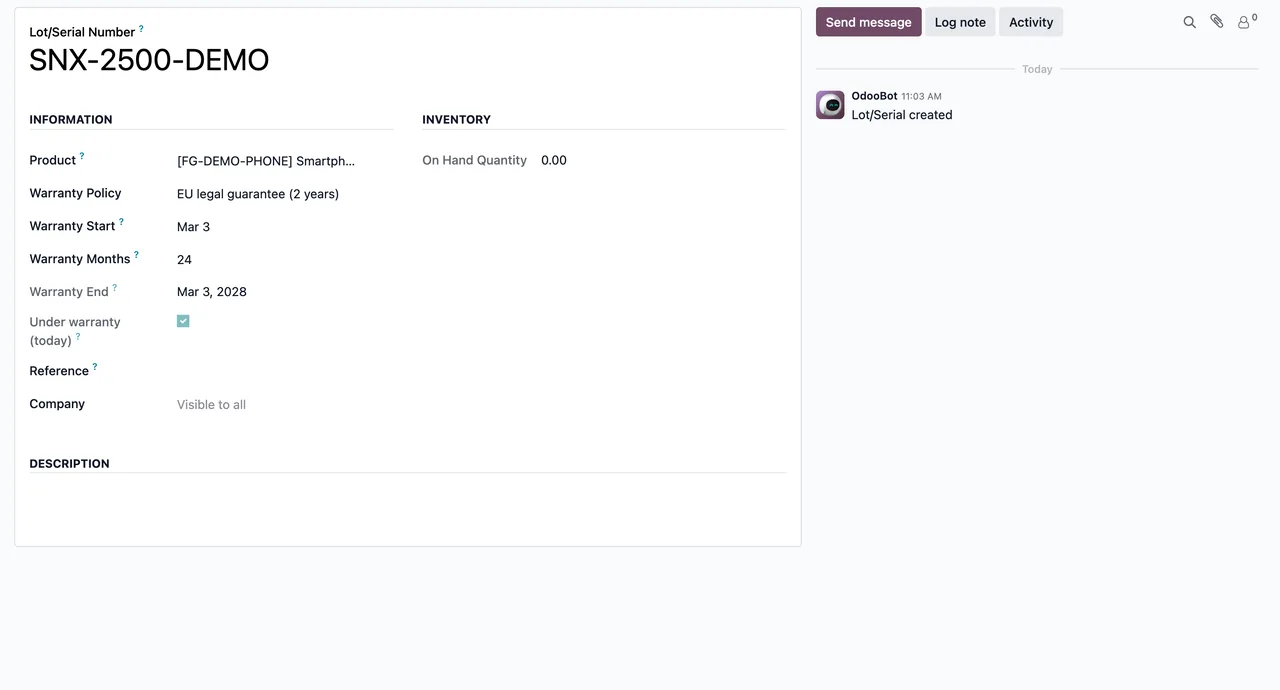
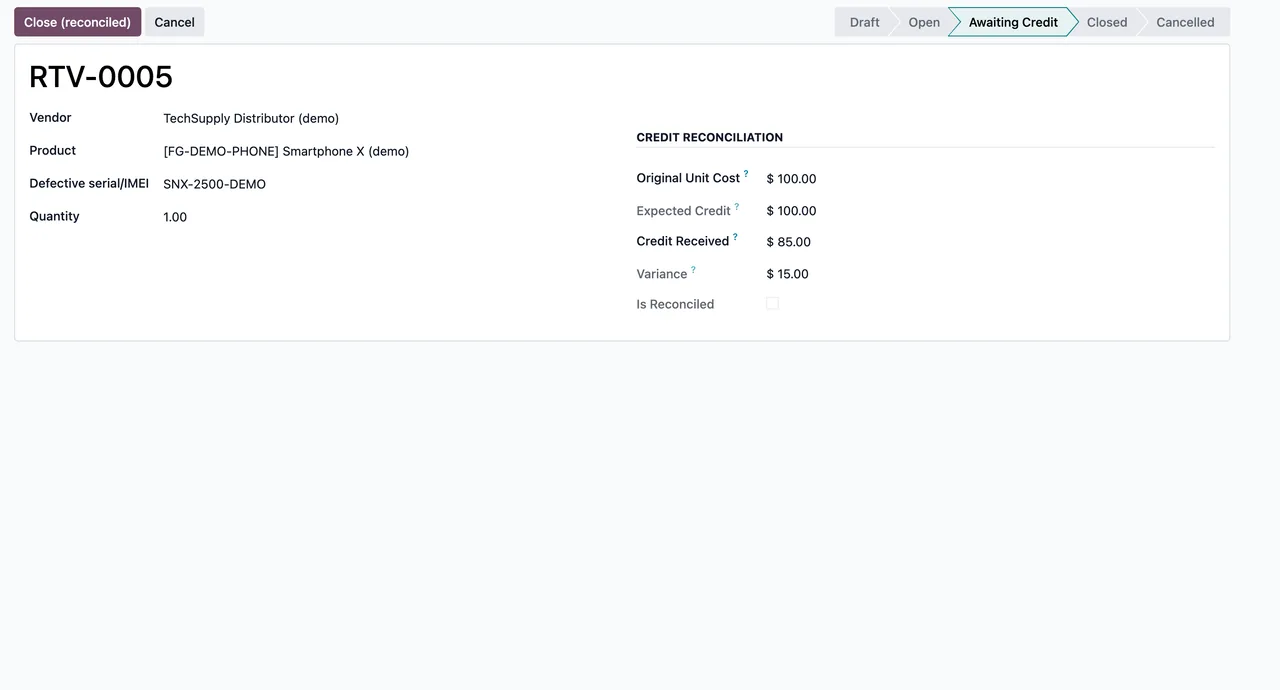
Awaiting Credit state, with the Credit Reconciliation section: original cost, expected credit, received and variance (demo data)The repair order in the last screenshot is in the New state, with customer, product, lot and warranty switched on. The Parts tab has no lines yet.
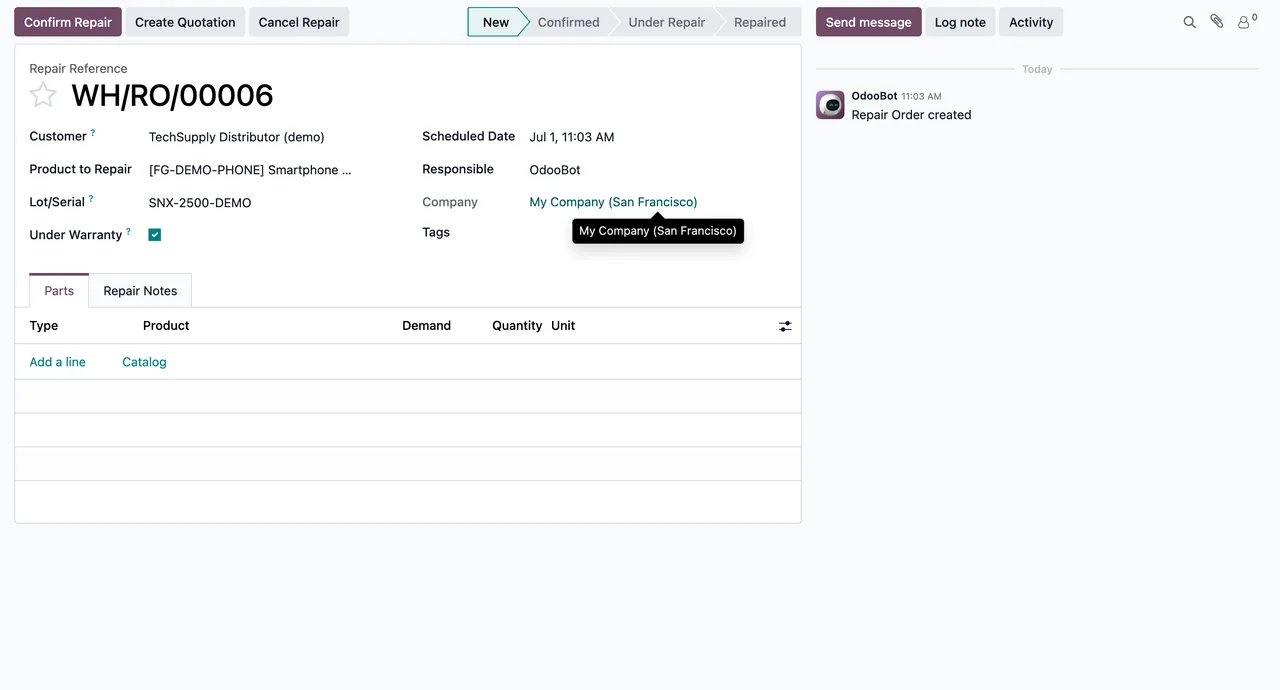
New state, with warranty switched on and the Parts tab still without lines (demo data)
With or without a subscription: what changes
As this module runs with a FlexigoTech Cloud local service, it helps to be clear on the difference between having the subscription active and not having it.
| Situation | What the subscription provides | Your data |
|---|---|---|
| Local service active | Works | In your Odoo |
| No subscription or service suspended | Stops | Stays in your Odoo |
The reading is simple: the records you have already created are not lost if you stop the subscription; what stops is what the service provides. The local service costs €29/month or €290/year excluding VAT, and the Pro plan €58/month or €580/year excluding VAT.
Odoo versions and where to buy it
The module is published on Odoo Apps for 17.0, 18.0, 19.0 and 20.0, at €9 per Odoo version, a one-off payment excluding VAT on each of the four. What changes depending on where you buy it is what happens when you upgrade:
| Where you buy it | Module for new Odoo versions |
|---|---|
| flexigotech.com, with the subscription | Included |
| Odoo App Store | Each Odoo version is bought there |
If you plan to migrate to a newer version over the next few years, keep this table in mind before deciding where to buy.
How FlexigoTech can help
FlexigoTech implements Odoo 17, 18, 19 and 20 and builds bespoke connectors and integrations. If you want warranty policies, loaners and vendor returns to fit the way you already handle serial numbers, or to connect them to another system, we can help with the implementation or the development. You will find all the details on the module page and on its Odoo Apps listing.
Keep reading
Checked in the module's source code (version 20.0) and the linked sources
Sources
- Module source code: flexigo_warranty_rma_rtv 20.0 (3cfe74a9): views/menus.xml
- Module source code: flexigo_warranty_rma_rtv 20.0 (3cfe74a9): data/cron.xml
- Module source code: flexigo_warranty_rma_rtv 20.0 (3cfe74a9): static/description/index.html
- Module source code: flexigo_warranty_rma_rtv 20.0 (3cfe74a9): models/fgt_motor.py
- Module source code: flexigo_warranty_rma_rtv 20.0 (3cfe74a9): models/loaner_assignment.py
- Module source code: flexigo_warranty_rma_rtv 20.0 (3cfe74a9): models/return_to_vendor.py
- Module source code: flexigo_warranty_rma_rtv 20.0 (3cfe74a9): models/warranty_policy.py
- apps.odoo.com/apps/modules/20.0/flexigo_warranty_rma_rtv
- apps.odoo.com/apps/modules/17.0/flexigo_warranty_rma_rtv
- apps.odoo.com/apps/modules/18.0/flexigo_warranty_rma_rtv
- apps.odoo.com/apps/modules/19.0/flexigo_warranty_rma_rtv
- flexigotech.com/en/services.html
- flexigotech.com/precios.html