

 Español
 Català
 Deutsch
 Français
 Português
 Italiano
 Nederlands
 Polski
What the module adds to your Odoo
The Odoo Apps listing sums it up in one line: Simple legal matter tracking in Odoo. Once installed, a new Legal menu appears with these entries:
Legal › Legal Matters: the legal matters themselves.Legal › Configuration: the module's configuration.Legal › Configuration › Categories: the matter categories.
Under the bonnet, the module brings three models. If you are a consultant reviewing access rights, views or reports, these are their technical names:
legal.matter(Legal Matter): each legal matter.legal.matter.category(Legal Matter Category): the categories.legal.matter.cancel.wizard(Cancel Legal Matter Reason): the cancellation wizard, with the reason in its very name.
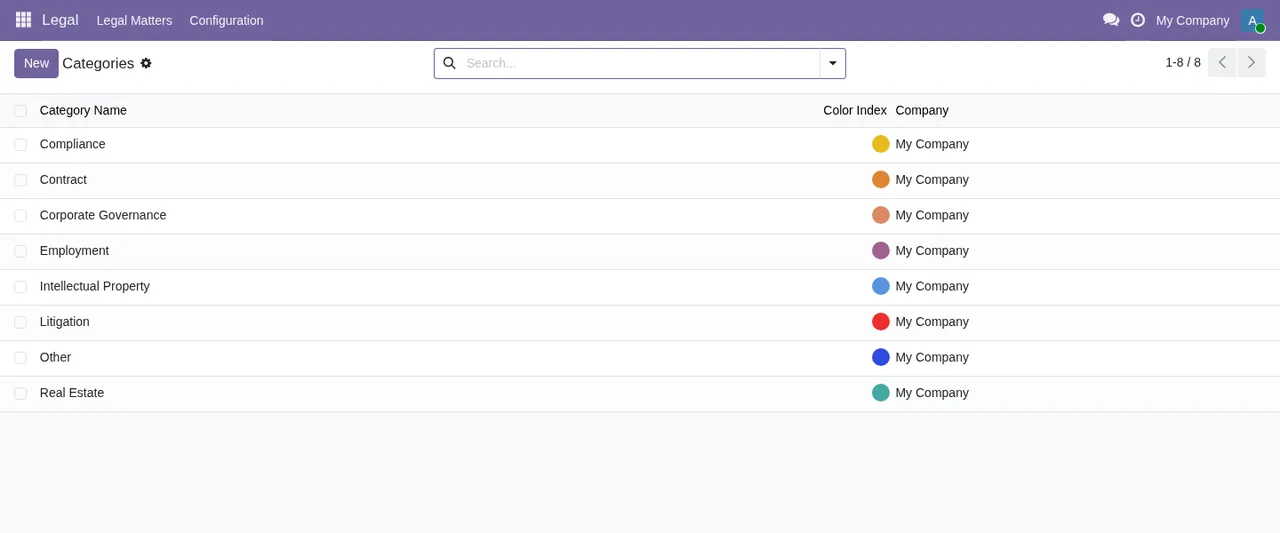
Legal › Configuration › Categories list, showing each category's name, colour index and company, plus the New button, the search bar and pagination.The states a legal matter goes through
The list and kanban views show three states for open matters: Draft, In Progress and Awaiting Signature. The module's validation messages also refer to completed, closed and archived matters, and set out which change is allowed from each point:
- Start: only from draft.
- Complete: only from in progress or awaiting signature.
- Archive: only a completed matter.
- Cancel: not possible once the matter is completed or closed, and a valid cancellation reason is required.
The module checks these rules when you click the action. If the matter is not in the right state, Odoo does not make the change and shows the message you will find further down.
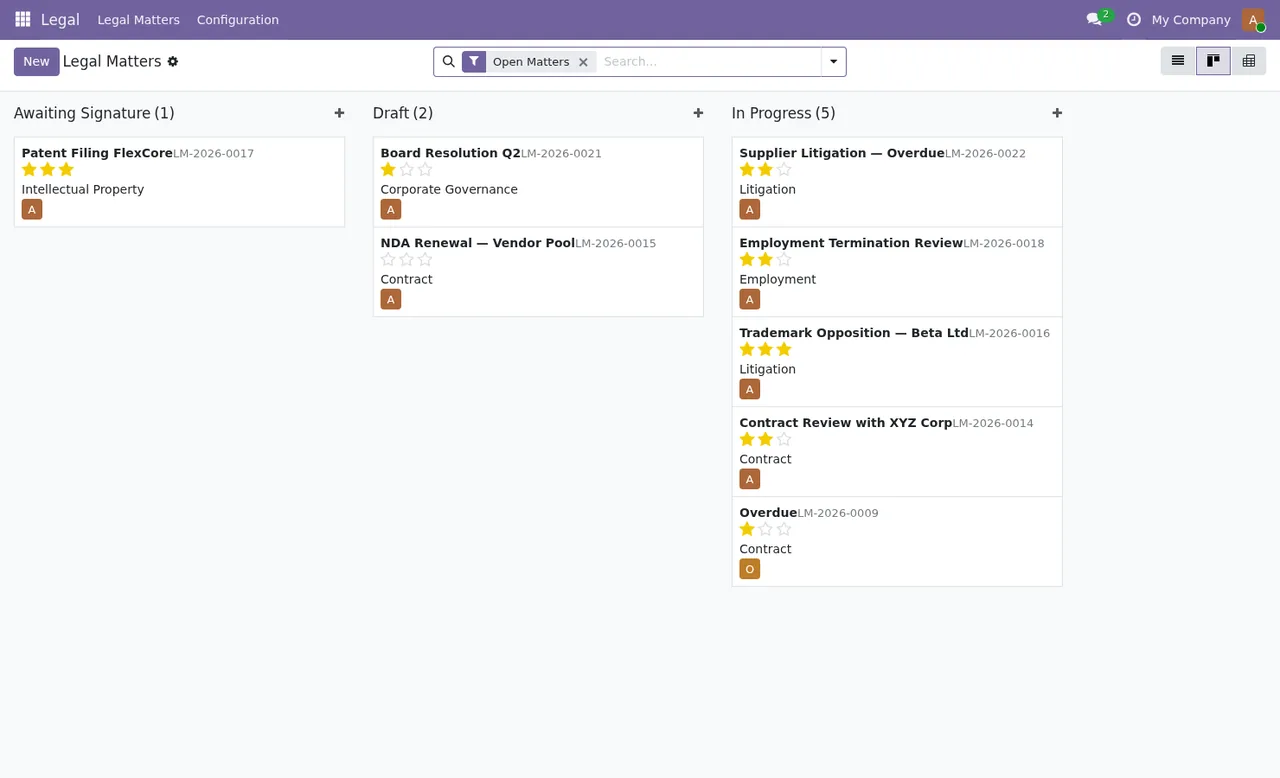
Legal › Legal Matters kanban with the Open Matters filter, grouped by state; each card carries the LM reference, priority stars, category and the owner's avatar.Step by step: from category to archive
This is the order in which a matter moves according to the module's rules. Menu, state and message names are given exactly as they appear in Odoo.
- Go to
Legal › Configuration › Categoriesand check which categories exist. TheNewbutton adds another one; each category shows its name, colour index and company. - Open
Legal › Legal Matters. TheOpen Mattersfilter shows the open matters; the list view displays reference, title, category, responsible user, dates, priority as stars and state. - Find the matter in
Draft. It is the only state from which a matter can be started. If you try to start a matter that is not in draft, you getOnly draft matters can be started. - Work on the matter while it sits in
In ProgressorAwaiting Signature. The kanban keeps them in separate columns, and a matter can be completed from either state. - Complete the matter. If it is neither in progress nor awaiting signature, the module rejects it with
Only in-progress or awaiting-signature matters can be completed. - Archive the matter once it is completed. From any other state you will see
Only completed matters can be archived. - If the matter has to be cancelled instead of finished, do it before it is completed or closed and enter a valid reason in the cancellation wizard. Without a valid reason you get
Please provide a valid cancellation reason.
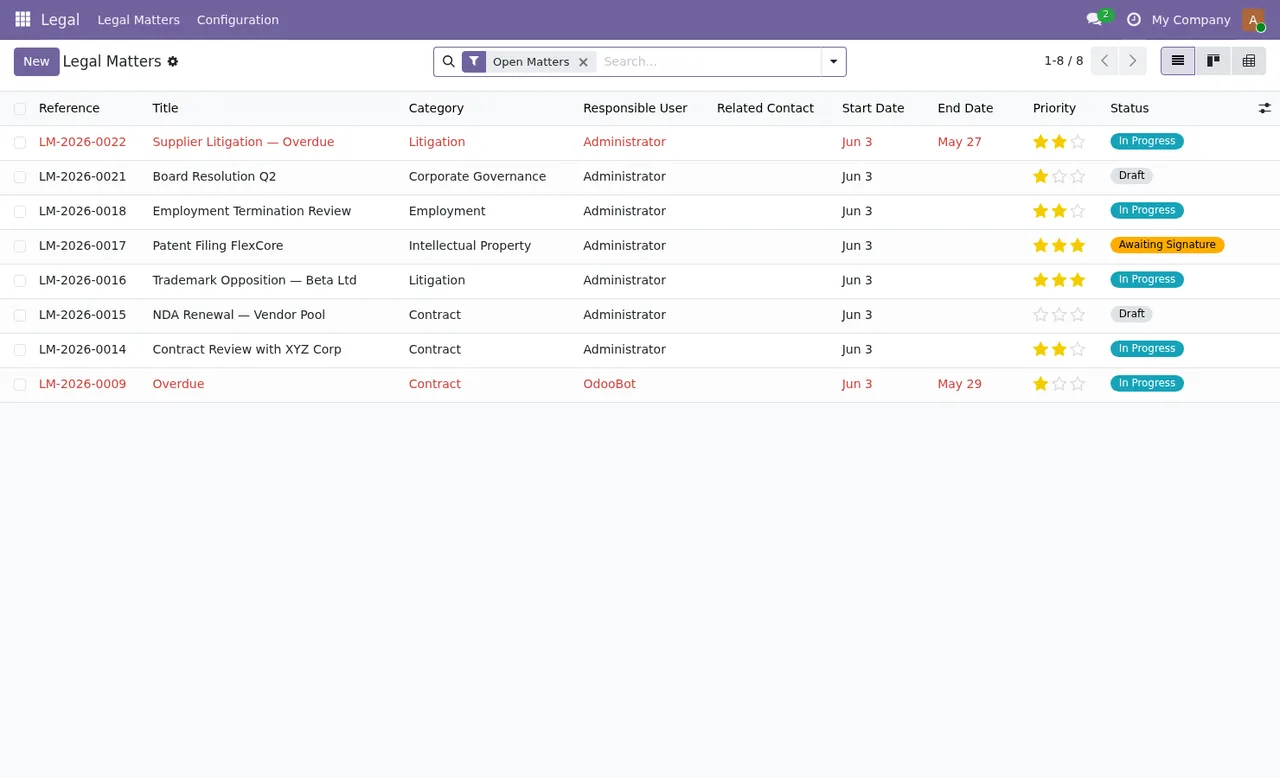
Legal › Legal Matters list with the Open Matters filter: reference, title, category, owner, dates, priority stars and state, with two rows in red because they are overdue.
Open Matters, the kanban by state and the pivot view counting matters by state and priority (High, Low, Medium, Urgent).Messages you will see if you skip a step
If one pops up, check the matter's state first:
Only draft matters can be started.: you are trying to start a matter that is not inDraft.Only in-progress or awaiting-signature matters can be completed.: you are trying to complete a matter that is in neitherIn ProgressnorAwaiting Signature.Only completed matters can be archived.: you are trying to archive a matter that is not yet completed.Completed or closed matters cannot be cancelled.: you are trying to cancel a completed or closed matter.Please provide a valid cancellation reason.: the cancellation wizard is missing a valid reason.
The completed-or-closed message appears in two different places in the module with identical wording. Whichever one triggers it, the answer is the same: that matter can no longer be cancelled.
Versions, price and how FlexigoTech can help
The module is published on Odoo Apps for Odoo 17.0, 18.0 and 19.0, and all three listings price it at €9 excluding VAT, a one-off payment per Odoo version. If you buy it at flexigotech.com with the subscription, the module for new Odoo versions is included; on the Odoo App Store, each version is bought there. Without a subscription, or with the service suspended, whatever the subscription provides stops and your data stays in your Odoo.
You can read the full listing on Odoo Apps. At FlexigoTech we implement Odoo and build bespoke connectors and integrations: if you need legal matter tracking to fit with the rest of your Odoo, or want categories, views or access rights adapted to the way you work, we can help you get it set up.
Keep reading
Checked in the module's source code (version 19.0) and the linked sources
Sources
- Module source code: flexigo_legal_matter_lite_with_odoo_sign_hooks 19.0 (a7c99cc0): static/description/index.html
- Module source code: flexigo_legal_matter_lite_with_odoo_sign_hooks 19.0 (a7c99cc0): views/legal_menu_views.xml
- Module source code: flexigo_legal_matter_lite_with_odoo_sign_hooks 19.0 (a7c99cc0): models/legal_matter.py
- Module source code: flexigo_legal_matter_lite_with_odoo_sign_hooks 19.0 (a7c99cc0): models/legal_matter_category.py
- apps.odoo.com/apps/modules/19.0/flexigo_legal_matter_lite_with_odoo_sign_hooks
- apps.odoo.com/apps/modules/17.0/flexigo_legal_matter_lite_with_odoo_sign_hooks
- apps.odoo.com/apps/modules/18.0/flexigo_legal_matter_lite_with_odoo_sign_hooks
- flexigotech.com/en/services.html
- flexigotech.com/precios.html