

 Español
 Català
 Deutsch
 Français
 Português
 Italiano
 Nederlands
 Polski
Before installing: version, purchase and service
The module is published on Odoo Apps for 17.0, 18.0, 19.0 and 20.0. It costs €9 excluding VAT per Odoo version, one-off payment, on all four listings, and the FlexigoTech Cloud local service that comes with it costs €29/month or €290/year excluding VAT (Pro: €58/month or €580/year).
Two things are worth knowing from day one. Without a subscription, or with the service suspended, whatever the subscription provides stops, but your data stays in your Odoo. And if you buy it on flexigotech.com, the subscription includes the module for new Odoo versions; on the Odoo App Store, each Odoo version is bought there. If you are still weighing up whether it suits you, start with what it covers and what you need before installing.
The two fields to settle before loading data
Among the module's fields there are two relations to Odoo master data:
company_id(Many2one), pointing to theres.companymodel.country_id(Many2one), pointing to theres.countrymodel.
Before creating or importing records, check that the company and countries you will pick in those fields exist and are spelt correctly in your Odoo. That way each record starts with the right company and country and you are not fixing them one by one later.
The case: Mercado Alba starts using the module
Example Illustrative case: the company and its figures are made up to explain the flow.
Mercado Alba is a made-up online shop selling third-party goods. It has just installed the module, and Julia, who handles compliance, sits down with the Odoo administrator to get it ready. They go through the lists in the order you would open them yourself.
Ad targeting policies and ADR providers
First they open the dsa.ad.targeting.policy list. They see the company, the Active box ticked, the special categories and the Blocked For and Effective Date columns. Julia checks that every policy has both columns filled in.
Then they move to dsa.adr.provider, the list of ADR providers, with the columns Company, Active, Provider Name, Jurisdiction, Contact Email and Specialization. Here Julia checks row by row that the jurisdiction and contact email are right.
dsa.ad.targeting.policy, dsa.adr.provider, dsa.complaint.appeal and dsa.dark.patternAppeals
The dsa.complaint.appeal list shows the company, the active box, the state, the linked complaint and the reason for the appeal. In the screenshot the records are in the Appeal New state. Julia reads the reasons to see what is on her plate.
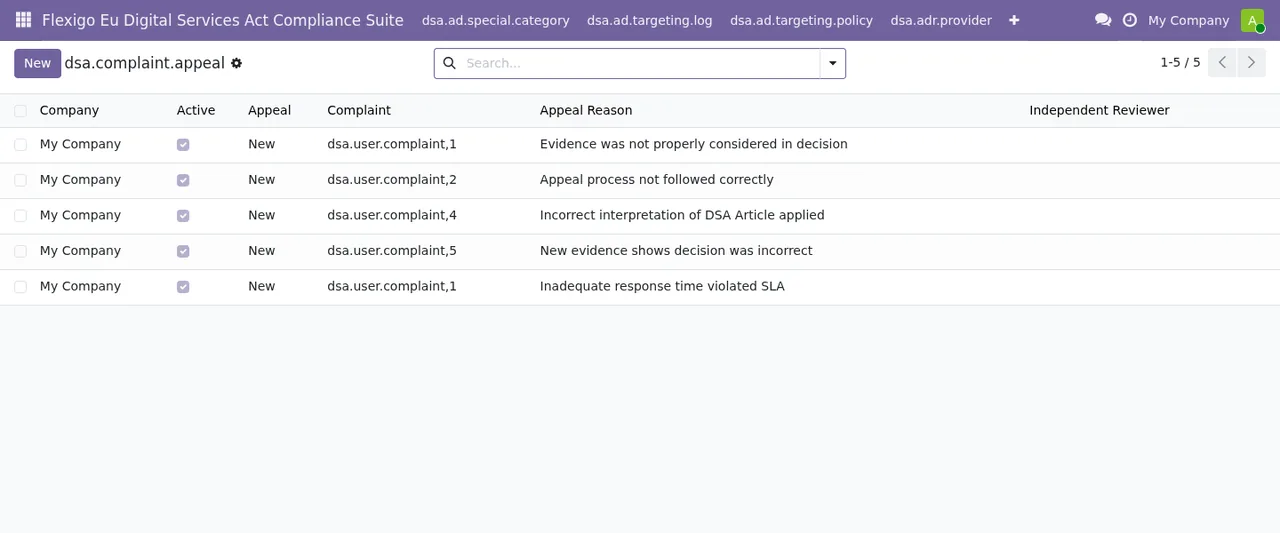
dsa.complaint.appeal list with five My Company records in the Appeal New stateDark patterns and audits
The dsa.dark.pattern list holds five active patterns: misleading urgency, Roach Motel, hidden costs, automatic renewal and trick question. The Category and Definition columns are empty, and Julia notes it down as a task: fill them in using her company's own criteria.
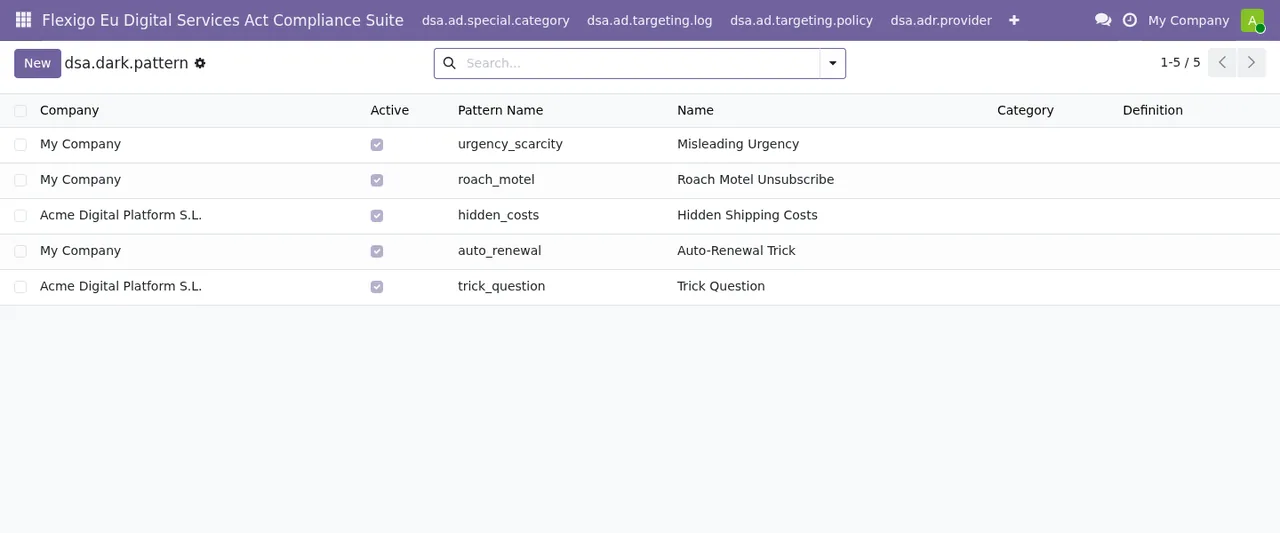
dsa.dark.pattern list with five active patterns and the Category and Definition columns still emptyFinally, dsa.independent.audit shows the audit year, the auditor's name and the scope. The Auditor Org column is empty, so that goes on the to-do list too.
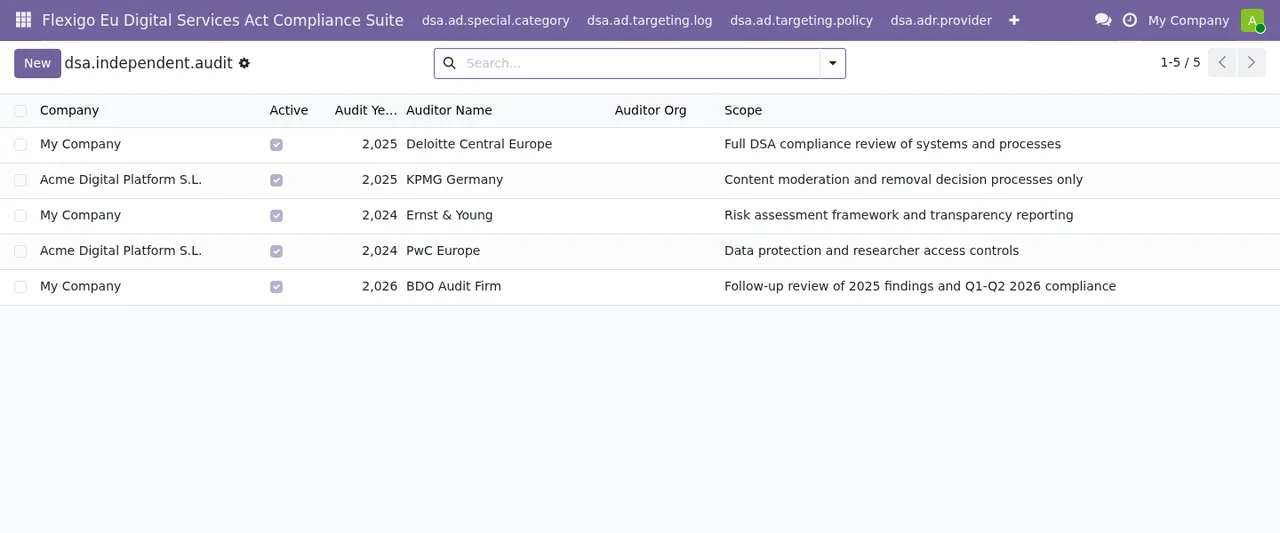
dsa.independent.audit list with five records and the Auditor Org column not yet filled inThe state fields you will be reading
The module defines several state fields. These are their values, in the order the module declares them:
workflow_state:Reported,Assessed,Decided,Notified,Resolved.appeal_state:Draft,Submitted,Under Review,Resolved.approval_status:Pending,Approved,Rejected,Revoked.review_status:Draft,Reviewed,Approved.sla_status:On Time,Warning,Breached.- A traffic-light
status:Red,Yellow,Green. - A
statewith legal review:Draft,Pending Review,Legal Approved,Published. - A receipt
state:Draft,Received,Acknowledged,Investigating,Resolved. - A publication
state:Draft,Published,Archived. - An activity
state:Active,Inactive,Suspended. - A tracking
status:Open,In Progress,Resolved. - A planning
status:Planned,In Progress,Completed. - Other work
stateandstatusfields:Draft,In Progressand thenCompleted,Doneor, in one of them,CompletedandReviewed.
Julia prints this list for her team: when someone asks where a record stands, the answer is one of these values.
The KPI trend data error
Midweek, while loading a sheet of trend data for the second time, the administrator sees this message: KPI trend data must be unique per KPI and period. What it says is that the module does not accept two trend data entries for the same KPI and the same period.
The fix: find the entry that already exists for that KPI and period and correct it there, or check whether the period on the new row is wrong. Do not try to save it as an extra record.
What Julia checks in the first week
- Records with
sla_statusatWarningorBreached. - Records with
statusatRedorYellow. - Items with
approval_statusatPending. - Records still in
Draftsince day one. - The empty columns she noted:
Category,DefinitionandAuditor Org. - That
company_idandcountry_idhold the right value on everything created so far.
What to take from the case
Setting up does not start with creating records but with checking the two relation fields and the core lists. Reading the states with the team avoids confusion, and the only error of the week was solved by knowing what the message says.
How FlexigoTech can help
FlexigoTech implements Odoo 17, 18, 19 and 20 and builds bespoke connectors and integrations. If you would like help loading your data or adapting the module to the way you work, get in touch from the module page or have a look at the Odoo Apps listing.
Keep reading
Checked in the module's source code (version 20.0) and the linked sources
Sources
- Module source code: flexigo_eu_digital_services_act_compliance_suite 20.0 (9fcb9eb3): models/dsa_kpi_trend.py
- Module source code: flexigo_eu_digital_services_act_compliance_suite 20.0 (9fcb9eb3): models/dsa_jurisdiction_config.py
- Module source code: flexigo_eu_digital_services_act_compliance_suite 20.0 (9fcb9eb3): models/dsa_audit_finding.py
- Module source code: flexigo_eu_digital_services_act_compliance_suite 20.0 (9fcb9eb3): models/dsa_complaint_appeal.py
- Module source code: flexigo_eu_digital_services_act_compliance_suite 20.0 (9fcb9eb3): models/dsa_dark_pattern_audit.py
- Module source code: flexigo_eu_digital_services_act_compliance_suite 20.0 (9fcb9eb3): models/dsa_dark_pattern_finding.py
- Module source code: flexigo_eu_digital_services_act_compliance_suite 20.0 (9fcb9eb3): models/dsa_independent_audit.py
- Module source code: flexigo_eu_digital_services_act_compliance_suite 20.0 (9fcb9eb3): models/dsa_kpi.py
- Module source code: flexigo_eu_digital_services_act_compliance_suite 20.0 (9fcb9eb3): models/dsa_policy.py
- Module source code: flexigo_eu_digital_services_act_compliance_suite 20.0 (9fcb9eb3): models/dsa_removal_decision.py
- Module source code: flexigo_eu_digital_services_act_compliance_suite 20.0 (9fcb9eb3): models/dsa_researcher_access.py
- Module source code: flexigo_eu_digital_services_act_compliance_suite 20.0 (9fcb9eb3): models/dsa_risk_mitigation.py
- Module source code: flexigo_eu_digital_services_act_compliance_suite 20.0 (9fcb9eb3): models/dsa_transparency_report.py
- Module source code: flexigo_eu_digital_services_act_compliance_suite 20.0 (9fcb9eb3): models/dsa_trusted_flagger.py
- Module source code: flexigo_eu_digital_services_act_compliance_suite 20.0 (9fcb9eb3): models/dsa_user_complaint.py
- Module source code: flexigo_eu_digital_services_act_compliance_suite 20.0 (9fcb9eb3): models/dsa_vlop_risk_assessment.py
- Module source code: flexigo_eu_digital_services_act_compliance_suite 20.0 (9fcb9eb3): models/eu_dsa_compliance_check.py
- Module source code: flexigo_eu_digital_services_act_compliance_suite 20.0 (9fcb9eb3): models/eu_dsa_compliance_dashboard.py
- Module source code: flexigo_eu_digital_services_act_compliance_suite 20.0 (9fcb9eb3): models/eu_dsa_compliance_report.py
- Module source code: flexigo_eu_digital_services_act_compliance_suite 20.0 (9fcb9eb3): models/eu_dsa_compliance_report_line.py
- apps.odoo.com/apps/modules/20.0/flexigo_eu_digital_services_act_compliance_suite
- apps.odoo.com/apps/modules/17.0/flexigo_eu_digital_services_act_compliance_suite
- apps.odoo.com/apps/modules/18.0/flexigo_eu_digital_services_act_compliance_suite
- apps.odoo.com/apps/modules/19.0/flexigo_eu_digital_services_act_compliance_suite
- flexigotech.com/en/services.html
- flexigotech.com/precios.html