

 Español
 Català
 Deutsch
 Français
 Português
 Italiano
 Nederlands
 Polski
The menus SEPA VoP Payment Gate adds
The module's listing on Odoo Apps sums it up in one heading: Stop payments to unverified payees. In your Odoo, that becomes a main SEPA VoP menu with these entries:
SEPA VoP › DashboardSEPA VoP › VoP ResultsSEPA VoP › Payee AliasesSEPA VoP › Import BatchesSEPA VoP › Audit LogSEPA VoP › Configuration, with two submenus:SEPA VoP › Configuration › PolicyandSEPA VoP › Configuration › Sources
Outside its own menu, the module adds an entry under Invoicing: Invoicing › VoP Import File. We quote every menu exactly as it appears in the module, so you can find each one without guessing at a translation.
The technical models the module creates
If you are a consultant, or you are about to review access rights, exports or reports, it helps to know the names of the models the module creates. They are:
sepa.vop.result(SEPA VoP Verification Result)sepa.vop.alias(SEPA VoP Payee Alias)sepa.vop.import(SEPA VoP Import Batch)sepa.vop.audit.event(SEPA VoP Audit Event)sepa.vop.policy(SEPA VoP Policy)sepa.vop.source(SEPA VoP Source Configuration)sepa.vop.health.log(SEPA VoP Health Log)
There are also two wizards: sepa.vop.import.wizard (SEPA VoP Import Wizard) and sepa.vop.manual.capture.wizard (SEPA VoP Manual Capture Wizard). Keeping these technical names to hand is useful when you look up a specific model from Odoo's technical side or when you prepare an export.
Timeline: what runs on its own, and how often
The module installs five scheduled actions, and all five come set as active. From most to least frequent:
- Every hour
SEPA VoP: Connector Health Check
- Every day
SEPA VoP: Evidence Retention Purge
- Every day
SEPA VoP: Staleness Check
- Every week
SEPA VoP: Evidence Retention Cleanup
- Every week
SEPA VoP: Raw Payload Cleanup
When you review an implementation, check these names against what you see in your own Odoo: if one is missing or switched off, you know it is not how the module ships.
What you see in a verification result
Results live in SEPA VoP › VoP Results. For each result, the list shows its reference, the partner's bank account, the IBAN, the result status, the decision, the verification date, the record status and the company. In the screenshot it is filtered by Active.
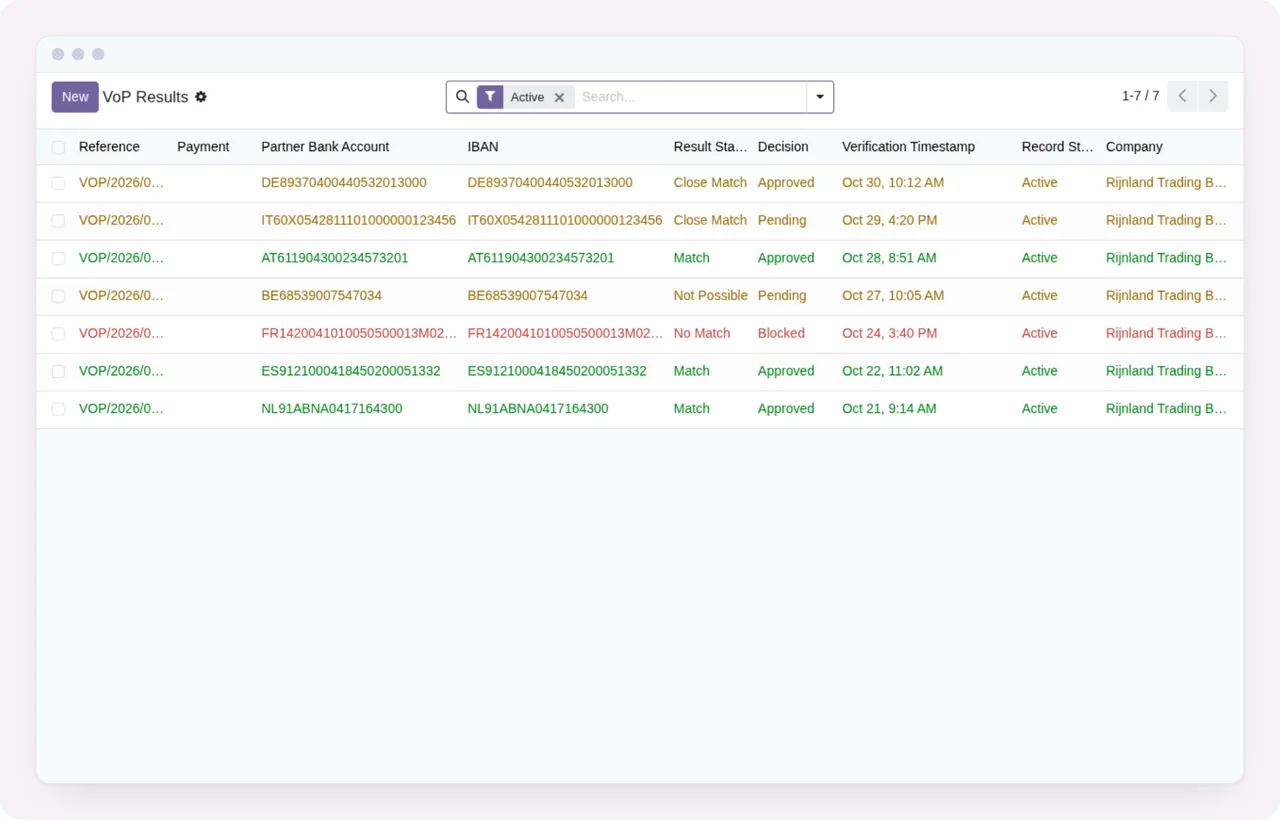
VoP Results list with the Active filter applied and seven records.Opening a result takes you to the full form. In the screenshot, the result status is Close Match and the form brings together three blocks: the payment details, the SEPA verification part and the decision, showing who approved it and the reason they recorded. It also shows whether the record is active.
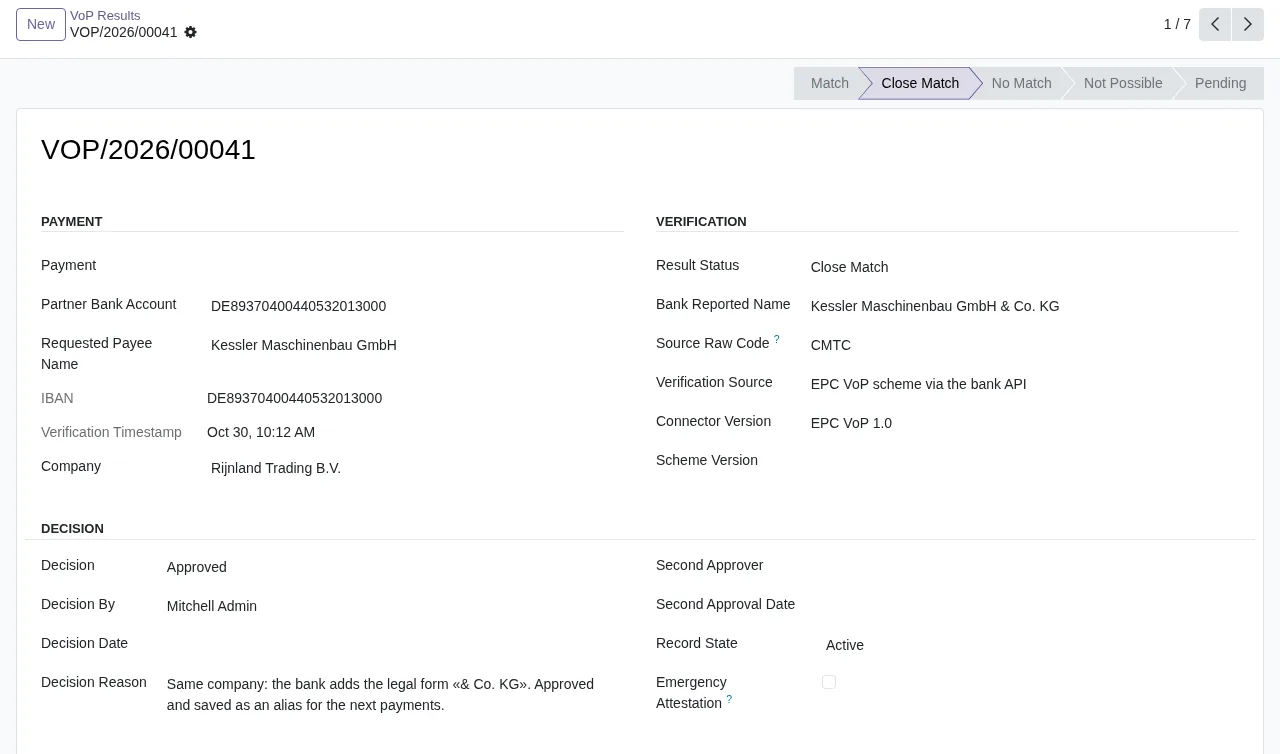
Close Match status and the decision approved by Mitchell Admin, with its reason and the record active.One screen shows both the status the verification returned and the decision someone took on it, with a name and a reason.
The policy you set in Configuration › Policy
The policy is set in SEPA VoP › Configuration › Policy. In the screenshot, the one for Rijnland Trading B.V., the form has a section for actions by result status, another for payment rules (an amount threshold and a freshness rule in days are visible) and a section for override controls.
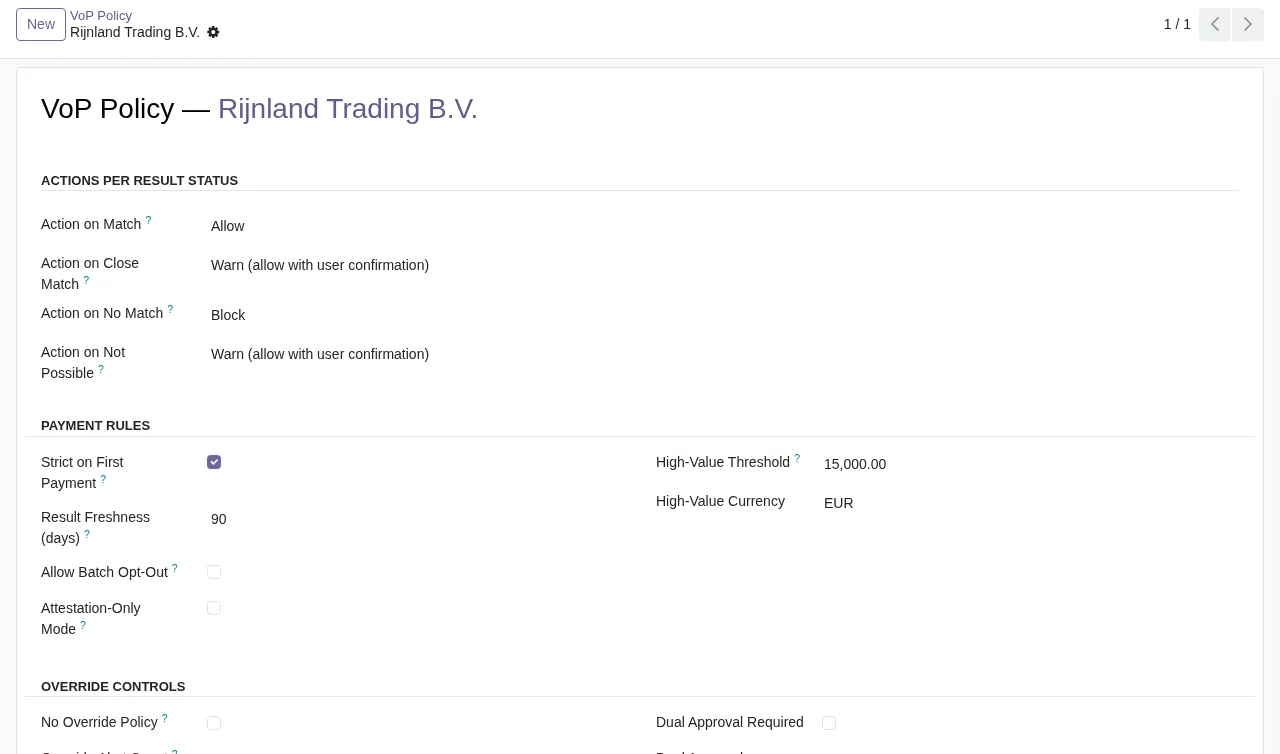
Sources have their own entry, SEPA VoP › Configuration › Sources, in the same configuration menu.
If you want to see the whole tour at a glance, this is the sequence of screens:
VoP Results list filtered by Active to the result with Close Match status and then to the policy for Rijnland Trading B.V.The part that relies on an external service
This module works with a local service from FlexigoTech Cloud, and the listing flags it in its own section: Before you buy: some features of this app use a paid external service. The listing also includes a Privacy policy section.
On Odoo Apps, the module costs €9 excluding VAT, as a one-off payment per version, and is published for Odoo 17.0, 18.0, 19.0 and 20.0. The local service costs €29/month or €290/year excluding VAT (Pro: €58/month or €580/year).
Without a subscription, or with the service suspended, whatever the subscription provides stops; your data stays in your Odoo.
On new Odoo versions: with the subscription, the module for those versions is included if you bought it on flexigotech.com; on the Odoo App Store, each Odoo version is bought there.
How FlexigoTech can help
FlexigoTech implements Odoo 17, 18, 19 and 20 and builds bespoke connectors and integrations, so we can help you install the module, set up the policy and sources and check that the scheduled actions are as they should be. If you are still unsure whether it fits, read whether SEPA VoP Payment Gate suits your business; if you already use it and a warning pops up, see the module's error messages and warnings. Everything else is on the module page.
Keep reading
Checked in the module's source code (version 20.0) and the linked sources
Sources
- Module source code: flexigo_sepa_verification_of_payee_module_for_odoo_19 20.0 (92ece3b6): views/menu.xml
- Module source code: flexigo_sepa_verification_of_payee_module_for_odoo_19 20.0 (92ece3b6): data/sepa_vop_cron.xml
- Module source code: flexigo_sepa_verification_of_payee_module_for_odoo_19 20.0 (92ece3b6): static/description/index.html
- Module source code: flexigo_sepa_verification_of_payee_module_for_odoo_19 20.0 (92ece3b6): models/sepa_vop_alias.py
- Module source code: flexigo_sepa_verification_of_payee_module_for_odoo_19 20.0 (92ece3b6): models/sepa_vop_audit_event.py
- Module source code: flexigo_sepa_verification_of_payee_module_for_odoo_19 20.0 (92ece3b6): models/sepa_vop_health_log.py
- Module source code: flexigo_sepa_verification_of_payee_module_for_odoo_19 20.0 (92ece3b6): models/sepa_vop_import.py
- Module source code: flexigo_sepa_verification_of_payee_module_for_odoo_19 20.0 (92ece3b6): models/sepa_vop_policy.py
- Module source code: flexigo_sepa_verification_of_payee_module_for_odoo_19 20.0 (92ece3b6): models/sepa_vop_result.py
- Module source code: flexigo_sepa_verification_of_payee_module_for_odoo_19 20.0 (92ece3b6): models/sepa_vop_source.py
- Module source code: flexigo_sepa_verification_of_payee_module_for_odoo_19 20.0 (92ece3b6): wizards/sepa_vop_import_wizard.py
- Module source code: flexigo_sepa_verification_of_payee_module_for_odoo_19 20.0 (92ece3b6): wizards/sepa_vop_manual_capture_wizard.py
- apps.odoo.com/apps/modules/20.0/flexigo_sepa_verification_of_payee_module_for_odoo_19
- apps.odoo.com/apps/modules/17.0/flexigo_sepa_verification_of_payee_module_for_odoo_19
- apps.odoo.com/apps/modules/18.0/flexigo_sepa_verification_of_payee_module_for_odoo_19
- apps.odoo.com/apps/modules/19.0/flexigo_sepa_verification_of_payee_module_for_odoo_19
- flexigotech.com/en/services.html
- flexigotech.com/precios.html