

 Español
 Català
 Deutsch
 Français
 Português
 Italiano
 Nederlands
 Polski
What SEPA VoP Payment Gate does before a payment is confirmed
The README describes the core as a «Real-time VoP gate»: the module intercepts action_post() on the outbound banking side and, at that point, applies the policy you have configured. The policy lets you set separate actions from these options:
Allow: the payment proceeds.Warn: a warning is logged and the payment proceeds.Block: the payment is not confirmed.
The verification result can arrive in three ways, according to the README: a live API, a bulk import file or manually. Around that gate sit further pieces: dual approval that requires a second approver for high-value items, an automatic activity when there are too many overrides, alias management that tracks accepted variants of the payee name, and an append-only audit log that records every verification, decision and import.
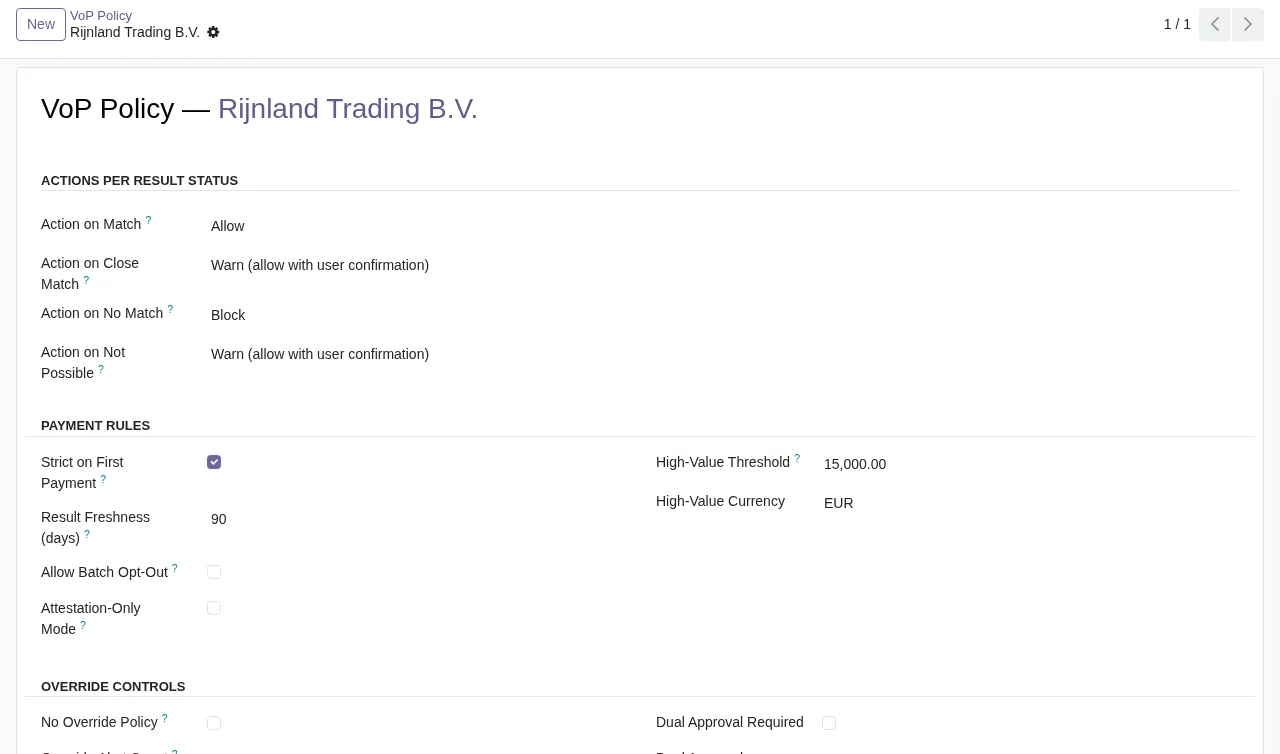
If you want to see which menus it adds and what each record goes through, it is all in how SEPA VoP Payment Gate works under the bonnet.
What it covers and what it does not, need by need
The table sets what you may be looking for against what the module documentation says and what you have to bring yourself.
| What you need | What the module does | Condition or separate piece |
|---|---|---|
| Stop a payment based on the VoP result | Policy with Allow, Warn or Block | Review the default policy in SEPA VoP → Configuration → Policy |
| Check the result live with your bank | Live API source | A bank-specific implementation, separate from the module |
| Use the result files your bank sends | Bulk import that validates and applies bank-supplied files | The files your bank provides |
Batch payments with account.batch.payment | Integration with that model | Odoo Enterprise |
| A second pair of eyes on large payments | Dual approval with a second approver for high-value items | None in the README |
| Keep overrides in check | Automatic activity when there are too many overrides | None in the README |
| Payee names with variants | Alias management for accepted variants | None in the README |
| A trail for every decision | Append-only audit log | None in the README |
| Keep evidence from the bank | Attach bank certificates or attestations | None in the README |
| Know whether the connector responds | Hourly connector health checks, with status | None in the README |
| Several companies in one database | Full data isolation per Odoo company | None in the README |
| Hear about changes to EU VoP rules | Alerts on FlexigoTech Cloud | FlexigoTech Cloud subscription |
How to read the table
The rows with a separate piece are the ones to look at first. The live API row is the clearest: the module provides the source architecture, but the README says live API connectors require a separate, bank-specific implementation. If your bank sends you result files, you have the bulk import, and there is also the manual route.
The second is the Odoo edition: the account.batch.payment integration requires Odoo Enterprise. The third is the alerts about changes to EU VoP rules, which the Odoo Apps listing places on FlexigoTech Cloud and which need its subscription. Everything else appears in the README with no added conditions.
What needs to be in place before you install it
- Odoo version. It is published on Odoo Apps for 17, 18, 19 and 20. The install command in the README is the Odoo 19 one:
-i flexigo_sepa_verification_of_payee_module_for_odoo_19. - Edition, if you pay in batches. For the
account.batch.paymentintegration you need Odoo Enterprise. - Where the result will come from. Choose between live API, bulk import file or manual, and set it up in
SEPA VoP → Configuration → Sources. For a live API connector, the README says to set the API endpoint and the credential keys. - The policy. The README asks you to review the default policy in
SEPA VoP → Configuration → Policy. - Who does what.
SEPA VoP / Usergives read-only access to VoP results and the audit log;SEPA VoP / Managergives full access, including override decisions. The IBAN is masked for non-managers.
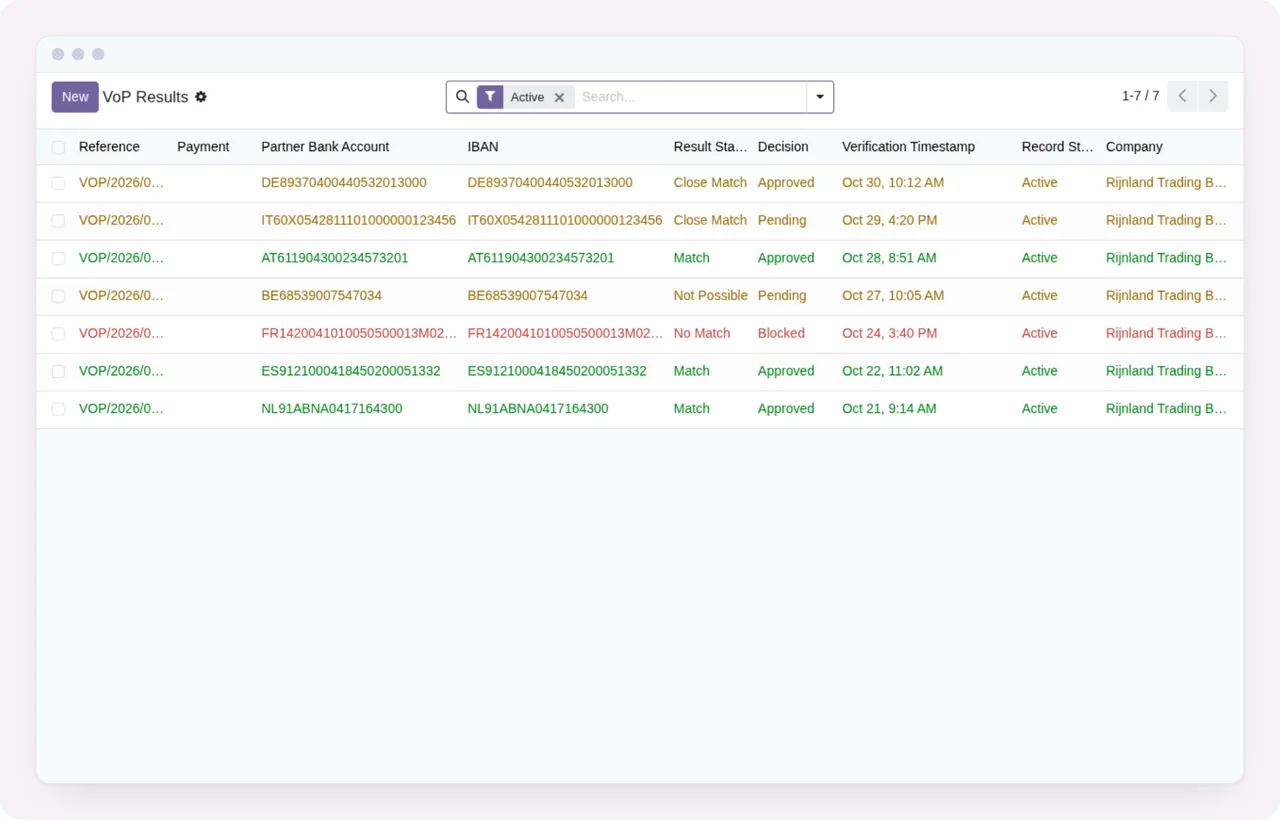
Active.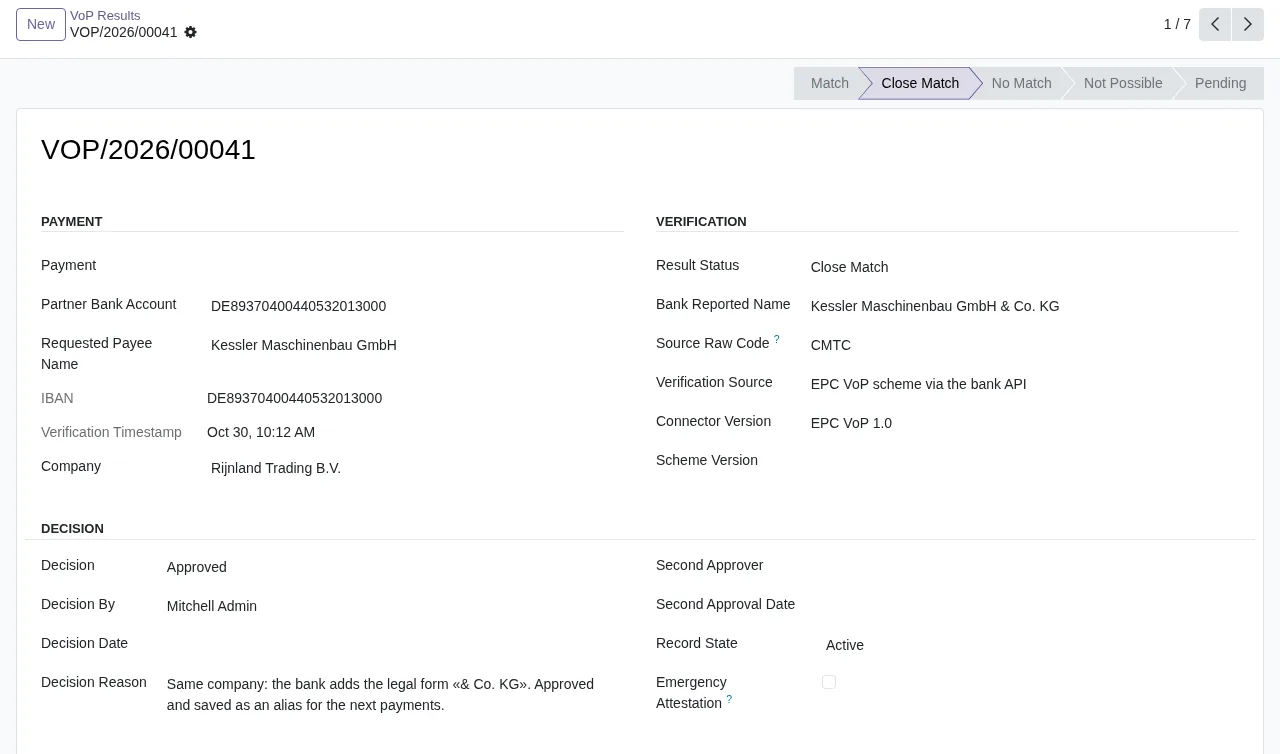
Close Match with demo data: payment details, SEPA verification and the approved decision with its reason.If you want to know what each warning means before going live, see the module's error messages and warnings.
If this is your situation, this is what suits you
- If your bank sends you files with verification results, start with the bulk import, which validates and applies those files.
- If you want live checks, plan for your bank-specific implementation before switching that source on.
- If you would rather not stop payments at first,
Warnlogs the warning and lets the payment through;Blockstops it. - If you pay with
account.batch.paymentand do not have Enterprise, that integration is out of reach. - If you run several companies in Odoo, the module isolates the data of each one.
- If you are concerned about who sees IBANs, you have masking for non-managers and the read-only group.
Versions, price and what happens without a subscription
On Odoo Apps it costs €9 per Odoo version, one-off payment excluding VAT, for 17, 18, 19 and 20. The local FlexigoTech Cloud service is separate: €29/month or €290/year excluding VAT (Pro: €58/month or €580/year).
Without a subscription, or with the service suspended, whatever the subscription provides stops, such as the alerts when EU VoP rules change, and your data stays in your Odoo. With the subscription, the module for new Odoo versions is included if you bought it on flexigotech.com; on the Odoo App Store, each Odoo version is bought there.
How FlexigoTech can help
FlexigoTech implements Odoo 17, 18, 19 and 20 and builds custom connectors and integrations, so we can take on the bank-specific implementation your bank's live API needs, or get the policy and sources ready. You will find the module and the service on the module page at flexigotech.com and on its Odoo Apps listing. For questions before you decide, write to comercial@flexigobe.com.
Keep reading
Checked in the module's source code (version 20.0) and the linked sources
Sources
- Module source code: flexigo_sepa_verification_of_payee_module_for_odoo_19 20.0 (92ece3b6): README.rst
- Module source code: flexigo_sepa_verification_of_payee_module_for_odoo_19 20.0 (92ece3b6): static/description/index.html
- apps.odoo.com/apps/modules/20.0/flexigo_sepa_verification_of_payee_module_for_odoo_19
- apps.odoo.com/apps/modules/17.0/flexigo_sepa_verification_of_payee_module_for_odoo_19
- apps.odoo.com/apps/modules/18.0/flexigo_sepa_verification_of_payee_module_for_odoo_19
- apps.odoo.com/apps/modules/19.0/flexigo_sepa_verification_of_payee_module_for_odoo_19
- flexigotech.com/en/services.html
- flexigotech.com/precios.html