

 Español
 Català
 Deutsch
 Français
 Português
 Italiano
 Nederlands
 Polski
The request it sends is Amazon's own, asking at once for a product review and seller feedback. Odoo adds no text of its own: it asks Amazon to send its request, and you decide when and to which orders.
It ships switched off. Until you tick «Request a Review (auto)» on the account, neither the task nor the order button sends anything.
Step by step
- Open Amazon › Configuration › Accounts and go into the Amazon account.
- Open the «Returns & Reviews» tab and find the «Request a Review» group.
- Tick «Request a Review (auto)». Two more fields appear.
- In «Request a Review: minimum days after order», set how many days to wait before asking. The default is 5.
- In «Request a Review: maximum days after order», set the day after which it stops trying. The default is 30. If the maximum is lower than the minimum, the module uses the minimum as the maximum too.
- Save. The «Amazon SP-API - Request a Review» task picks it up on its next run.
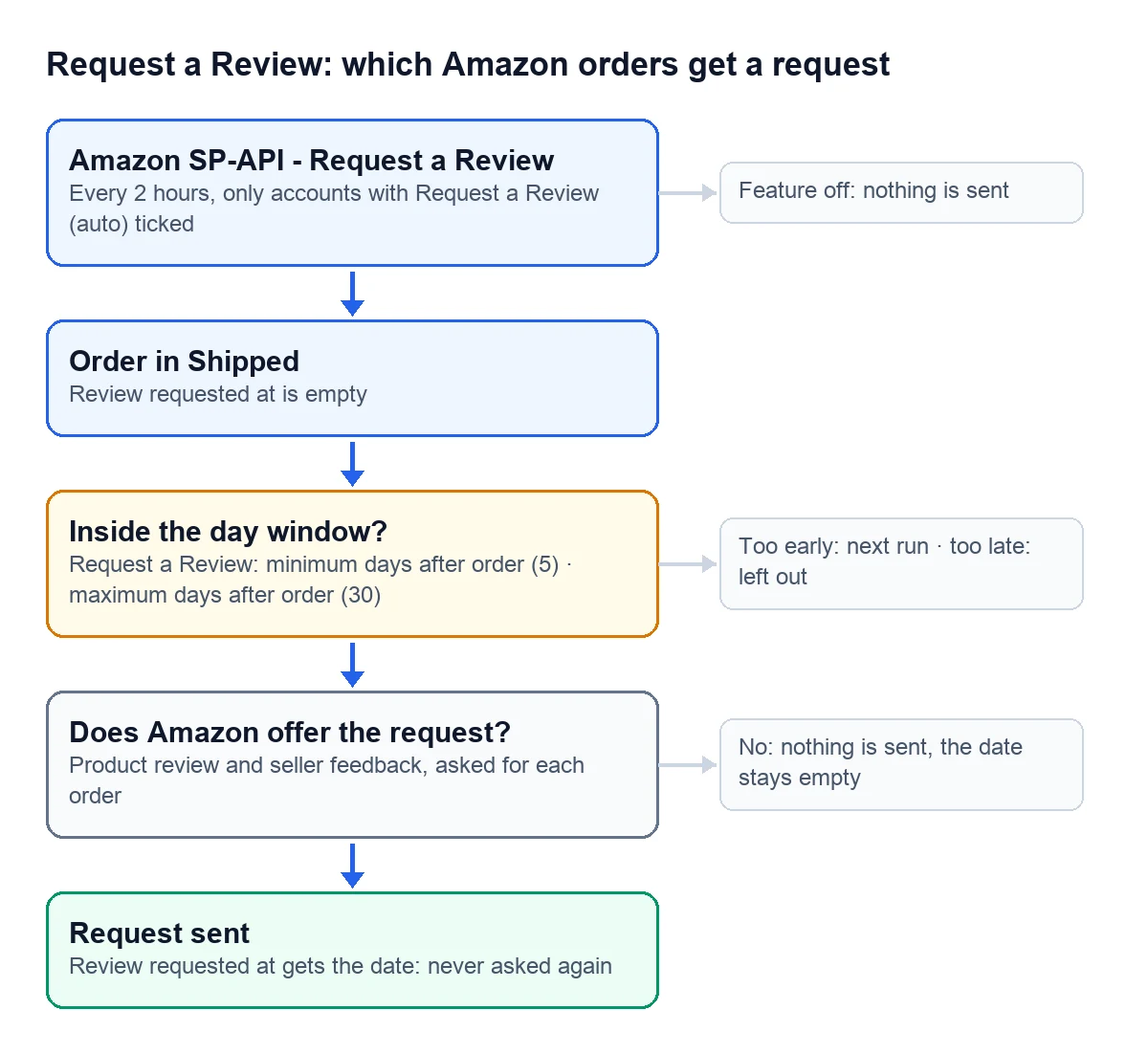

What it checks before asking
| Check | Who does it | If it fails |
|---|---|---|
| The feature is on for the account | Odoo | The task skips that account |
| The order is in Shipped | Odoo | The order is left out |
| «Review requested at» is empty | Odoo | It is not asked again |
| Between the minimum and maximum days have passed | Odoo, only in the task | Too early, it waits for another run; too late, it is out |
| Amazon offers the request for that order | Amazon | Nothing is sent |
Days count from the order's last update on Amazon or, if there is none, from the purchase date.
The module does not split FBA from FBM orders. It asks Amazon about each one, and Amazon says whether that order accepts the request. When it does not, the order stays without a date and the task asks again on a later run while it is still inside the window.
What each run does
The task runs every 2 hours. Each run takes up to 300 Shipped orders with no request yet, oldest first, and tries at most 100 of those inside the window. When Amazon accepts it, the order stores the date and time in «Review requested at». Orders that leave the window without a request, or that Amazon does not accept, keep no date and come back among those 300 on every run, and so do old orders you import already shipped: once they add up to 300, the task no longer reaches new orders.
That field is the lock: once it has a date, neither the task nor the button asks for a review of that order again.
Requesting a review for one order
In Amazon › Orders, open an order in Shipped. If it has not been asked yet, the «Request a Review» button is at the top. It asks you to confirm and sends the request right away.
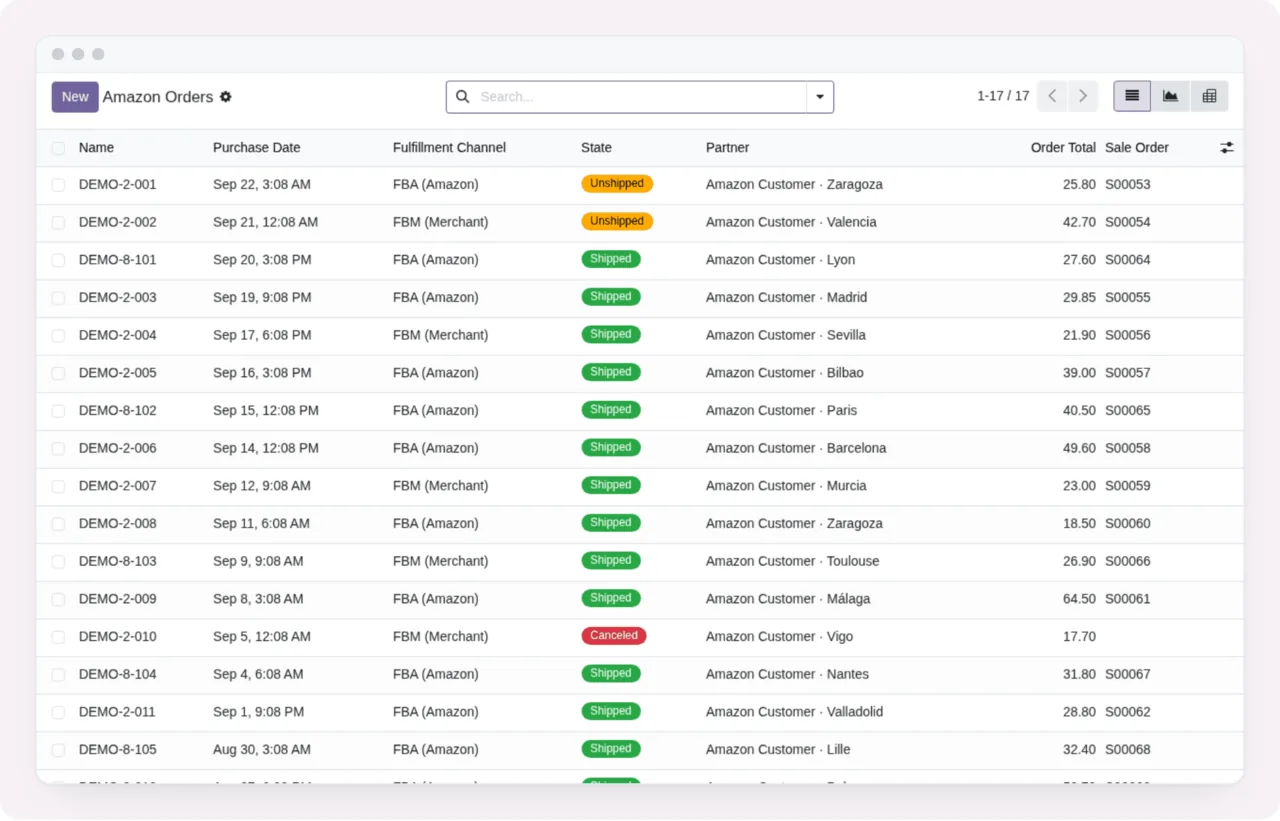
By hand it works like this:
- It ignores the day window. Use it to ask right now for an order you care about.
- It still asks Amazon first. If Amazon does not offer the request for that order, nothing is sent and «Review requested at» stays empty.
- With the feature off on the account, the message is
Request a Review is disabled. Enable it on the Amazon account configuration first (OFF by default). - If the order has no account, the message is
This Amazon order has no account. - When it works, the button disappears and the date stays.
Can it ask twice for the same order?
No. As soon as Amazon accepts the request, the order stores the date in «Review requested at» and it is not asked again, neither by the task nor by the button.
Which Odoo versions have it?
The automatic request, the two day fields and the order button are in the connector published for Odoo 17, 18, 19 and 20.
Keep reading
Checked in the connector's source code (version 17.0, 18.0, 19.0 and 20.0) and the linked sources
Sources
- Module source code: flexigobe_amazon_seller_connector · 17.0 9a6d49f · 18.0 aecae86 · 19.0 fa9ae73 · 20.0 be50529: models/amazon_spapi_account.py, views/amazon_spapi_account_views.xml
- Module source code: flexigobe_amazon_seller_connector · 17.0 9a6d49f · 18.0 aecae86 · 19.0 fa9ae73 · 20.0 be50529: models/amazon_order.py (cron_amazon_request_reviews), data/ir_cron_data.xml
- Module source code: flexigobe_amazon_seller_connector · 17.0 9a6d49f · 18.0 aecae86 · 19.0 fa9ae73 · 20.0 be50529: models/amazon_order.py (_amazon_review_request_eligible)
- Module source code: flexigobe_amazon_seller_connector · 17.0 9a6d49f · 18.0 aecae86 · 19.0 fa9ae73 · 20.0 be50529: models/amazon_order.py (_amazon_request_review)
- Module source code: flexigobe_amazon_seller_connector · 17.0 9a6d49f · 18.0 aecae86 · 19.0 fa9ae73 · 20.0 be50529: views/amazon_order_views.xml, models/amazon_order.py
- apps.odoo.com/apps/modules/20.0/flexigobe_amazon_seller_connector