

 Español
 Català
 Deutsch
 Français
 Português
 Italiano
 Nederlands
 Polski
Why the deposit does not match your invoices
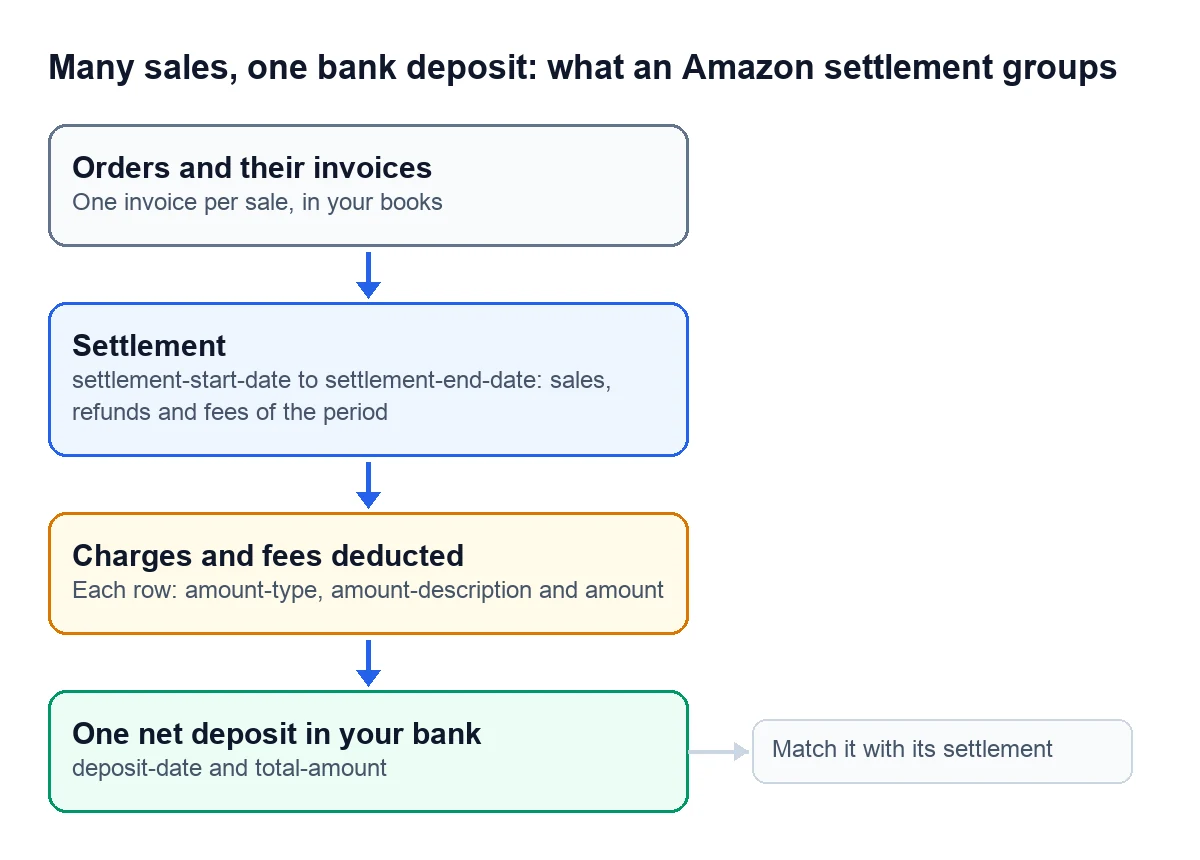
You invoice order by order. Amazon, on the other hand, pays you through settlements, and it generates its settlement reports on its own: they cannot be requested or scheduled. Each report carries the period it covers, the deposit date, the total and one row per amount, with the type of charge or fee it belongs to.
Shopify Payments works in a similar way. Each payment, which Shopify calls a payout, is a transfer between your Shopify Payments balance and your bank account. It comes with its net amount and a summary that breaks down fees and gross amounts by transaction type: charges, refunds and adjustments.
Your bank shows a single deposit. Your invoicing program shows every sale of the period. In between are the fees and the refunds, and that is what you have to rebuild.

The terms, one by one
- Settlement
- The document Amazon uses to group the sales, refunds and fees of a period. Amazon generates settlement reports on its own; they cannot be requested or scheduled.
- Settlement period
- The start and end dates each settlement covers. In Amazon's report they are settlement-start-date and settlement-end-date.
- Deposit
- The money that reaches your bank. In Amazon's report it comes with its date, deposit-date, and its total, total-amount.
- Amount type
- In Amazon's settlement report, each row says which charge or fee it is (amount-type and amount-description), and the amount sits in a single column, amount.
- Payout
- In Shopify Payments, the transfer between your Shopify Payments balance and your bank account, with its net amount, issue date and status.
- Deposit and withdrawal
- The two directions of a Shopify payout: into your bank account or back to Shopify Payments.
- Payout summary
- The breakdown of fees and gross amounts in a Shopify payout by transaction type: charges, refunds and adjustments.
- Clearing account
- An accounting pass-through account where what you invoiced and what was settled meet. In the Amazon connector it is called Amazon clearing account.
- Bank reconciliation
- Matching each statement line with where it came from. With a marketplace, a deposit comes from its settlement.
What the Spanish Commercial Code asks for
With spreadsheets or with software, the Spanish Commercial Code asks every business owner for orderly accounts that let you follow your operations in chronological order. It also requires you to keep your books, correspondence, documents and receipts, in order, for six years from the last entry.
Download your settlement reports and keep them with those receipts. If someone ever asks where a deposit comes from, the answer is in its settlement.
How it works with Odoo and the Amazon connector
On the Amazon account form there are three boxes for this, and all three come unticked:
- "Enable settlement sync" imports settlements with their payments and fees. The "Amazon SP-API - Sync settlements" task runs every day, and settlements show up under Amazon › Finances › Settlements (payouts & fees).
- "Post settlements to accounting" lets you post each settlement as a single journal entry, with the clearing account, the fees and the net deposit. It does not do it on its own: each settlement is posted by hand, with the "Post to Accounting" button on its record.
- "Match bank deposits automatically" uses the daily "Amazon SP-API - Match settlement bank deposits" task to look for the unreconciled statement line with the same amount and currency, close to the deposit date: 5 days before or after, by default. If there are several, it picks the one that mentions Amazon; if there is still doubt, it links none.
That last step only links the bank line to its settlement and leaves a note: it neither reconciles nor posts anything for you. The guide with every setting is in Amazon settlements in Odoo, from journal entry to bank.
How we set it up
At FlexigoTech we implement Odoo 17, 18, 19 or 20 with your channels connected, so that orders, invoices, settlements and bank live in the same place. Odoo Online does not accept third-party modules, so we work on Odoo.sh or on your own server. The Connector plan starts at €49 a month, VAT excluded. If you get paid through a gateway or a marketplace that has no connector yet, we build a small custom integration: we analyse the case for free and give you a closed price before we write any code.
Write to comercial@flexigobe.com, leave your details on our contact page or book a call.
Keep reading
Checked in the connector's source code (version 17.0, 18.0, 19.0 and 20.0) and the linked sources
Sources
- developer-docs.amazon.com/sp-api/docs/report-type-values-settlement
- shopify.dev/docs/api/admin-graphql/latest/objects/ShopifyPaymentsPayout.md
- www.boe.es/buscar/act.php?id=BOE-A-1885-6627
- Module source code: flexigobe_amazon_seller_connector · 17.0 9a6d49f · 18.0 aecae86 · 19.0 fa9ae73 · 20.0 be50529: data/ir_cron_data.xml (las dos tareas, cada día, activas), models/amazon_spapi_account.py (casillas con default=False y tolerancia 5 en las cuatro), models/amazon_spapi_settlement.py (_find_bank_deposit_candidates, _match_bank_deposit, cron_amazon_settlement_bank_match), views/menu_views.xml
- flexigotech.com/precios.html
- flexigotech.com/services/desarrollo-a-medida.html
- flexigotech.com/en/services.html