

 Español
 Català
 Deutsch
 Français
 Português
 Italiano
 Nederlands
 Polski
The six menus under Real Estate
Everything the module adds to the main menu sits under Real Estate. These are its entries, exactly as the module names them:
Real Estate › PropertiesReal Estate › TenantsReal Estate › LeasesReal Estate › ExpensesReal Estate › Maintenance RequestsReal Estate › Data Subject Requests
The property list is the screen that best sums up how the module organises the information for each building.
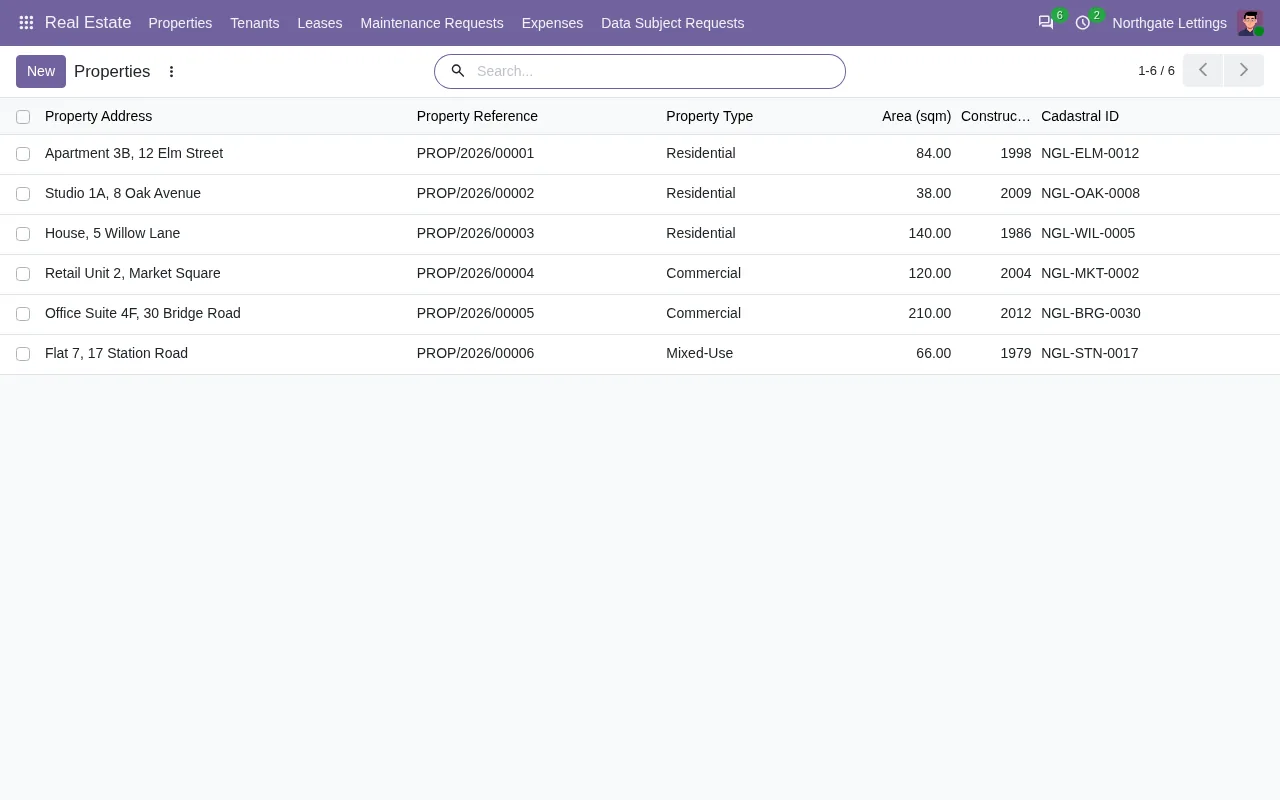
Real Estate › Properties list with six records, a search bar and the Nuevo (New) button.For each property the list shows the address, a reference with the PROP/2026 prefix, the type (residential, commercial or mixed), the floor area, the year built and the cadastral ID. The Nuevo (New) button adds another property.
The models behind the screens
If you are going to build reports, exports or custom development on top of the module, the technical names are worth knowing. Here they are:
| Technical name | Description in the module |
|---|---|
real_estate.property | Real Estate Property |
real_estate.tenant | Real Estate Tenant |
real_estate.lease | Real Estate Lease |
real_estate.expense | Real Estate Property Expense |
real_estate.maintenance.request | Real Estate Maintenance Request |
real_estate.dsar.request | Real Estate DSAR Request |
real_estate.lease.terminate.wizard | Lease Termination Wizard |
real_estate.dsar.export.wizard | DSAR Data Export Wizard |
Reading the table is straightforward: six models hold data (property, tenant, lease, expense, maintenance request and DSAR request) and two are wizards, one named Lease Termination Wizard and the other DSAR Data Export Wizard.
The five scheduled tasks, compared
The module ships five scheduled actions. Here they are side by side by frequency and status:
| Scheduled task | Frequency | Active |
|---|---|---|
Real Estate: Expire Leases | every day | active |
Real Estate: Generate Rent Invoices | every day | active |
Real Estate: Check Maintenance SLA Breaches | every 4 hours | active |
Real Estate: Expire DSAR Downloads | every day | active |
Real Estate: Notify Overdue DSARs | every day | active |
Four tasks run once a day and only one, Real Estate: Check Maintenance SLA Breaches, runs more often, every four hours. Two of them share the DSAR initials with the real_estate.dsar.request model and the Real Estate › Data Subject Requests menu. All five are listed as active in the module.
The task name is what the module gives you; if you need to know exactly which records each one touches before going live, ask us and we will review it with you.
What you see inside Odoo versus what you see in the portal
Part of the module lives in the Odoo back end and part in the portal. This table compares the three screens we show:
| Screen | Where | What it shows |
|---|---|---|
| Property list | Real Estate › Properties | Address, reference, type, floor area, year built and cadastral ID |
| «Report a maintenance issue» form | Portal, maintenance requests | Property, type, title, description, Send request button and a table of requests with title and status |
| Lease | Portal, leases | Property, active status, dates, monthly rent, deposit, an issue button and a table of rent invoices |
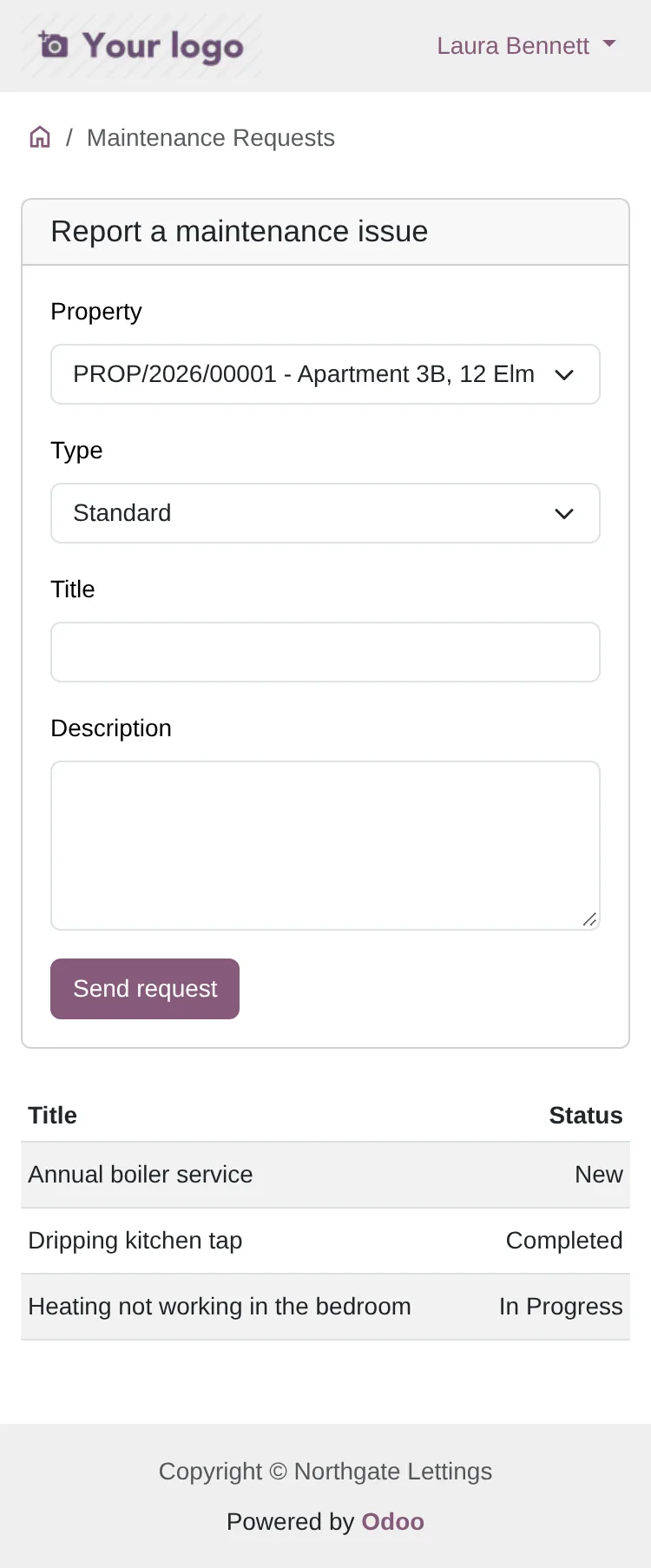
Send request button and, below it, the table of requests with their title and status.In the portal, an issue is filled in with the property, the type, a title and a description, and sent with Send request. Underneath sits the table of requests already sent, each with its title and status.
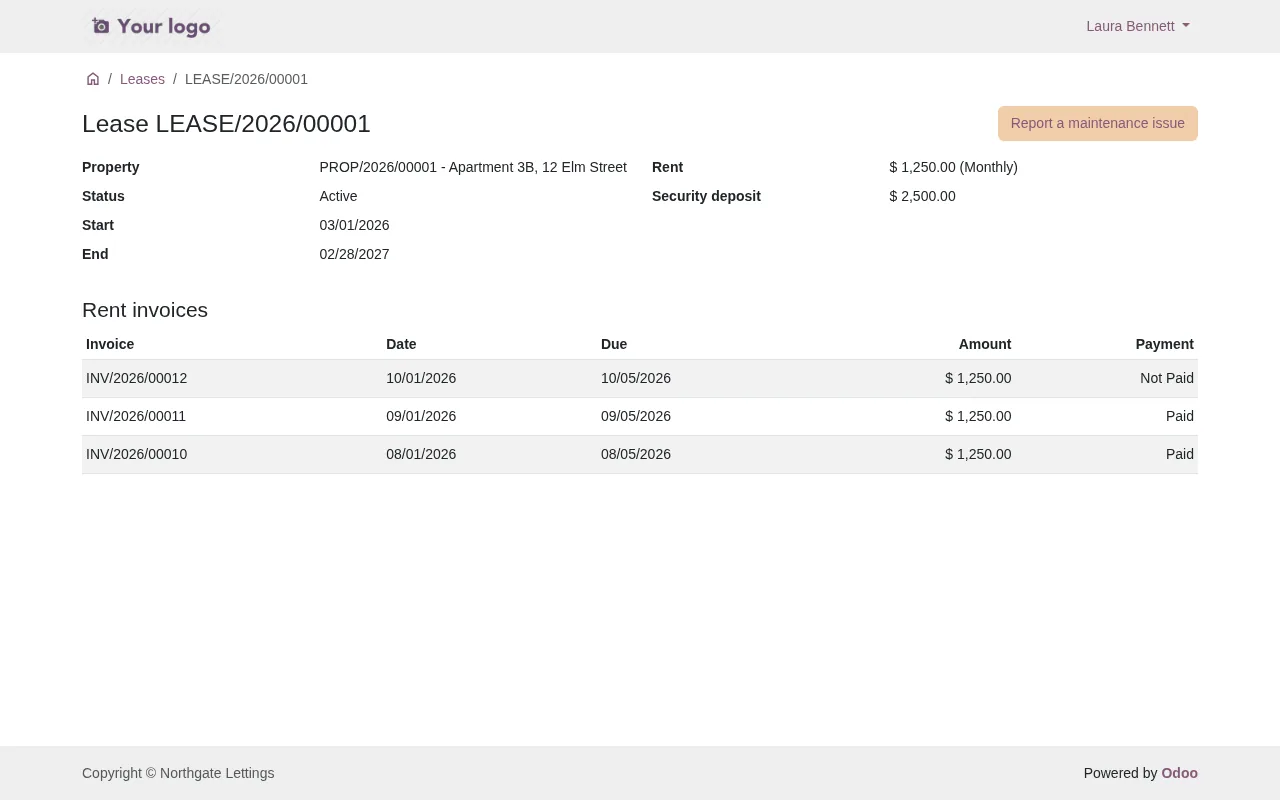
The lease in the portal brings together the property, status, dates, monthly rent, deposit and rent invoices on one screen, plus a button to open an issue.
What relies on the FlexigoTech Cloud service
The listing flags it in its «Before you buy» section: some features of the app use a paid external service. For this module that is the FlexigoTech Cloud local service. This is how things change depending on your situation:
| Situation | What happens |
|---|---|
| Active subscription | What the subscription provides works and, if you bought the module on flexigotech.com, the module for new Odoo versions is included |
| No subscription or service suspended | What the subscription provides stops; your data stays in your Odoo |
| Module bought on the Odoo App Store | Each Odoo version is bought there |
The local service costs €29/month or €290/year excluding VAT (Pro: €58/month or €580/year). Which specific features go through the service is set out on the module page and on the Odoo Apps listing.
Published versions
Real Estate Management is published on Odoo Apps for 17.0, 18.0, 19.0 and 20.0. On all four listings, checked on 03-11-2026, the module costs €9 per Odoo version as a one-off payment, excluding VAT. If you are still unsure whether it fits and on which version, see the guide on whether Real Estate Management fits your company.
How FlexigoTech can help
FlexigoTech implements Odoo 17, 18, 19 and 20 and builds bespoke connectors and integrations. If you want to get the module running with your properties and leases, fit the scheduled tasks to the way you work or connect it to another system, we can do it with you. And if a warning pops up while you use it, check the module's error messages and warnings.
Keep reading
Checked in the module's source code (version 20.0) and the linked sources
Sources
- Module source code: flexigo_real_estate_management 20.0 (1ee4171b): views/menus_gen.xml
- Module source code: flexigo_real_estate_management 20.0 (1ee4171b): data/ir_cron.xml
- Module source code: flexigo_real_estate_management 20.0 (1ee4171b): static/description/index.html
- Module source code: flexigo_real_estate_management 20.0 (1ee4171b): models/real_estate_dsar_request.py
- Module source code: flexigo_real_estate_management 20.0 (1ee4171b): models/real_estate_expense.py
- Module source code: flexigo_real_estate_management 20.0 (1ee4171b): models/real_estate_lease.py
- Module source code: flexigo_real_estate_management 20.0 (1ee4171b): models/real_estate_maintenance_request.py
- Module source code: flexigo_real_estate_management 20.0 (1ee4171b): models/real_estate_property.py
- Module source code: flexigo_real_estate_management 20.0 (1ee4171b): models/real_estate_tenant.py
- Module source code: flexigo_real_estate_management 20.0 (1ee4171b): wizard/real_estate_dsar_export_wizard.py
- Module source code: flexigo_real_estate_management 20.0 (1ee4171b): wizard/real_estate_lease_terminate_wizard.py
- apps.odoo.com/apps/modules/20.0/flexigo_real_estate_management
- apps.odoo.com/apps/modules/17.0/flexigo_real_estate_management
- apps.odoo.com/apps/modules/18.0/flexigo_real_estate_management
- apps.odoo.com/apps/modules/19.0/flexigo_real_estate_management
- flexigotech.com/en/services.html
- flexigotech.com/precios.html