

 Español
 Català
 Deutsch
 Français
 Português
 Italiano
 Nederlands
 Polski
The Signature Bridge menus side by side
The whole module hangs off a single root menu, Signature Bridge. Inside it there are three top-level entries and one configuration entry, and the latter opens into five submenus. The table pairs each path with the technical model whose description matches the menu name, so you know what to look for if you work in developer mode or with a consultant. Where we do not have that information, the cell says so.
| Menu | Full path | Model with a matching name |
|---|---|---|
Requests | Signature Bridge › Requests | sign.bridge.request (Signature Bridge Request) |
Evidence Vault | Signature Bridge › Evidence Vault | Model not specified |
Audit Events | Signature Bridge › Audit Events | sign.bridge.audit.event (Signature Bridge Audit Event) |
Providers | Signature Bridge › Configuration › Providers | sign.bridge.provider (Signature Bridge Provider Configuration) |
Retention Policies | Signature Bridge › Configuration › Retention Policies | sign.bridge.retention.policy (Signature Bridge Retention Policy) |
Webhook Events | Signature Bridge › Configuration › Webhook Events | sign.bridge.webhook.event (Signature Bridge Webhook Event) |
Provider API Calls | Signature Bridge › Configuration › Provider API Calls | sign.bridge.api.log (Signature Bridge: provider API call) |
Compliance KPIs | Signature Bridge › Configuration › Compliance KPIs | sign.bridge.compliance.kpi (Signature Bridge Compliance KPI) |
The practical reading of the table: the top level holds the requests (Requests), the evidence store (Evidence Vault) and the audit log (Audit Events). Under Configuration you find the providers, the retention policies, the webhook events, the provider API calls and the compliance indicators. The three entries whose names refer to the provider or its webhooks, Providers, Webhook Events and Provider API Calls, all sit on that second level, inside Configuration.
The scheduled actions and how often they run
The module installs four scheduled actions, and all four come marked as active. What sets them apart is frequency: one runs every 30 minutes and the other three run once a day.
| Scheduled action | Frequency | Active on install |
|---|---|---|
Signature Bridge: reconcile requests | Every 30 minutes | Yes |
Signature Bridge: verify audit chain | Every day | Yes |
Signature Bridge: cleanup webhook dedupe | Every day | Yes |
Signature Bridge: refresh compliance KPIs | Every day | Yes |
If you compare the action names with the menus in the first table, you will see that they match pieces that have their own menu: requests (Requests), auditing (Audit Events), webhook events (Webhook Events) and compliance indicators (Compliance KPIs). If you look after the server, these are the four actions to recognise in Odoo's list of scheduled actions.
The only action that is not daily is Signature Bridge: reconcile requests, which runs every 30 minutes.
Which models relate to a signature request
Among the models the module adds, these are the ones related to the request, the signers, the sending step, the eIDAS level and the provider:
| Technical model | Description in the module |
|---|---|
sign.bridge.request | Signature Bridge Request |
sign.bridge.signer | Signature Bridge Signer |
sign.bridge.send.wizard | Send for Signature Wizard |
sign_bridge_eidas.level | Signature Bridge eIDAS Level |
sign.bridge.adapter | Signature Bridge Adapter Contract |
sign.bridge.provider | Signature Bridge Provider Configuration |
Three points are worth keeping in mind when you review the module: signers have their own model, distinct from the request model; sending for signature has its own wizard (Send for Signature Wizard); and the eIDAS level also has its own model. Which states a request goes through and which fields you fill in at each step are covered in the module set-up guide, which deals with the journey of each record.
What the configuration and audit lists look like
The screenshots below are the module's lists as they appear in Odoo. They help you recognise each screen before you install it.
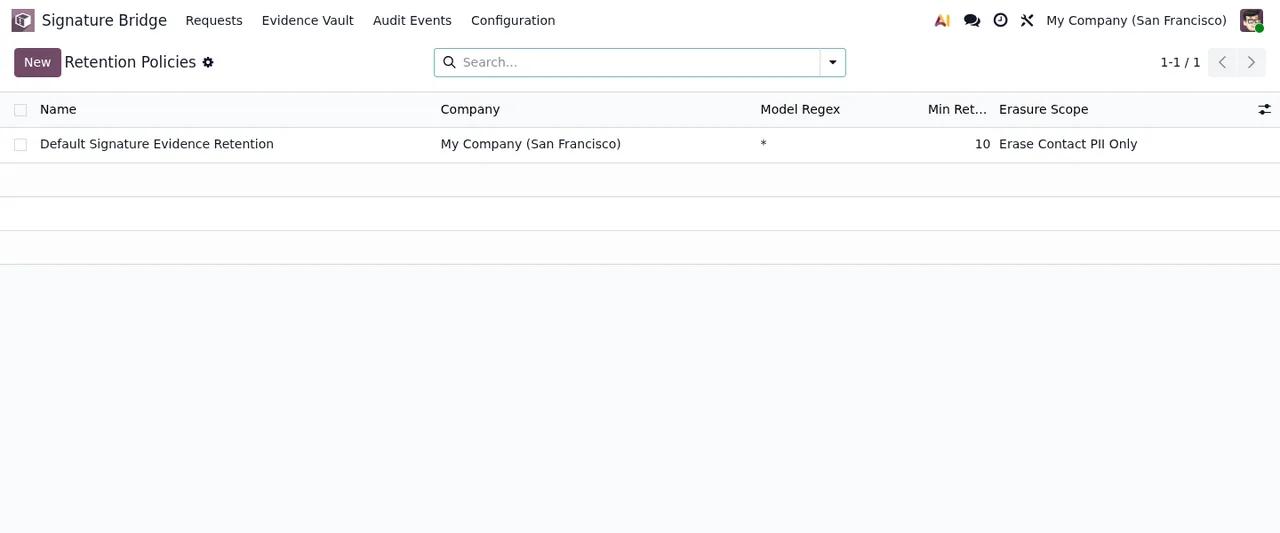
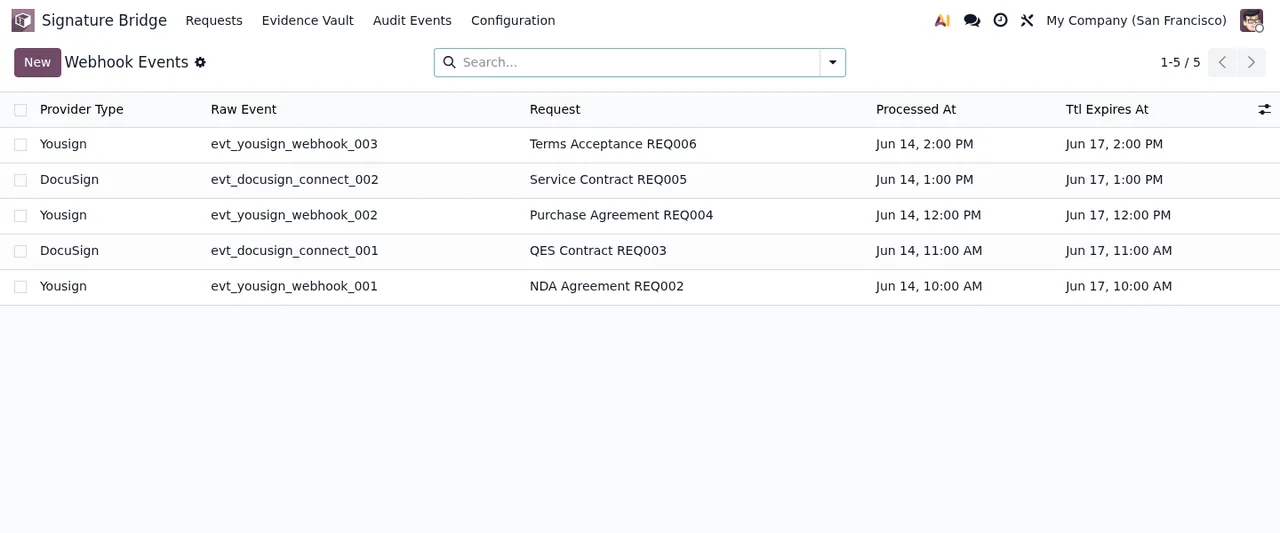
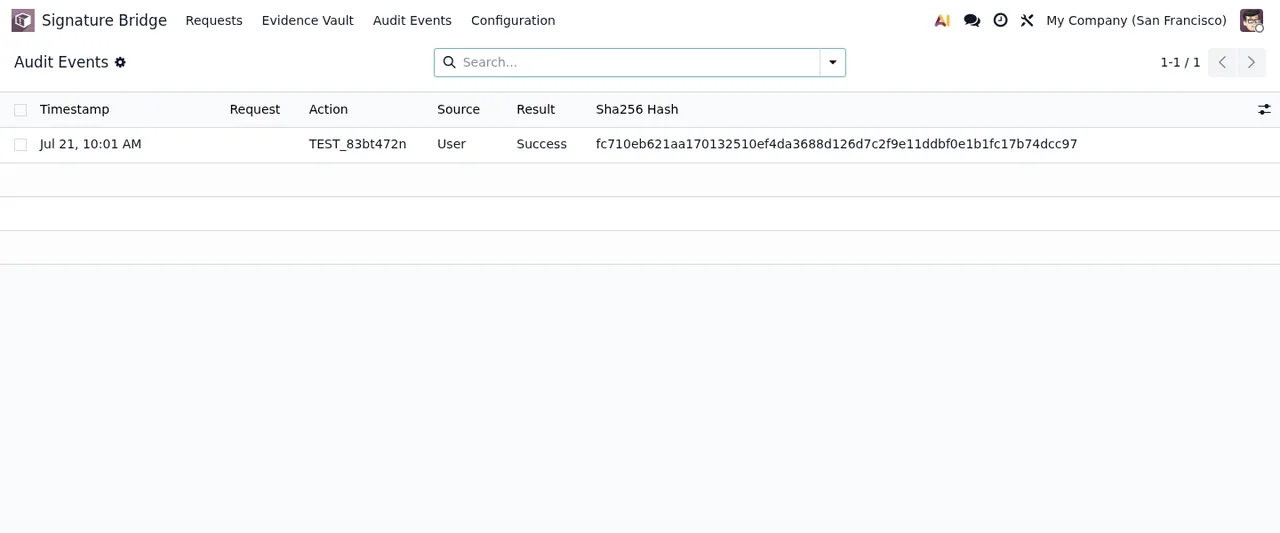
If you would rather see them in sequence, this walkthrough goes through the three lists in the same order:
The export and erasure wizards
As well as the sending wizard, the module ships two more wizards whose names refer to export and erasure:
sign.bridge.dsar.wizard: Signature Bridge DSAR Export Wizard.sign.bridge.erasure.wizard: Signature Bridge Erasure Wizard.
Alongside the Retention Policies list, these are the pieces to find if someone in your company handles export requests (DSAR) or data erasure.
Odoo versions and price
The module is published on Odoo Apps for Odoo 17, 18, 19 and 20. It costs €9 per Odoo version, a one-off payment excluding VAT, for 17, 18, 19 and 20 according to each version's listing. You can check the Odoo Apps listing or the module page on flexigotech.com.
How FlexigoTech can help
At FlexigoTech we implement Odoo 17, 18, 19 and 20 and build bespoke connectors and integrations. If you need Signature Bridge to fit your signing workflows or other modules in your Odoo, we can help you get it running. And if a warning pops up while you use it, the literal messages and what to do about each one are in the article on the module's error messages.
Keep reading
Checked in the module's source code (version 20.0) and the linked sources
Sources
- Module source code: flexigo_docusign_yousign_bridge_for_regulated_sign_work 20.0 (d528b22d): views/sign_bridge_menus.xml
- Module source code: flexigo_docusign_yousign_bridge_for_regulated_sign_work 20.0 (d528b22d): data/sign_bridge_cron.xml
- Module source code: flexigo_docusign_yousign_bridge_for_regulated_sign_work 20.0 (d528b22d): static/description/index.html
- Module source code: flexigo_docusign_yousign_bridge_for_regulated_sign_work 20.0 (d528b22d): models/eidas_level.py
- Module source code: flexigo_docusign_yousign_bridge_for_regulated_sign_work 20.0 (d528b22d): models/sign_bridge_adapter.py
- Module source code: flexigo_docusign_yousign_bridge_for_regulated_sign_work 20.0 (d528b22d): models/sign_bridge_api_log.py
- Module source code: flexigo_docusign_yousign_bridge_for_regulated_sign_work 20.0 (d528b22d): models/sign_bridge_audit_event.py
- Module source code: flexigo_docusign_yousign_bridge_for_regulated_sign_work 20.0 (d528b22d): models/sign_bridge_compliance_kpi.py
- Module source code: flexigo_docusign_yousign_bridge_for_regulated_sign_work 20.0 (d528b22d): models/sign_bridge_provider.py
- Module source code: flexigo_docusign_yousign_bridge_for_regulated_sign_work 20.0 (d528b22d): models/sign_bridge_request.py
- Module source code: flexigo_docusign_yousign_bridge_for_regulated_sign_work 20.0 (d528b22d): models/sign_bridge_retention_policy.py
- Module source code: flexigo_docusign_yousign_bridge_for_regulated_sign_work 20.0 (d528b22d): models/sign_bridge_signer.py
- Module source code: flexigo_docusign_yousign_bridge_for_regulated_sign_work 20.0 (d528b22d): models/sign_bridge_webhook_event.py
- Module source code: flexigo_docusign_yousign_bridge_for_regulated_sign_work 20.0 (d528b22d): wizards/sign_bridge_dsar_wizard.py
- Module source code: flexigo_docusign_yousign_bridge_for_regulated_sign_work 20.0 (d528b22d): wizards/sign_bridge_erasure_wizard.py
- Module source code: flexigo_docusign_yousign_bridge_for_regulated_sign_work 20.0 (d528b22d): wizards/sign_bridge_send_wizard.py
- apps.odoo.com/apps/modules/20.0/flexigo_docusign_yousign_bridge_for_regulated_sign_work
- apps.odoo.com/apps/modules/17.0/flexigo_docusign_yousign_bridge_for_regulated_sign_work
- apps.odoo.com/apps/modules/18.0/flexigo_docusign_yousign_bridge_for_regulated_sign_work
- apps.odoo.com/apps/modules/19.0/flexigo_docusign_yousign_bridge_for_regulated_sign_work
- flexigotech.com/en/services.html