

 Español
 Català
 Deutsch
 Français
 Português
 Italiano
 Nederlands
 Polski
What Deduce solves, according to its listing
The module's listing starts from one idea: a receipt without your tax ID can't reclaim VAT. From there, Deduce reads the receipt or invoice the moment you capture it, tells you when to ask for a full invoice and posts the expense in Odoo. What's left for you is taking the photo and reviewing.
The listing sums up the flow in four moves: you snap a receipt, the AI reads it, Deduce tells you if you can deduct the VAT and you post it. Its motto is «zero typing»: the AI reads, you review. The rest of this article explains where each of those things happens inside Odoo.
The menus Deduce adds
Once installed, these entries appear, named exactly as they are in the module:
Deduce › Captures: where captured receipts and invoices live.Deduce › Queues: a menu with several submenus underneath.Deduce › CockpitDeduce › Form 303 preparationDeduce › Recoverable VAT (total)Deduce › Tax rulesDeduce › Configuration
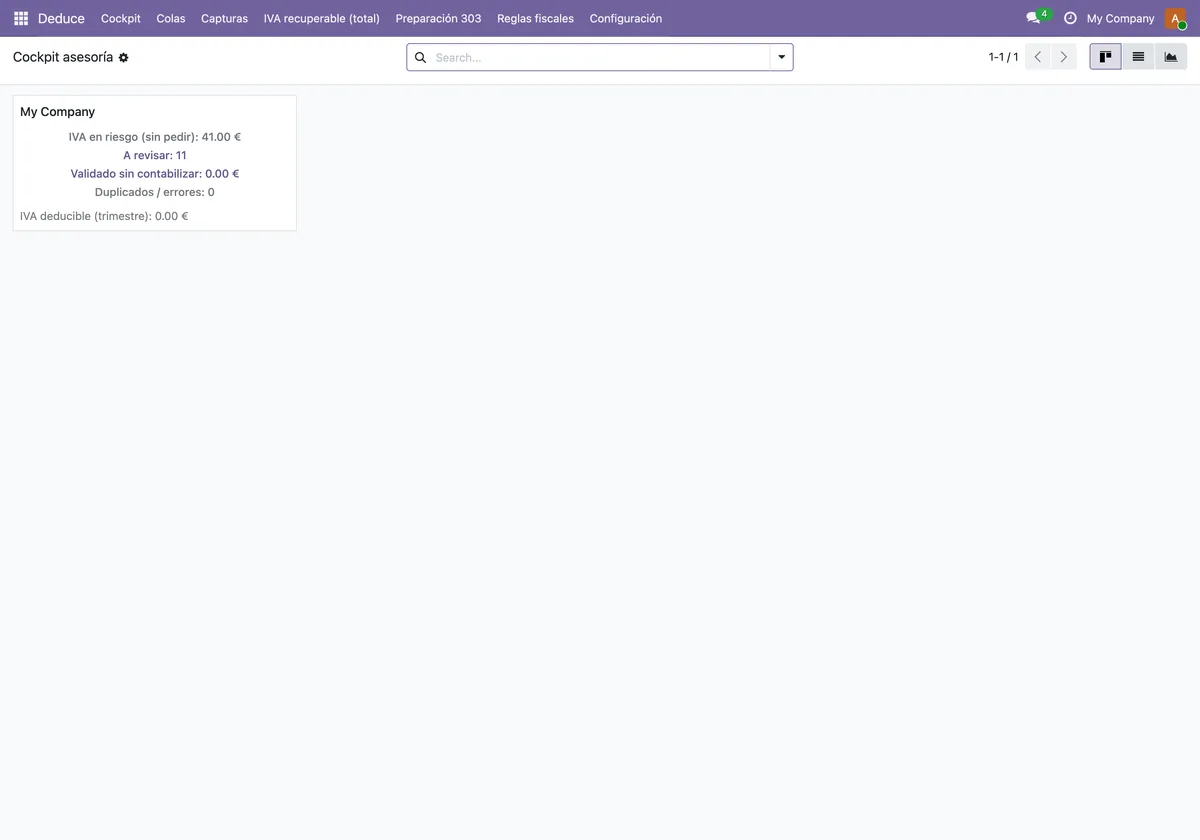
The Cockpit is a kanban view with one card per company. In the screenshot below, the My Company card brings together VAT at risk, captures to review, validated but not posted, duplicates and quarterly deductible VAT.
The scheduled task running in the background
Deduce ships with a single scheduled task, active out of the box:
- Name:
Deduce: procesar capturas pendientes. - Frequency: every 10 minutes.
Its name says what it does: process the captures that are pending. If you upload several captures in a row, this is the task that comes back to whatever is still pending every 10 minutes. If you deactivate it, it stops running, so it's worth checking it is still active after installing or updating the module.
The path of a capture, step by step
A new capture is opened from Deduce › Captures. The empty form already shows the pieces you'll work with: the Upload your file button, the destination (Vendor Bill in the screenshot), the merchant fields and the Tax details and Text / AI tabs.
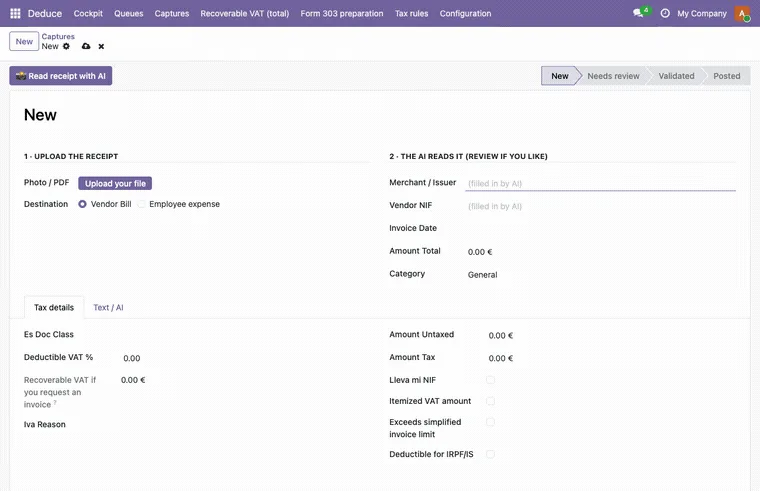
This is the order in which you use it:
- Go to
Deduce › Capturesand create a new capture. The form starts in theNewstate. - Upload the photo or file with
Upload your file. - Choose the destination. The listing says a record can end up as a vendor bill or as an employee expense; in the example form the destination shown is
Vendor Bill. - Let Deduce read the document. According to the listing, it reads it the moment you capture it; the
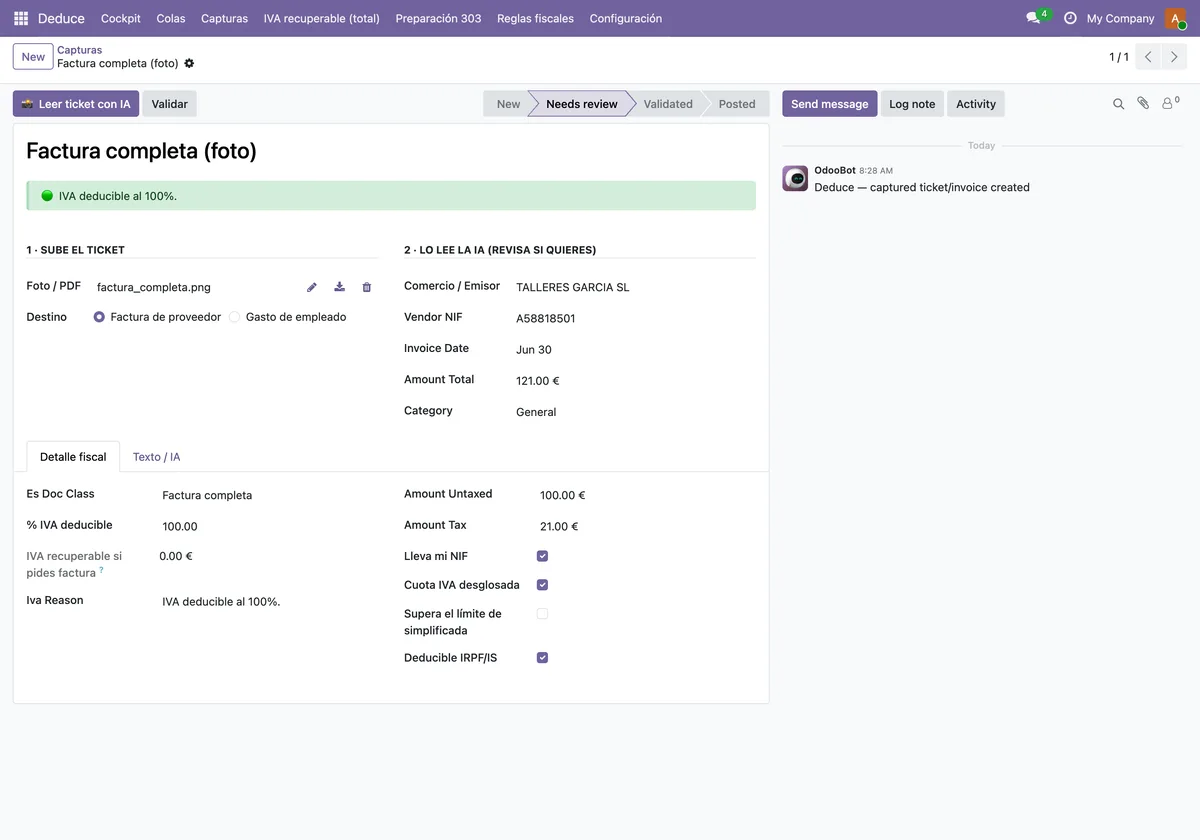
Deduce: procesar capturas pendientestask also goes over pending captures every 10 minutes. - Review the data the AI has read. In the example in the screenshot below, the form shows that data, the
Detalle fiscaltab and theNeeds reviewstate, with an OdooBot message in the chatter. - Read the deductibility notice. Deduce tells you whether you can deduct the VAT and when to ask for a full invoice; in the example a green deductible VAT notice is shown.
- Post it. The listing states that Deduce posts the expense in Odoo.
- Follow the whole picture from
Deduce › Cockpit, where each company card brings together what is at risk, what is waiting for review and what is validated but not posted.
If you'd like to see the three screens in a row, this is the sequence:
For the settings and fields to fill in before your first receipt, see setting up Deduce.
The pieces working underneath
Behind the menus sit several Odoo models. Their technical descriptions help you understand what is stored and what is worked out:
deduce.capture: the captured receipt or invoice.deduce.extraction.service: the extraction service, described as native AI plus an optional bring-your-own key. The listing puts it as «your AI or keyless, on your server».deduce.deductibility.engine: the EU VAT deductibility engine.deduce.rule: the deductibility rule, with editable limits. In the menu you'll findDeduce › Tax rules.deduce.nif.validator: a fiscal ID validator for ES, FR and DE.deduce.client.cockpit: the advisory cockpit per client.deduce.iva303.readiness: VAT-return readiness per client and quarter.
The listing mentions 10 countries, each with its own VAT rules. What the module applies in each case is whatever you have in its rules; don't treat it as settled legal advice and check it with your accountant.
Versions and price
Deduce is published on Odoo Apps for Odoo 17.0, 18.0 and 19.0, and the listing for each of those versions shows €39, a one-off payment per version, excluding VAT. You can check it on the Odoo Apps listing or on the module page.
How FlexigoTech can help
If you're rolling out Odoo or already use it and want Deduce to fit your accounting, FlexigoTech implements Odoo and builds bespoke connectors and integrations. We can help you set up the rules, the destination for each capture and the follow-up from the cockpit.
Keep reading
Checked in the module's source code (version 19.0) and the linked sources
Sources
- Module source code: deduce_base 19.0 (2ef1ed0e): views/deduce_capture_views.xml
- Module source code: deduce_base 19.0 (2ef1ed0e): views/deduce_cockpit_views.xml
- Module source code: deduce_base 19.0 (2ef1ed0e): views/deduce_report_views.xml
- Module source code: deduce_base 19.0 (2ef1ed0e): views/deduce_rule_views.xml
- Module source code: deduce_base 19.0 (2ef1ed0e): views/res_config_settings_views.xml
- Module source code: deduce_base 19.0 (2ef1ed0e): data/deduce_cron_data.xml
- Module source code: deduce_base 19.0 (2ef1ed0e): static/description/index.html
- Module source code: deduce_base 19.0 (2ef1ed0e): models/deduce_capture.py
- Module source code: deduce_base 19.0 (2ef1ed0e): models/deduce_client_cockpit.py
- Module source code: deduce_base 19.0 (2ef1ed0e): models/deduce_deductibility_engine.py
- Module source code: deduce_base 19.0 (2ef1ed0e): models/deduce_extraction_service.py
- Module source code: deduce_base 19.0 (2ef1ed0e): models/deduce_iva303_readiness.py
- Module source code: deduce_base 19.0 (2ef1ed0e): models/deduce_nif_validator.py
- Module source code: deduce_base 19.0 (2ef1ed0e): models/deduce_rule.py
- apps.odoo.com/apps/modules/19.0/deduce_base
- apps.odoo.com/apps/modules/17.0/deduce_base
- apps.odoo.com/apps/modules/18.0/deduce_base
- flexigotech.com/en/services.html