
 Español
 Català
 Deutsch
 Français
 Português
 Italiano
 Nederlands
 Polski



Deduce for Odoo
Take a photo of the receipt or forward the invoice. The AI reads it, tells you how much VAT you can deduct and gets it ready to post.
€29/month14 days free, no card
Yearly and Pro
- Standard€29/month · €290/year
- Pro€58/month · €580/year
Reply within 1 working day; with Pro, 4 hours. FlexigoTech Cloud pricing
After you buy
- You pay for the license (€9 + VAT) and get an email with the link to download the module.
- You install it in your Odoo, on Odoo.sh or your own server.
- In Settings → FlexigoTech Cloud you accept the data list and press «Try free for 14 days». The trial doesn't ask for a card.
- To continue, you press «Subscribe», create your account on app.flexigotech.com and pay for the plan by card.
Every purchase includes 2 months of support: we help you install it, set it up and get it working, by email and video call.
- Tested on Odoo 17, 18, 19 and 20
- Odoo Learning Partner
 A receipt without your tax IDReal Odoo screenshot
Get started in 3 steps
- Install the moduleFrom Odoo Apps or flexigotech.com, on Odoo.sh or your own server.
- Start the trialIn Settings › FlexigoTech Cloud, an administrator connects the database, accepts the data processing and starts the 14-day trial, no card needed.
- Choose FlexigoTech's AIIn Deduce › Configuration, pick FlexigoTech Cloud AI as the reader.
Upload or forward your receipts From Deduce › Captures or by email to the tickets-deduce alias of your Odoo.
What you need Odoo 17, 18, 19 or 20 with Accounting and Expenses, on Odoo.sh or your own server, not Odoo Online. The FlexigoTech Cloud subscription for the hosted AI.
What it does
- The AI reads the documentVendor, tax ID, date, base, VAT and total, for you to review.
- Can you deduct the VAT?It applies the rule for each expense. Fuel for a passenger car, at 50%.
- Receipts without your tax ID, flaggedIt shows the VAT you lose and asks for the full invoice.
- Into accounting in one clickA vendor bill or an employee expense, linked to its capture.
How it works
Sent from your Odoo
- The photo or PDF of each document
- Its text, if it has any
Back from FlexigoTech Cloud
- What the AI read, for you to review
- A warning when few documents are left this month

Your Odoo sends the photo or PDF to FlexigoTech Cloud. Our AI model, on our servers in Germany, reads it and sends back what it says. We do not keep the document.
Where you see it in Odoo
- Deduce menucaptures, queues, cockpit, VAT return preparation and rules
 Accountingthe vendor bill, linked to its capture
 Expensesthe employee expense, with its receipt
Inside Odoo
Real Odoo screenshots.
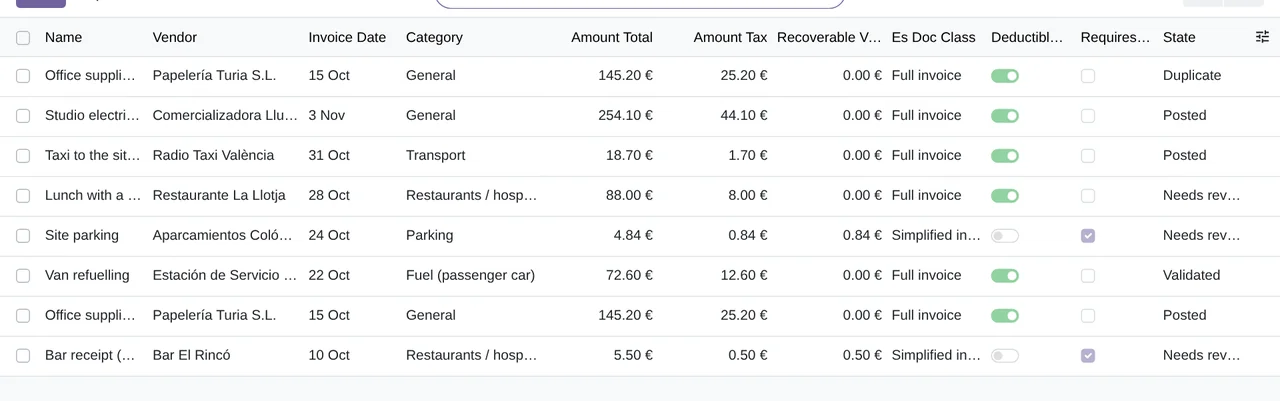
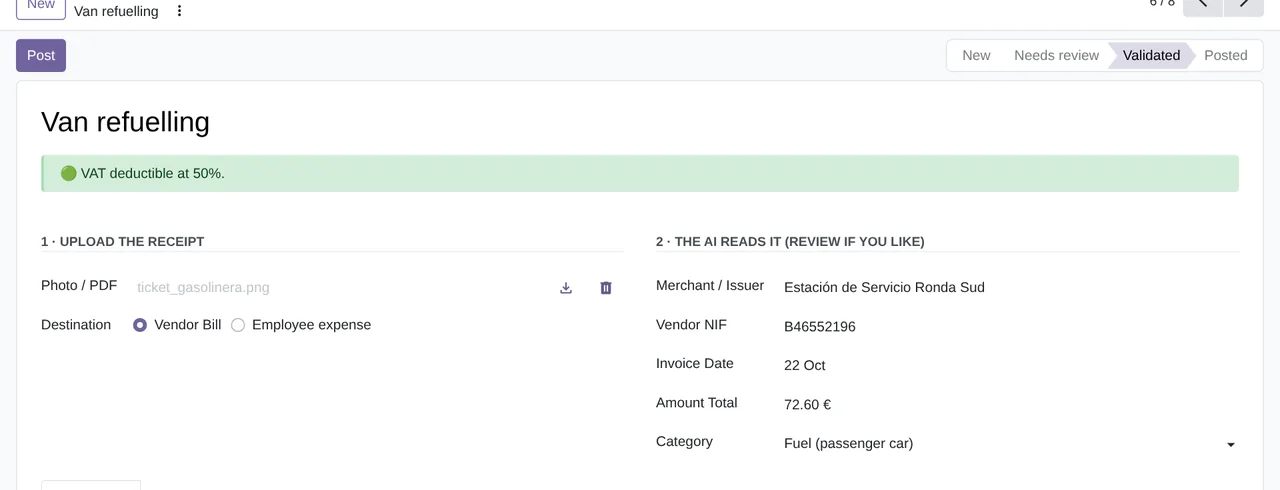
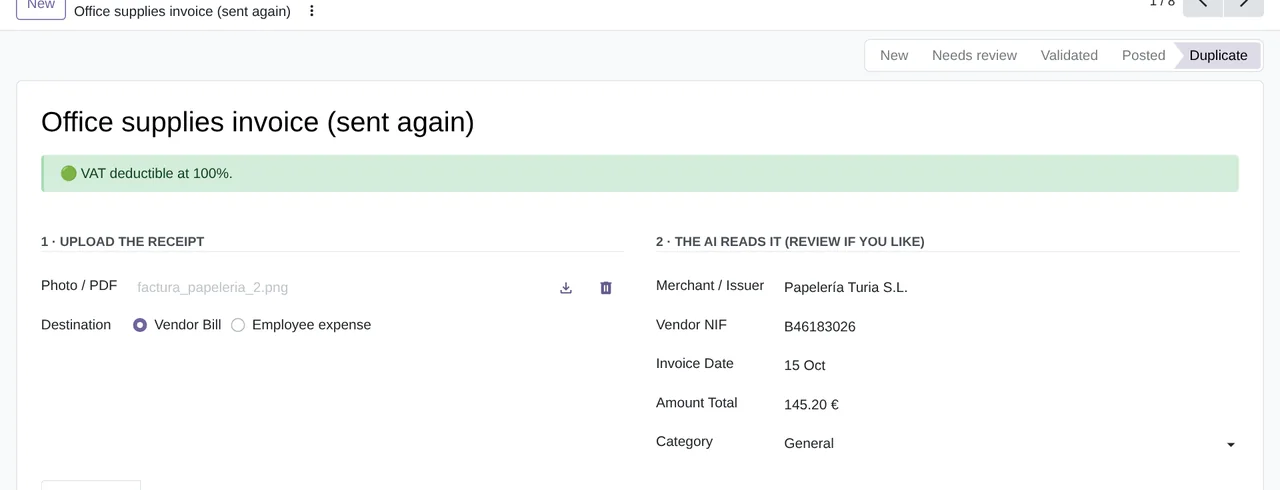
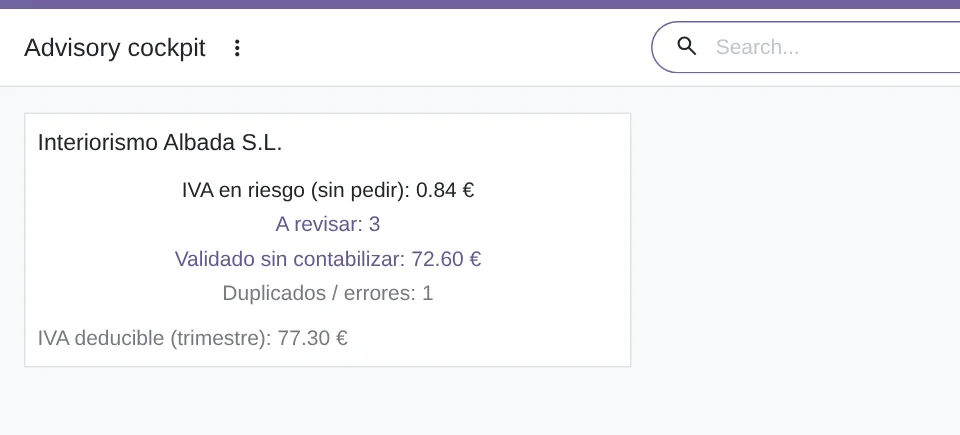
Price
Standard
€29a month + VAT
€290 a year + VAT 2 months free
- Hosted AI: 500 documents a month (Pro, 1,000)
- First response 1 working day
- Video call included for the first 2 months
Pro
€58a month + VAT
€580 a year + VAT 2 months free
- Everything in Standard
- First response 4 working hours
- Video call if needed
- + €9 for the module license, per Odoo version
- 14 days free, no card
- Cancel in two clicks
- Every purchase includes 2 months of support: we help you install it, set it up and get it working, by email and video call. While you're subscribed, support for the service stays included. Still integrating or testing? Extend your free trial.
If you cancel What the subscription gives stops. Your data stays in your Odoo.
- Support with response timesMonday to Friday, 9:00 to 18:00 (Barcelona), except public holidays.
- Maintenance and improvementsOdoo 17-20, on Odoo.sh or your own server
- You review itThe AI suggests and a person checks it before posting.
- Servers in GermanyWe read your documents with our own model and do not keep them
- Tested On Odoo 17, 18, 19 and 20. Reading with the hosted AI, end to end against the simulated service in the module's tests. The screenshots on this page come from a real Odoo 20 with the AI simulated.
- 1 purchase on Odoo Apps · 14-11-2026
- 4,854 lines of code · 14-11-2026
- 165 automated tests · 14-11-2026
- No reviews yet · leave yours
Frequently asked questions
Which documents does it read?
Vendor bills, receipts and simplified invoices, as a photo or a PDF. You upload them in Deduce or forward them to the Deduce email alias.
How many documents does the subscription include?
500 a month per database with Standard and 1,000 with Pro. When few are left, Deduce warns you on the capture.
How does it know whether the VAT is deductible?
It checks whether the document shows your tax ID and the VAT amount, and applies the rule for each kind of expense: fuel for a passenger car, at 50%. You can edit the Spanish ones. If your company is in France, Germany, Italy, Portugal, Belgium, Austria, the Netherlands, Ireland or Luxembourg, it applies that country's rules.
Does it post on its own?
No, unless you ask it to. Each capture waits for your review and you validate it. An administrator can set a threshold so that captures read with high confidence are validated on their own.
What if I upload the same invoice twice?
Deduce marks it as a duplicate and will not let you post it again.
Does it work without FlexigoTech Cloud?
No. Deduce works with an active subscription: reading each document with AI runs on FlexigoTech Cloud.
What happens after you press «Buy now»?
1. You pay for the license (€9 + VAT) and get an email with the link to download the module. 2. You install it in your Odoo, on Odoo.sh or your own server. 3. In Settings → FlexigoTech Cloud you accept the data list and press «Try free for 14 days». The trial doesn't ask for a card. 4. To continue, you press «Subscribe», create your account on app.flexigotech.com and pay for the plan by card.
Does it work on Odoo Online?
No: Odoo Online does not allow third-party modules. It is for Odoo 17, 18, 19 and 20, on Odoo.sh or on your own server.
Who installs it?
You do: you buy it on flexigotech.com or on Odoo Apps and install it in your Odoo. We help you install it and set it up, by email and video call, during the 2 months of included support. Custom development and data migration are quoted separately.
What support is included?
Every purchase includes 2 months of support: we help you install it, set it up and get it working, by email and video call. While you're subscribed, support for the service stays included.
What if the AI cannot read a document?
The capture stays in your Odoo with a note and you complete it by hand. And support has response times: first response within 1 working day; with Pro, within 4 working hours.
What about my data? And if I cancel?
The photo or PDF of each document goes to FlexigoTech Cloud, which reads it with our AI model on our servers in Germany and does not keep it. You cancel in two clicks: if you don't subscribe when the trial ends, the service stops and nothing is charged. Your data stays in your Odoo, and you can always view and export it.
Not on Odoo yet?
We set up Odoo with your company's invoicing and stay on.
From €2,450 + VAT
Start with OdooMore about Deduce
What it does
A FlexigoTech module for Odoo 17, 18, 19 and 20, Community and Enterprise. It collects supplier invoices, till receipts and expense receipts, as a photo, a PDF or by email, reads them with FlexigoTech Cloud's AI, tells you how much VAT you can deduct and gets them ready for accounting as a vendor bill or an employee expense. A person reviews what the AI reads.
- Photo, PDF or emailYou upload the document in Deduce › Captures or forward it by email to the tickets-deduce alias of your Odoo, and each document becomes a capture with its own number. With «Read the photo on upload», which comes switched on, the AI reads it as soon as you attach it; if you switch it off, you read it with the button. A scheduled task looks at the waiting captures every 10 minutes.
- The AI reads, you reviewFlexigoTech Cloud's AI fills in the shop or issuer, its tax ID, the date, the net amount, the VAT, the total and the expense category, and marks whether the document carries your tax ID and the VAT amount stated separately. You check it, correct it if needed and validate the capture.
- The VAT you can deduct, in green or in redWith your tax ID and the VAT stated separately, the document is a full invoice and the VAT is deducted at the percentage of its category's rule: fuel for a passenger car at 50 %; the other categories it comes with at 100 %. A receipt without your tax ID is a simplified invoice: the capture warns you in red about the VAT you cannot deduct and tells you to ask for the full invoice. The rules are those of your company's country: Spain's can be edited, and France, Germany, Italy, Portugal, Belgium, Austria, the Netherlands, Ireland and Luxembourg have their own.
- The full invoice, requested from the captureA button emails the supplier asking for the full invoice with your tax ID and marks the capture as requested. If the supplier has no email in Odoo, the capture is marked all the same and the note says so, so you can ask at the counter. The «VAT at risk (not requested)» queue gathers what you have not asked for yet.
- The same document, only onceDeduce recognises a repeated document by the issuer's tax ID, the date and the total (on a receipt without a tax ID, also by the net amount and the VAT). If an identical one is already validated or posted in the same company, the new capture becomes a duplicate and cannot be posted again.
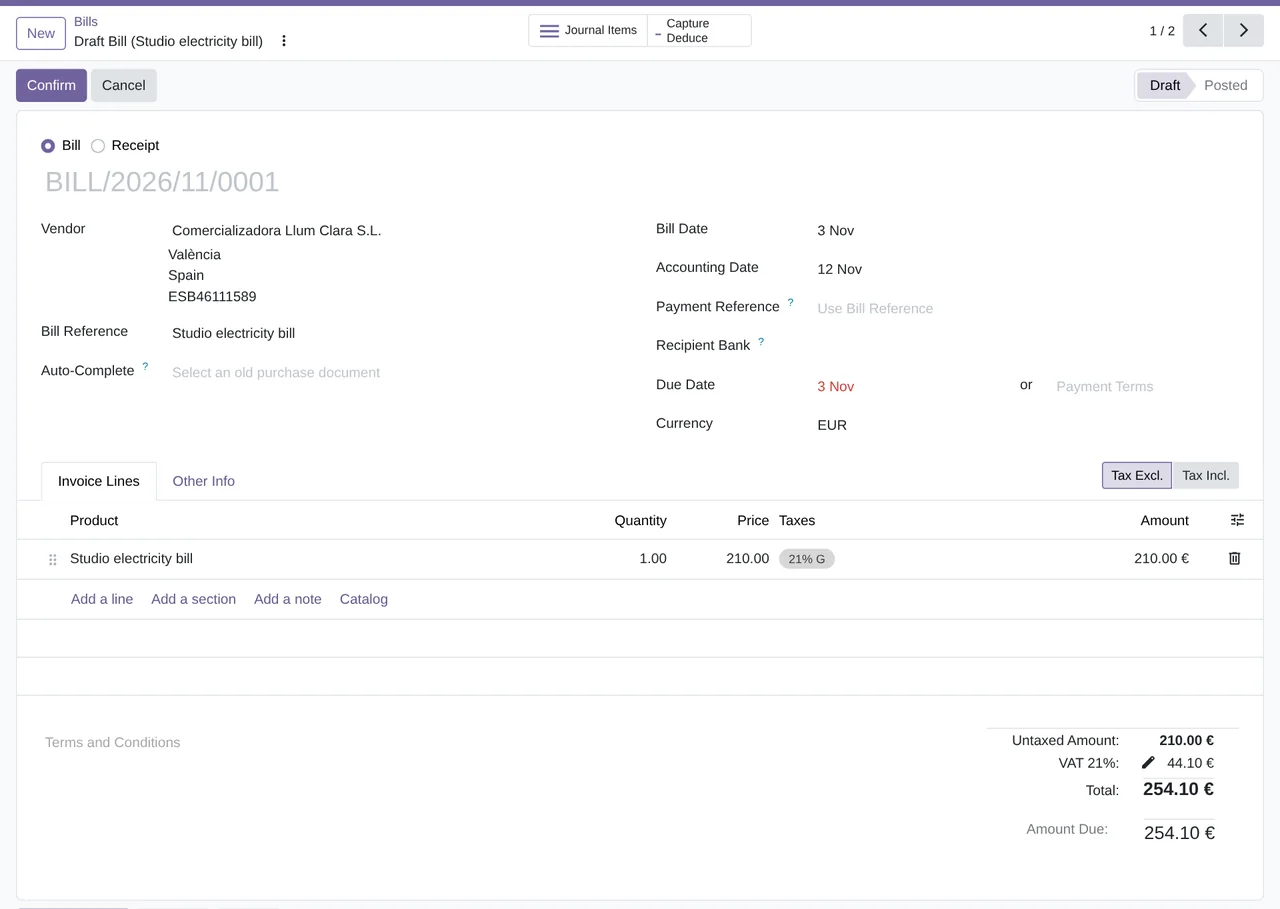
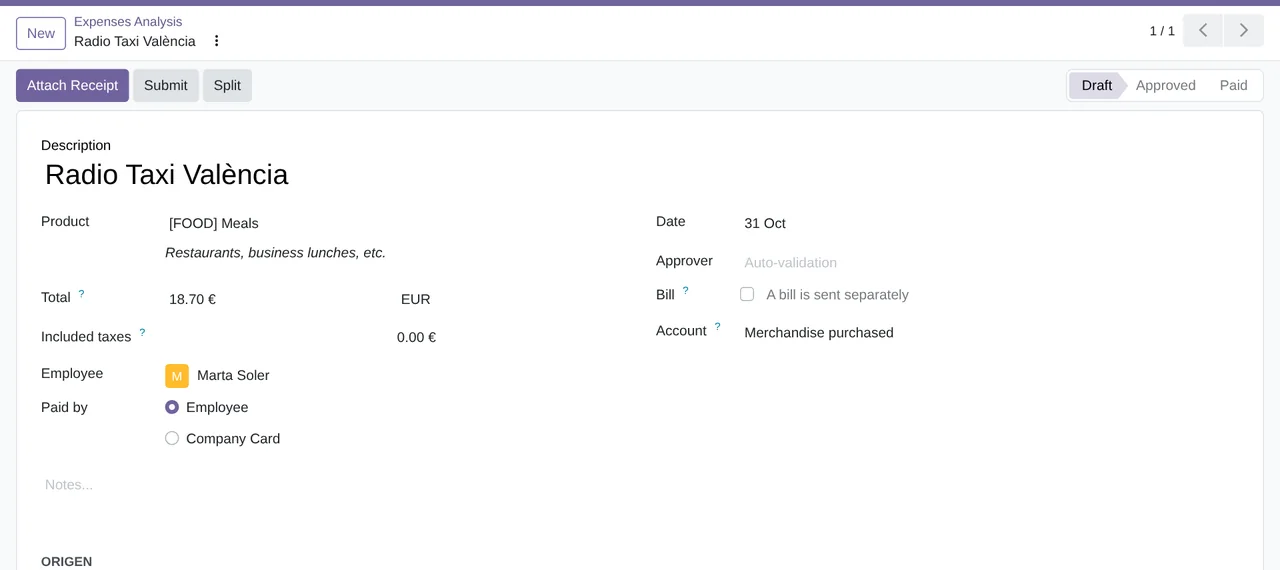
- Into accounting, as a bill or as an expenseWhen you post a validated capture, Deduce creates the vendor bill as a draft or the employee expense, paid by the employee to be reimbursed or with the company card. The bill and the expense stay linked to their capture, which keeps the photo or the PDF.
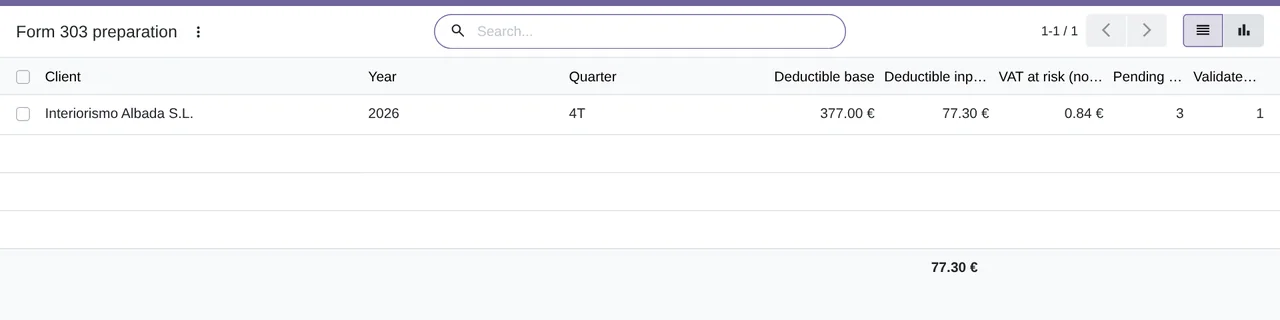
- The cockpit and Form 303, for accounting firmsThe cockpit sums up per company what is left to review, the VAT at risk and the VAT requested, what is validated but not posted, duplicates and errors, and the deductible VAT of the quarter. Form 303 preparation gives per company and quarter the deductible net amount and input VAT, and what is still missing. In the list of captures, the actions work on many at once: validate, request the full invoice, post, read again or mark as duplicates.
What it does not do
- It does not file Form 303 or anything with the tax officeIt shows you what is ready for each quarter's Form 303. You or your accountant file the return.
- It does not decide for youIt applies the rules that come with the module and the ones you edit, and helps you review each document. The tax judgement is yours or your accountant's.
- It does not post without your reviewEach capture waits for you to validate it. Only if an administrator sets a confidence threshold does Deduce validate on its own the ones read with high confidence, and even then the vendor bill is created as a draft.
- It does not include the subscriptionReading with FlexigoTech Cloud's AI is paid separately, monthly or yearly, with a 14-day trial and no card. The module is licensed per Odoo version.
What it looks like inside Odoo
Real screens of the module installed on Odoo 20, with the documents of a made-up interior design studio in Valencia.
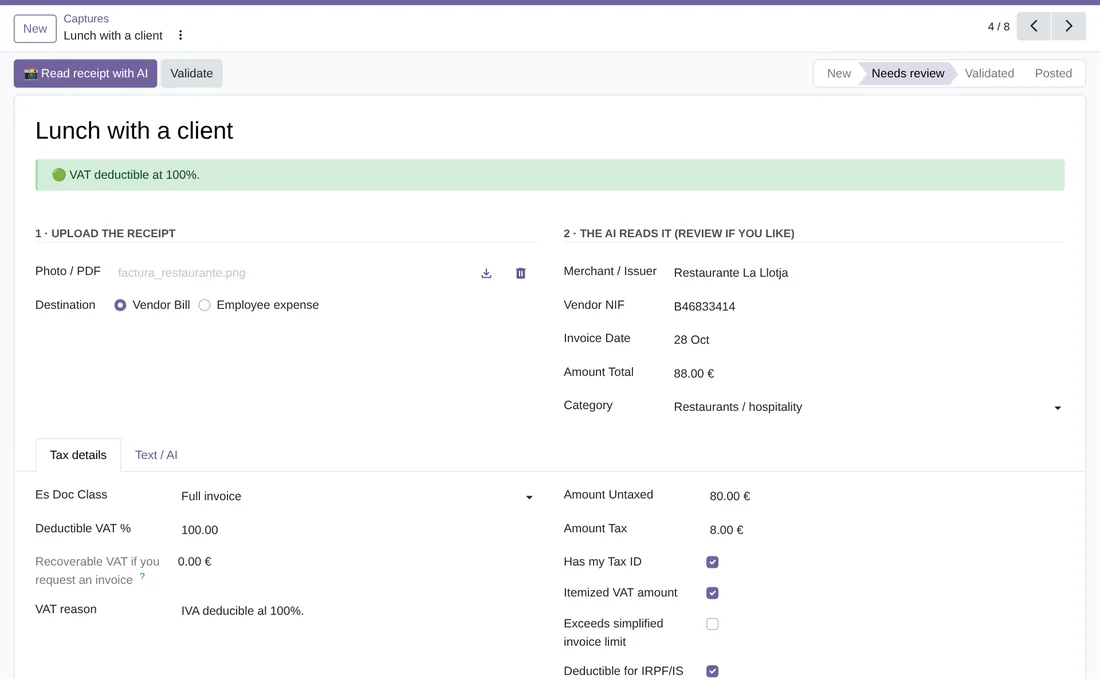
A lunch with a client, in green
The AI has read the restaurant, its tax ID, the date and the amounts. With your tax ID and the VAT stated separately it is a full invoice: VAT deductible at 100 %.
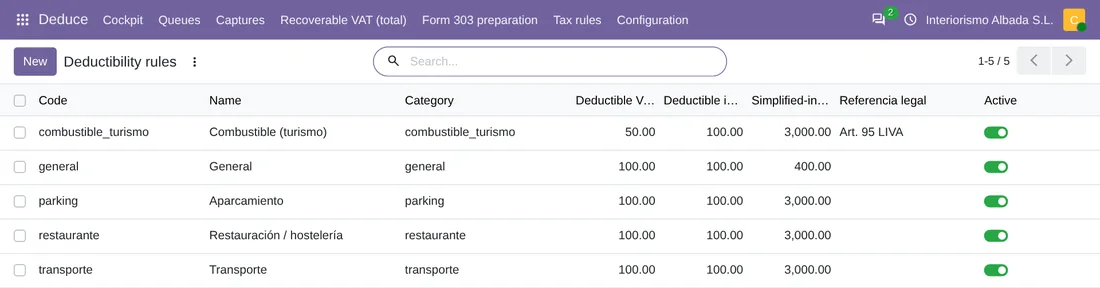
Spain's tax rules
Each category with its deductible VAT and income tax and the simplified-invoice ceiling. Fuel for a passenger car at 50 %, with its legal reference. An administrator changes them.

VAT at risk, in its own queue
The receipts without your tax ID that you have not yet asked to have as a full invoice, with the VAT you recover if you ask for it.

How much VAT you can recover
The report gathers the captures that still need the full invoice, with the VAT you would recover. It shows as a pivot table, a graph or a list.
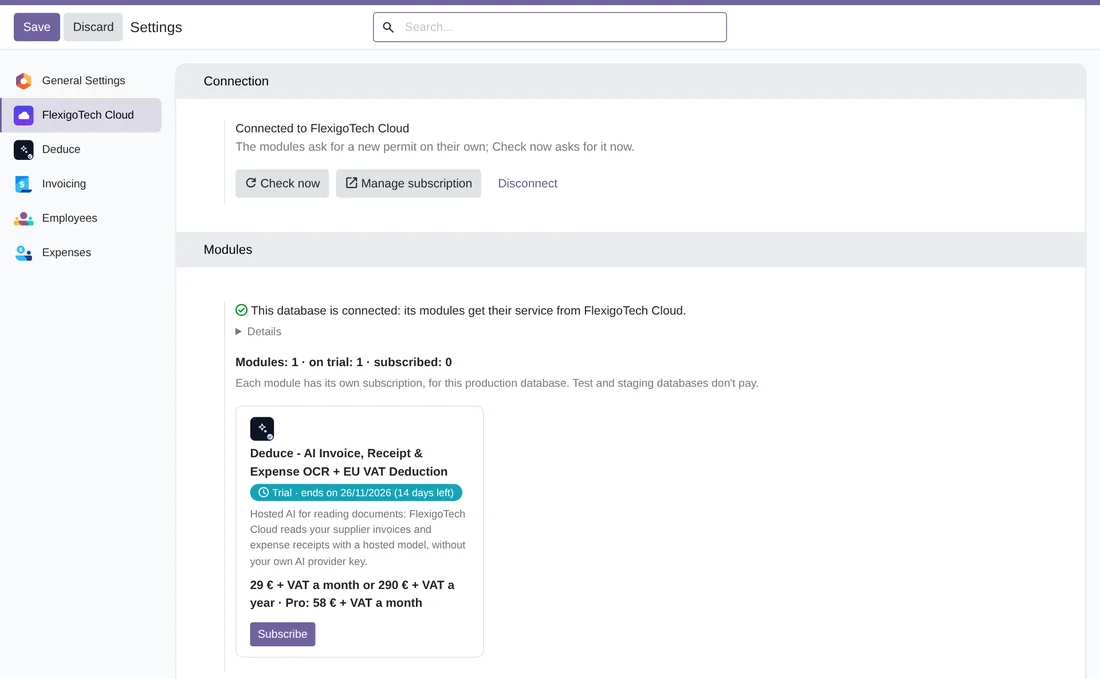
Deduce on FlexigoTech Cloud
Settings › FlexigoTech Cloud: the database connected and Deduce in its 14-day trial, with what the subscription includes and its price.
At a glance
Questions before buying? Talk to the engineer.
We tell you whether Deduce fits your Odoo and the way you handle expenses before you pay anything. No middlemen.
Related
Deduce is a FlexigoTech module for Odoo.
Deduce - AI Invoice, Receipt & Expense OCR + EU VAT Deduction guides
2 practical guides on this module: step-by-step guides.