

 Español
 Català
 Deutsch
 Français
 Português
 Italiano
 Nederlands
 Polski
What the module puts into your Odoo
The Odoo Apps listing sums the module up with a plain heading, Send Chile DTEs to the SII from Odoo, and has a How it works section. Inside Odoo that becomes a menu of its own, Chile SII, plus a set of models (the tables where the module stores its data), which are worth knowing by their technical names if you are a consultant or need to review access rights.
These are the menu entries:
Chile SII › Documents (DTE)Chile SII › EnvelopesChile SII › CAF (Folios)Chile SII › CertificatesChile SII › ConfigurationChile SII › Audit LogChile SII › Data Access Requests
And these are the models the module defines, with their descriptions as they appear in the code: sii.configuration (Chile SII Configuration), sii.certificate (SII Digital Certificate), sii.caf (Chile SII CAF (authorized folios)), sii.dte (SII Electronic Document (DTE)), sii.dte.line (DTE Line Item), sii.submission.wizard (Send Invoices to the SII), sii.submission.batch (SII Submission Envelope (EnvioDTE)), sii.audit.log (SII Audit Log) and cl.sii.dsar.request (DSAR - Data Subject Access Request).
A tour of the module, screen by screen
If you have just installed it and want to know what lives where, this tour takes you through every piece. It is there to help you find your way; the fields to fill in and what to check when you start are covered in setting up the module.
- Open
Chile SII › Configuration. The module's configuration model is calledsii.configuration(Chile SII Configuration).
- Move on to
Chile SII › Certificates. The module stores digital certificates in thesii.certificatemodel (SII Digital Certificate). TheChile SII: certificate expiry alertsaction runs once a day and, going by its name, raises certificate expiry alerts.
- Go into
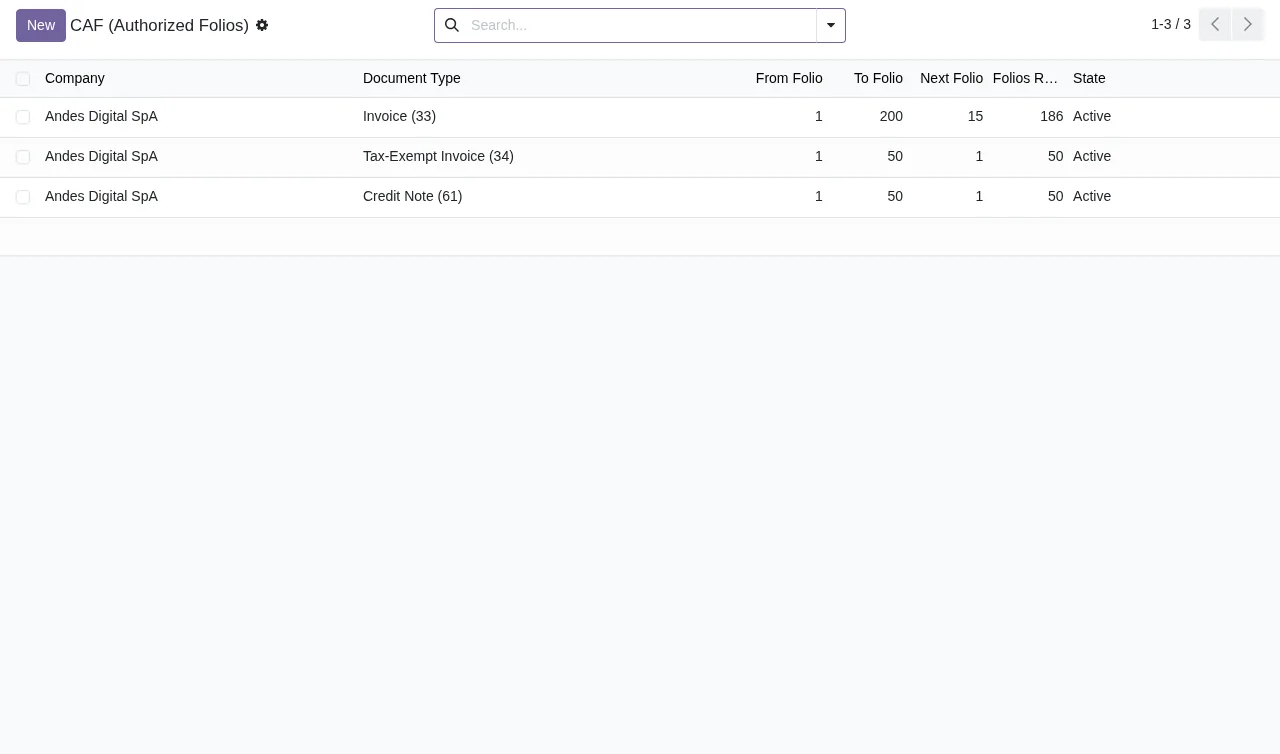
Chile SII › CAF (Folios). The module stores the authorised folios in thesii.cafmodel. For each CAF the list shows the folio range, the next folio and its state. TheChile SII: low folio alertsaction runs every 6 hours and, going by its name, raises low folio alerts.
- Open
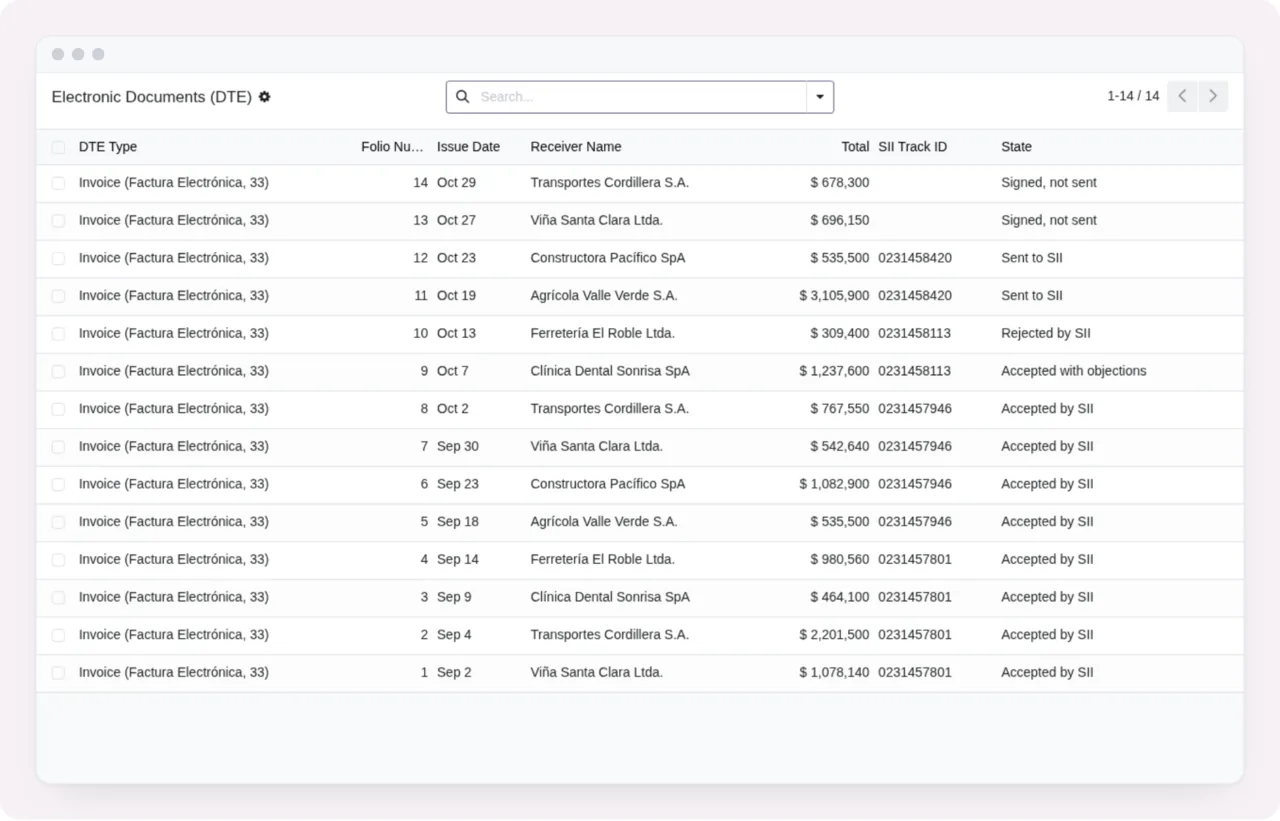
Chile SII › Documents (DTE). The module stores the electronic documents in thesii.dtemodel. The lines of each document sit in a separate model,sii.dte.line(DTE Line Item).
- For sending, the module includes a wizard called
Send Invoices to the SII(modelsii.submission.wizard). Separately, theChile SII: send invoices marked Auto-Submitaction runs every hour and, going by its name, sends the invoices markedAuto-Submit.
- Check
Chile SII › Envelopes. The module stores submission envelopes in thesii.submission.batchmodel, which the code describes asSII Submission Envelope (EnvioDTE). TheChile SII: check the state of sent envelopesaction runs every 30 minutes and, going by its name, checks the state of sent envelopes.
- Look at
Chile SII › Audit Log. The module's audit log lives in thesii.audit.logmodel (SII Audit Log).
- Finish at
Chile SII › Data Access Requests. Data subject access requests are held in thecl.sii.dsar.requestmodel (DSAR - Data Subject Access Request). The Odoo Apps listing also has aPrivacy policysection.
Signed, not sent state, with document details, issuer and recipient details, amounts and the SII section not yet sentThe four scheduled actions that run on their own
The module ships four scheduled actions, and all four come active. This is what each one does according to its name, and how often it runs:
Chile SII: check the state of sent envelopes: every 30 minutes, checks the state of sent envelopes.Chile SII: send invoices marked Auto-Submit: every hour, sends invoices markedAuto-Submit.Chile SII: certificate expiry alerts: once a day, certificate expiry alerts.Chile SII: low folio alerts: every 6 hours, low folio alerts.
Which parts of the module touch a document
Seen from the data side, the module spreads its information across several models. It stores authorised folios in sii.caf and digital certificates in sii.certificate. The document itself is a sii.dte record, with its lines in sii.dte.line. For sending you have the Send Invoices to the SII wizard and the hourly action that sends invoices marked Auto-Submit. Submission envelopes are kept in sii.submission.batch, and the 30-minute action checks the state of sent envelopes. The sii.audit.log model holds the module's audit log.
In the DTE list you can see where each document stands from the state column and the SII tracking ID, as in the screenshot above. On the form of a document in Signed, not sent state, the SII section shows it has not been sent.
The external service and what happens without a subscription
The listing warns you before you buy: Before you buy: some features of this app use a paid external service. This is a module with a local FlexigoTech Cloud service. The module costs €9 excluding VAT per Odoo version, one-off payment, for 17, 18, 19 and 20. The local service costs €29/month or €290/year excluding VAT (Pro: €58/month or €580/year).
Without a subscription, or with the service suspended, whatever the subscription provides stops, and your data stays in your Odoo. With the subscription, the module for new Odoo versions is included if you bought it on flexigotech.com; on the Odoo Apps listing, each Odoo version is bought there. If you are still unsure whether it fits, see what it covers and what you need before installing it.
How FlexigoTech can help
FlexigoTech implements Odoo 17, 18, 19 and 20 and builds bespoke connectors and integrations. If you would like help leaving the Chile SII menu configured and the scheduled actions reviewed, or you need a bespoke integration around sending, get in touch from the module page.
Keep reading
Checked in the module's source code (version 20.0) and the linked sources
Sources
- Module source code: flexigo_chile_sii_integration 20.0 (2c228713): views/menus_gen.xml
- Module source code: flexigo_chile_sii_integration 20.0 (2c228713): data/ir_cron.xml
- Module source code: flexigo_chile_sii_integration 20.0 (2c228713): static/description/index.html
- Module source code: flexigo_chile_sii_integration 20.0 (2c228713): models/dsar_request.py
- Module source code: flexigo_chile_sii_integration 20.0 (2c228713): models/sii_audit_log.py
- Module source code: flexigo_chile_sii_integration 20.0 (2c228713): models/sii_caf.py
- Module source code: flexigo_chile_sii_integration 20.0 (2c228713): models/sii_certificate.py
- Module source code: flexigo_chile_sii_integration 20.0 (2c228713): models/sii_configuration.py
- Module source code: flexigo_chile_sii_integration 20.0 (2c228713): models/sii_dte.py
- Module source code: flexigo_chile_sii_integration 20.0 (2c228713): models/sii_dte_line.py
- Module source code: flexigo_chile_sii_integration 20.0 (2c228713): models/sii_submission_batch.py
- Module source code: flexigo_chile_sii_integration 20.0 (2c228713): wizards/sii_submission_wizard.py
- apps.odoo.com/apps/modules/20.0/flexigo_chile_sii_integration
- apps.odoo.com/apps/modules/17.0/flexigo_chile_sii_integration
- apps.odoo.com/apps/modules/18.0/flexigo_chile_sii_integration
- apps.odoo.com/apps/modules/19.0/flexigo_chile_sii_integration
- flexigotech.com/en/services.html
- flexigotech.com/precios.html