

 Español
 Català
 Deutsch
 Français
 Português
 Italiano
 Nederlands
 Polski
What the module adds to your Odoo
Once installed, a root menu called ARCA Suppliers appears. Under it sit Result Codes, Invoice Queue, Perception Matrix, Suppliers, Audit Log, Supplier Cache, Exclusion List, Overrides, Withholding Matrix, Configuration and Data Requests. Separately, under the root menu ARCA Suppliers, there is Batch Import (RFE).
The Odoo Apps listing groups what the module does into six sections: «Supplier check at ARCA», «APOC exclusion list», «Withholding and perception estimates», «Retries when ARCA is down», «Batch import of suppliers» and «Personal data requests». The terms in this glossary are grouped by topic: suppliers first, then perceptions, withholdings and bills, then the scheduled actions, and finally the error code and report models.
Glossary: suppliers and their data
ARCA Suppliers › Suppliers- The module's supplier list, built on the
arca.suppliermodel. In the screenshot, with a single record, you can see the CUIT, name, category and state columns, theNewbutton, the search bar and pagination.
Unknown- The state shown by the only supplier in the screenshot, in the state column of
arca.supplier. It is the value visible in that view; for the other states and their order, see the module set-up guide.
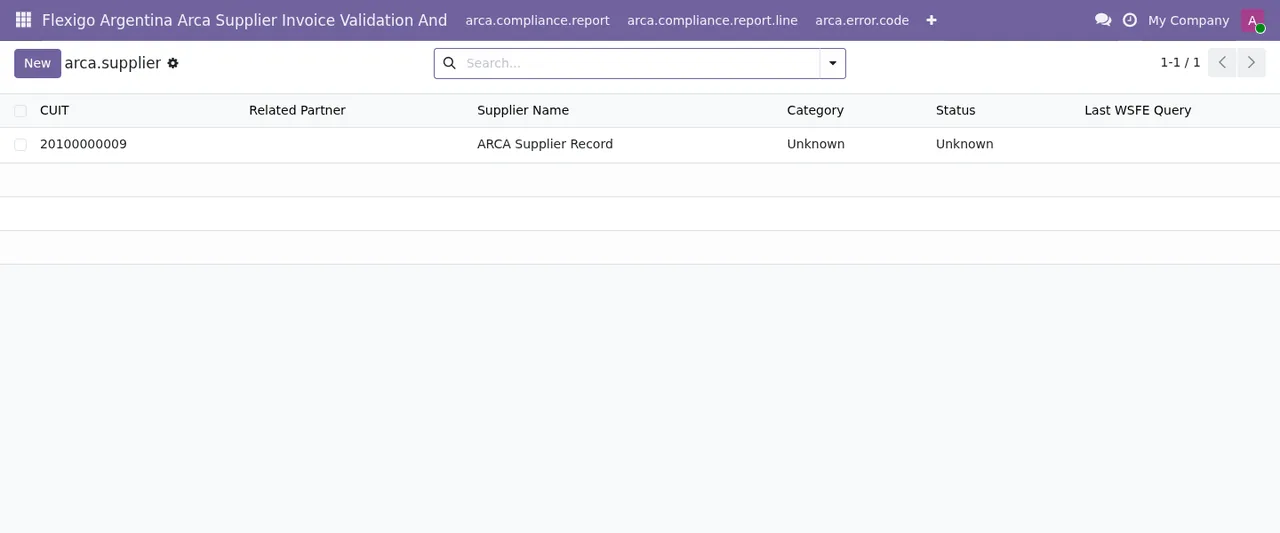
Suppliers list with one record, in Unknown state.ARCA Suppliers › Supplier Cache- Menu under
ARCA Suppliersfor the supplier cache. In the animated walkthrough below, the list of thearca.supplier.cachemodel shows one record: the supplier and its CUIT, hit and miss counters (at zero on that screen) and the cache creation date.
ARCA Suppliers › Exclusion List- Menu under
ARCA Suppliersholding the exclusion list. The listing has a section called «APOC exclusion list», and one of the scheduled actions syncs the supplier exclusion list (APOC base).
Batch Import (RFE)- Menu under the root menu
ARCA Suppliers. The listing includes a section titled «Batch import of suppliers».
Glossary: perceptions, withholdings and bills
ARCA Suppliers › Perception Matrix- The perception matrix, built on the
arca.perception.matrixmodel. Its list has columns for code, description, perception percentage, province code and transaction type.
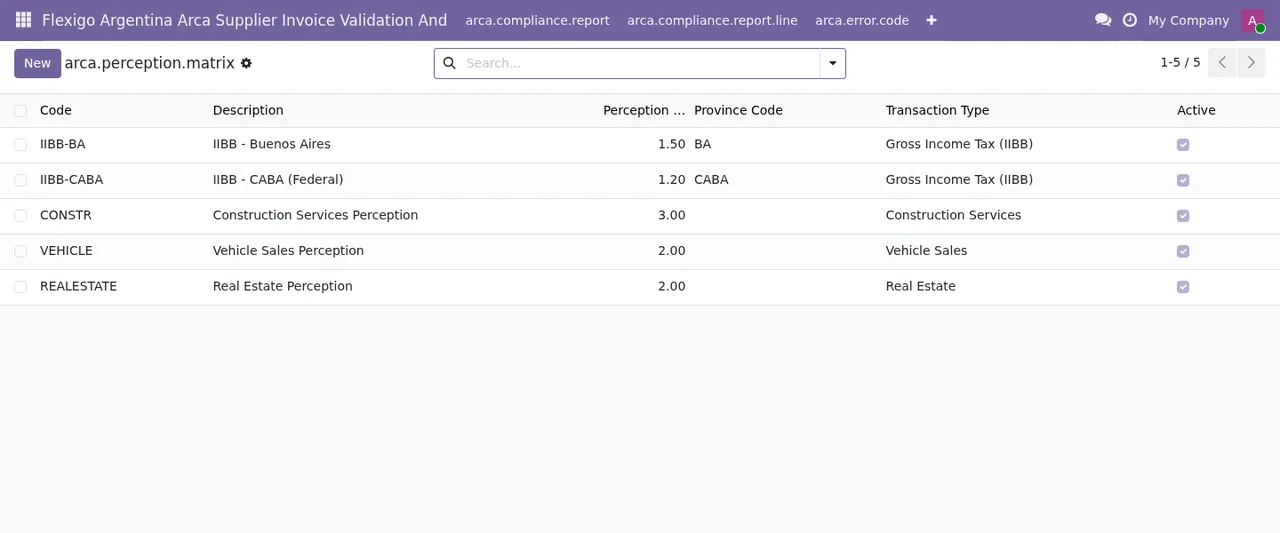
Perception Matrix with five active records, the New button and the search bar.ARCA Suppliers › Withholding Matrix- Menu under
ARCA Supplierswith the withholding matrix. In the listing, withholdings and perceptions are covered in the «Withholding and perception estimates» section.
ARCA Suppliers › Invoice Queue- Menu under
ARCA Supplierswith the invoice queue. In the listing, the «Retries when ARCA is down» section covers retries when ARCA does not respond.
The menu is completed by Result Codes, Audit Log, Overrides and Configuration. Which settings to fill in under Configuration is covered in the set-up article.
Glossary: the scheduled actions
ARCA: sync supplier exclusion list (APOC base)- Active action that runs every month and syncs the supplier exclusion list from the APOC base.
ARCA: retry vendor bills ARCA could not validate- Active action that runs every 5 minutes and retries the vendor bills ARCA could not validate.
ARCA: delete personal data archives whose download link expired- Active action that runs every hour and deletes personal data archives whose download link has expired. Alongside it are the
Data Requestsmenu and the listing's «Personal data requests» section.
All three actions are listed as active. If one is not running, check in Odoo that it is still active before looking for the fault elsewhere.
Glossary: error codes and reports
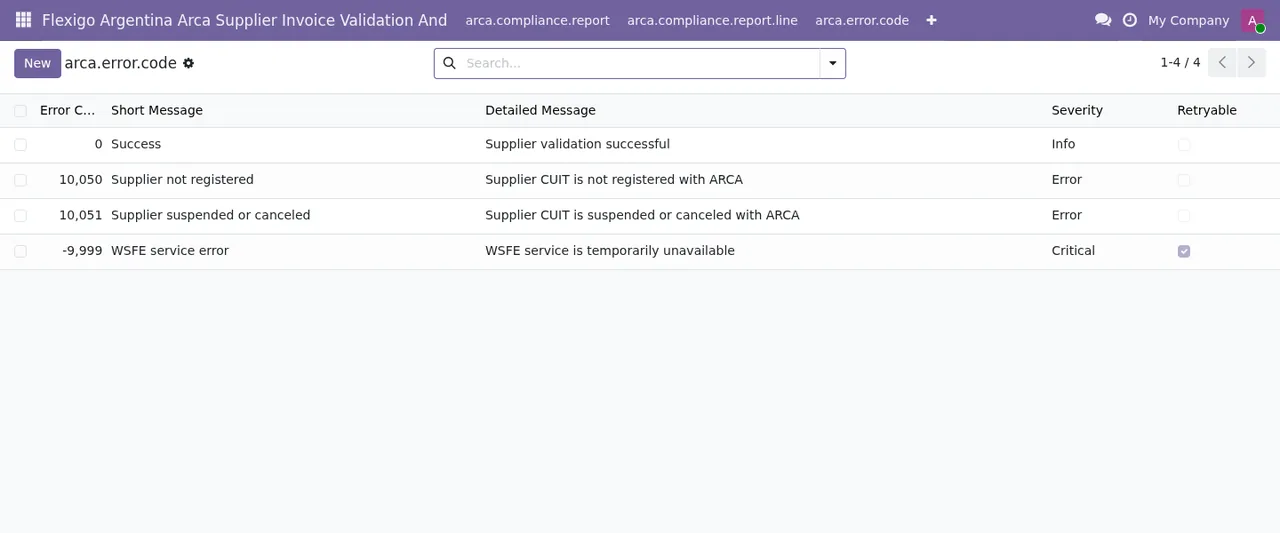
arca.error.code- The «ARCA Error Code Mapping» model. Its list shows error code, short message, detailed message, severity and whether the error is retryable. What each message means and what to do about it is in the errors and warnings article.
arca.compliance.report- The «ARCA Monthly Compliance Report» model. Its lines are stored in
arca.compliance.report.line, «ARCA Compliance Report Line».
Perception Matrix and Suppliers.What happens to each kind of record
Putting the menus and actions together, the journey reads like this. A supplier sits in Suppliers with its state, and in the cache view with its hit and miss counters. The APOC exclusion list is synced once a month. A vendor bill ARCA could not validate is picked up by the retry action every 5 minutes. A personal data archive whose download link has expired is deleted by the hourly action. Error codes have their own table with severity and a retryable flag.
The part that relies on the external service
The listing flags it in its own section: «Before you buy: some features of this app use a paid external service». This module uses FlexigoTech Cloud's local service. The module costs €9 excluding VAT, a one-off payment per version, on Odoo Apps for Odoo 17, 18, 19 and 20, and the service costs €29/month or €290/year excluding VAT (Pro: €58/month or €580/year). Without a subscription, or with the service suspended, whatever the subscription provides stops and your data stay in your Odoo. With the subscription, the module for new Odoo versions is included if you bought it on flexigotech.com; on the Odoo App Store, each version is bought there. If you are unsure whether it fits, read what it covers and what it does not.
How FlexigoTech can help
FlexigoTech implements Odoo 17, 18, 19 and 20 and builds bespoke connectors and integrations. If you want help getting this module running or adapting it to your purchasing flow, the details are on the module page.
Keep reading
Checked in the module's source code (version 20.0) and the linked sources
Sources
- Module source code: flexigo_argentina_arca_supplier_invoice_validation_and 20.0 (8e403746): views/menus_gen.xml
- Module source code: flexigo_argentina_arca_supplier_invoice_validation_and 20.0 (8e403746): wizards/arca_batch_import_wizard_views.xml
- Module source code: flexigo_argentina_arca_supplier_invoice_validation_and 20.0 (8e403746): data/ir_cron.xml
- Module source code: flexigo_argentina_arca_supplier_invoice_validation_and 20.0 (8e403746): static/description/index.html
- Module source code: flexigo_argentina_arca_supplier_invoice_validation_and 20.0 (8e403746): models/arca_compliance_report.py
- Module source code: flexigo_argentina_arca_supplier_invoice_validation_and 20.0 (8e403746): models/arca_error_code.py
- apps.odoo.com/apps/modules/20.0/flexigo_argentina_arca_supplier_invoice_validation_and
- apps.odoo.com/apps/modules/17.0/flexigo_argentina_arca_supplier_invoice_validation_and
- apps.odoo.com/apps/modules/18.0/flexigo_argentina_arca_supplier_invoice_validation_and
- apps.odoo.com/apps/modules/19.0/flexigo_argentina_arca_supplier_invoice_validation_and
- flexigotech.com/en/services.html
- flexigotech.com/precios.html