

 Español
 Català
 Deutsch
 Français
 Português
 Italiano
 Nederlands
 Polski
What GoCardless says
| Event | Cause | GoCardless text |
|---|---|---|
| mandates · expired | mandate_expired | The mandate is being marked as expired, because no payments have been collected against it for the dormancy period of your service user number. If you have access to the mandate reinstation API endpoint, you can use this to attempt to set this mandate up again. |
| payments · cancelled | mandate_expired | The mandate expired before the payment could be collected. |
The event description makes it clear: “No collection attempts were made against the mandate within the dormancy period of your service user number.”. And the consequence: “As a result it has expired, and no further collections can be taken against it.”. The mandate status changes to expired, which GoCardless defines as expired due to dormancy.
When it happens
It happens to a mandate that was signed and then stopped being used: a customer who no longer buys, or one charged so infrequently that the whole dormancy period passes between one collection and the next. What counts is the time without collection attempts, not the signing date.
If a collection was waiting to be submitted when the mandate expired, GoCardless cancels it with the same cause: “The mandate expired before the payment could be collected.”.
What Odoo does with the connector
- The expired mandate event retires it. The connector treats an
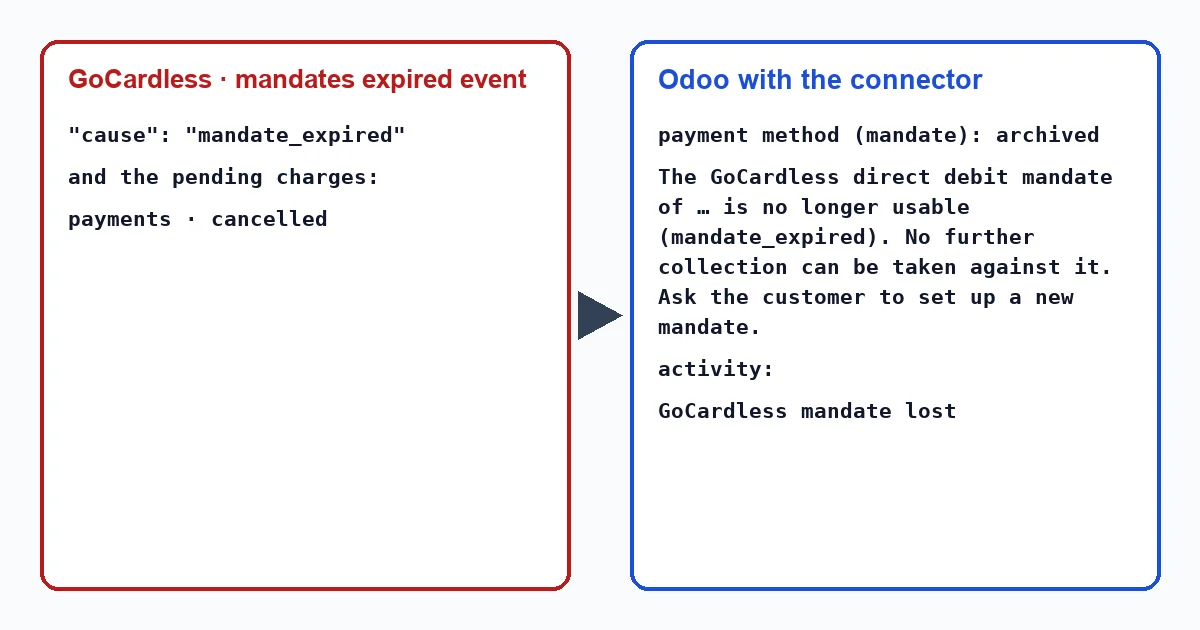
expiredmandate as dead: it archives the customer's payment method, writes in its record that the mandate can no longer be used and creates the activity “GoCardless mandate lost”. It only does this the first time; if another event brings the same news, it finds it already archived. - The cancelled payment sets its transaction to “Error”, which you can open from the invoice with the “Payment Transaction” button above, with “GoCardless could not collect this payment (mandate_expired).”. If the invoice was already paid with that collection, it reverses the payment and the invoice becomes outstanding again. And since
mandate_expiredis one of the causes for which the connector archives the mandate, that event also retires it, asexpired. - In the payment method record, “Mandate Status” shows
expired.
The connector writes these texts when it applies the event, with nobody in front of the screen. The connector writes these texts in English, so in an English-language Odoo they appear exactly as quoted here, whether a user or a scheduled action triggers them: “The GoCardless direct debit mandate of … is no longer usable (mandate_expired). No further collection can be taken against it. Ask the customer to set up a new mandate.”, “GoCardless mandate lost” and “GoCardless could not collect this payment (mandate_expired).”.
If Odoo tries to collect with the mandate before it learns of the expiry, because the event was lost along the way, GoCardless replies mandate_is_inactive. The connector then fetches the mandate, archives it and puts its own message in the transaction: “The customer's GoCardless mandate is expired, so it cannot be charged. Ask the customer for a new mandate.”. The task that recovers lost events every hour also ends up bringing in the mandate event.
Reinstate it or ask for another?
GoCardless offers two paths. To keep collecting from that customer, it says, you should request their permission and use the reinstatement. But that endpoint is restricted: it requires custom payment pages approved by GoCardless (“Restricted this endpoint requires approved custom payment pages”).
The connector does not reinstate mandates in production: the “Reinstate mandate (sandbox)” button on the payment method record only appears with the provider in test mode and the mandate cancelled, failed or expired. In production, the way forward is a new mandate.
What to do
- Talk to the customer: if they are still a customer, ask them to sign a new mandate. In Odoo it will be a new payment method.
- Collect the outstanding invoices with them. Collections that GoCardless cancelled because of the expiry will not be submitted on their own.
- If a customer is charged very infrequently, expect that their mandate may expire between one collection and the next.
Can I collect with an expired mandate if the customer agrees?
Not with that mandate: GoCardless does not let you create collections with it. You need a new one or, where it can be used, GoCardless reinstatement.
Can reinstatement be tested?
Yes, in the GoCardless sandbox. With the provider in test mode, the payment method record shows “Reinstate mandate (sandbox)” when the mandate is expired.
With our connector
In Odoo 17, 18, 19 and 20 the connector retires the expired mandate as soon as GoCardless reports it, leaves the collection cancelled in error with its cause, and flags it on the customer's record, so you can ask for a new mandate before the next invoice.
Keep reading
Checked in the connector's source code (version 17.0, 18.0, 19.0 and 20.0) and the linked sources
Sources
- docs.gocardless.com/docs/api-reference/events/mandate
- docs.gocardless.com/docs/api-reference/events/payment
- docs.gocardless.com/docs/api-reference/mandate
- Module source code: flexigo_payment_gocardless: const.py, line 33 in 17.0 (d203ee6), 18.0 (e2ab18b), 19.0 (ce7f5a3) and 20.0 (688d86b)
- Module source code: flexigo_payment_gocardless: models/payment_token.py, line 83 in 17.0 (d203ee6), line 83 in 18.0 (e2ab18b), line 83 in 19.0 (ce7f5a3) and line 82 in 20.0 (688d86b)
- Module source code: flexigo_payment_gocardless: models/payment_token.py, line 131 in 17.0 (d203ee6), line 131 in 18.0 (e2ab18b), line 131 in 19.0 (ce7f5a3) and line 130 in 20.0 (688d86b)
- Module source code: flexigo_payment_gocardless: i18n/flexigo_payment_gocardless.pot, line 1148 in 17.0 (d203ee6), line 1148 in 18.0 (e2ab18b), line 1148 in 19.0 (ce7f5a3) and line 1155 in 20.0 (688d86b)
- Module source code: flexigo_payment_gocardless: i18n/flexigo_payment_gocardless.pot, line 495 in 17.0 (d203ee6), line 495 in 18.0 (e2ab18b), line 495 in 19.0 (ce7f5a3) and line 497 in 20.0 (688d86b)
- Module source code: flexigo_payment_gocardless: const.py, line 76 in 17.0 (d203ee6), 18.0 (e2ab18b), 19.0 (ce7f5a3) and 20.0 (688d86b)
- Module source code: flexigo_payment_gocardless: models/payment_transaction.py, line 914 in 17.0 (d203ee6), line 914 in 18.0 (e2ab18b), line 913 in 19.0 (ce7f5a3) and line 937 in 20.0 (688d86b)
- Module source code: flexigo_payment_gocardless: models/payment_transaction.py, line 725 in 17.0 (d203ee6), line 725 in 18.0 (e2ab18b), line 724 in 19.0 (ce7f5a3) and line 748 in 20.0 (688d86b)
- Module source code: flexigo_payment_gocardless: models/payment_transaction.py, line 754 in 17.0 (d203ee6), line 754 in 18.0 (e2ab18b), line 753 in 19.0 (ce7f5a3) and line 777 in 20.0 (688d86b)
- Module source code: flexigo_payment_gocardless: i18n/flexigo_payment_gocardless.pot, line 436 in 17.0 (d203ee6), line 436 in 18.0 (e2ab18b), line 436 in 19.0 (ce7f5a3) and line 438 in 20.0 (688d86b)
- Module source code: flexigo_payment_gocardless: models/payment_transaction.py, line 278 in 17.0 (d203ee6), line 278 in 18.0 (e2ab18b), line 278 in 19.0 (ce7f5a3) and line 289 in 20.0 (688d86b)
- Module source code: flexigo_payment_gocardless: models/payment_transaction.py, line 321 in 17.0 (d203ee6), line 321 in 18.0 (e2ab18b), line 321 in 19.0 (ce7f5a3) and line 332 in 20.0 (688d86b)
- docs.gocardless.com/docs/api-reference/responses-and-errors
- Module source code: flexigo_payment_gocardless: i18n/flexigo_payment_gocardless.pot, line 1233 in 17.0 (d203ee6), line 1233 in 18.0 (e2ab18b), line 1233 in 19.0 (ce7f5a3) and line 1240 in 20.0 (688d86b)
- Module source code: flexigo_payment_gocardless: views/payment_token_views.xml, line 15 in 17.0 (d203ee6), 18.0 (e2ab18b), 19.0 (ce7f5a3) and 20.0 (688d86b)
- Module source code: flexigo_payment_gocardless: i18n/flexigo_payment_gocardless.pot, line 785 in 17.0 (d203ee6), line 785 in 18.0 (e2ab18b), line 785 in 19.0 (ce7f5a3) and line 800 in 20.0 (688d86b)
- Module source code: flexigo_payment_gocardless: views/payment_token_views.xml, line 23 in 17.0 (d203ee6), 18.0 (e2ab18b), 19.0 (ce7f5a3) and 20.0 (688d86b)
- Module source code: flexigo_payment_gocardless: i18n/flexigo_payment_gocardless.pot, line 998 in 17.0 (d203ee6), line 998 in 18.0 (e2ab18b), line 998 in 19.0 (ce7f5a3) and line 1013 in 20.0 (688d86b)
- Module source code: flexigo_payment_gocardless: models/payment_token.py, line 162 in 17.0 (d203ee6), line 162 in 18.0 (e2ab18b), line 162 in 19.0 (ce7f5a3) and line 161 in 20.0 (688d86b)
- Module source code: flexigo_payment_gocardless: const.py, line 117 in 17.0 (d203ee6), 18.0 (e2ab18b), 19.0 (ce7f5a3) and 20.0 (688d86b)
- github.com/odoo/odoo/blob/17.0/odoo/http.py
- github.com/odoo/odoo/blob/20.0/addons/payment/i18n/payment.pot
- github.com/odoo/odoo/blob/20.0/addons/account_payment/views/account_move_views.xml
- Module source code: flexigo_payment_gocardless: __manifest__.py, line 31 in 17.0 (d203ee6), 18.0 (e2ab18b), 19.0 (ce7f5a3) and 20.0 (688d86b)