

 Español
 Català
 Deutsch
 Français
 Português
 Italiano
 Nederlands
 Polski
What the listing does not tell you about the module's messages
Where you see %s or %.2f, the screen shows the specific value for your case: a fund name, a number of characters or a total. If you would rather get your bearings in the menus and the journey of each record first, see how the module works under the bonnet.
Audit and overrides: what is logged stays as it is
Four messages say the same thing in different words:
Audit events are immutable and cannot be modified.Audit events are immutable and cannot be deleted.Override log entries are immutable.Override log entries cannot be deleted.
They appear when you try to edit or delete an audit event or an override log entry. This is not a fault: the module does not allow those records to be changed or removed. Bear it in mind before you carry out an override (see below): whatever ends up in that log stays there as written.
Each sensitive action names a role
Several messages are not about data but about who may perform the action:
Only a Payday Super Manager may resolve a dispute.Only a Payday Super Manager may override an SGC calculation.Only a payroll manager can approve an extended timeframe.Only a payroll manager can override a member verification.Only a payroll manager can perform an override.Only a compliance admin can export unmasked employee data.
Check which role each one names, because it is not the same throughout: Payday Super Manager, payroll manager or compliance admin. The fix is to ask someone with that role to carry out the action. The last message has a practical consequence: without the compliance admin role, employee data is not exported unmasked.
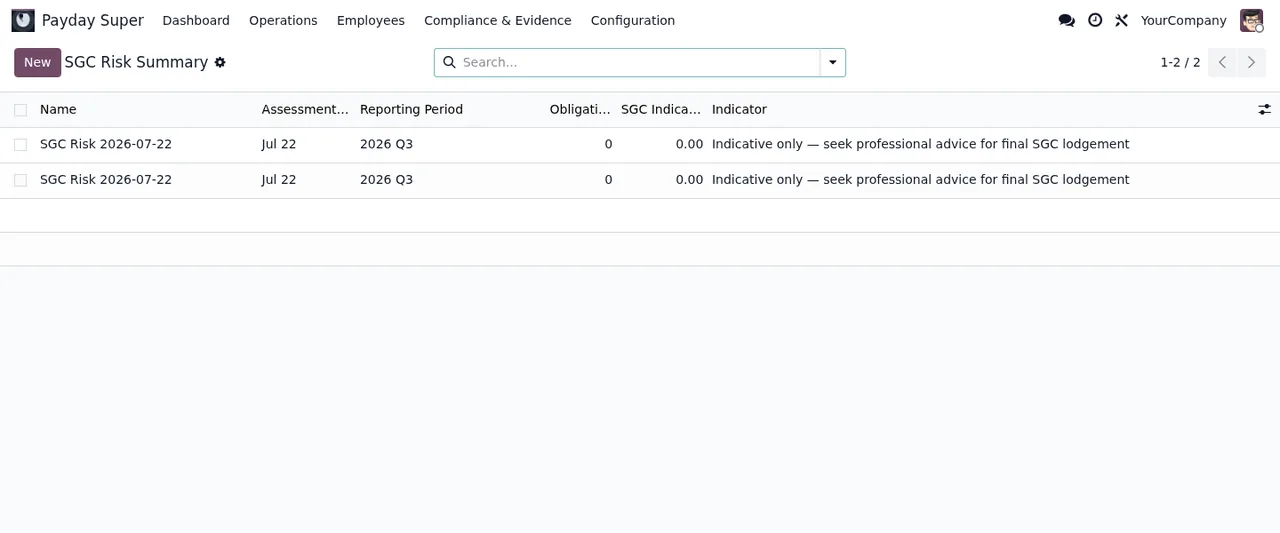
SGC Risk Summary list under Payday Super › Compliance & Evidence, with two identical records, no obligations and the Indicative only noticeAn empty or too-short reason will not go through
The module asks for text on several actions and, on some, a minimum number of characters:
Resolution notes are required.An override reason is required.An override reason of at least %s characters is required.An extended timeframe needs a justification of at least %s characters.
The first two appear if you leave the field empty; the last two if what you wrote falls short of the minimum. The figure shown in place of %s is that minimum, so lengthen the text until you reach it. As override log entries cannot be changed afterwards, write the reason with the person who will read it later in mind.
Extending a timeframe: justification, role and an authorising rule pack
To approve an extended timeframe the module sets three conditions, each with its own message. You have already seen the justification with a minimum length above. Approval belongs to a payroll manager (Only a payroll manager can approve an extended timeframe.). And you need a rule pack that authorises it: An authorising rule pack is required to approve this extension.
There is another deadline-related message worth knowing: Enter the date of the Commissioner's determination (SGAA 1992 s.18C(4)): the deadlines are computed from it. According to the message itself, the module computes the deadlines from that date, so it cannot carry on without it. Enter it and try again.
Rule packs: overlaps, missing data and draft sources
Rule packs have their own checks when you save or activate them:
Rule packs of type %s have overlapping effective date ranges.Two rule packs of the same type have effective periods that overlap. Review the dates of that type until they no longer clash.Cannot activate rule pack %sfollowed bymissing: %s. Aftermissing:the message lists what is absent; fill it in and activate again.Rule pack %s uses a DRAFT source. Confirm the draft-source marker before activation.The rule pack relies on a source marked as draft. The message asks you to confirm that marker before activating it.
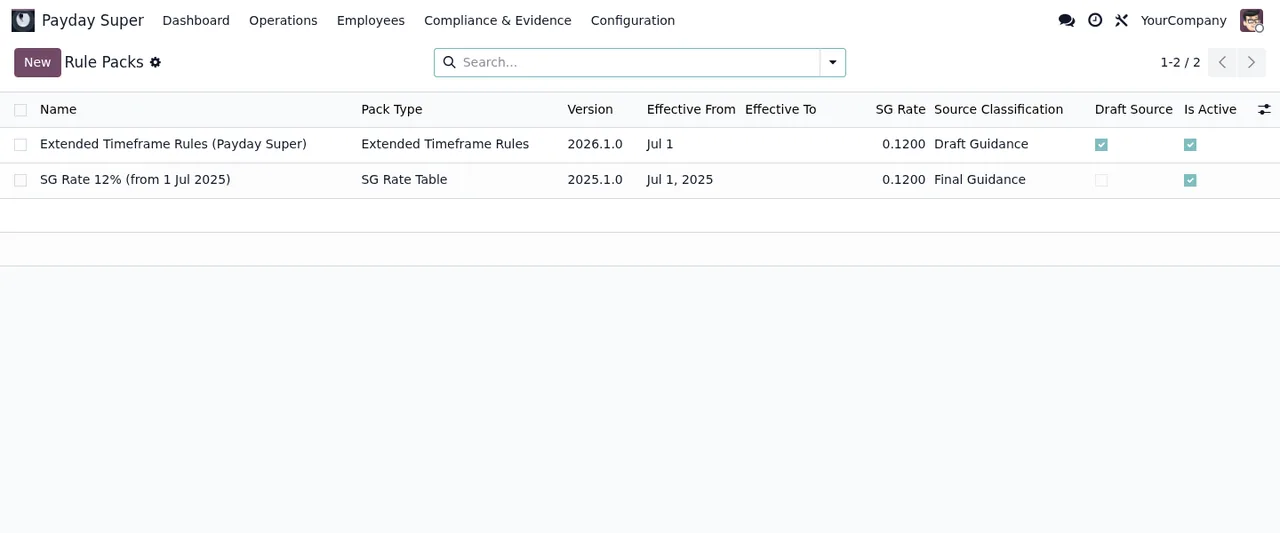
Payday Super › Compliance & Evidence › Rule Packs: an extended timeframe rule pack in draft and an SG rate tableFunds and splits: closed USI and percentages that do not reach 100
Two validations affect each employee's funds:
Fund %s has a closed USI and cannot be selected without a documented exception.The chosen fund has a closed USI. Either pick another fund or record the documented exception the message refers to.Active percentage splits for %s must sum to 100%% (currently %.2f%%).That employee's active splits do not add up to the total. The brackets show the current sum; adjust the active percentages until they reach 100.
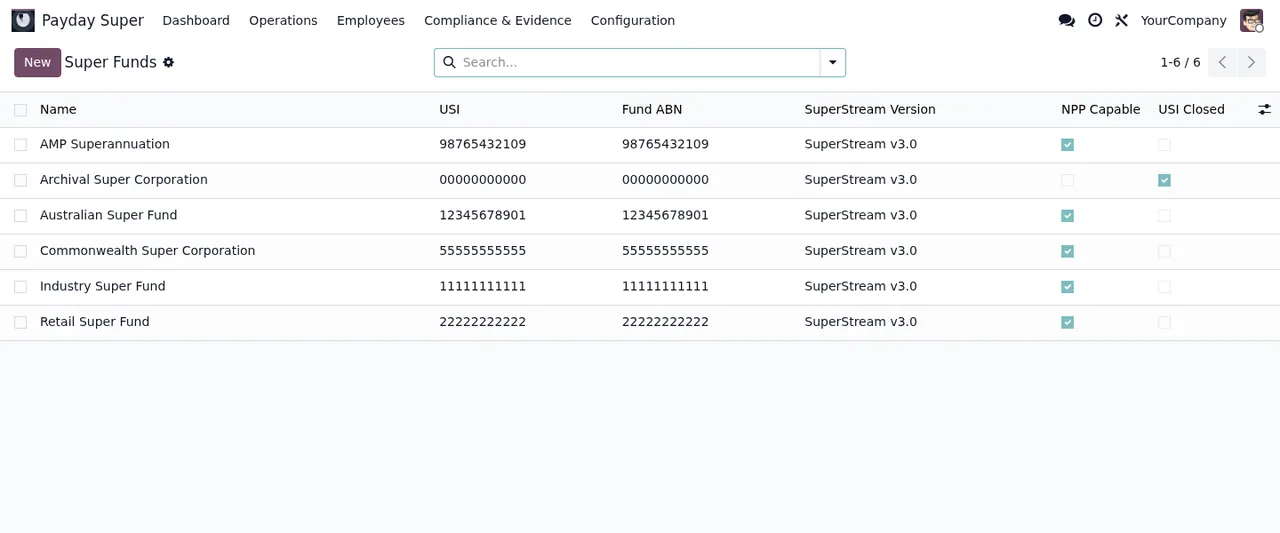
Payday Super › Super Funds, the USI Closed column lets you see which funds have a closed USI before you assign themGenerating obligations, importing and handing off to the ATO
The last group appears at the end of the process:
Some salary rule classifications are still "review required". Resolve them before generating Payday Super obligations.Some salary rule classifications are still awaiting review. Resolve them and generate again.No obligations found for the selected criteria.The criteria you chose return no obligations; review your selection.Could not decode the CSV file: %sThe module could not read the CSV. The detail follows the colon; correct the file using that clue and upload it again.The record to override (%s, %s) does not exist.The record you want to override does not exist. Check that you are pointing at the right one.This handoff cannot be marked as reported to the ATO without a certified STP connector. It can only be prepared for certified STP software.The module does not mark a handoff as reported to the ATO without the STP connector the message names; what it does is prepare it for that kind of software.
How FlexigoTech can help
FlexigoTech implements Odoo 17, 18, 19 and 20 and builds bespoke connectors and integrations, so we can review roles, rule packs and funds with you before these messages hold you up. If you are just starting, the set-up guide walks through the settings and fields for the first week. The module costs €9 per Odoo version (17, 18, 19 and 20) on Odoo Apps, a one-off payment excluding VAT, and the FlexigoTech Cloud local service is separate: €29/month or €290/year excluding VAT (Pro: €58/month or €580/year). Full details are on the module page.
Keep reading
Checked in the module's source code (version 20.0) and the linked sources
Sources
- Module source code: flexigo_australia_payday_super_superstream_3_0_payroll_ 20.0 (dc0cce8c): models/payday_super_audit_event.py
- Module source code: flexigo_australia_payday_super_superstream_3_0_payroll_ 20.0 (dc0cce8c): models/payday_super_dispute.py
- Module source code: flexigo_australia_payday_super_superstream_3_0_payroll_ 20.0 (dc0cce8c): models/payday_super_employee_fund.py
- Module source code: flexigo_australia_payday_super_superstream_3_0_payroll_ 20.0 (dc0cce8c): models/payday_super_extended_timeframe.py
- Module source code: flexigo_australia_payday_super_superstream_3_0_payroll_ 20.0 (dc0cce8c): models/payday_super_member_verification.py
- Module source code: flexigo_australia_payday_super_superstream_3_0_payroll_ 20.0 (dc0cce8c): models/payday_super_override_log.py
- Module source code: flexigo_australia_payday_super_superstream_3_0_payroll_ 20.0 (dc0cce8c): models/payday_super_rule_pack.py
- Module source code: flexigo_australia_payday_super_superstream_3_0_payroll_ 20.0 (dc0cce8c): models/payday_super_sgc_calculation.py
- Module source code: flexigo_australia_payday_super_superstream_3_0_payroll_ 20.0 (dc0cce8c): models/payday_super_stp_handoff.py
- Module source code: flexigo_australia_payday_super_superstream_3_0_payroll_ 20.0 (dc0cce8c): wizard/payday_super_batch_create_wizard.py
- Module source code: flexigo_australia_payday_super_superstream_3_0_payroll_ 20.0 (dc0cce8c): wizard/payday_super_calculate_wizard.py
- Module source code: flexigo_australia_payday_super_superstream_3_0_payroll_ 20.0 (dc0cce8c): wizard/payday_super_employee_data_export_wizard.py
- Module source code: flexigo_australia_payday_super_superstream_3_0_payroll_ 20.0 (dc0cce8c): wizard/payday_super_holiday_import_wizard.py
- Module source code: flexigo_australia_payday_super_superstream_3_0_payroll_ 20.0 (dc0cce8c): wizard/payday_super_override_wizard.py
- apps.odoo.com/apps/modules/20.0/flexigo_australia_payday_super_superstream_3_0_payroll_
- apps.odoo.com/apps/modules/17.0/flexigo_australia_payday_super_superstream_3_0_payroll_
- apps.odoo.com/apps/modules/18.0/flexigo_australia_payday_super_superstream_3_0_payroll_
- apps.odoo.com/apps/modules/19.0/flexigo_australia_payday_super_superstream_3_0_payroll_
- flexigotech.com/en/services.html
- flexigotech.com/precios.html
- Module source code: flexigo_australia_payday_super_superstream_3_0_payroll_ 20.0 (dc0cce8c): __manifest__.py