

 Español
 Català
 Deutsch
 Français
 Português
 Italiano
 Nederlands
 Polski
The Payday Super menus in your Odoo
If you already run Odoo or are rolling it out, the first thing you need is to know where each screen lives and what it is called. The paths are written exactly as they appear in the module's menu, with the › sign between levels, so you can look them up as they are.
What is inside Payday Super › Dashboard?
From Payday Super › Dashboard you reach four entries:
Payday Super › Dashboard › Readiness ChecksPayday Super › Dashboard › SGC Risk SummaryPayday Super › Dashboard › Compliance ReportsPayday Super › Dashboard › Deadline Compliance
In the code, the module also defines a model payday.super.dashboard named Payday Super Dashboard. If a consultant asks you for the dashboard's technical name, that is it.
Which screens are in Payday Super › Operations?
Under Payday Super › Operations you will find these entries:
Payday Super › Operations › ObligationsPayday Super › Operations › Calculate ObligationPayday Super › Operations › Contribution BatchesPayday Super › Operations › Create BatchPayday Super › Operations › Exception QueuePayday Super › Operations › ReconciliationPayday Super › Operations › Reconcile BatchPayday Super › Operations › Member Verification
Notice that several entries have paired names, one like a list and one with a verb: Obligations and Calculate Obligation, Contribution Batches and Create Batch, Reconciliation and Reconcile Batch. The settings and fields to fill in before you use them are in the module set-up guide.
The scheduled tasks running in the background
Which scheduled tasks does the module bring and how often do they run?
There are five, and all of them come active:
Payday Super: Deadline Risk Check: every day.Payday Super: SGC Risk Assessment: every day.Payday Super: FVS Freshness Check: every week.Payday Super: Audit Retention Anonymise: every month.Payday Super: Employee Notification Dispatch: every 6 hours.
The most frequent is Payday Super: Employee Notification Dispatch; the least frequent, Payday Super: Audit Retention Anonymise. When you review the scheduled tasks in your Odoo, search for the Payday Super: prefix, which all five share.
What is the FlexigoTech Cloud rules engine?
The module defines the model payday.fgt.motor, named FlexigoTech Cloud Payday Super rules engine. Its label identifies it as the rules engine of FlexigoTech Cloud, the paid external service the app uses. The Odoo Apps listing, headed Payday Super and SuperStream 3.0 in Odoo, flags the paid service in its Before you buy: this app uses a paid external service section, and also has How it works and Privacy policy sections.
Which records it keeps and what its lists show
Which kinds of record does the module define?
These models appear in the code, each with its technical name and label:
payday.super.batch:Payday Super Contribution Batch.payday.super.batch.line:Payday Super Batch Line.payday.super.employee.fund:Payday Super Employee Fund.payday.super.employee.notification:Payday Super Employee Notification.payday.super.dispute:Payday Super Dispute.payday.super.annual.totalisation:Payday Super Annual Totalisation.payday.super.audit.event:Payday Super Audit Event.payday.super.compliance.report:Payday Super Compliance Report.payday.super.compliance.evidence:Payday Super First-Year Compliance Evidence.payday.super.conformance.evidence:Payday Super SuperStream v3.0 Conformance Evidence.payday.super.error.map:Payday Super Error Code Mapping.
Keep these names to hand when you brief whoever builds something bespoke for you, and note that there are two evidence models with similar names: the first-year one (compliance.evidence) and the SuperStream conformance one (conformance.evidence).
What does each employee's fund list show, and what status does it carry?
The Employee Funds list, under Payday Super › Employee Funds, shows for each row the retirement fund, the USI, the masked member number, the fund source and the status, with the values Approved or Pending Approval.
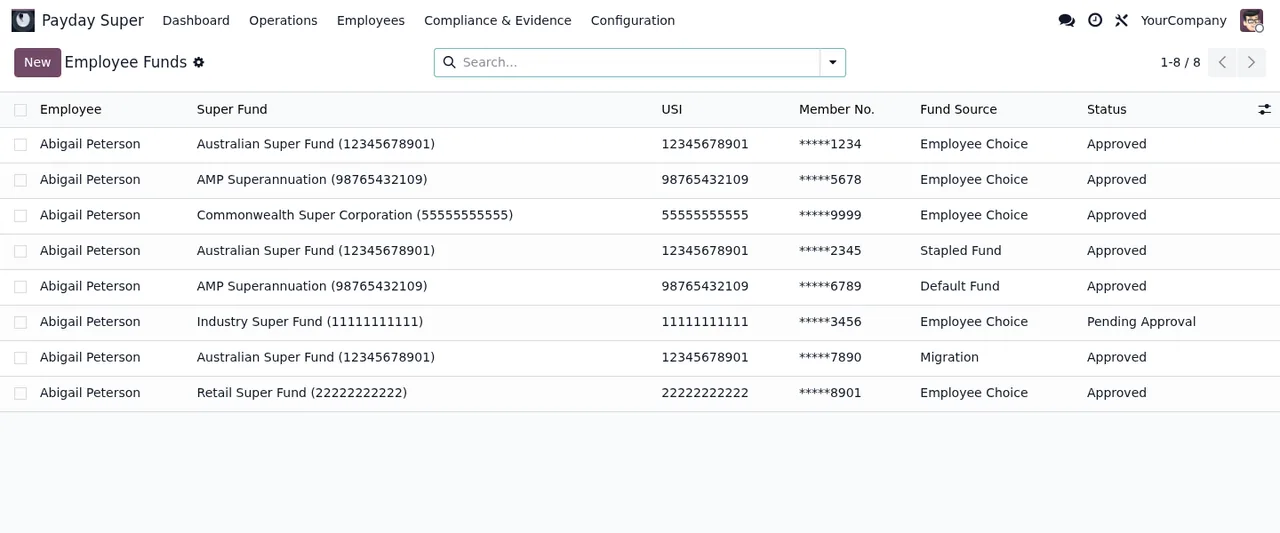
Employee Funds list: every row belongs to Abigail Peterson, with status Approved or Pending Approval.The Super Funds list, under Payday Super › Super Funds, has the columns Name, USI, Fund ABN, SuperStream Version, NPP Capable and USI Closed.
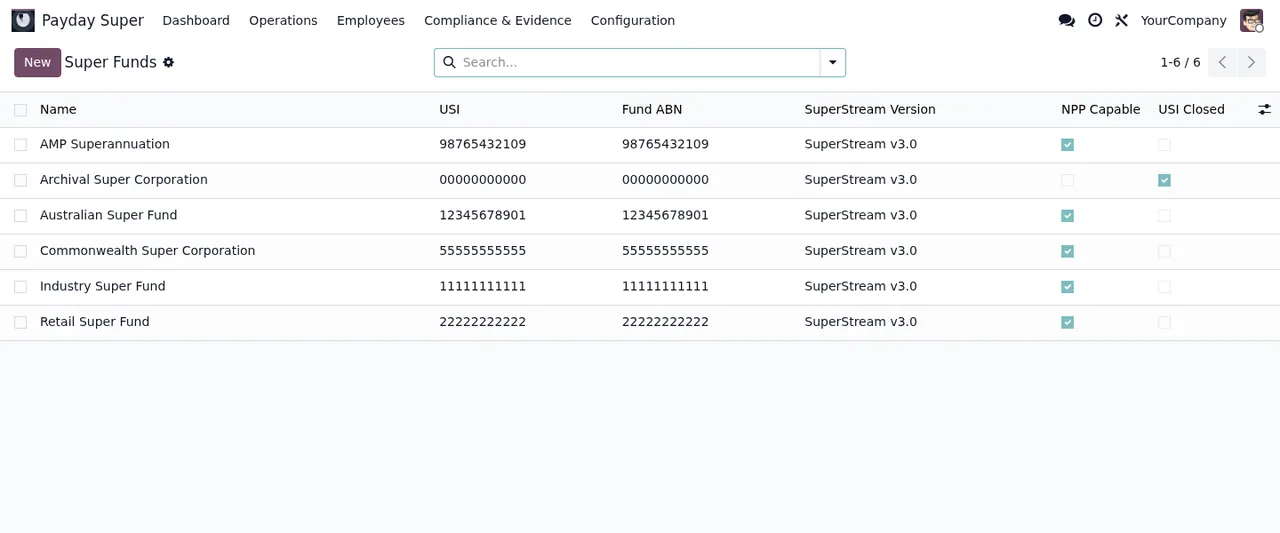
Super Funds list, with the search bar and the New button.What is in the Error Map list?
It sits under Payday Super › Error Map, and in the code the module defines the model payday.super.error.map labelled Payday Super Error Code Mapping. The screenshot shows SUPER.GEN codes from the generic provider, with Major or Critical severity and the permanence column unticked. What each warning means and what to do about it is covered in the module's error messages.
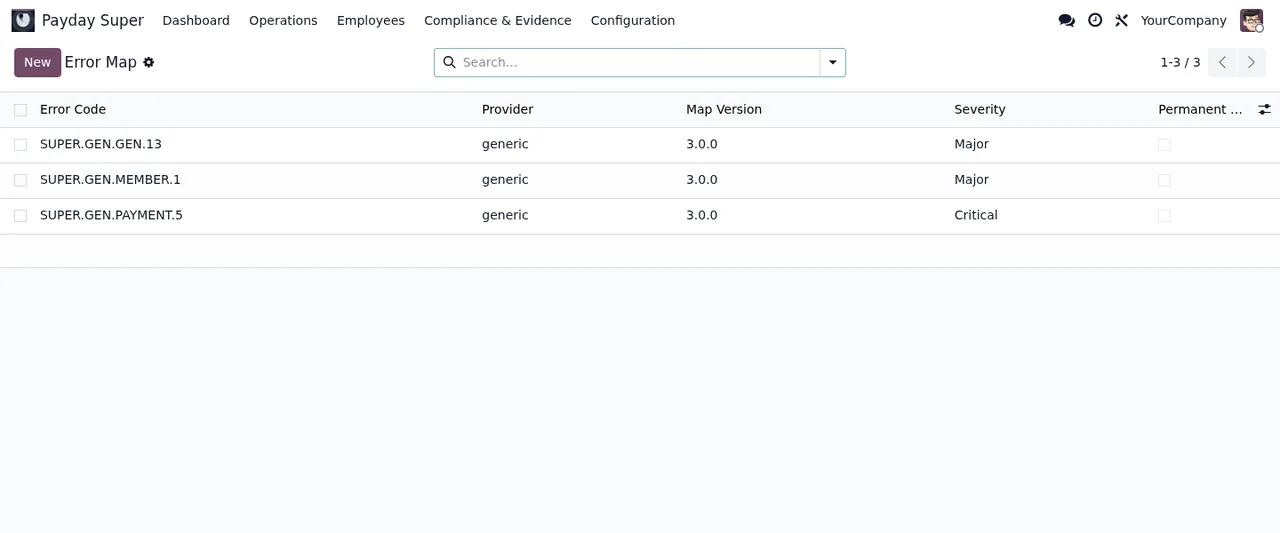
Error Map list with SUPER.GEN codes from the generic provider and Major or Critical severity.
Employee Funds, Error Map and Super Funds lists and, last, Rule Packs, with extended deadline rules in draft and an SG rate table.Which Odoo versions is it on and what does it cost?
It is published on Odoo Apps for 17.0, 18.0, 19.0 and 20.0, at €9 per Odoo version, one-off and excluding VAT, on all four. On top of that, the manifest says it uses a paid external service, the FlexigoTech Cloud subscription (from €29/month excluding VAT): the local service plan costs €29/month or €290/year excluding VAT (Pro: €58/month or €580/year). Without a subscription, or with the service suspended, whatever the subscription provides stops and your data stays in your Odoo; with it, the module for new Odoo versions is included if you bought it on flexigotech.com, whereas on the Odoo App Store each version is bought there.
How FlexigoTech can help
FlexigoTech implements Odoo 17, 18, 19 and 20 and builds bespoke connectors and integrations. If you want someone to go through the Payday Super › Operations menus and the scheduled tasks with you before working with real data, or you need to connect the module to another system, the details are on the module page at flexigotech.com.
Keep reading
Checked in the module's source code (version 20.0) and the linked sources
Sources
- Module source code: flexigo_australia_payday_super_superstream_3_0_payroll_ 20.0 (dc0cce8c): views/payday_super_menus.xml
- Module source code: flexigo_australia_payday_super_superstream_3_0_payroll_ 20.0 (dc0cce8c): data/payday_super_cron_data.xml
- Module source code: flexigo_australia_payday_super_superstream_3_0_payroll_ 20.0 (dc0cce8c): models/fgt_motor.py
- Module source code: flexigo_australia_payday_super_superstream_3_0_payroll_ 20.0 (dc0cce8c): models/payday_super_annual_totalisation.py
- Module source code: flexigo_australia_payday_super_superstream_3_0_payroll_ 20.0 (dc0cce8c): models/payday_super_audit_event.py
- Module source code: flexigo_australia_payday_super_superstream_3_0_payroll_ 20.0 (dc0cce8c): models/payday_super_batch.py
- Module source code: flexigo_australia_payday_super_superstream_3_0_payroll_ 20.0 (dc0cce8c): models/payday_super_batch_line.py
- Module source code: flexigo_australia_payday_super_superstream_3_0_payroll_ 20.0 (dc0cce8c): models/payday_super_compliance_evidence.py
- Module source code: flexigo_australia_payday_super_superstream_3_0_payroll_ 20.0 (dc0cce8c): models/payday_super_compliance_report.py
- Module source code: flexigo_australia_payday_super_superstream_3_0_payroll_ 20.0 (dc0cce8c): models/payday_super_conformance_evidence.py
- Module source code: flexigo_australia_payday_super_superstream_3_0_payroll_ 20.0 (dc0cce8c): models/payday_super_dashboard.py
- Module source code: flexigo_australia_payday_super_superstream_3_0_payroll_ 20.0 (dc0cce8c): models/payday_super_dispute.py
- Module source code: flexigo_australia_payday_super_superstream_3_0_payroll_ 20.0 (dc0cce8c): models/payday_super_employee_fund.py
- Module source code: flexigo_australia_payday_super_superstream_3_0_payroll_ 20.0 (dc0cce8c): models/payday_super_employee_notification.py
- Module source code: flexigo_australia_payday_super_superstream_3_0_payroll_ 20.0 (dc0cce8c): models/payday_super_error_map.py
- Module source code: flexigo_australia_payday_super_superstream_3_0_payroll_ 20.0 (dc0cce8c): static/description/index.html
- apps.odoo.com/apps/modules/20.0/flexigo_australia_payday_super_superstream_3_0_payroll_
- apps.odoo.com/apps/modules/17.0/flexigo_australia_payday_super_superstream_3_0_payroll_
- apps.odoo.com/apps/modules/18.0/flexigo_australia_payday_super_superstream_3_0_payroll_
- apps.odoo.com/apps/modules/19.0/flexigo_australia_payday_super_superstream_3_0_payroll_
- flexigotech.com/en/services.html
- flexigotech.com/precios.html