

 Español
 Català
 Deutsch
 Français
 Português
 Italiano
 Nederlands
 Polski
Before you start: where it is and what you need
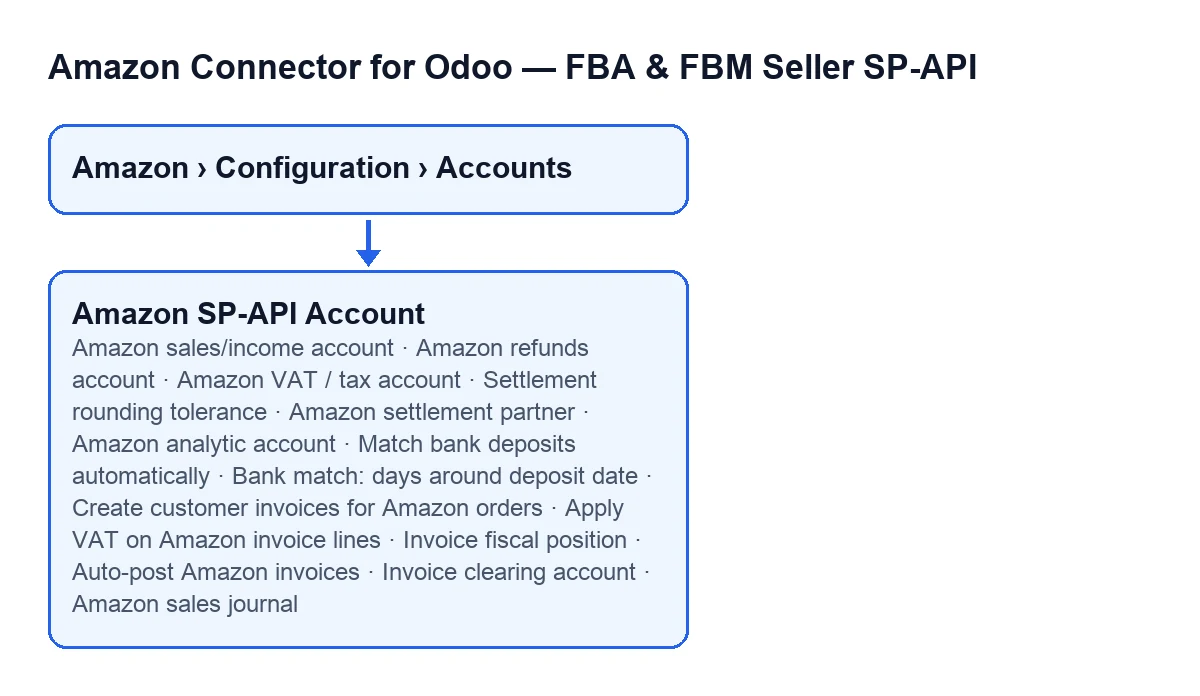
The fields are under Amazon › Configuration › Accounts, on the account form, in the Payments & Accounting tab. What follows describes the published code of Odoo 20.0; the module is published on Odoo Apps for 17.0, 18.0, 19.0 and 20.0.
- Check that your user can see the menu: the
Amazonstep needsViewer, and theConfigurationandAccountssteps needManager. If you lack one, you do not see that step.
- Confirm the subscription: the module is a one-off payment per version and needs the FlexigoTech Cloud subscription, Connector plan: €49/month or €490/year excluding VAT (Pro: €98/month or €980/year), with up to 3 accounts on the platform (Pro: 10).
- Know what the subscription provides: the connection goes through FlexigoTech Cloud, which stores the credentials encrypted, monitors synchronisation and emails you if it fails. Without a subscription, or with the service suspended, whatever the subscription provides stops; your data stays in your Odoo.

Settlements: which account each line goes to
These fields are hidden with the default values: they appear when the account has settlement posting to accounting switched on. The three account fields are optional, and whatever you leave empty goes to the clearing account.
Amazon sales/income account: the settlement'sProduct saleslines post here. Empty = the clearing account (previous behaviour).
Amazon refunds account: the settlement'sRefundslines post here. Empty = clearing.
Amazon VAT / tax account: collected tax and marketplace-facilitator tax post here (e.g. VAT payable). Empty = clearing.
- Decide with your accountant which ones to leave empty: according to the help, each empty field means those lines stay in the clearing account.
Amazon settlement partner: optional. It is set on every settlement journal line so that Amazon sales and fees appear on that partner's ledger (e.g. anAmazoncontact).
Amazon analytic account: optional. It tags the settlement P&L lines (sales, fees, tax, refunds) with that analytic account for cost and revenue analytics.
Rounding tolerance
Settlement rounding tolerance: the maximum absolute residual that is auto-absorbed as rounding when posting a settlement. The default value is0.05. It is also hidden with the default values.
- If the unbalanced amount exceeds the tolerance, the help says a line is missing or miscategorised and that posting is blocked with an error: review the lines of that settlement before changing the tolerance.
Customer invoices for orders
The first field is always visible in the tab; the others in this block are hidden with the default values and appear once you tick it.
Create customer invoices for Amazon orders: off by default. When on, each imported order also gets a customer invoice so that the settlement clearing account nets and VAT reaches a tax account. It works in Odoo Community.
Apply VAT on Amazon invoice lines: off by default, in which case taxes are stripped, as before. When on, lines get taxes mapped via the fiscal position or the product's default tax.
Invoice fiscal position: optional, used to map product taxes to the marketplace VAT. Empty = the partner's fiscal position, then the product's default tax.
Auto-post Amazon invoices: off by default, in which case invoices are left in draft for an accountant to review and post. When on, they post automatically.
Invoice clearing account: the receivable account the Amazon invoice debits. The help asks you to set it to the same clearing account the settlement credits so the two net. Empty = reuse the settlement clearing account.
Amazon sales journal: optional sales journal for Amazon invoices. Empty = the company default.
Bank matching
Match bank deposits automatically: off by default. When on, a job that runs every day links each settlement to the unreconciled bank statement line with the same amount near the deposit date, preferring lines that mention Amazon.
- Keep in mind what it does not do, whatever the label says: according to the help, it only links and adds a note, nothing is reconciled or posted automatically, and ambiguous amounts are never guessed.
Bank match: days around deposit date: it only appears once you switch on the field above. It sets how many days before and after the deposit date to look for the bank line, because transfers take a few days to land. The default value is5.
After saving
- Go over the fields you left empty and confirm you want those lines to go to the clearing account.
- If invoices stay in draft, tell whoever reviews and posts them.
- If you switched on
Match bank deposits automatically, remember that it only links and adds a note: reconciling and posting do not happen on their own.
How FlexigoTech can help
FlexigoTech implements Odoo 17, 18, 19 and 20 and builds connectors and custom integrations, so we can help you settle these accounts with your accountant. You can see the listing on Odoo Apps and the module page.
Keep reading
Checked in the connector's source code (version 20.0) and the linked sources
Sources
- Module source code: flexigobe_amazon_seller_connector 20.0 (8576afa5): models/amazon_spapi_account.py
- apps.odoo.com/apps/modules/20.0/flexigobe_amazon_seller_connector
- flexigotech.com/precios.html
- flexigotech.com/en/services.html