

 Español
 Català
 Deutsch
 Français
 Português
 Italiano
 Nederlands
 Polski
Where the fields are and what you need
Where do I open the form with these fields?
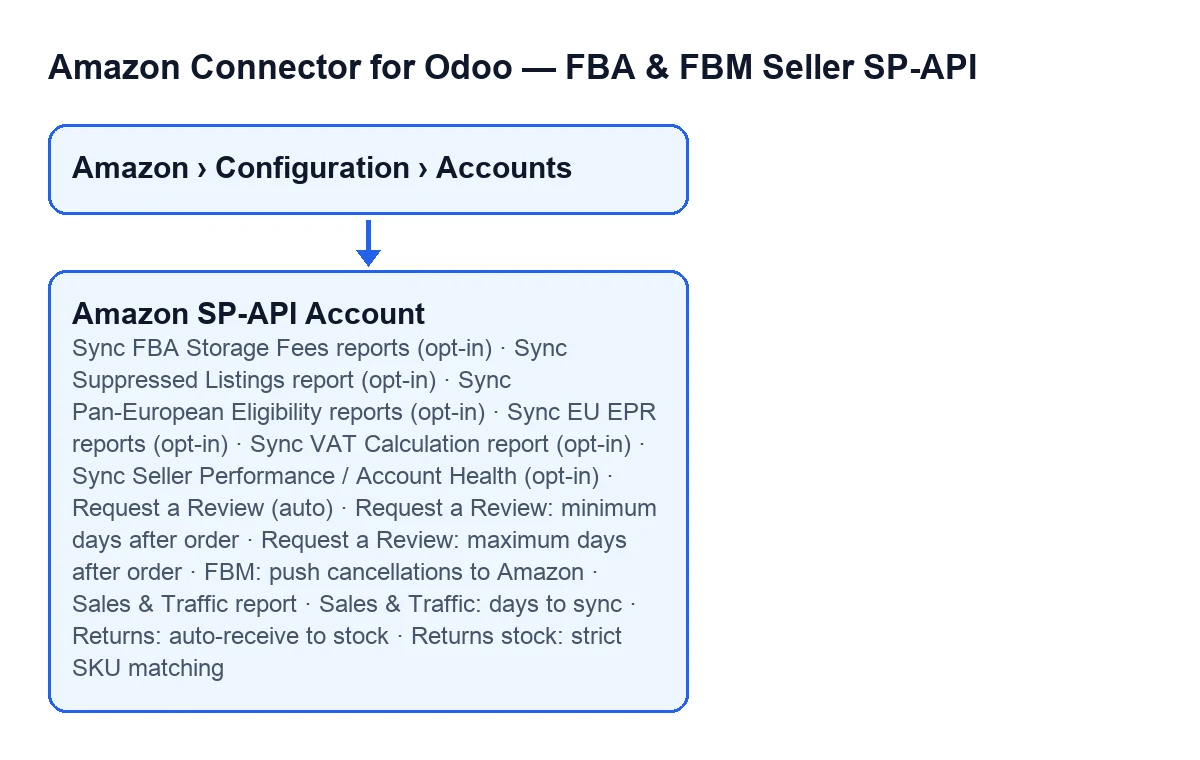
From the menu Amazon › Configuration › Accounts. Each step asks for a permission, and if you lack one you do not see that step: Amazon needs Viewer, and Configuration and Accounts need Manager.
Do I need anything besides the module?
Yes. It is a one-off payment per Odoo version (published for 17, 18, 19 and 20) and it needs the FlexigoTech Cloud subscription, Connector plan: €49/month or €490/year excluding VAT, up to 3 accounts of the platform (Pro: €98/month or €980/year, up to 10). The connection goes through FlexigoTech Cloud, which stores the credentials encrypted, watches the synchronisation and emails you if it fails. Without a subscription, or with the service suspended, whatever the subscription provides stops; your data stays in your Odoo. On the Odoo App Store each Odoo version is bought there; if you buy on flexigotech.com, the module for newer Odoo versions is included with the subscription. See the Odoo Apps listing and the module page.

The opt-in reports
Which reports does a checkbox turn on in the FBA reports tab and the compliance and sales tab?
All of these checkboxes are off by default and each one downloads reports from the Amazon Reports API. Turn on only the ones you need:
Sync FBA Storage Fees reports (opt-in): on theFBA Reports (opt-in)tab, in theFBA Storage Fees (real per-SKU storage cost)group. It downloads both fee reports (the monthly one and the long-term surcharge). It is read-only: it never books accounting entries.Sync Suppressed Listings report (opt-in): on theCompliance & Sales Reports (opt-in)tab, in theSuppressed Listings (revenue-at-risk visibility)group. It brings in the listings suppressed from the Buy Box or search for policy violations. It requires theProduct Listingrole (standard).Sync Pan-European Eligibility reports (opt-in): same tab,Pan-European Eligibility (FBA + self-fulfilled)group. It downloads both Pan-EU eligibility reports, for FBA and self-fulfilled ASINs, meant for stock-placement and expansion decisions across Spain, the UK, France, Germany and Italy.Sync EU EPR reports (opt-in): same tab,EU EPR Reports (packaging/WEEE/battery compliance)group. It downloads all three Extended Producer Responsibility reports (monthly, quarterly and annual): packaging, WEEE and battery figures that Amazon reports on your behalf, so you can reconcile them against your own EPR registrations or declarations.
Sync FBA Storage Fees reports (opt-in) according to the language of Odoo.Which Seller Central roles do the other report checkboxes need?
Three checkboxes, all on the Compliance & Sales Reports (opt-in) tab, depend on a Seller Central role, and the help of each says the same: without the role, the sync fails gracefully and logs the error.
Sync VAT Calculation report (opt-in): downloads Amazon's VAT calculation per transaction, with ship-from and ship-to jurisdiction detail, scoped to the account's marketplace. Per its help, it complements VAT Transactions for OSS/349/VeriFactu reconciliation. It requires the restrictedTax Invoicingrole.Sync Seller Performance / Account Health (opt-in): brings in the Account Health rating and metrics such as Order Defect Rate, Late Shipment Rate and Pre-Fulfillment Cancel Rate, so you can see suspension risk without a trip to Seller Central. It requires the restrictedSelling Partner Insightsrole.Sales & Traffic report: a daily job downloads sessions, page views, Buy Box % and conversion. It sits in theSales & Traffic Report (requires Seller Central role: Brand Analytics)group and requires theBrand Analyticsrole.
Before turning one of them on, check in Seller Central that you have the role it asks for.
What are the days to sync for the Sales & Traffic report?
The Sales & Traffic: days to sync field sets, per its help, how many days of history are requested on each sync. It is 30 by default and stays hidden while Sales & Traffic report is unticked: tick that checkbox first and the field appears.
Reviews, cancellations and returns
How does the automatic review request work?
On the Returns & Reviews tab, Request a Review (auto) is off by default. If you turn it on, a review request is sent automatically for each order, inside the window Amazon allows. It is one per order, ever, and Amazon itself is the source of truth for eligibility. Ticking it reveals two more fields:
Request a Review: minimum days after order: no request is made before this many days have passed since the order was marked shipped. It is 5 by default, and the help says Amazon allows 5-30 days.Request a Review: maximum days after order: it stops trying after this many days. It is 30 by default, because Amazon stops accepting solicitations at 30 days.
What does pushing FBM cancellations to Amazon do?
FBM: push cancellations to Amazon, on the same tab, is off by default. If you turn it on, cancelling the Odoo sale order of an unshipped FBM order sends the cancellation to Amazon (order acknowledgement feed), so the order is cancelled on the marketplace too. It only works going forward: it fires when you cancel, and historical cancellations are never re-scanned or re-sent.
What happens with returns and stock?
The Return Stock Automation (ON by default) group includes, among others, these two checkboxes, both on out of the box. Returns: auto-receive to stock creates and validates return pickings in Odoo for finalised Amazon returns. Returns stock: strict SKU matching, when enabled, requires the return SKU to match the sold SKU in Odoo.
How FlexigoTech can help
FlexigoTech implements Odoo 17, 18, 19 and 20 and builds custom connectors and integrations. If you are unsure which checkboxes to turn on for your account, or need to adapt the connector to the way you work, get in touch from the module page.
Keep reading
Checked in the connector's source code (version 20.0) and the linked sources
Sources
- Module source code: flexigobe_amazon_seller_connector 20.0 (8576afa5): models/amazon_spapi_account.py
- apps.odoo.com/apps/modules/20.0/flexigobe_amazon_seller_connector
- flexigotech.com/en/services.html
- flexigotech.com/precios.html