

 Español
 Català
 Deutsch
 Français
 Português
 Italiano
 Nederlands
 Polski
Why it matters
In Shopify, the customer picks a shipping method by the name you gave it in your store: «Express shipping», «Store pickup», a courier's name. Odoo has no idea what lies behind that text. If the order comes in without a carrier, someone has to choose one by hand before the shipment can be prepared.
The mapping is stored per store: each Shopify name points to an «Odoo Delivery Carrier». It is not case-sensitive, and the same name cannot appear twice in one store.
Step by step
- Open your Shopify store (instance) form in Odoo and go to the «Carrier Mappings» tab.
- Press «Discover Carriers from Orders & Profiles». Odoo gathers the names on the shipping lines of orders already imported and the methods in Shopify's delivery profiles, and creates a mapping for each name that is missing.
- Go through the list it opens. Those whose name matches an Odoo carrier come already linked; the rest show up as Unmapped.
- On each Unmapped one, pick the carrier in «Odoo Delivery Carrier». If it does not exist yet, press «Create Odoo Carrier»: it creates the carrier with the «Shipping» service product and confirms with «Carrier Created».
- If you would rather have Odoo create it when the first order shows up, tick «Auto-Create Carrier» instead of picking one. The status changes to Auto-Create.
- On the store form, fill in «Fallback Carrier». It is the one used when no name matches.
The same list is also under Shopify › Configuration › Mappings › Carriers, with filters for the Mapped, Unmapped and Auto-Create ones and for those that have never been used.
The order it searches in
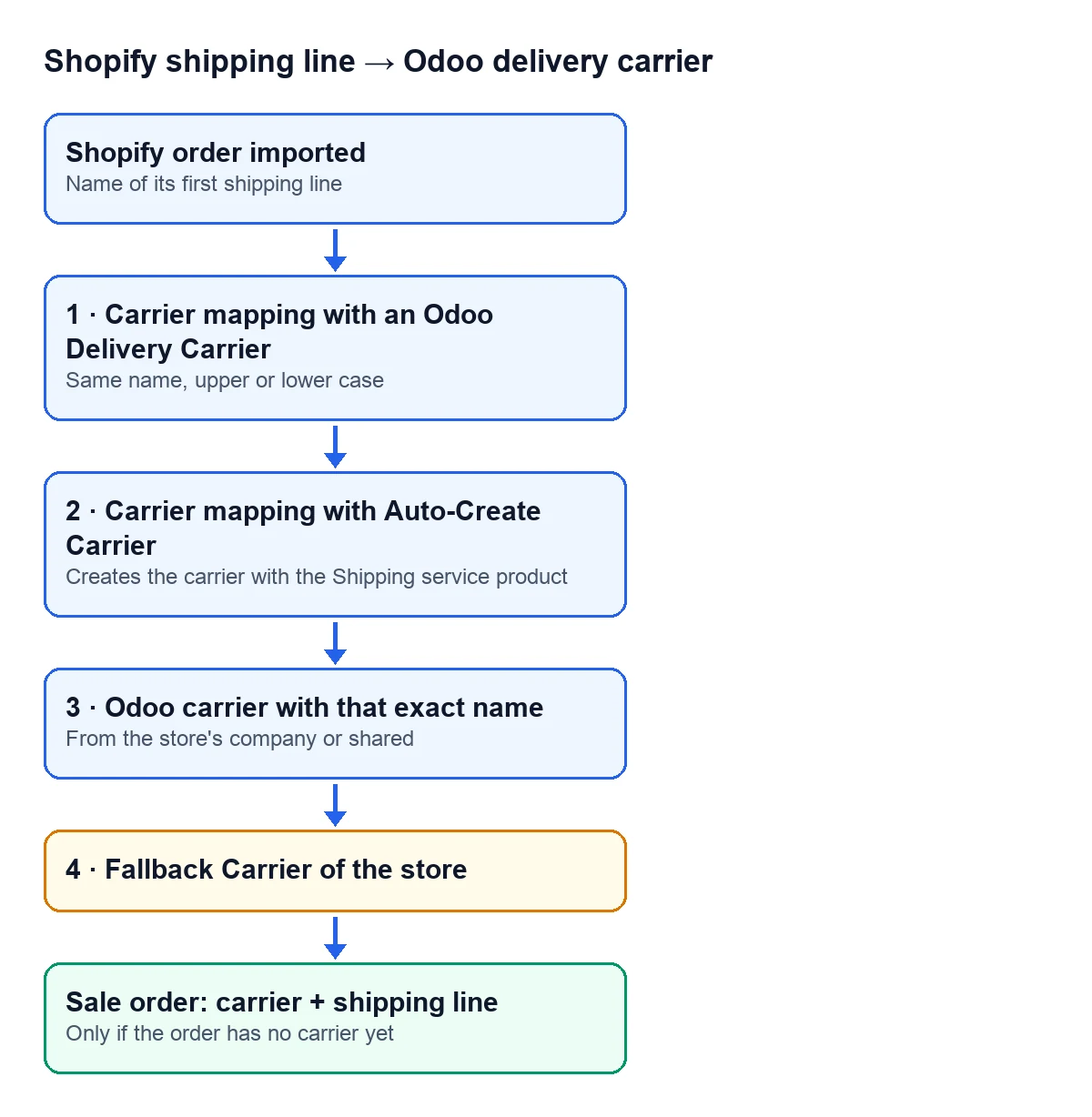
When it imports an order, the connector takes the name on its first shipping line and tries, in this order:
| Priority | What it looks for | What happens if it finds it |
|---|---|---|
| 1 | A mapping with an «Odoo Delivery Carrier» | Uses that carrier, if it belongs to the store's company or is shared |
| 2 | A mapping with «Auto-Create Carrier» | Finds or creates a carrier with that name |
| 3 | An Odoo carrier with that exact name | Uses it, if it belongs to the store's company or is shared |
| 4 | The store's «Fallback Carrier» | Uses it as a last resort |
A carrier from another company is never used, even if the mapping points to it. If you run several companies in the same database, check that each store points to carriers of its own company or to shared ones.
What ends up on the order
The carrier it finds goes on the sales order only if the order does not have one yet: if you had already chosen one, it stays. The shipping amount comes in as one more line, with that carrier's delivery product; if the carrier has no product, Odoo looks for a service product called Delivery.
Each mapping counts how many times it has been used and when it was last used. It is the quick way to see which shipping methods your customers really use and which ones you can delete.
Common problems
- You press discover and nothing shows up. You get the message
No shipping carrier names found in orders or Shopify delivery profiles.: there are no imported orders with a shipping line yet, and no methods in the store's delivery profiles. - A name changes in Shopify. If you rename a method in the store, Odoo sees a new name. Run discover again and link the new one.
- Orders landing on the fallback carrier. Filter the mappings by Unmapped: that is where you find the names that do not point to any carrier yet.
Does it work in every Odoo version?
Yes. The mappings, the discover button and the fallback carrier are in the connector published for Odoo 17, 18, 19 and 20.
Keep reading
Checked in the connector's source code (version 17.0, 18.0, 19.0 and 20.0) and the linked sources
Sources
- Module source code: flexigobe_shopify_seller_connector · 17.0 2c06264 · 18.0 0272d17 · 19.0 19422d4 · 20.0 2950bdc: views/menu_views.xml
- Module source code: flexigobe_shopify_seller_connector · 17.0 2c06264 · 18.0 0272d17 · 19.0 19422d4 · 20.0 2950bdc: models/shopify_carrier_mapping.py
- Module source code: flexigobe_shopify_seller_connector · 17.0 2c06264 · 18.0 0272d17 · 19.0 19422d4 · 20.0 2950bdc: models/shopify_instance.py
- Module source code: flexigobe_shopify_seller_connector · 17.0 2c06264 · 18.0 0272d17 · 19.0 19422d4 · 20.0 2950bdc: models/shopify_order.py
- apps.odoo.com/apps/modules/20.0/flexigobe_shopify_seller_connector