

 Español
 Català
 Deutsch
 Français
 Português
 Italiano
 Nederlands
 Polski
Ciclos Montseny wants to take payments with seQura
Example Illustrative case: the company and its figures are made up to explain the flow.
Ciclos Montseny is a made-up shop selling bikes and spare parts through Odoo, and it wants to offer seQura to shoppers in Spain. Marta, who runs it, installs Payment Provider: seQura from the module page and takes the Connector plan, because the connection goes through FlexigoTech Cloud: the service stores the credentials encrypted, monitors the sync and sends an email if it fails. Everything below she does with the provider in test mode.
Test Mode and Published, the form with hidden credentials and the Fetch merchant accounts button, the seQura accounts tab with a line for Spain, and the payment methods tab with a part_payment row and the Refresh button.Step one: the merchant reference for each country
The animation shows the seQura accounts tab with a line for Spain, its Merchant ID and its Assets key. Marta goes through that account's fields one by one:
Country(country_id): the shopper country this merchant reference serves.Merchant ID(merchant_ref): the merchant reference seQura issued to her for that country.Assets key(assets_key): required by the promotional widgets; seQura reports it along with the credentials.Signed webhooks(verify_signature): whether seQura signs the webhook events it sends to this account.Signature secret(signature_secret): used to verify that webhook events really came from seQura.
Since the promotional widgets require the Assets key, Marta copies it in as soon as seQura sends it with the credentials, rather than leaving it for later.
The detail Marta makes a note of: Signed webhooks and Signature secret go together. The first says whether seQura signs that account's events; the second is what's used to check an event came from seQura. She makes sure both reflect what seQura has told her for her account.
Step two: reading the payment methods properly
In the animation, the payment methods tab shows a row for Spain with the category part_payment. Each method stores these fields, and Marta reads them before publishing anything:
Product(product_code) andCampaign(campaign): the method's product and campaign.Category(category): one ofpay_now,pay_laterorpart_payment.Title,Long title,Claim,DescriptionandCost description: the texts the method stores.Icon (SVG)(icon_svg): the method's icon in SVG format.Minimum amountandMaximum amount: the method's minimum and maximum amounts.Basket range(limits_display): the basket sizes this product may be offered for.Available fromandAvailable until: the start and end of availability.
There are three more fields Marta finds but doesn't interpret on her own: Covers services (allows_services), Contract options (contract_options) and Confirmation path (confirmation_path), whose definition includes the value down_payment_on_confirmation. If you have questions about them, the article on how the module works under the bonnet is the place to carry on.
Step three: the promotional widgets
With the Spain account complete, Marta opens the seQura widgets tab to decide where to show them. First she checks the Assets key is filled in, as it's the field the promotional widgets require.
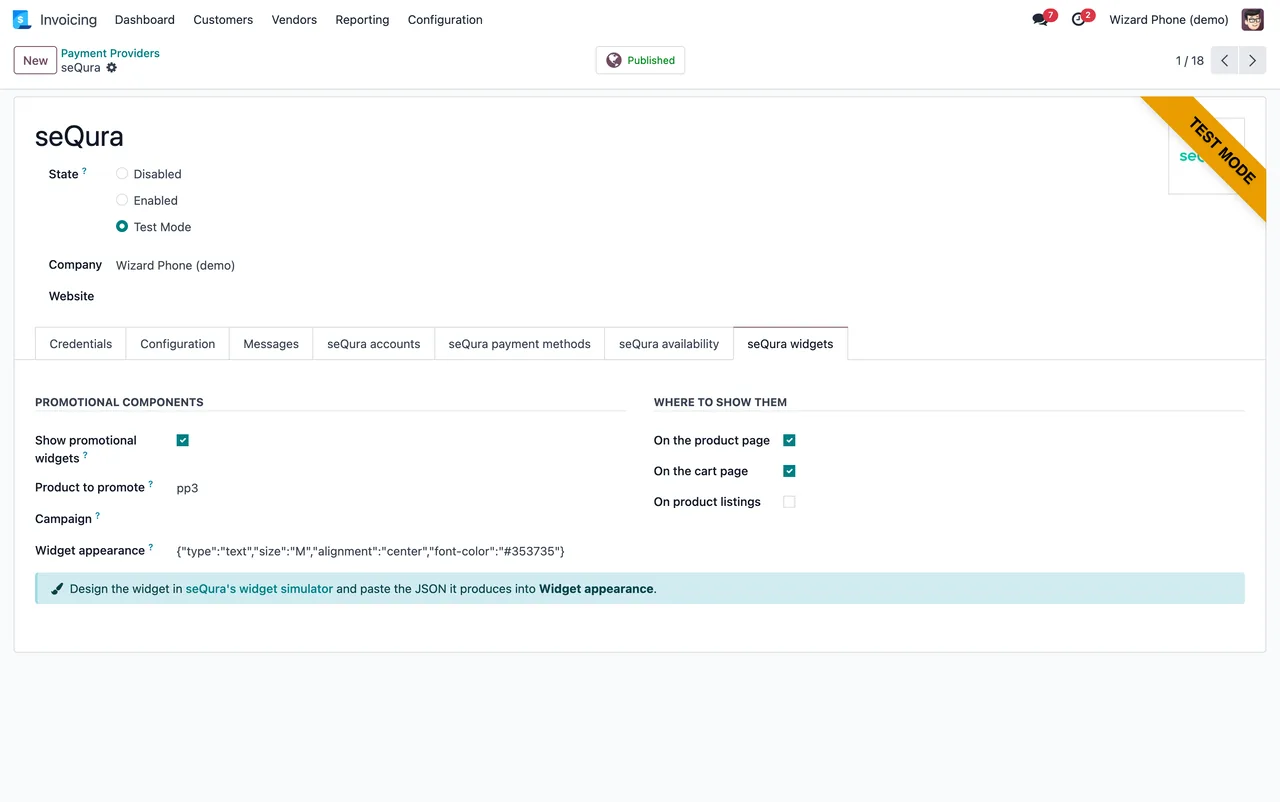
seQura widgets tab: promotional widget options, product, JSON appearance and where to show them on product, basket and listing pages. With demo data.Step four: what the person reconciling will see
The module also includes a seQura disbursements area, with operations, finance and configuration menus. Marta walks her bookkeeper through it using the demo screenshots, so they know which screens to expect.
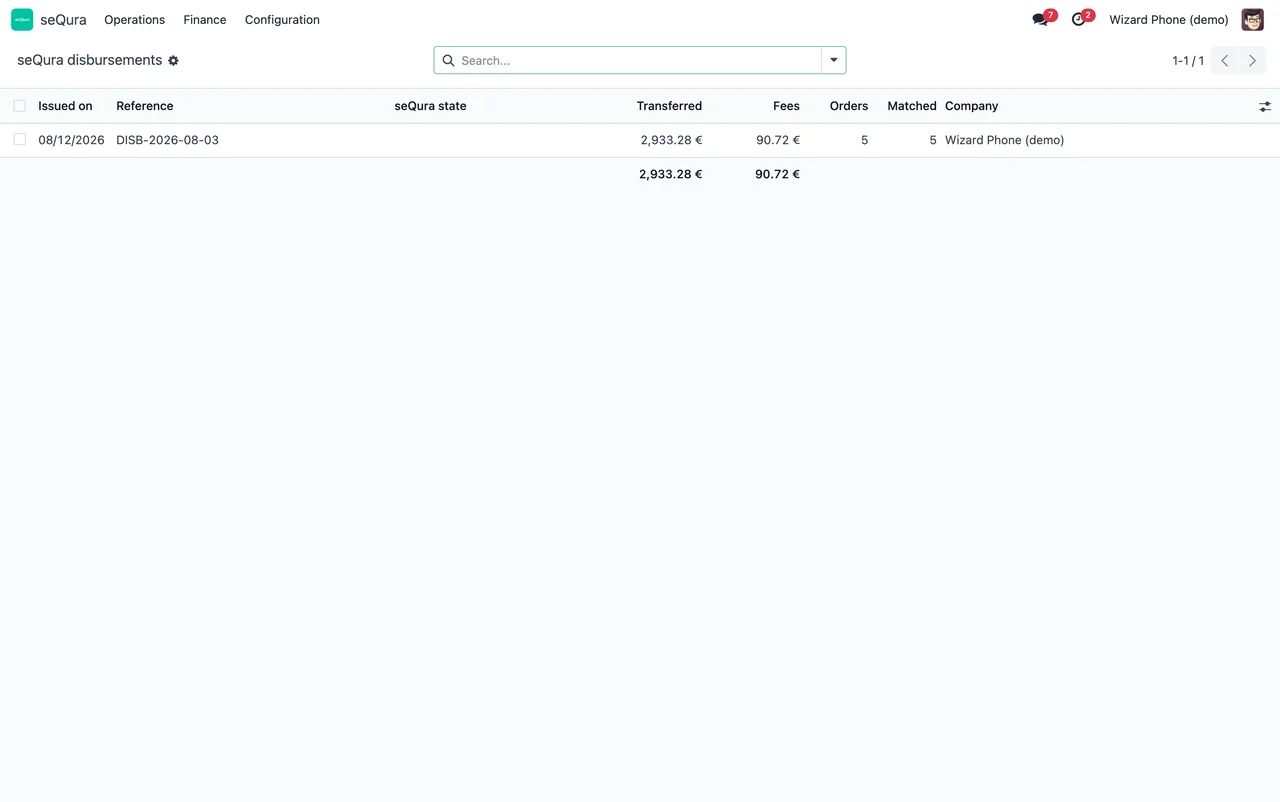
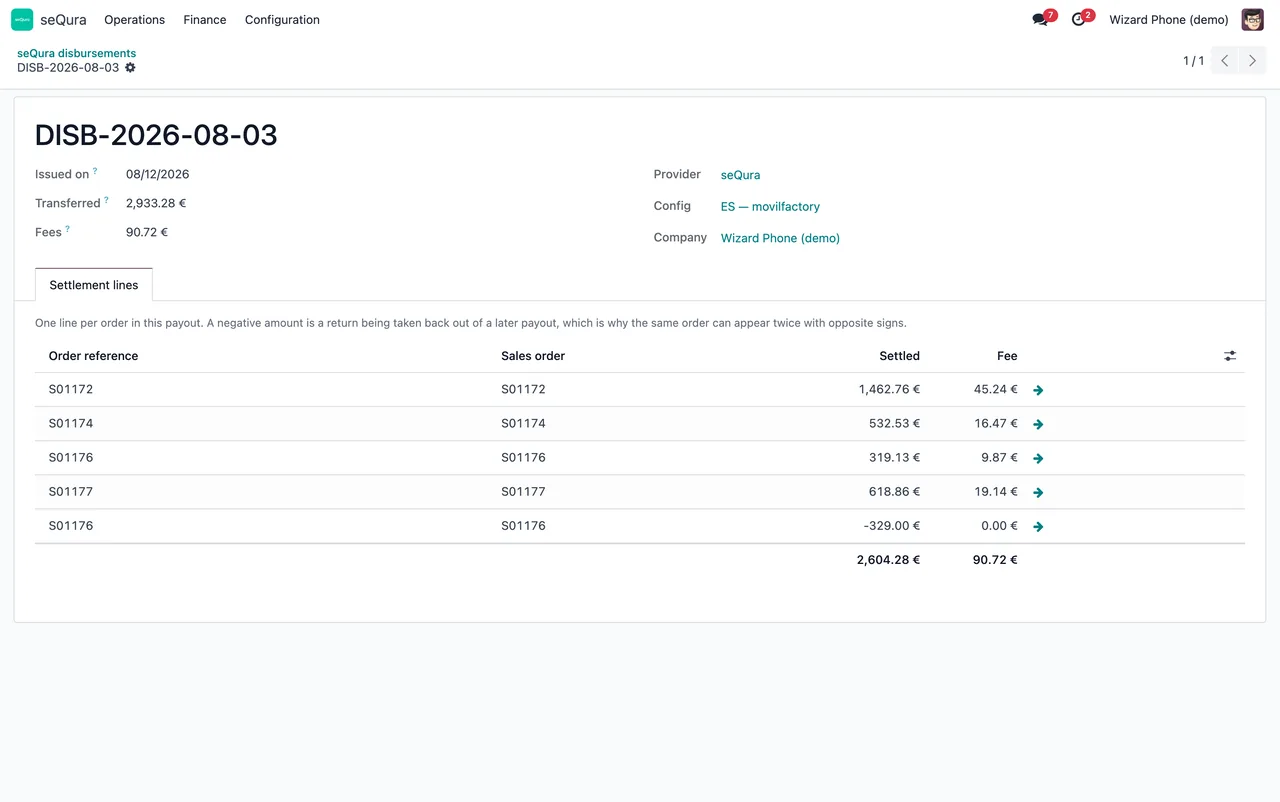
Settlement lines tab with five orders and their totals. With demo data.The first week: what Marta checks
Once the provider is up and running, Marta sets aside a few minutes every couple of days to go over this:
- That the Spain account has the right
Countryand theMerchant IDseQura issued for that country. - That the
Assets keyis still filled in if the shop uses promotional widgets. - That
Signed webhooksandSignature secretmatch what seQura states for the account. - That each payment method has the
Categoryshe expects, and thatMinimum amount,Maximum amountandBasket rangefit what she sells. - That no method she wants to offer has an
Available untildate already in the past. - Her inbox: FlexigoTech Cloud sends an email if the sync fails, so Marta doesn't filter those alerts out.
If a message turns up that she doesn't understand, she looks it up in the list of the module's error messages and warnings, with the literal text of each one.
What to take from the example
The setup falls into two blocks: the account per country (merchant reference, Assets key and signed webhooks) and the payment methods with their amounts, basket range and dates. Once the first block is complete, the second is a matter of reading each field carefully.
It also helps to know what happens with the subscription: without it, or with the service suspended, whatever the subscription provides stops, but your data stays in your Odoo. And if seQura changes its API, the module and the service are adapted.
How FlexigoTech can help
Payment Provider: seQura is published on Odoo Apps for Odoo 17, 18, 19 and 20, at €9 per Odoo version (one-off payment, excluding VAT), and the connection runs on the FlexigoTech Cloud Connector plan: €49/month or €490/year excluding VAT, with up to 3 platform accounts. With the subscription, the module for new Odoo versions is included if you bought it on flexigotech.com; on the Odoo App Store, each version is bought there. You can see it on the Odoo Apps listing.
If you're still implementing Odoo, FlexigoTech implements Odoo 17, 18, 19 and 20 and builds bespoke connectors and integrations, so we can leave seQura configured as part of the project.
Keep reading
Checked in the connector's source code (version 20.0) and the linked sources
Sources
- Module source code: flexigo_sequra_bnpl 20.0 (f94d334a): models/sequra_country_config.py
- Module source code: flexigo_sequra_bnpl 20.0 (f94d334a): models/sequra_payment_method.py
- apps.odoo.com/apps/modules/20.0/flexigo_sequra_bnpl
- apps.odoo.com/apps/modules/17.0/flexigo_sequra_bnpl
- apps.odoo.com/apps/modules/18.0/flexigo_sequra_bnpl
- apps.odoo.com/apps/modules/19.0/flexigo_sequra_bnpl
- flexigotech.com/en/services.html
- flexigotech.com/precios.html