

 Español
 Català
 Deutsch
 Français
 Português
 Italiano
 Nederlands
 Polski
Which parts of Odoo come into play with seQura
Payment Provider: seQura is a FlexigoTech connector for Odoo. The README for the Odoo 20 version requires the modules payment, website_sale, account, sale and stock: payments, the web shop, accounting, sales and inventory. If you currently run seQura from its own dashboard on one side and your shop and accounts on the other, that list tells you which parts of Odoo need to be up and running before you connect anything.
The module is published on Odoo Apps for Odoo 17, 18, 19 and 20. What follows is based on the README for the Odoo 20 version and on the connector's listing.

Six ideas worth correcting before you decide
Myth: I need Odoo Enterprise to take payments with seQura
Reality: the README requirements for Odoo 20 say Odoo 20.0, Community or Enterprise. So, for that version, the module does not require the Enterprise edition. What it does require is the Odoo modules listed above and a contract with seQura.
Myth: it works the same in any country I sell to
Reality: the README asks for an active seQura merchant contract in Spain, Portugal, Italy or France. When you configure the provider you pick the deployment: seQura for Spain and SVEA for the other markets. If you sell in more than one of those countries, be clear from the start which deployment each contract uses.
Myth: I install the module and the shop is already taking seQura payments
Reality: the README sets out a specific order for going live:
- Install the module.
- Open
Accounting → Configuration → Payment Providers → seQura.
- Pick the deployment (seQura for Spain, SVEA for the other markets) and enter your access details.
- Leave it in
Test modeto rehearse.
- When you are ready, switch it to
Enabledand publish it.
The README also has its own section, Testing against seQura's sandbox, for testing against seQura's sandbox. You'll find each field explained in the step-by-step setup guide.
Myth: buying the module on Odoo Apps gives me the connection
Reality: the listing is clear: the sync with seQura goes through FlexigoTech Cloud and requires the subscription. The cloud stores the credentials encrypted, monitors the sync, emails you if it fails and, if seQura changes its API, both the module and the service are adapted. The subscription also includes module updates, support with a first response within 1 working day and up to 3 accounts per connector, with a 14-day trial and no card needed.
The module costs €9 per Odoo version, a one-off payment excluding VAT, for 17, 18, 19 and 20; the Connector plan is €49/month or €490/year excluding VAT (Pro: €98/month or €980/year, up to 10 accounts). If you buy it on flexigotech.com with a subscription, the module for new Odoo versions is included; on the Odoo App Store each version is bought there. Without a subscription, or with the service suspended, whatever the subscription provides stops, but your data stays in your Odoo.
Myth: if my Odoo talks to an outside cloud, my orders leave the building
Reality: the listing spells out what FlexigoTech Cloud receives:
- The identifier (uuid) of the database, its address (URL) and the Odoo version.
- The FlexigoTech modules installed, with their version, and whether the database is a neutralised copy (staging or test).
- The company name, and the email of the person who accepts, with the date and version of the text accepted.
- A public code to check that requests come from that database, and a proof that it is that database, computed on your server without sending its secret.
- A request for its service permit every 6 hours, and the health of the sync: counters and errors (type and code), without the content of your records.
- Your seQura key, which is kept encrypted.
The listing adds that your data stays yours: you can view and export it at any time.
Myth: the connector includes having it all set up for me with my history
Reality: third-party costs are separate from the subscription: you contract and pay for your seQura account, Odoo and your hosting yourself.
What you'll see inside Odoo once seQura is connected
The seQura provider has its own form with tabs. One of them, seQura availability, brings together the allowed IPs, order handling, services and several option checkboxes.
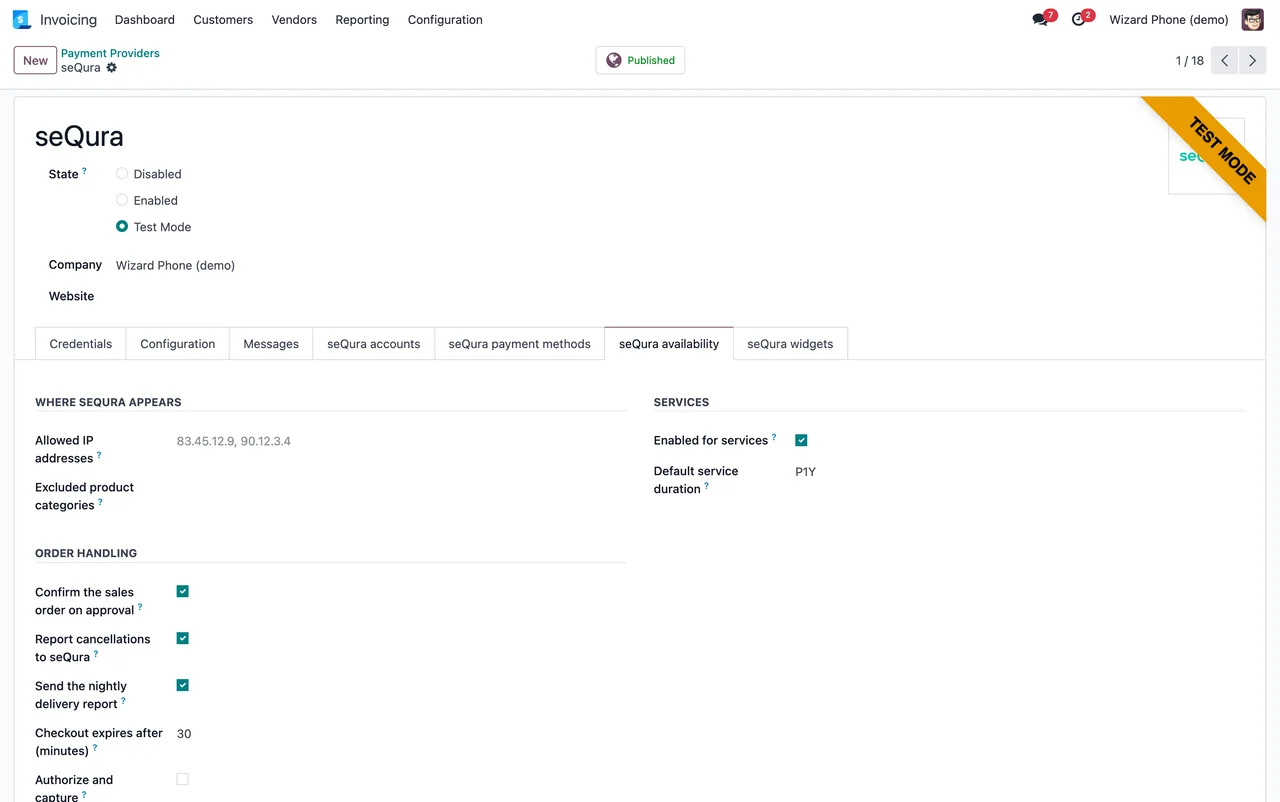
seQura availability tab.seQura disbursements also appear as records in Odoo. In the next screenshot, a disbursement shows its date, the amounts transferred and the fees, the provider, the configuration and the company, and on the Settlement lines tab a table of settlement lines with five orders and their totals. If you want to see which menus the module adds and what each record goes through, I cover it in how it works under the bonnet.
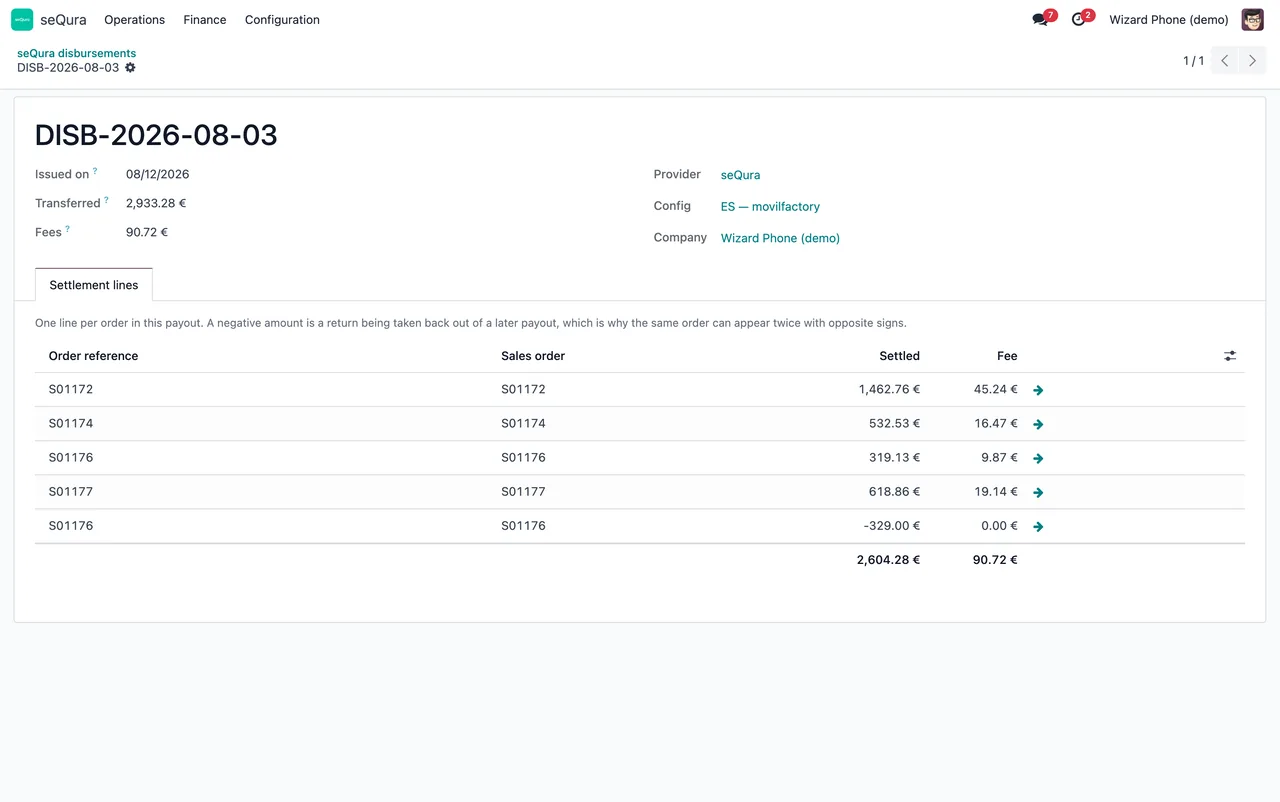
Settlement lines tab.Where to start: implementation and connector
If you aren't on Odoo yet, the sensible order has two parts. First, an Odoo database with sales, the web shop, accounting and inventory, which are the modules the README asks for. Then the connector, set up first in Test mode and tested before you publish it.
At FlexigoTech we implement Odoo 17, 18, 19 and 20 and build custom connectors and integrations. We can handle implementing that base and, as a service separate from the subscription, configuring the provider or any specific development you need. You'll find the connector details and the trial on the module page, and the listing for each version on Odoo Apps.
Keep reading
Checked in the connector's source code (version 20.0) and the linked sources
Sources
- Module source code: flexigo_sequra_bnpl 20.0 (f94d334a): README.md
- Module source code: flexigo_sequra_bnpl 20.0 (f94d334a): static/description/index.html
- apps.odoo.com/apps/modules/20.0/flexigo_sequra_bnpl
- apps.odoo.com/apps/modules/17.0/flexigo_sequra_bnpl
- apps.odoo.com/apps/modules/18.0/flexigo_sequra_bnpl
- apps.odoo.com/apps/modules/19.0/flexigo_sequra_bnpl
- flexigotech.com/en/services.html
- flexigotech.com/precios.html