

 Español
 Català
 Deutsch
 Français
 Português
 Italiano
 Nederlands
 Polski
Distribuções Ribeira, the thread of the case
Example Illustrative case: the company and its figures are made up to explain the flow.
Distribuções Ribeira is an invented company that invoices in Portugal from Odoo 18 and runs a second company in the same database. Marta, who heads its admin team, has to get Portugal SAF-T (PT) File Checks ready. The case has no figures: what matters is which screens she opens, which fields she checks and which states she comes across.
The module is published on Odoo Apps for 17.0, 18.0, 19.0 and 20.0, so Marta picks the listing for her version. It costs €9 per Odoo version, one-off and excluding VAT, on all four versions, and because it comes with a FlexigoTech Cloud local service there is also a subscription of €29/month or €290/year excluding VAT (Pro: €58/month or €580/year).
Day one: the ATCUD configuration form
When she creates a new ATCUD configuration from Invoicing, Marta finds a form split into sections: company information, ATCUD, email and notifications, and upload. Only the endpoint URL appears filled in; the rest is empty.
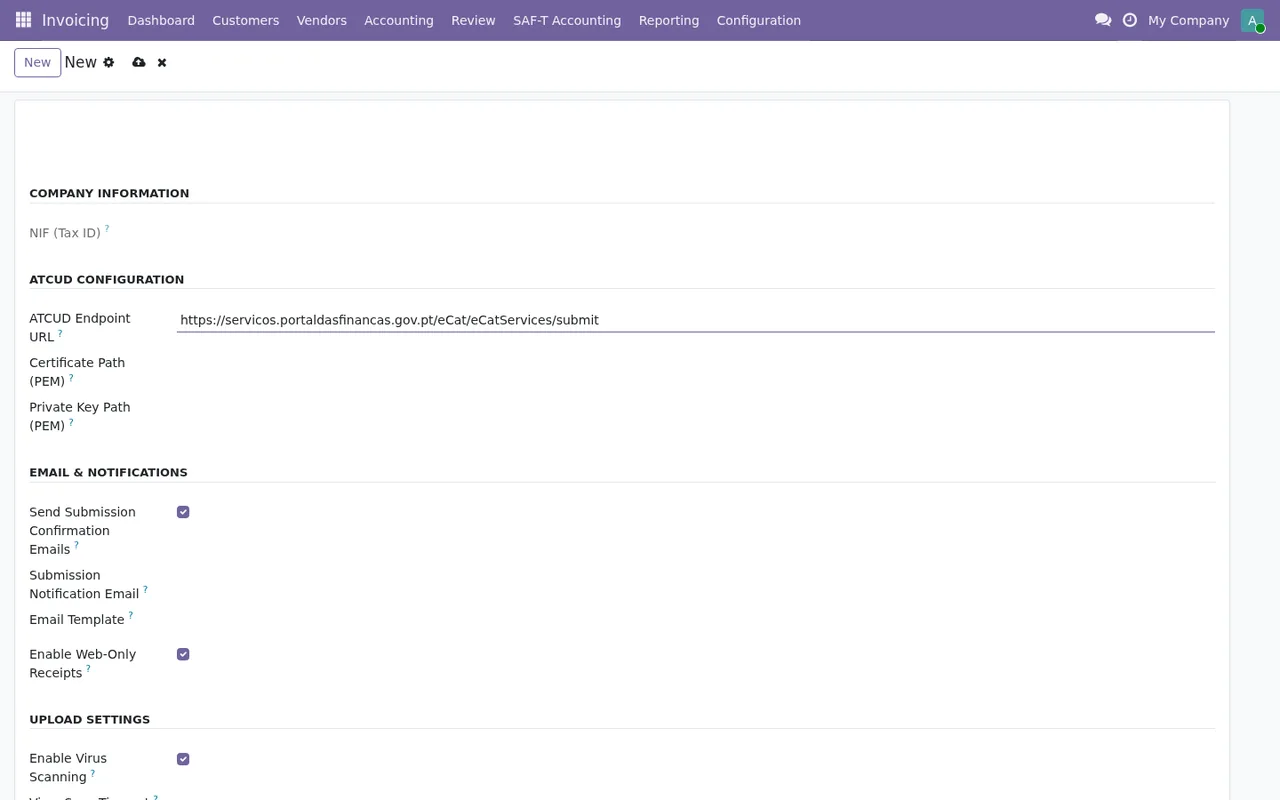
What Marta does is go through the form section by section, top to bottom, including the part that does not fit on screen. The endpoint URL already being there tells her nothing about the rest, so she does not treat the configuration as complete until she has checked all of it.
The fields Marta looks at closely
Before generating anything, Marta goes over the module fields that affect her. These are the ones she identifies:
company_id: appears in several of the module's models as a link tores.company. With two companies in the same database, Marta checks which company each record belongs to.schema_url, labelledSAF-T Schema URL: according to the field description, the URL from which the Portuguese SAF-T XSD schema is fetched.export_file_csv: an attachment (ir.attachment) described asExported CSV format.transaction_count, labelledTransaction Count: the number of transactions included in the SAF-T.name, labelledRequest ID.submission_id: a link tosaft.submission, described asRelated SAF-T submission if applicable.
Marta gives these fields no more purpose than their name or description states. If you need to know how they fit together internally, it is covered in how the module works under the bonnet.
The states each record can have
On day two, Marta learns the state values the module defines. There are four separate sets, and it pays not to mix them up:
- A
statefield withDraft,ExportedandSubmitted. - A
statusfield withDraft,Processing,ApprovedandDenied. - A
statefield withDraft,Generated,Validated,Validation FailedandSubmitted. These are the ones shown in theGenerate SAF-T Fileslist. - A
statefield withDraft,Validated,Submitted,Accepted,Rejected,ATCUD UnreachableandError.
From this list, Marta notes the values she wants to keep an eye on every day: Validation Failed, Denied, Rejected, ATCUD Unreachable and Error. She does not assume the cause of any of them; when one appears, she looks up the exact wording in the guide to the module's error messages.
The first week: what she checks each morning
With the configuration done, during the first week Marta opens the same screens in the same order every morning. The round looks like this:
Draft, Generated, Validated, Validation Failed and Submitted, with file size and transactions at zero.- In
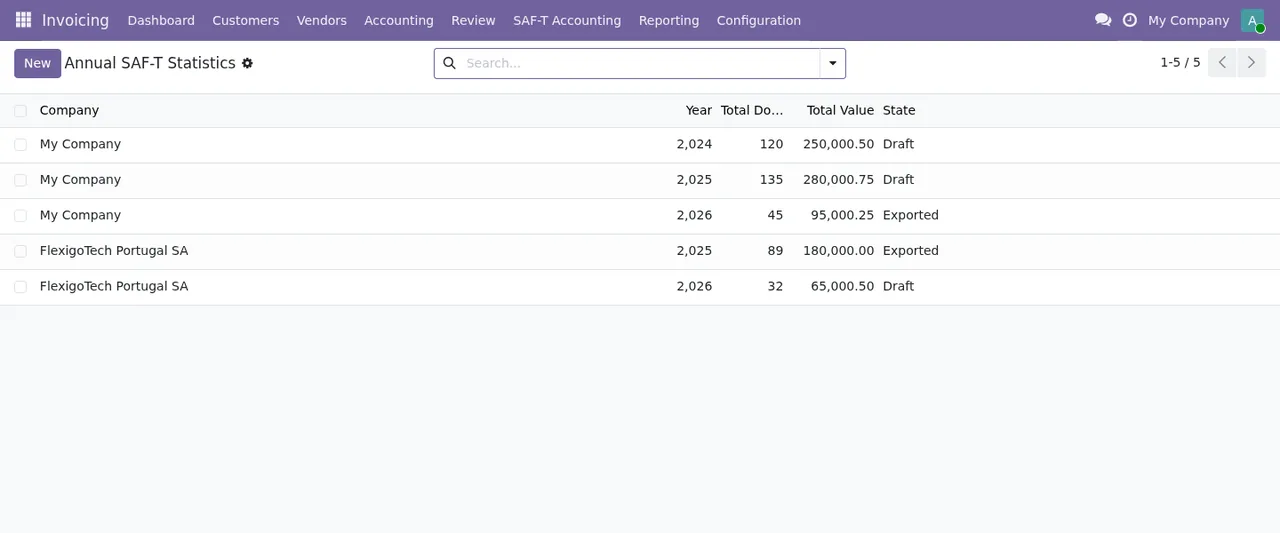
Invoicing › Annual SAF-T Statisticsshe looks at theCompany,Year,Total Documents,Total ValueandStatecolumns, and checks that each row belongs to the company she expects. - In
SAF-T Error Logsshe reads the date, error type, severity and message of each record, and notes which ones still have the resolved box unticked. - In
Generate SAF-T Filesshe reviews the state of each period, from start to end, alongside file size and transactions.
In her database, with two companies, the Company column is the first thing Marta looks at. The same list has a New button and a search bar:
What the Ribeira case teaches
- The new ATCUD form appears almost empty, with only the endpoint URL: go through it section by section, including the part that does not fit on screen, before treating it as complete.
company_idsits in several models. If you run more than one company, check the company on each record before anything else.- There are four different sets of states. Learn which list shows each one and which values you want to watch.
- The three lists in the round (annual statistics, error logs and file generation) are Marta's routine in her first week.
How FlexigoTech can help
FlexigoTech implements Odoo 17, 18, 19 and 20 and builds bespoke connectors and integrations, so we can set up the ATCUD configuration and your companies with you. If you buy the module on its flexigotech.com page, the subscription includes the module for new Odoo versions; on the Odoo App Store, by contrast, each version is bought there (Odoo Apps listing). Without a subscription, or with the service suspended, whatever the subscription provides stops, and your data stays in your Odoo. If you are still unsure whether it fits, first read what it covers and what you need before installing it.
Keep reading
Checked in the module's source code (version 20.0) and the linked sources
Sources
- Module source code: flexigo_portugal_saf_t_accounting_atcud_submission_tool 20.0 (6935c20f): models/saft_annual_statistics.py
- Module source code: flexigo_portugal_saf_t_accounting_atcud_submission_tool 20.0 (6935c20f): models/saft_config.py
- Module source code: flexigo_portugal_saf_t_accounting_atcud_submission_tool 20.0 (6935c20f): models/saft_dsar_request.py
- Module source code: flexigo_portugal_saf_t_accounting_atcud_submission_tool 20.0 (6935c20f): models/saft_error_log.py
- Module source code: flexigo_portugal_saf_t_accounting_atcud_submission_tool 20.0 (6935c20f): models/saft_exporter.py
- Module source code: flexigo_portugal_saf_t_accounting_atcud_submission_tool 20.0 (6935c20f): models/saft_submission.py
- apps.odoo.com/apps/modules/20.0/flexigo_portugal_saf_t_accounting_atcud_submission_tool
- apps.odoo.com/apps/modules/17.0/flexigo_portugal_saf_t_accounting_atcud_submission_tool
- apps.odoo.com/apps/modules/18.0/flexigo_portugal_saf_t_accounting_atcud_submission_tool
- apps.odoo.com/apps/modules/19.0/flexigo_portugal_saf_t_accounting_atcud_submission_tool
- flexigotech.com/en/services.html
- flexigotech.com/precios.html