
 Español
 Català
 Deutsch
 Français
 Português
 Italiano
 Nederlands
 Polski



SAF-T PT Checks for Odoo
Generates the accounting SAF-T (PT) of each period in Odoo, checks it against the AT's official schema and records each delivery with its receipt.
€29/month14 days free, no card
Yearly and Pro
- Standard€29/month · €290/year
- Pro€58/month · €580/year
Reply within 1 working day; with Pro, 4 hours. FlexigoTech Cloud pricing
After you buy
- You pay for the license (€9 + VAT) and get an email with the link to download the module.
- You install it in your Odoo, on Odoo.sh or your own server.
- In Settings → FlexigoTech Cloud you accept the data list and press «Try free for 14 days». The trial doesn't ask for a card.
- To continue, you press «Subscribe», create your account on app.flexigotech.com and pay for the plan by card.
Every purchase includes 2 months of support: we help you install it, set it up and get it working, by email and video call.
- Tested on Odoo 17, 18, 19 and 20
- Odoo Learning Partner
 Checked against the official schemaReal Odoo screenshot
Get started in 3 steps
- Install the moduleFrom Odoo Apps or flexigotech.com, on Odoo.sh or your own server. If the Portuguese localisation is missing, it is installed with it.
- Start the trialIn Settings › FlexigoTech Cloud, an administrator connects the database and starts the 14-day trial, no card needed.
- Check the companyOn the company form: the Portuguese NIF in the VAT number, the street, the city, the postcode and the euro as currency. The SAF-T settings are created on their own with the first file.
Generate, check and deliver Choose the period and press «Generate SAF-T». Once the file is validated, you hand it over to the AT yourself and record the receipt in «Record delivery to the AT».
What you need Odoo 17, 18, 19 or 20 with Invoicing or Accounting and the Portuguese localisation (the module installs it if missing), on Odoo.sh or your own server, not Odoo Online. A company with a Portuguese NIF, its address and the euro, and users with full accounting rights or Invoicing administrators. The server must be able to download the schema once from the AT's website. The FlexigoTech Cloud subscription or its 14-day trial.
What it does
- Checked against the AT's schemaEach file goes through the official 1.04_01 XSD, downloaded from the AT's website. If it fails, you see each error.
- The accounting SAF-T of a periodChart of accounts with opening and closing balances, the customers and suppliers of the entries, and the posted journal entries.
- Each delivery, recordedThe AT's receipt, the delivery date and whether the AT accepted or rejected the file, with its errors.
- GDPR with accounting retentionAn erasure request is denied while 10 years have not passed since the contact's last journal entry.
How it works
Sent from your Odoo
- The database identifier and address, the Odoo version and the FlexigoTech modules
- The request for this module's alerts, with no accounting data
Back from FlexigoTech Cloud
- An alert when an official SAF-T (PT) source the module follows changes
- The name of the source and the link to its official page

Every day, from our servers in Germany, FlexigoTech Cloud watches the official AT sources this module follows: the SAF-T (PT) 1.04_01 XSD schema, the SAF-T (PT) versions page and its technical FAQ, among others. When one changes, it alerts you in Settings › FlexigoTech Cloud with the link to the source. The SAF-T file is generated and checked in your Odoo: it does not go through the cloud.
Where you see it in Odoo
- SAF-T Accounting menuinside Invoicing (or Accounting, depending on your Odoo): Generate SAF-T, SAF-T Deliveries, Settings, Error Logs, Annual Statistics and GDPR Requests
- Generate SAF-Tthe file of a period, with «Generate SAF-T», «Validate SAF-T» and «Record delivery to the AT»
- SAF-T Deliveriesthe AT's receipt, the delivery date and whether the AT accepted or rejected the file
- Settings › FlexigoTech Cloudthe trial, the subscription and the monitoring alerts
Inside Odoo
Real Odoo screenshots.




Price
Standard
€29a month + VAT
€290 a year + VAT 2 months free
- Alerts when the official SAF-T (PT) sources change
- First response 1 working day
- Video call included for the first 2 months
Pro
€58a month + VAT
€580 a year + VAT 2 months free
- Everything in Standard
- First response 4 working hours
- Video call if needed
- + €9 for the module license, per Odoo version
- 14 days free, no card
- Cancel in two clicks
- Every purchase includes 2 months of support: we help you install it, set it up and get it working, by email and video call. While you're subscribed, support for the service stays included. Still integrating or testing? Extend your free trial.
If you cancel What the subscription gives stops. Your data stays in your Odoo.
- Support with response timesMonday to Friday, 9:00 to 18:00 (Barcelona), except public holidays.
- Maintenance and improvementsOdoo 17-20, on Odoo.sh or your own server
- If the schema changes, we tell youFlexigoTech Cloud's monitoring follows the 1.04_01 XSD and the AT's SAF-T (PT) pages every day.
- Your accounting stays in OdooNeither the SAF-T file, nor the journal entries, nor your customers go to FlexigoTech Cloud
- Tested On Odoo 17, 18, 19 and 20. Against the AT's official schema: the module's tests check the files with the 1.04_01 XSD downloaded at install, and the screenshots on this page come from a real Odoo 20 with that same schema.
- 4,121 lines of code · 14-11-2026
- 59 automated tests · 14-11-2026
- No reviews yet · leave yours
Frequently asked questions
Which SAF-T (PT) version does it generate?
1.04_01, the structure approved by Portaria n.º 302/2016, in its accounting variant (type C). It is checked against the XSD schema published by the AT.
Does it send the file to the AT?
No. The module sends nothing to the AT: you hand the file over yourself, and record the receipt and the AT's answer in Odoo.
Does it put the ATCUD or the QR code on invoices?
No. It does not number invoices or add the ATCUD or the QR code of Portaria n.º 195/2020, and it does not make the invoicing SAF-T (type F).
When is the accounting SAF-T (PT) needed?
According to the AT, Portaria n.º 321-A/2007 requires corporate income tax (IRC) payers whose main activity is commercial, industrial or agricultural and who keep their accounts by computer to produce the file whenever the inspection services ask for it. With the module you generate it from Odoo when you need it.
What does it do with a GDPR erasure request?
If the contact has journal entries from the last 10 years, it denies the request and says until when its accounting is kept; if not, it erases its name, email and phone. The 10 years are set by article 123(4) of the Portuguese Corporate Income Tax Code (Código do IRC).
Which language are the screens in?
In yours: the module comes translated into the 9 languages of this page.
What does the subscription give me?
The monitoring of the official SAF-T (PT) sources the module follows, with an alert when one changes, and support with response times: first response within 1 working day, or 4 working hours with Pro.
Does it work without FlexigoTech Cloud?
No. SAF-T PT Checks works with an active FlexigoTech Cloud subscription or its 14-day trial.
What happens after you press «Buy now»?
1. You pay for the license (€9 + VAT) and get an email with the link to download the module. 2. You install it in your Odoo, on Odoo.sh or your own server. 3. In Settings → FlexigoTech Cloud you accept the data list and press «Try free for 14 days». The trial doesn't ask for a card. 4. To continue, you press «Subscribe», create your account on app.flexigotech.com and pay for the plan by card.
Does it work on Odoo Online?
No: Odoo Online does not allow third-party modules. It is for Odoo 17, 18, 19 and 20, on Odoo.sh or on your own server.
Who installs it?
You do: you buy it on flexigotech.com or on Odoo Apps and install it in your Odoo. We help you install it and set it up, by email and video call, during the 2 months of included support. Custom development and data migration are quoted separately.
What support is included?
Every purchase includes 2 months of support: we help you install it, set it up and get it working, by email and video call. While you're subscribed, support for the service stays included.
What if something fails?
If the file does not pass the schema, it stays in «Validation Failed» with each error in its validation log and in «Error Logs»; you fix it in your accounting and generate it again. If the server cannot reach the AT's website to download the schema, Odoo tells you. And support has response times: first response within 1 working day.
Where is my data?
In your Odoo: it stays there, and you can always view and export it. The connection data go to FlexigoTech Cloud, on our servers in Germany, among them the database identifier and address, the Odoo version, the FlexigoTech modules, the company name and the email of the person who accepts. The SAF-T file, the journal entries and your customers' data do not leave your Odoo.
Not on Odoo yet?
We set up Odoo with sales, purchasing, inventory and invoicing, and stay on.
From €2,450 + VAT
Start with OdooMore about SAF-T PT Checks
What it does
A FlexigoTech module for Odoo 17, 18, 19 and 20, Community and Enterprise. It generates the accounting SAF-T (PT) of each period, checks it against the AT's official schema and records each delivery.
- The accounting SAF-T (PT) of a periodVersion 1.04_01, the one of Portaria n.º 302/2016, in its accounting variant: the chart of accounts with opening and closing balances, the customers and suppliers of the entries and every posted journal entry of the period, in euros.
- Checked against the official schemaThe XSD schema is the one the AT publishes on its website: the module downloads it once and keeps it in the database. Each error stays in the file's validation log and in «Error Logs», and «Validate SAF-T» checks again.
- The delivery, recordedThe module sends nothing to the AT. You hand the file over yourself, and record in Odoo the receipt and whether the AT accepted or rejected it, with its errors. If you turn it on, a confirmation email goes out.
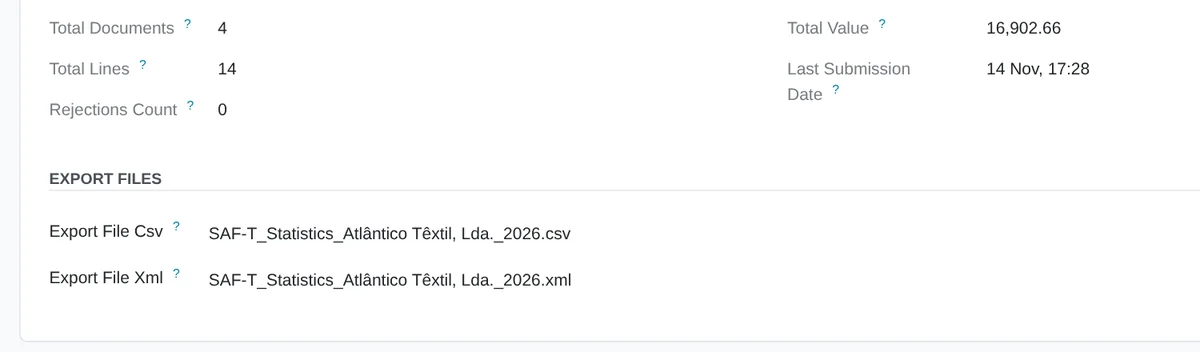
- The year in figuresThe journal entries, lines and total debit of the files the AT accepted or rejected in the year, and how many it rejected, exported to CSV or XML.
- GDPR requests with accounting retentionIf the contact has journal entries from the last 10 years, the erasure request is denied with the date until which they are kept; if not, its name, email and phone are erased. You send the reply letter.
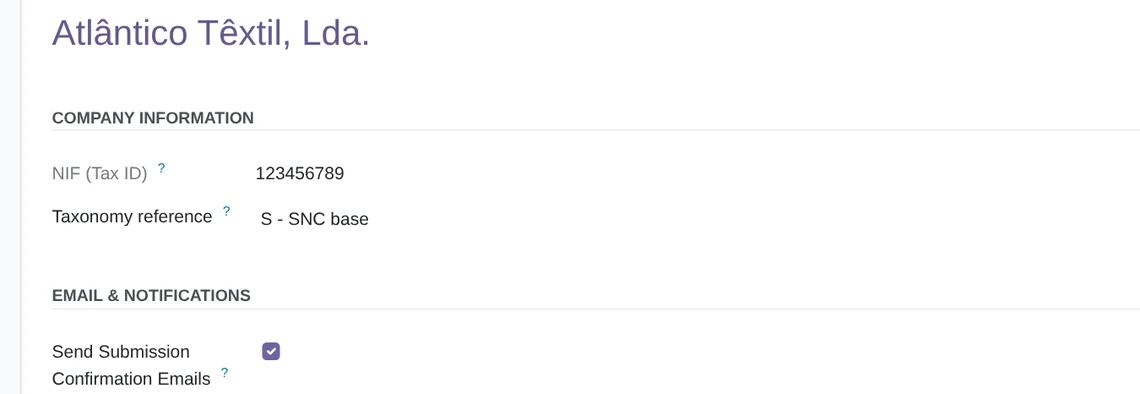
- Each company, with its ownFiles, deliveries, settings, errors and statistics follow the companies each user works in.
What it does not do
- It does not send anything to the ATThere is no send button: you make the delivery and the module records it.
- It does not number invoices or add the ATCUDNeither the ATCUD nor the QR code of invoicing documents (Portaria n.º 195/2020) comes from this module.
- It does not make the invoicing SAF-TOnly the accounting one (type C), not the invoicing one (type F).
- It does not include the subscriptionFlexigoTech Cloud is paid separately, monthly or yearly, with a 14-day trial.
What it looks like inside Odoo
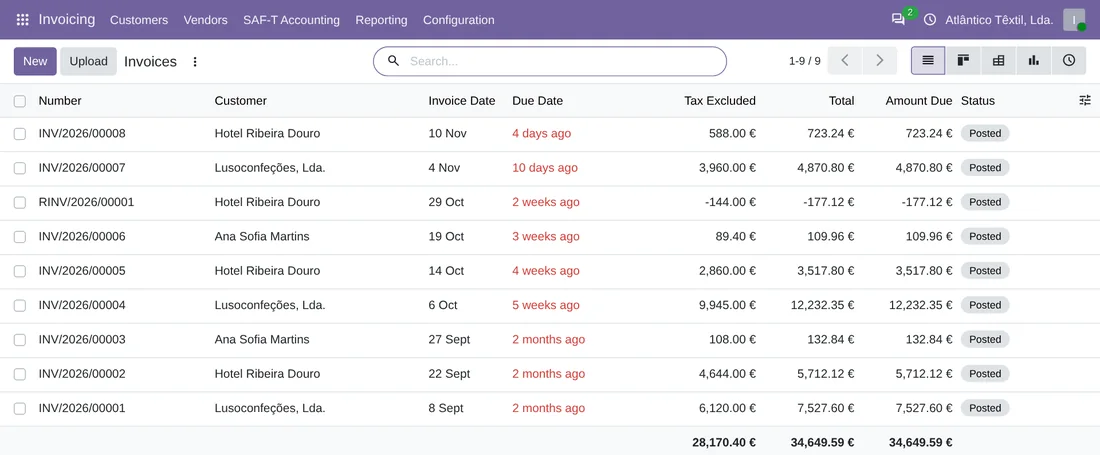
Real screens of the module installed on Odoo 20, with the data of a sample textile company in Porto. The module's screens show in your language.
From invoices to the file
The period's posted invoices go into the SAF-T as journal entries, and their customers into the file's customer list.

A new file
You choose the company and the period, and press «Generate SAF-T».
A file already delivered
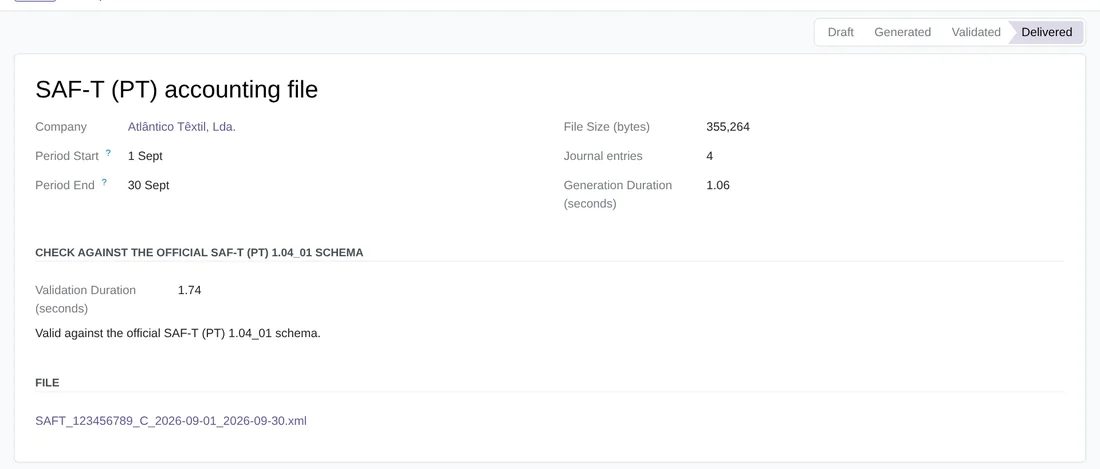
The September SAF-T in «Delivered»: its journal entries, its check against the official schema and the file, which you download from here.
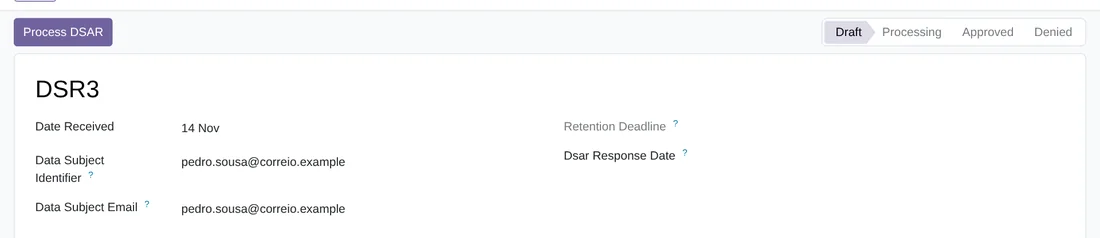
A request to process
DSR3, just in: «Process DSAR» decides whether it is denied because of accounting retention or the contact is anonymised.
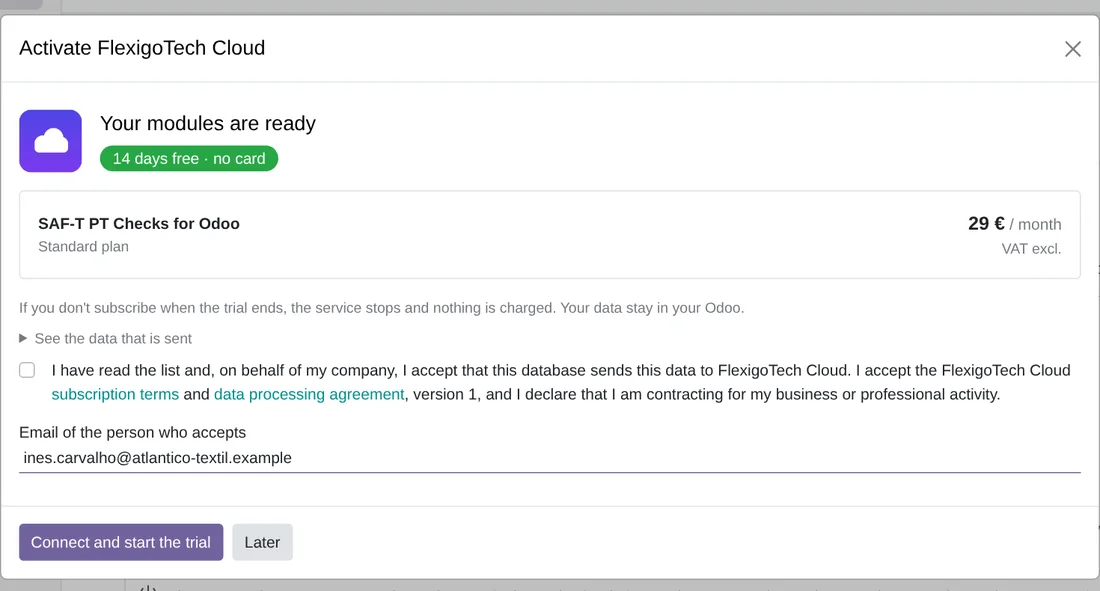
The trial, no card
An administrator connects the database in Settings › FlexigoTech Cloud and starts the 14-day trial. If you do not subscribe at the end, the service stops and nothing is charged.
Technical sheet
Keep exploring
Questions before buying? Talk to the engineer.
We tell you whether SAF-T PT Checks fits your Portuguese accounting in Odoo, and we help you get it running.
Related
SAF-T PT Checks is a FlexigoTech module for Odoo.
SAF-T PT Checks guides
1 practical guides on this module: use cases.