

 Español
 Català
 Deutsch
 Français
 Português
 Italiano
 Nederlands
 Polski
What the module adds to the app menu
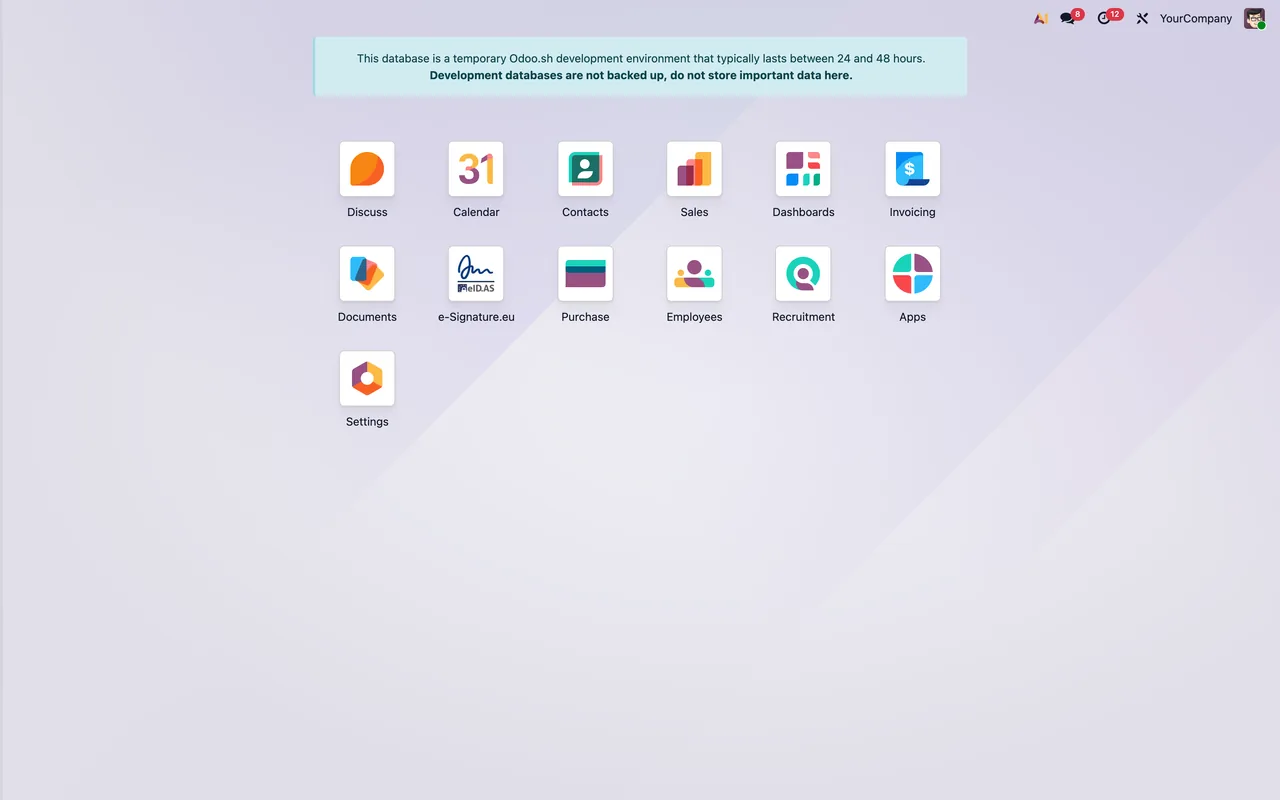
Once the module is installed, e-Signature.eu appears in the Odoo app grid alongside your other apps. Inside it you will find these menu entries:
e-Signature.eu › Signature Requestse-Signature.eu › Documentse-Signature.eu › Configuration, which groupse-Signature.eu › Configuration › Accountsande-Signature.eu › Configuration › Webhook Events
The module's Odoo Apps listing sums this up in one of its headings: «Everything you need, inside the menu bar». Another states the problem it starts from: «Stop bouncing between tools to get a document signed».
The models the module defines
Besides the menus, the module defines its own record types (models). These are their technical names and the description the module itself gives them:
esignature.eu.account: e-Signature.eu Account.esignature.eu.request: e-Signature.eu Signature Request.esignature.eu.signer: e-Signature.eu Signer.esignature.eu.method: e-Signature.eu Signing Method.esignature.eu.event: e-Signature.eu Webhook Event, which the module describes as an idempotency log.esignature.eu.mixin: e-Signature.eu Sendable Document Mixin.esignature.eu.send.wizard: theSend for Signaturewizard.esignature.eu.send.wizard.line: Send for Signature, Signer Line, that is, the signer lines of that wizard.
Account versus request: the two forms compared
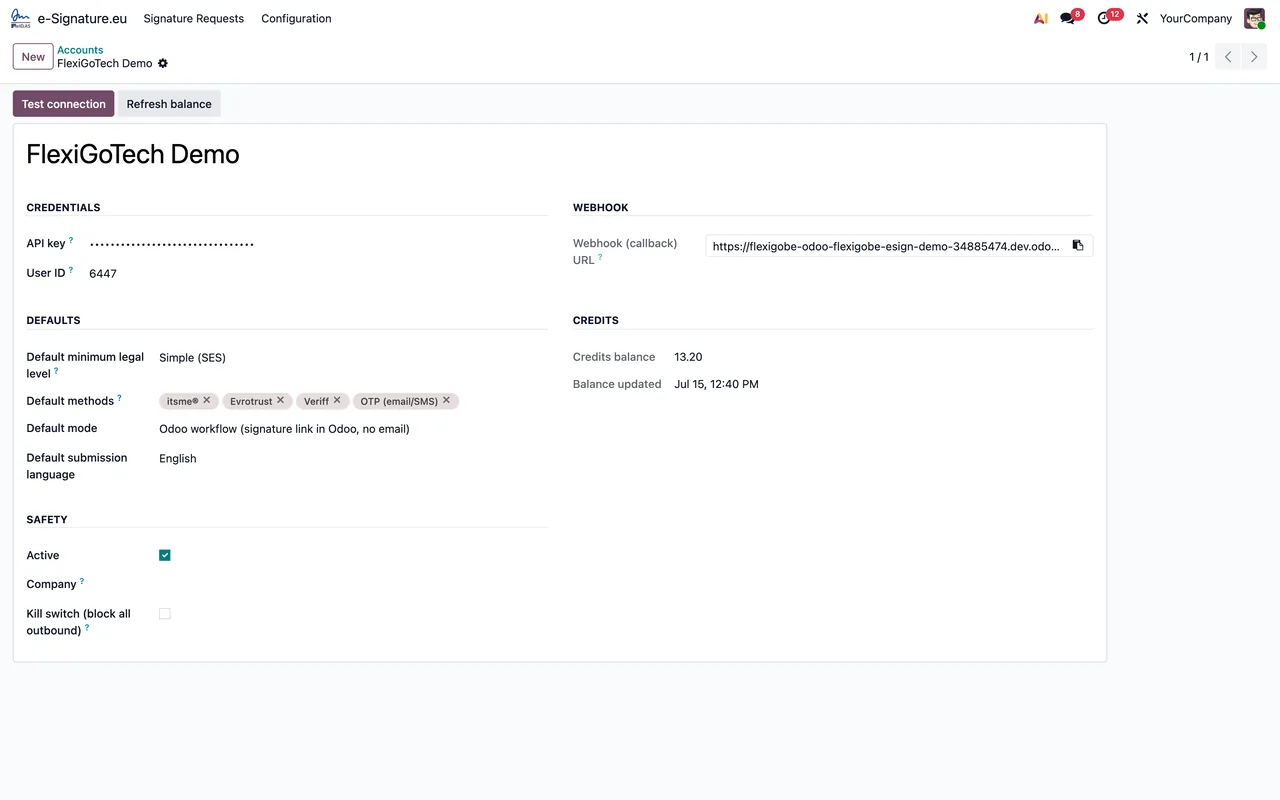
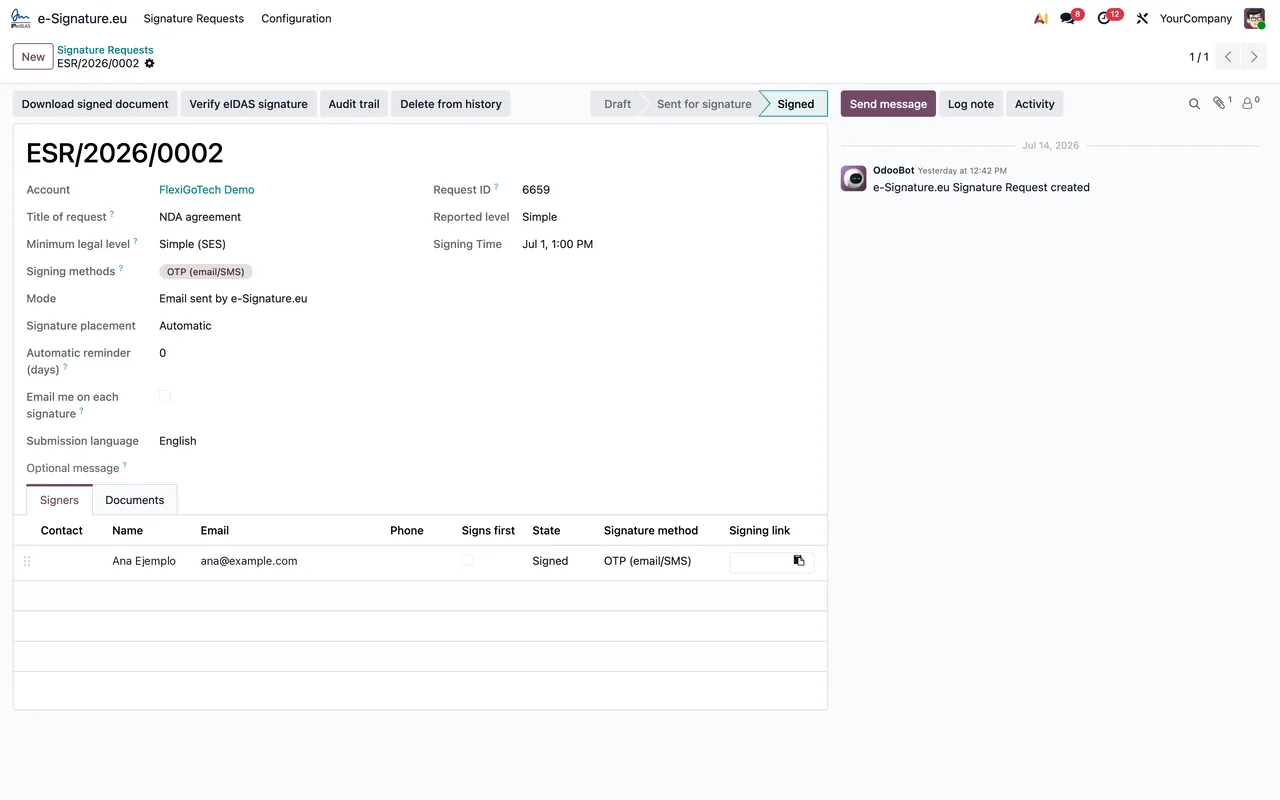
The screenshots show two of the module's forms. Put side by side, you can see what each one holds and how they relate.
| Aspect | Account form | Signature request form |
|---|---|---|
| Example in the screenshot | «FlexiGoTech Demo» account | Request titled NDA agreement |
| Data it brings together | Credentials, webhook URL, default values, credit balance and security options | Account, title, eIDAS level and signing method |
| Visible values | Not shown in the screenshot description | SES level and OTP method |
| Buttons or tabs | Test connection and Refresh balance buttons | Signers tab with one signer |
| State | Not shown in the screenshot description | Signed |
| Chatter | Not shown in the screenshot description | With a message from OdooBot |
The reading is straightforward. The account holds everything to do with the connection: credentials, webhook URL, credit balance and security, with one button to test the connection and another to refresh the balance. The request holds everything to do with a specific document: which account it uses, which eIDAS level and signing method, who signs and what state it is in.
The three scheduled tasks, side by side
The module comes with three scheduled tasks, and all three are active. What sets them apart is how often they run and what their name refers to.
| Task | Frequency | Active | What its name refers to |
|---|---|---|---|
e-Signature.eu: poll signature completion | Every hour | Yes | Completion of signatures |
e-Signature.eu: refresh credit balance | Every day | Yes | The credit balance |
e-Signature.eu: cleanup old webhook events | Every week | Yes | Old webhook events |
The most frequent task is the only one whose name mentions signatures, and the listing has a heading along the same lines: «Never wonder where a signature stands». The daily one refers to the credit balance, the same figure you see on the account form next to the Refresh balance button. The weekly one refers to old webhook events, and the e-Signature.eu › Configuration › Webhook Events menu carries the same name.
You can find these three tasks by their exact names, the ones in the first column of the table.
What a signature request goes through
Based on the facts and the screenshots, a signature request brings these pieces together:
- The e-Signature.eu account, in the account field on the form.
- The eIDAS level: the listing says «Pick the eIDAS level per request», so you choose it on each request.
- The signing method, OTP in the screenshot.
- The signers, on the
Signerstab. - The state, Signed in the screenshot, and the chatter with its messages.
The listing also describes the start and end of the journey: «Send a quote for signature in one click» and «From quotation to signed PDF in four steps». For the overall picture, another of its headings: «See every request at a glance».
The fields to fill in, the states and what to check in the first few days are covered in setting up the connector. If a warning appears when you test the connection or send something, the connector's error messages lists each literal text with an explanation.
Published versions and price
The connector is published on Odoo Apps for Odoo 17, 18, 19 and 20. According to the listing for each version, it costs €149 excluding VAT, a one-off payment per Odoo version, in all four. The listing also states that the interface is available in seven languages.
How FlexigoTech can help
At FlexigoTech we implement Odoo 17, 18, 19 and 20 and build bespoke connectors and integrations. If you want to look at the module before installing it, there is its page on flexigotech.com and the Odoo Apps listing. If your signing process needs something the connector does not include, we can look at it as a bespoke development.
Keep reading
Checked in the module's source code (version 20.0) and the linked sources
Sources
- Module source code: flexigobe_esignature_eidas_itsme_evrotrust_veriff_connector 20.0 (4958ee1e): views/menus.xml
- Module source code: flexigobe_esignature_eidas_itsme_evrotrust_veriff_connector 20.0 (4958ee1e): data/ir_cron.xml
- Module source code: flexigobe_esignature_eidas_itsme_evrotrust_veriff_connector 20.0 (4958ee1e): static/description/index.html
- Module source code: flexigobe_esignature_eidas_itsme_evrotrust_veriff_connector 20.0 (4958ee1e): models/esignature_account.py
- Module source code: flexigobe_esignature_eidas_itsme_evrotrust_veriff_connector 20.0 (4958ee1e): models/esignature_event.py
- Module source code: flexigobe_esignature_eidas_itsme_evrotrust_veriff_connector 20.0 (4958ee1e): models/esignature_method.py
- Module source code: flexigobe_esignature_eidas_itsme_evrotrust_veriff_connector 20.0 (4958ee1e): models/esignature_mixin.py
- Module source code: flexigobe_esignature_eidas_itsme_evrotrust_veriff_connector 20.0 (4958ee1e): models/esignature_request.py
- Module source code: flexigobe_esignature_eidas_itsme_evrotrust_veriff_connector 20.0 (4958ee1e): models/esignature_signer.py
- Module source code: flexigobe_esignature_eidas_itsme_evrotrust_veriff_connector 20.0 (4958ee1e): wizard/esignature_send_wizard.py
- apps.odoo.com/apps/modules/20.0/flexigobe_esignature_eidas_itsme_evrotrust_veriff_connecto
- apps.odoo.com/apps/modules/17.0/flexigobe_esignature_eidas_itsme_evrotrust_veriff_connecto
- apps.odoo.com/apps/modules/18.0/flexigobe_esignature_eidas_itsme_evrotrust_veriff_connecto
- apps.odoo.com/apps/modules/19.0/flexigobe_esignature_eidas_itsme_evrotrust_veriff_connecto
- flexigotech.com/en/services.html