

 Español
 Català
 Deutsch
 Français
 Português
 Italiano
 Nederlands
 Polski
What comes from Tickelia into Odoo
The connector imports the settlement the employee closes, with every expense inside it. Each line brings its VAT rate (one line per rate), the receipt photo, Tickelia's PDF and the attached documents. Everything arrives as a draft: nothing is posted until you decide.
Importing does not change anything in Tickelia either. The connector reads what is pending without marking it, and only asks for the accounted mark once Odoo has posted the document.
Before you start, choose in Account by how you want to receive it: Settlement (the usual way, each settlement the employee closes) or Report (each report as soon as it is approved). Never both at once, because the same expense sits first in a report and later in a settlement.
Step 1: map your tables
In Tickelia › Configuration you tell Odoo what each Tickelia item is:
- Expense Types
- The Odoo expense product for each type (hotel, taxi, meal…).
- Tax Codes
- The Odoo tax for each Tickelia VAT code.
- Cost Centers & Projects
- The analytic account for each one.
- Payment Methods
- Whether the employee or the company paid.
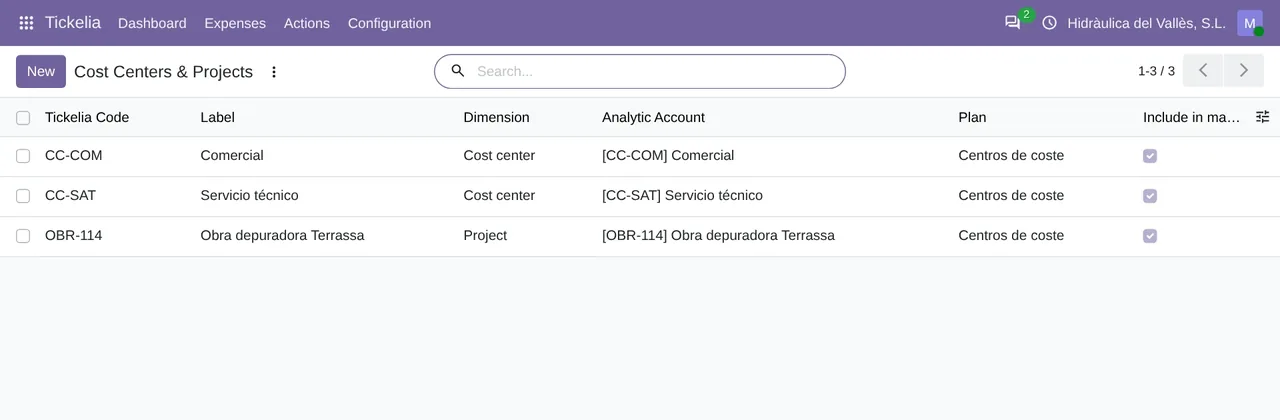
Tickelia › Configuration › Cost Centers & Projects: each Tickelia code with its label, its dimension (cost center or project) and the Odoo analytic account it goes to.Four checkboxes decide how much the connector trusts what it does not know. Require tax mapping comes on: a line with an unknown VAT code is blocked instead of falling back to the expense type's default tax. Require payment method mapping also comes on, and it is the one that stops a corporate-card expense from being reimbursed to the employee. Require cost center mapping comes off: the line goes in without an analytic distribution. And Create missing merchants creates the vendor you do not have yet, looking it up first by its tax ID.
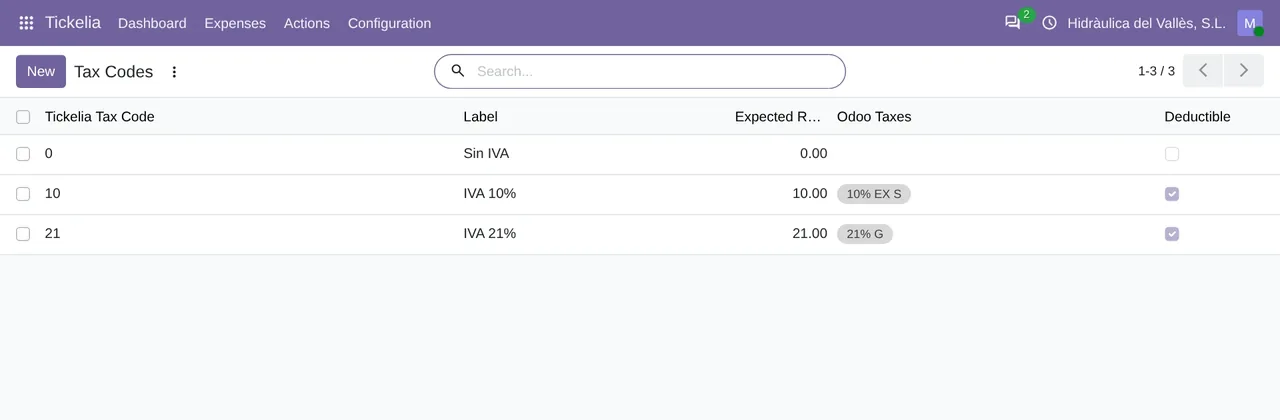
Tickelia › Configuration › Tax Codes: each Tickelia VAT code with its expected rate and the Odoo taxes it maps to.Step 2: import
Run the import from Tickelia › Actions › Import from Tickelia whenever you like. If you would rather have it run on its own, switch on Import automatically for the company: it comes off, and once it is on the scheduled task imports every 4 hours.
Step 3: validate and fill in what is missing
Press Validate on the settlement. Each line checks the employee, the expense type, the VAT, the payment method, the analytics and the amounts, and everything missing is written in full on the line, under Blocking Reason. If the settlement ends up blocked, you fix it in Tickelia › Configuration, validate it again and it moves on.
A line without an amount, such as mileage without a rate per km, blocks nothing: it stays in Not Booked (0). We explain it in Tickelia mileage and allowances in Odoo.
Step 4: post
With the settlement in Ready to post, press Post to Accounting. Out of the box, Post journal entries is off: Odoo expenses are created and follow your usual approval. Switch it on and the connector goes all the way to the posted journal entry.
In Odoo 17 and 18 the expenses are grouped into expense reports, one per employee and per who paid. In Odoo 19 and 20 the journal entry hangs off each expense. If you want it all to run by itself, Post settlements automatically (off by default) makes the daily task post the settlements that validate with no problem at all; anything blocked stays in the list, untouched.
Last step: telling Tickelia
Acknowledge back to Tickelia comes on. When you post, the settlement is marked as accounted in Tickelia and leaves its pending queue, and the connector asks Tickelia to email the employee. The connector reads the pending list again and only records the mark if the settlement is no longer there.
We tested it on 19-11-2026 against a real Tickelia account. The journal entry number was written on the expense and the settlement left the pending list. The only thing Tickelia did not confirm was that email to the employee, and the connector keeps that as a warning, without retrying.
Questions about Tickelia expense reports in Odoo
Does anything get posted without me seeing it?
No. Everything comes in as a draft. Only if you switch on automatic posting does the daily task post for you, and only what validates with no problem at all.
What about the VAT recovery invoices?
Tickelia explains that it turns receipts into full invoices by asking the merchant for them, and that it integrates them with the ERP to book them. The connector brings each pending exchange invoice and records it as a vendor bill, with its PDF and the merchant's tax ID.
How much does it cost?
The module costs €9 per Odoo version on Odoo Apps. It runs with FlexigoTech Cloud, from €49/month: Connector plan Standard at €49/month or €490/year, or Pro at €98/month or €980/year, VAT excluded. The trial is 14 days, free and without a card. It includes 2 months of support to get it running and, while you stay subscribed, updates and support, as the terms of sale 2.2 say. It is all on the Tickelia connector page.
Which Odoo versions does it work with?
Odoo 17, 18, 19 and 20 with Expenses and Accounting, on Odoo.sh or on your own server. It does not work on Odoo Online. Your Tickelia account with API access and its fees are separate.
Keep reading
Checked in the connector's source code (version 20.0) and the linked sources
Sources
- Module source code: flexigo_tickelia_connector 20.0 (840deb1b): models/tickelia_settlement_line.py:219
- Module source code: flexigo_tickelia_connector 20.0 (840deb1b): models/tickelia_settlement_line.py:137
- Module source code: flexigo_tickelia_connector 20.0 (840deb1b): models/res_company.py:213
- Module source code: flexigo_tickelia_connector 20.0 (840deb1b): models/res_company.py:222
- Module source code: flexigo_tickelia_connector 20.0 (840deb1b): models/res_company.py:227
- Module source code: flexigo_tickelia_connector 20.0 (840deb1b): models/res_company.py:231
- Module source code: flexigo_tickelia_connector 20.0 (840deb1b): views/res_config_settings_views.xml:86
- Module source code: flexigo_tickelia_connector 20.0 (840deb1b): models/res_company.py:179
- Module source code: flexigo_tickelia_connector 20.0 (840deb1b): models/res_company.py:183
- Module source code: flexigo_tickelia_connector 20.0 (840deb1b): models/res_company.py:202
- Module source code: flexigo_tickelia_connector 20.0 (840deb1b): models/res_company.py:193
- Module source code: flexigo_tickelia_connector 20.0 (840deb1b): models/tickelia_settlement.py:447
- Module source code: flexigo_tickelia_connector 20.0 (840deb1b): models/tickelia_settlement.py:537
- Module source code: flexigo_tickelia_connector 20.0 (840deb1b): models/tickelia_settlement.py:206
- Module source code: flexigo_tickelia_connector 20.0 (840deb1b): models/tickelia_api_client.py:20
- Module source code: flexigo_tickelia_connector 20.0 (840deb1b): models/res_company.py:188
- Module source code: flexigo_tickelia_connector 20.0 (840deb1b): static/description/index.html
- Module source code: flexigo_tickelia_connector 20.0 (840deb1b): views/menu.xml
- Module source code: flexigo_tickelia_connector 20.0 (840deb1b): data/tickelia_cron_data.xml
- tickelia.com/recuperacion-de-iva/
- tickelia.com/integracion/
- flexigotech.com/en/tickelia-connector-odoo.html
- FlexigoTech real test against a Tickelia account (19-11-2026)
- flexigotech.com/en/condiciones-contratacion.html
- tickelia.com/
- tickelia.com/en/
- tickelia.com/ca/
- tickelia.com/de/
- tickelia.com/fr/
- tickelia.com/pt/
- tickelia.com/pl/