

 Español
 Català
 Deutsch
 Français
 Português
 Italiano
 Nederlands
 Polski
The Tickelia card
Tickelia has its own card. Its website, in Spanish, presents it as a Visa card to pay all kinds of company expenses that makes reporting them simpler. It also issues virtual cards: a single-use virtual card for each approved spending request, disabled once the purchase is made.
Accounting needs to know, expense by expense, whether the company paid it or the employee advanced it.
The case: a settlement with three expenses
A business trip with three expenses in the same settlement:
- Hotel
- €132.00, paid with the corporate card.
- Taxi
- €18.70, paid by the employee.
- Meal
- €26.40, paid by the employee.
The settlement adds up to €177.10, but the company only has to reimburse 18.70 + 26.40 = €45.10. The hotel is already on the card's bank statement. If it were taken as an employee expense, they would be paid €132.00 they never advanced.
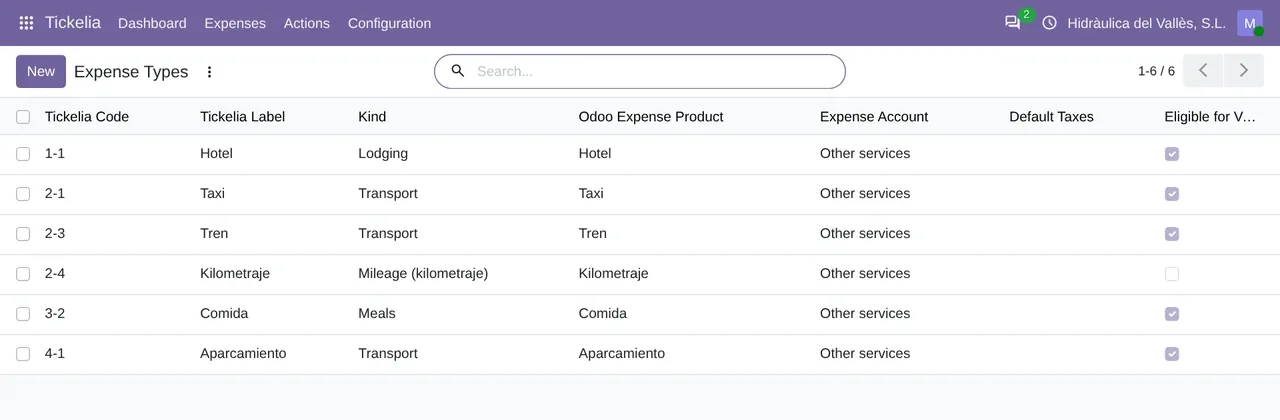
Tickelia › Configuration › Expense Types: the types in the case (hotel, taxi, meal) and the rest, each with its kind and its Odoo expense product.What the payment method decides
Each Tickelia expense can carry its payment method. In Tickelia › Configuration › Payment Methods you map each one to Employee paid (to reimburse) or to Company paid (corporate card / direct). That is what decides, in Odoo, who paid the expense.
For the company methods you also pick the Company Payment Journal: the bank or cash journal of the card or account that paid. The Corporate card checkbox marks the payment methods reconciled through Tickelia's card module.
If the payment method is not mapped
Require payment method mapping comes on. With it, a line whose payment method the connector does not know is blocked, and the reason says it plainly: it cannot tell whether the company owes that money to the employee. In the case, the hotel would not go in until its payment method is mapped.
If a line comes with no payment method at all, the connector treats it as paid by the employee. That is the safe choice: at worst it reimburses too little, never twice.
How it looks in Odoo
In Odoo 17 and 18, expenses are grouped into expense reports per employee and per who paid, because Odoo does not mix what is reimbursed with what the company paid in one report. The case would give two reports: one ending in To reimburse, with the taxi and the meal (€45.10), and one ending in Company paid, with the hotel (€132.00).
In Odoo 20, approving an expense leaves its journal entry in draft. With Post journal entries on, the hotel is posted through its payment, in the card's journal, and the taxi and the meal with the settlement date.
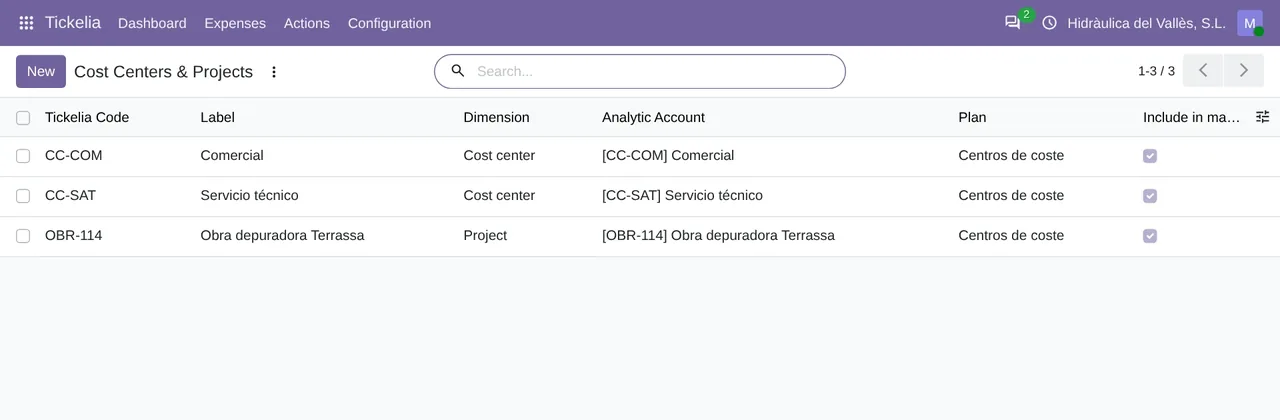
Tickelia › Configuration › Cost Centers & Projects: the cost center or project of each expense, with its Odoo analytic account.Card reconciliation
The connector also brings the card movements. In Tickelia › Expenses › Card Reconciliation, each movement shows the expense that justifies it and its bank statement line. It is Justified by an expense, No expense or Closed without expense.
That way the accountant sees at a glance the charges nobody justified, such as a bank fee or a personal use already paid back. In Odoo, a Tickelia manager can close them with Close in Tickelia without expense: the connector closes the movement in Tickelia and reads it back, and if Tickelia did not close it, nothing changes in Odoo.
The full journey of a settlement, from import to journal entry, is in Tickelia expense reports in Odoo.
Questions about the Tickelia card in Odoo
Can I request a card or change its limits from Odoo?
No. Tickelia's own cards for the United States (asking for a card, setting its limits) are not managed from Odoo.
How much does it cost?
The module costs €9 per Odoo version on Odoo Apps. It runs with FlexigoTech Cloud, from €49/month: Connector plan Standard at €49/month or €490/year, or Pro at €98/month or €980/year, VAT excluded. The trial is 14 days, free and without a card. It includes 2 months of support to get it running and, while you stay subscribed, updates and support, as the terms of sale 2.2 say. It is all on the Tickelia connector page.
Which Odoo versions does it work with?
Odoo 17, 18, 19 and 20 with Expenses and Accounting, on Odoo.sh or on your own server. It does not work on Odoo Online. Your Tickelia account with API access and its fees are separate.
Keep reading
Checked in the connector's source code (version 20.0) and the linked sources
Sources
- Module source code: flexigo_tickelia_connector 20.0 (840deb1b): models/tickelia_payment_method.py:2
- Module source code: flexigo_tickelia_connector 20.0 (840deb1b): models/tickelia_payment_method.py:31
- Module source code: flexigo_tickelia_connector 20.0 (840deb1b): models/tickelia_payment_method.py:37
- Module source code: flexigo_tickelia_connector 20.0 (840deb1b): models/tickelia_settlement_line.py:363
- Module source code: flexigo_tickelia_connector 20.0 (840deb1b): models/res_company.py:222
- Module source code: flexigo_tickelia_connector 20.0 (840deb1b): models/tickelia_settlement.py:447
- Module source code: flexigo_tickelia_connector 20.0 (840deb1b): models/tickelia_settlement.py:537
- Module source code: flexigo_tickelia_connector 20.0 (840deb1b): models/tickelia_settlement.py:206
- Module source code: flexigo_tickelia_connector 20.0 (840deb1b): models/tickelia_card_movement.py:56
- Module source code: flexigo_tickelia_connector 20.0 (840deb1b): models/tickelia_card_movement.py:183
- Module source code: flexigo_tickelia_connector 20.0 (840deb1b): models/tickelia_card_movement.py:2
- Module source code: flexigo_tickelia_connector 20.0 (840deb1b): models/tickelia_settlement_line.py:219
- Module source code: flexigo_tickelia_connector 20.0 (840deb1b): models/res_company.py:227
- Module source code: flexigo_tickelia_connector 20.0 (840deb1b): static/description/index.html
- Module source code: flexigo_tickelia_connector 20.0 (840deb1b): views/menu.xml
- tickelia.com/tarjetas/
- FlexigoTech real test against a Tickelia account (19-11-2026)
- flexigotech.com/en/tickelia-connector-odoo.html
- flexigotech.com/en/condiciones-contratacion.html
- tickelia.com/
- tickelia.com/en/
- tickelia.com/ca/
- tickelia.com/de/
- tickelia.com/fr/
- tickelia.com/pt/
- tickelia.com/pl/