

 Español
 Català
 Deutsch
 Français
 Português
 Italiano
 Nederlands
 Polski
What Tickelia says
On its expense digitisation page, Tickelia sums it up in Spanish: its solution lets you set the mileage rate and calculate it automatically with Google Maps or with predefined routes. About allowances, it says you can easily report the per diems set by your collective agreement.
With the rate set, the line arrives with its amount and enters Odoo like any other expense.
What the connector does with a line without an amount
If a line arrives without an amount, the connector does not book it and leaves it in Not Booked (0). That happens with mileage without a rate per km or with an allowance without an amount. The line does not hold the settlement back: the rest is validated and posted as usual.
What is not booked stays visible. The settlement and its journal entries carry a note naming each line: «Not booked, Tickelia sent them with no amount: %s. If they must be paid, set the rate per km or the allowance amount in Tickelia.»
We checked it on 19-11-2026 against a real Tickelia account, with a test settlement of three expenses. The mileage without a rate and the allowance without an amount stayed in Not Booked (0), and the 24.20 EUR expense was posted with its VAT, its photo and its analytics, with the note on the journal entry.
If it has to be paid: two ways
The first is the one the note suggests: set the rate per km or the allowance amount in Tickelia, so the next settlements arrive complete.
The second works for the settlement you already have in Odoo. Since version 1.2.0, if you type the amount on the line by hand, pressing Post to Accounting validates the settlement again and that line is booked with the others. That way Tickelia is never told a settlement is accounted while one of its expenses is missing.
Kilometres as the quantity
On a mileage line with a rate, the Odoo expense carries the kilometres as its quantity. The unit price then comes out as the rate per km, which is what an auditor looks for. The line keeps Distance (km) and Rate per km, and the expense description carries both.
Depending on the order in which Odoo computes its fields, the unit price can be calculated while the quantity is still 1. The connector corrects it, so that a 31.20 EUR expense does not read «120 x 31,20».
Where you set it up
In Tickelia › Configuration › Expense Types each type has its Kind. The ones that matter here are Mileage (kilometraje) and Per diem / allowance (dieta), and they tell the connector which fields count: the distance for mileage.
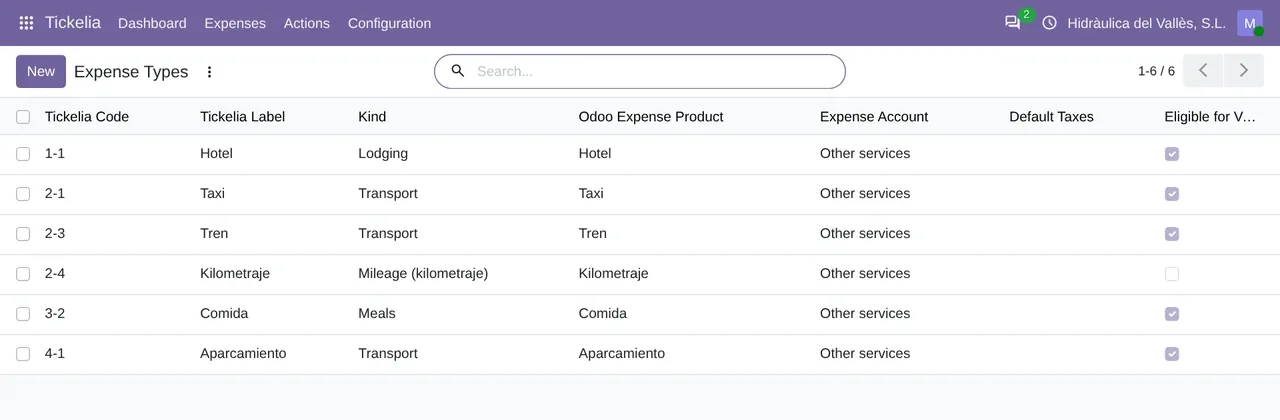
Tickelia › Configuration › Expense Types: each Tickelia code with its label, its kind (Mileage among them) and the Odoo expense product it maps to.VAT is separate, in Tickelia › Configuration › Tax Codes. With Require tax mapping on, which is how it comes, a line with an unknown code is blocked instead of taking the expense type's default tax.
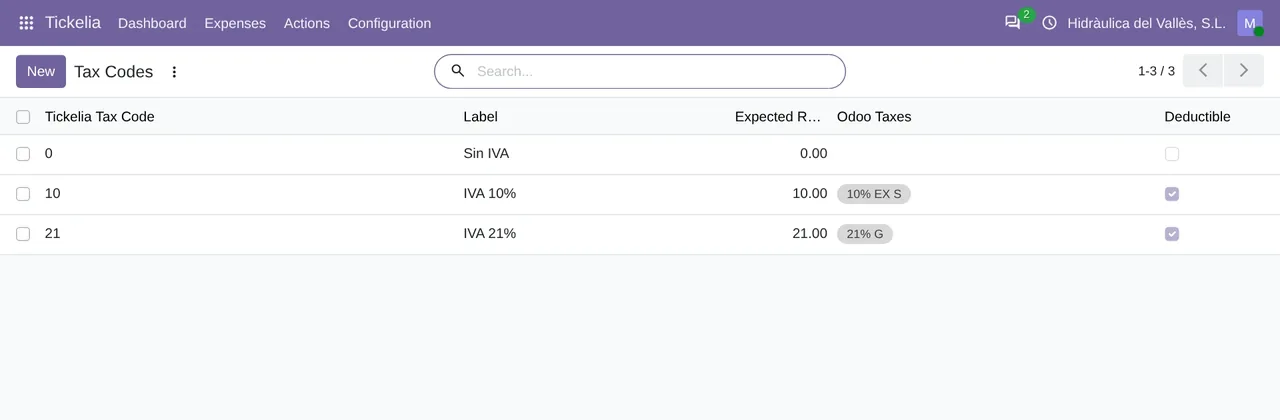
Tickelia › Configuration › Tax Codes: the Tickelia codes, from the one without VAT to the 10 % and 21 % ones, each with its Odoo tax.If you want the whole journey of a settlement, from import to journal entry, it is in Tickelia expense reports in Odoo.
Questions about Tickelia mileage in Odoo
Does a €0 line block the settlement?
No. Since version 1.2.0 it stays in Not Booked (0) and the rest of the settlement goes on.
Where do I see which lines were not booked?
In Tickelia › Expenses › Expense Lines, by their status, and in the note on the settlement and its journal entries.
How much does it cost?
The module costs €9 per Odoo version on Odoo Apps. It runs with FlexigoTech Cloud, from €49/month: Connector plan Standard at €49/month or €490/year, or Pro at €98/month or €980/year, VAT excluded. The trial is 14 days, free and without a card. It includes 2 months of support to get it running and, while you stay subscribed, updates and support, as the terms of sale 2.2 say. It is all on the Tickelia connector page.
Which Odoo versions does it work with?
Odoo 17, 18, 19 and 20 with Expenses and Accounting, on Odoo.sh or on your own server. It does not work on Odoo Online. Your Tickelia account with API access and its fees are separate.
Keep reading
Checked in the connector's source code (version 20.0) and the linked sources
Sources
- Module source code: flexigo_tickelia_connector 20.0 (840deb1b): models/tickelia_settlement_line.py:211
- Module source code: flexigo_tickelia_connector 20.0 (840deb1b): models/tickelia_settlement.py:375
- Module source code: flexigo_tickelia_connector 20.0 (840deb1b): models/tickelia_settlement.py:326
- Module source code: flexigo_tickelia_connector 20.0 (840deb1b): models/tickelia_settlement_line.py:555
- Module source code: flexigo_tickelia_connector 20.0 (840deb1b): models/tickelia_settlement_line.py:596
- Module source code: flexigo_tickelia_connector 20.0 (840deb1b): models/tickelia_settlement_line.py:79
- Module source code: flexigo_tickelia_connector 20.0 (840deb1b): models/tickelia_expense_type.py:51
- Module source code: flexigo_tickelia_connector 20.0 (840deb1b): models/tickelia_settlement_line.py:137
- Module source code: flexigo_tickelia_connector 20.0 (840deb1b): models/res_company.py:213
- Module source code: flexigo_tickelia_connector 20.0 (840deb1b): models/tickelia_settlement_line.py:219
- Module source code: flexigo_tickelia_connector 20.0 (840deb1b): models/res_company.py:202
- Module source code: flexigo_tickelia_connector 20.0 (840deb1b): models/res_company.py:179
- Module source code: flexigo_tickelia_connector 20.0 (840deb1b): static/description/index.html
- Module source code: flexigo_tickelia_connector 20.0 (840deb1b): views/menu.xml
- tickelia.com/digitalizacion-del-gasto/
- flexigotech.com/en/tickelia-connector-odoo.html
- FlexigoTech real test against a Tickelia account (19-11-2026)
- flexigotech.com/en/condiciones-contratacion.html
- tickelia.com/
- tickelia.com/en/
- tickelia.com/ca/
- tickelia.com/de/
- tickelia.com/fr/
- tickelia.com/pt/
- tickelia.com/pl/