
 Español
 Català
 Deutsch
 Français
 Português
 Italiano
 Nederlands
 Polski



Tickelia connector for Odoo
Tickelia expense settlements reach Odoo with every line and its receipt; you review them and post them when you decide.
€49/month14 days free, no card
Yearly and Pro
- Standard€49/month · €490/year
- Pro€98/month · €980/year
Reply within 1 working day; with Pro, 4 hours. FlexigoTech Cloud pricing
After you buy
- You pay for the license (€9 + VAT) and get an email with the link to download the module.
- You install it in your Odoo, on Odoo.sh or your own server.
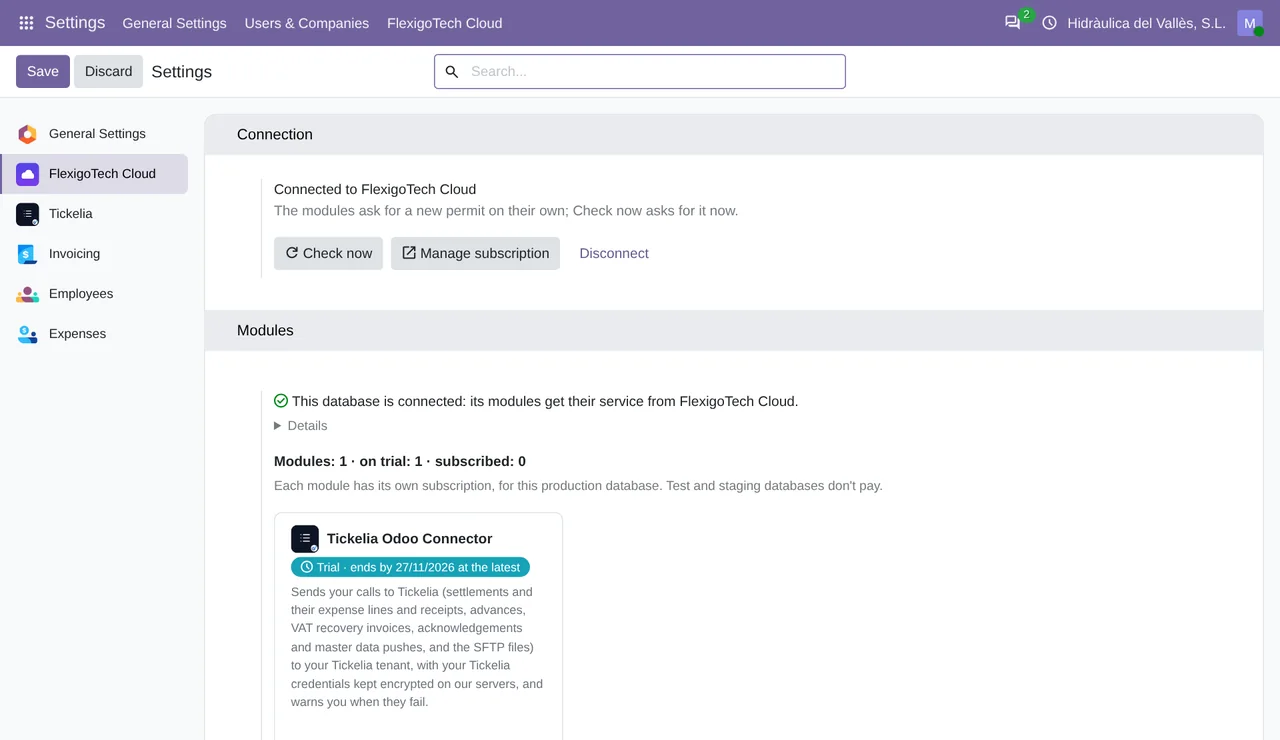
- In Settings → FlexigoTech Cloud you accept the data list and press «Try free for 14 days». The trial doesn't ask for a card.
- To continue, you press «Subscribe», create your account on app.flexigotech.com and pay for the plan by card.
Every purchase includes 2 months of support: we help you install it, set it up and get it working, by email and video call.
- Tested on Odoo 17, 18, 19 and 20
- Odoo Learning Partner
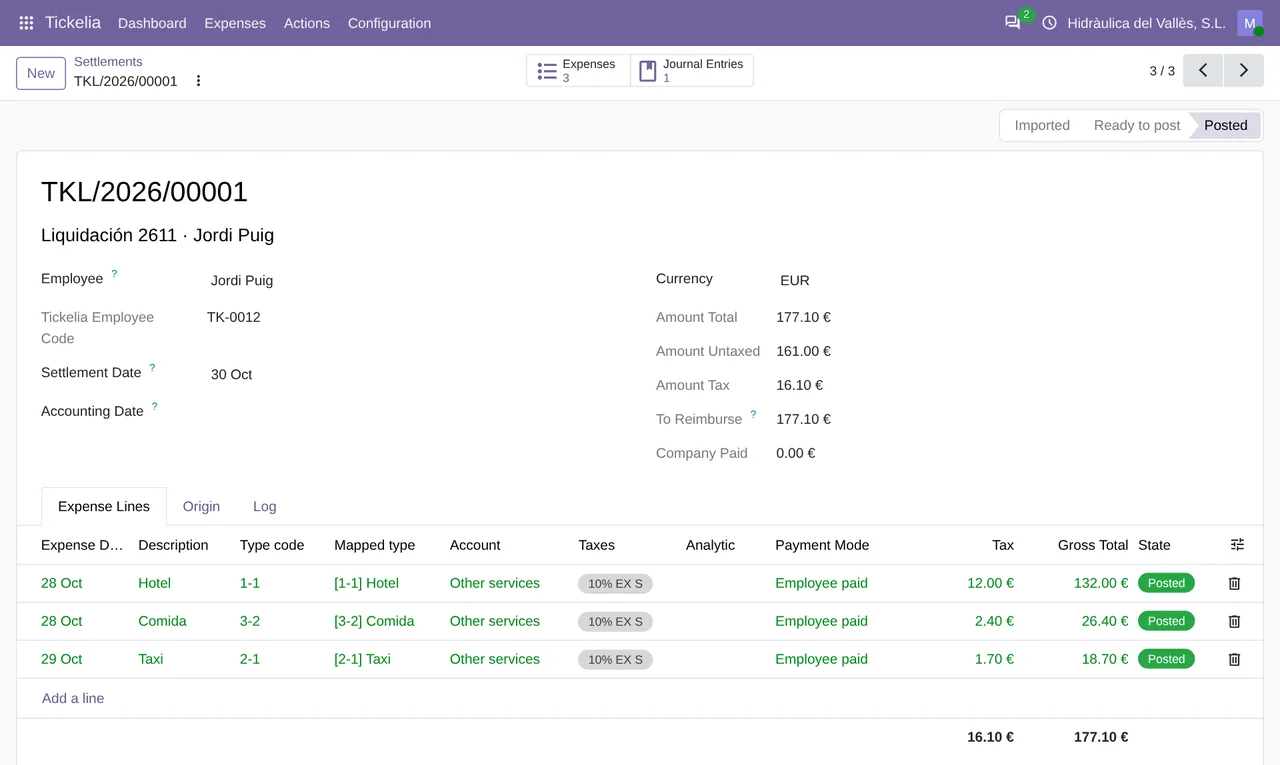
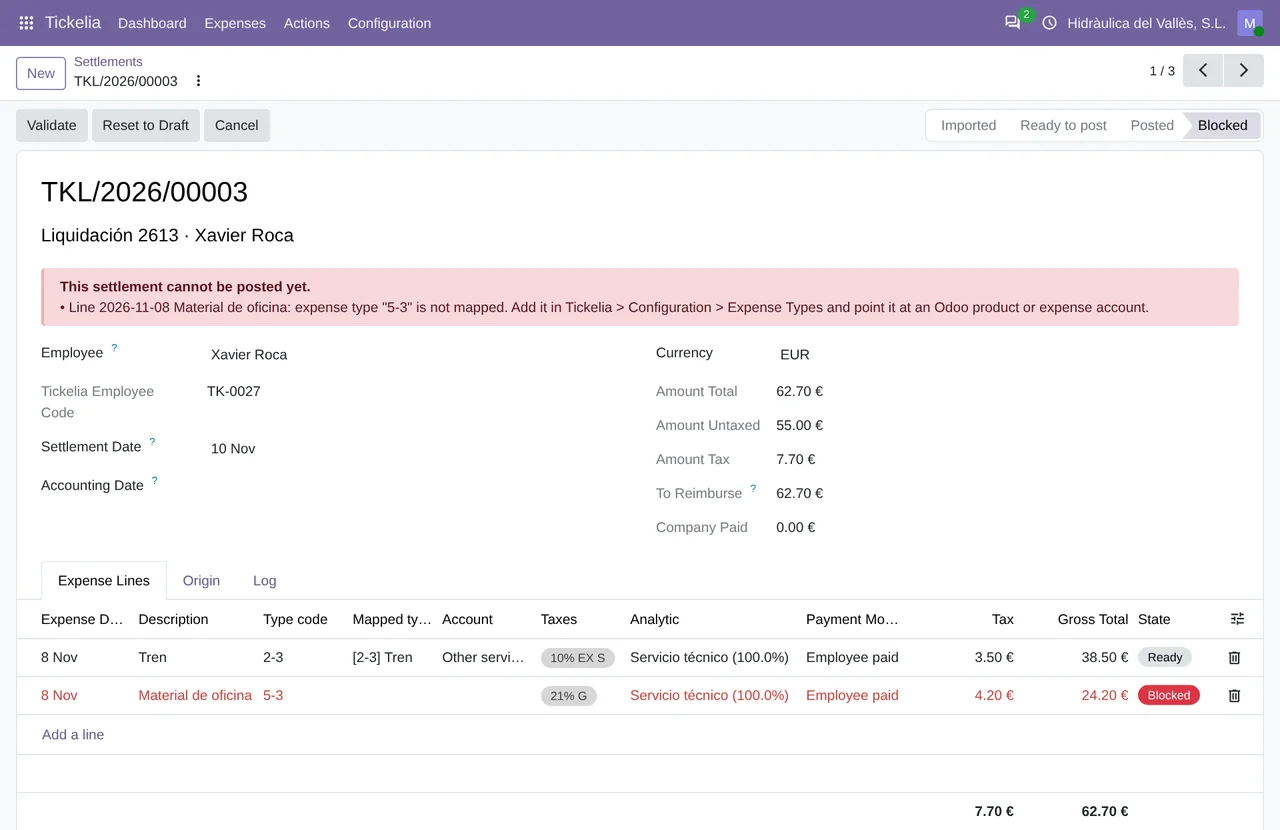
 Each Tickelia settlement, with its statusReal Odoo screenshot
Get started in 3 steps
- Install the moduleOn Odoo.sh or your own server, once it is published.
- Turn on FlexigoTech CloudAn administrator accepts the data list in Settings › FlexigoTech Cloud.
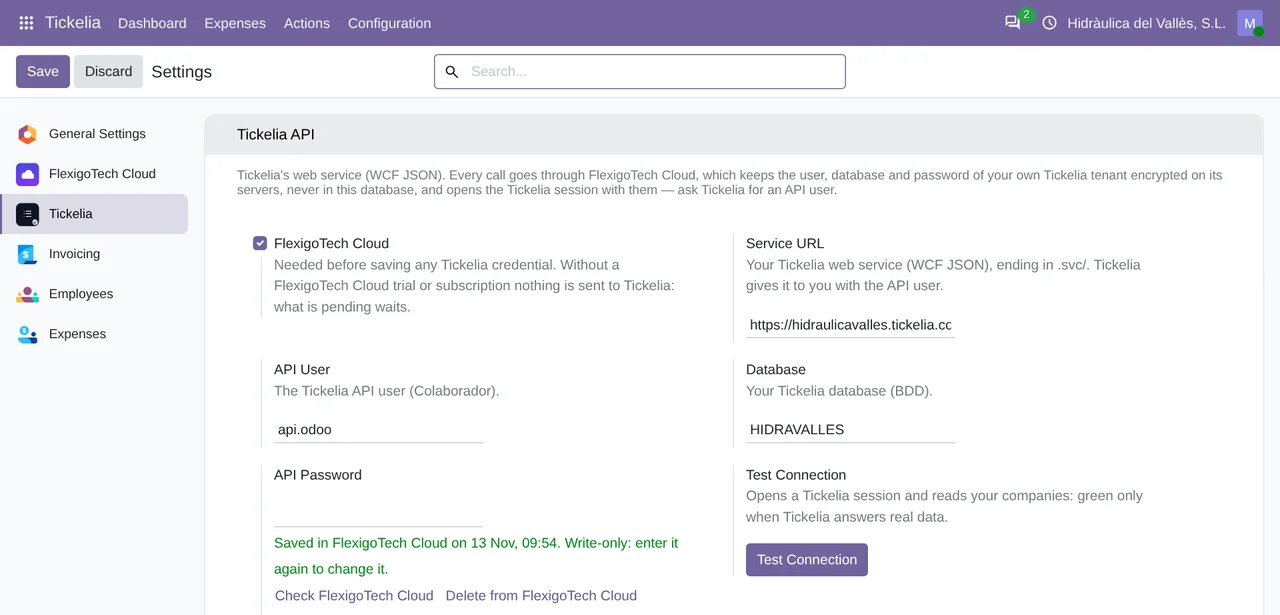
- Connect TickeliaIn Tickelia › Configuration › Settings, accept the consent, enter your service address, user, database and password, and press «Test Connection».
Fill in the mappings Tickelia expense types, VAT codes and cost centers, each with its Odoo account, tax or analytic account.
What you need Your Tickelia account with API access: your service address, the user, the database and the password Tickelia gives you. And Odoo 17, 18, 19 or 20 with Expenses and Accounting. Tickelia's fees are not included.
What it does
- Every settlement, line by lineWith the employee, expense type, VAT and receipt.
- Nothing posted uncheckedWhatever does not match stays blocked and says why.
- Company card or employeeWhat the card paid is not refunded again.
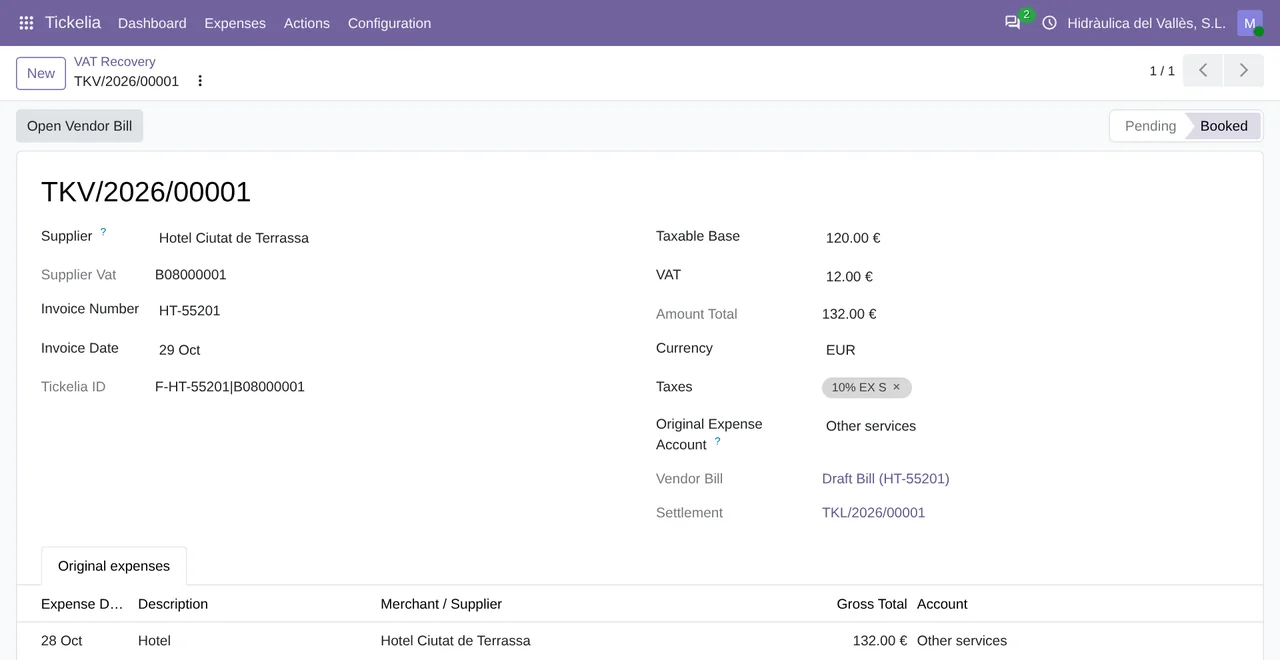
- Advances and VAT recoveryAdvances and swap invoices come into Odoo too.
How it works
From Tickelia
- Pending settlements, with every expense and its receipt
- Employee advances
- The swap invoices of the VAT recovery service
FlexigoTech Cloud
From Odoo
- The notice that a settlement is posted
- The payment of an advance
- Cost centers, projects and employees, after a preview

The Tickelia API user, database and password go once, encrypted, to FlexigoTech Cloud, which opens the Tickelia session on every call. Odoo does not keep the password.
Where you see it in Odoo
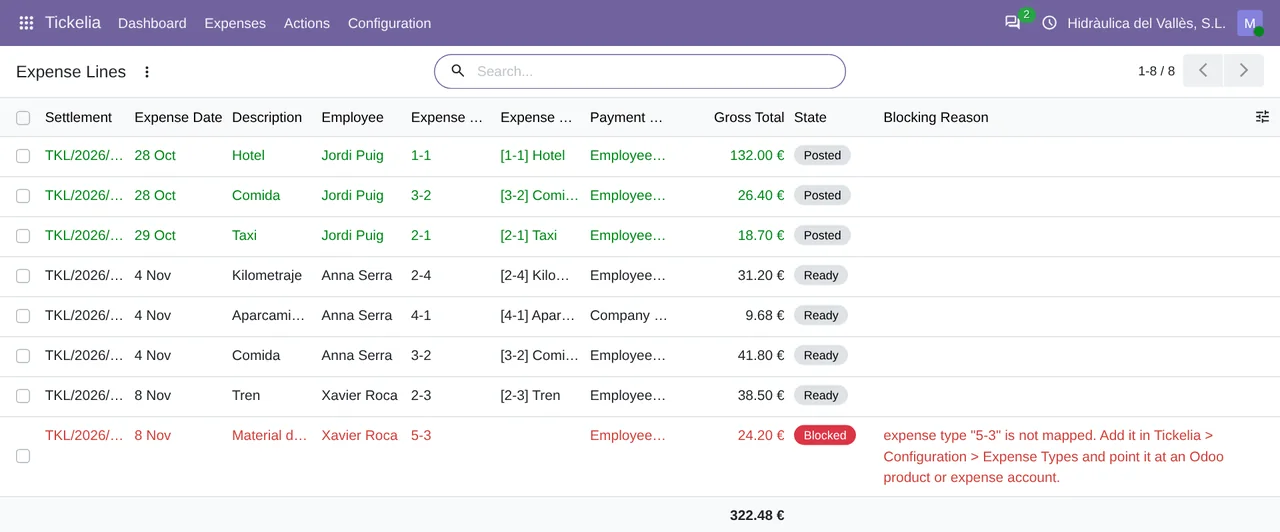
- Tickelia menudashboard, settlements, expense lines, advances and VAT recovery
 Expenseseach posted line, an Odoo expense with its entry
 Accountingthe VAT swap invoice, as a vendor bill
Inside Odoo
Real Odoo screenshots.
Price
Standard
€49a month + VAT
€490 a year + VAT 2 months free
- The connection runs on our servers
- We alert you if sync fails
- First response 1 working day
- Video call included for the first 2 months
- Accounts per connector Up to 3
Pro
€98a month + VAT
€980 a year + VAT 2 months free
- Everything in Standard
- First response 4 working hours
- Video call if needed
- Accounts per connector Up to 10
- + €9 for the module license, per Odoo version
- 14 days free, no card
- Cancel in two clicks
- Every purchase includes 2 months of support: we help you install it, set it up and get it working, by email and video call. While you're subscribed, support for the service stays included. Still integrating or testing? Extend your free trial.
If you cancel What the subscription gives stops. Your data stays in your Odoo.
- Support with response timesMonday to Friday, 9:00 to 18:00 (Barcelona), except public holidays.
- Maintenance and improvementsOdoo 17-20, on Odoo.sh or your own server
- We handle changes to their APIIf the platform changes its API, we adapt the module and the service.
- Servers in GermanyWe store your credentials encrypted
- Tested On Odoo 17, 18, 19 and 20. Against a live Tickelia account, with a test settlement (November 2026): it imports it, posts it in Odoo and writes the acknowledgement back to Tickelia, which stores the journal entry number on each posted expense and removes the settlement from the pending list. The only thing Tickelia did not confirm is the notification email to the employee. Also against a simulator of its API built from its official documentation and Postman collection.
- Over 240 tests passing on Odoo 17, 18, 19 and 20 · 13-11-2026
- No reviews yet · leave yours
Frequently asked questions
Can I buy it now?
Yes. You can buy it on the Odoo App Store or in our shop, for Odoo 17, 18, 19 and 20: €9 per Odoo version, plus the FlexigoTech Cloud subscription, from €49/month or €490/year.
Does anything get posted on its own?
Not unless you switch it on. Everything arrives as an imported settlement and a person posts it. With «Post settlements automatically» on, a daily task posts only the ones with no open problem.
How often do settlements come in?
The scheduled task imports every 4 hours for the companies that turn on automatic import. If you do not want to wait, start it yourself from Tickelia › Actions › Import from Tickelia.
What happens to an expense Odoo cannot translate?
The settlement stays blocked with the full list of what is missing: an expense type with no mapping, a VAT code with no tax, an employee with no Tickelia code. You fix it in Configuration, validate it again and it moves on.
What if I run several companies in Tickelia?
Each Odoo company connects with its own credentials and only imports the settlements, advances and invoices of its own Empresa, the one with its tax number. Anything from another company stays out and is noted in the log.
Does it work over SFTP?
The module has it, but it is not live yet: FlexigoTech Cloud only connects to the Tickelia SFTP servers on its list, and that list stays empty until Tickelia confirms their addresses and fingerprints. The API does work.
What happens after you press «Buy now»?
1. You pay for the license (€9 + VAT) and get an email with the link to download the module. 2. You install it in your Odoo, on Odoo.sh or your own server. 3. In Settings → FlexigoTech Cloud you accept the data list and press «Try free for 14 days». The trial doesn't ask for a card. 4. To continue, you press «Subscribe», create your account on app.flexigotech.com and pay for the plan by card.
Does it work on Odoo Online?
No: Odoo Online does not allow third-party modules. It is for Odoo 17, 18, 19 and 20, on Odoo.sh or on your own server.
Who installs it?
You, in your Odoo, once it is published. Configuration help will be included; if you would rather we set it up, we do it as a separate service.
What support is included?
Every purchase includes 2 months of support: we help you install it, set it up and get it working, by email and video call. While you're subscribed, support for the service stays included.
What if something fails?
We monitor the connection and email you if something fails. And support has response times: first response within 1 working day; with Pro, within 4 working hours.
What about my data? And if I cancel?
The connection goes through FlexigoTech Cloud, on our servers in Germany, with your credentials encrypted. You cancel in two clicks: if you don't subscribe when the trial ends, the service stops and nothing is charged. Your data stays in your Odoo, and you can always view and export it.
Using Tickelia but not Odoo yet?
We set up Odoo, connect it to Tickelia and stay on.
From €2,450 + VAT
Start with OdooRelated
Tickelia is a trademark of its owner. FlexigoTech publishes this connector on its own, with no endorsement or sponsorship from the trademark owner.