

 Español
 Català
 Deutsch
 Français
 Português
 Italiano
 Nederlands
 Polski
What the message says and when it appears
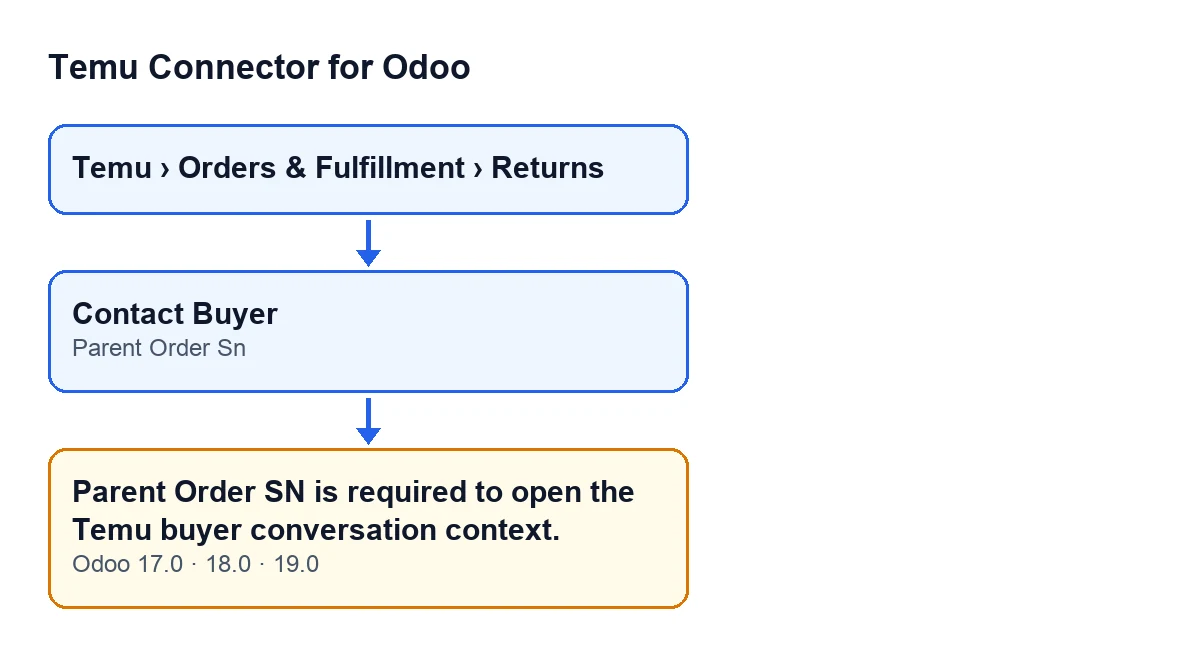
The full text is Parent Order SN is required to open the Temu buyer conversation context. It appears when you press the Contact Buyer button on a Temu return. The code checks one condition: whether the Parent Order Sn field is empty. If it is, the action stops, no window opens and the message tells you the value is missing.
The message is in the published code of versions 17, 18 and 19 of the module. The diagram below puts together the menu you go through, the button, the field and the message.

What it means
The button needs the value of Parent Order Sn to build what it is going to open. So, before doing anything else, the code looks at whether that field is empty and, if it is, raises the message. There is no other condition behind this message: it does not depend on any other field of the return.
The Parent Order Sn field is visible on the «Temu Returns» form and also in the «Temu Returns» list. That is the place to check it.
Before you press the button
Use this first list to check the ground before the error shows up.
- Open the return from the menu
Temu › Orders & Fulfillment › Returns.
- Look at the
Parent Order Snfield on the «Temu Returns» form. It also appears in the «Temu Returns» list, so you can review several returns at a glance.
- Look for the
Contact Buyerbutton. In Odoo 17, 18 and 19 the view hides it whenCan Contact Buyeris not met. That field is not shown in any view, so you will not see it on screen: if the button is not there, there is nothing to press and therefore no message either.
Contact Buyer button label.If you get the message
The message comes when you press the button. Here is the sequence to sort it out.
- Close the message. The action has stopped: no new window has been opened and nothing has been saved by that action.
- Go back to the return form and check whether
Parent Order Snis empty. That is exactly what the code checks: if the field is empty, it raises the message.
- If it is empty, the button cannot go on while it stays that way. The field needs a value before you press again.
- Once the field has a value, press
Contact Buyeragain.
What the button does when the field has a value
The code follows a clear order. First it checks whether Parent Order Sn is empty; if it is, it raises the message and stops there. If the field has a value, it builds an address from the return's instance and opens it in a new window. The button writes nothing to the return.
The address points to the order-detail.html page and includes the value of Parent Order Sn as a parameter. When building it, the code discards any parameter that has no value, so only those with a value are included.
After you have fixed it
- Check that pressing
Contact Buyeropens a new window with theorder-detail.htmlpage.
- Go back to the «Temu Returns» list and check whether other returns have an empty
Parent Order Sn, so the next one does not give you the same message.
Versions, subscription and help
Temu Connector for Odoo is published on Odoo Apps for versions 17.0, 18.0, 19.0 and 20.0. It is a one-off purchase per version and needs the FlexigoTech Cloud subscription (Connector plan): €49 per month or €490 per year, excluding VAT. The connection goes through FlexigoTech Cloud, which stores the credentials encrypted, monitors synchronisation and emails you if it fails. Without a subscription, or with the service suspended, whatever the subscription provides stops; your data stays in your Odoo.
If you are implementing Odoo and want to review how Temu fits into your returns flow, FlexigoTech implements Odoo 17, 18, 19 and 20 and builds connectors and custom integrations. The module's details are on its page at flexigotech.com.
Keep reading
Checked in the connector's source code (version 19.0) and the linked sources
Sources
- Module source code: flexigobe_temu_connector 19.0 (455b3f0f): models/temu_return.py
- Module source code: flexigobe_temu_connector 19.0 (455b3f0f): views/temu_return_views.xml
- apps.odoo.com/apps/modules/19.0/flexigobe_temu_connector
- flexigotech.com/precios.html
- flexigotech.com/en/services.html