

 Español
 Català
 Deutsch
 Français
 Português
 Italiano
 Nederlands
 Polski
Instance records for Temu open from the Temu menu. The module is published for Odoo 17, 18, 19 and 20.
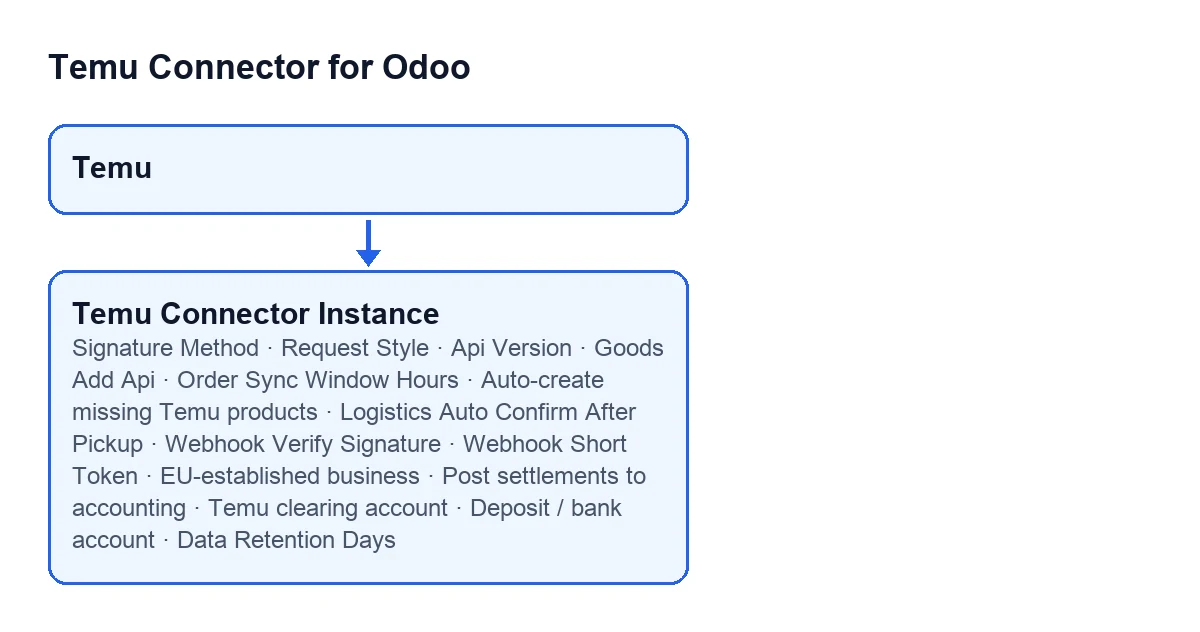
Before you touch anything
The idea is to tick boxes phase by phase. Several fields ship with a default value; your job is to decide which ones stay as they are and which ones you change because your case calls for it.
- Open the
Temu Dashboardform from theTemumenu.
- Keep the documentation of your Temu app to hand: the help texts of
Signature MethodandRequest Stylerefer to what your app requires or expects.

Connecting to the Temu API
Three fields define how requests are signed and built.
Signature Method: choose betweenMD5 (secret + sorted params + secret)andHMAC-SHA256. The default is the first. Its help text says the Temu Open API commonly uses the MD5 wrapped signature and that you should use HMAC only if your app docs require it. Leave the default unless that documentation asks for HMAC.
Request Style: choose betweenQuery params + JSON body(the default) andSingle JSON payload. Its help text says to pick the HTTP payload format your Temu app expects, so the decision comes from your app, not from preference.
Api Version: an optional text field. Its help text says it overrides the Temu API version (for exampleV2) for endpoints that require an explicit version. Fill it in only if an endpoint in your app needs it.
Products, orders and shipments
Goods Add Api: sets how products are published. The default is the V3 option, the one the module labels as recommended. According to its help text, V3 publishes with one simplified, auto-enriched call: Temu picks the category and attributes and downloads images from the URLs you provide, with nocatId, cost template or image-upload calls needed. The V2 option is the manual one: it requires a leafcatIdand a cost template. If you have no reason to use V2, start with V3.
Order Sync Window Hours: an integer,24by default. Its help text describes it as the fallback time window used when no previous order sync timestamp exists. Decide how many hours back you want to look in that case.
Auto-create missing Temu products: a checkbox, on by default. If you turn it off, according to its help text the product sync only refreshes Odoo products already linked to Temu goods or SKU identifiers, and no new inventory products are created automatically. Leave it on if you want missing ones created; turn it off if you only want to refresh what is already linked.
Logistics Auto Confirm After Pickup: a checkbox, on by default. It makes the module sendautoConfirmAfterPickupexplicitly when creating or updating a shipment. Its help text adds that Temu now defaults this totrue, but you can turn it off to preserve manual confirmation for delayed shipments. The question to answer: do you want manual confirmation on those shipments?
Webhook
These two fields are on the Webhook tab of the form.
Webhook Verify Signature: a checkbox, off by default. If you turn it on, incoming webhook requests must provide a valid HMAC-SHA256 signature.
Webhook Short Token: read-only, so you do not type it in. By default it holds a short random value, and its help text gives the reason: to keep the Push Website URL short. TheRegenerate Webhook Tokenbutton fills it in. If you need a different value, that is the route.
Regenerate Webhook Token; with Odoo in Spanish, Regenerate Webhook Token.Finance and tax
These fields are on the Finance & Tax tab. The first two are checkboxes that are off by default, and it is worth understanding what each one switches on.
EU-established business(groupVAT / Tax (informational only)): its help text speaks of a conservative default, off. Turn it on only if your business is established in the EU. It is used only to tailor informational VAT notes, never to compute tax.
Post settlements to accounting(groupSettlements → Accounting (optional GL posting)): off by default. According to its help text, once on, posting a settlement creates a balanced journal entry: the net payout and Temu fees against a clearing account. The help text itself asks you to configure the journal and the accounts below first.
Temu clearing account: the receivable or clearing account the payout settles against, which according to its help text nets against invoices. With the default values it is not visible: it only appears whenPost settlements to accountingis on.
Deposit / bank account: says where the net payout lands. If you leave it empty, according to its help text the clearing account is used. Like the previous one, it stays hidden until you turn onPost settlements to accounting.
Compliance
Data Retention Days: an integer,30by default. It sits on theTerms & Policiestab, in theCompliance Operationsgroup. Its help text describes it as the automatic cleanup threshold for sensitive payload logs. Set the value that fits your internal policy.
Final pass
- Review the checkboxes that come with a default:
Auto-create missing Temu productsandLogistics Auto Confirm After Pickupare on;Webhook Verify Signature,EU-established businessandPost settlements to accountingare off.
- Check that the format fields (
Signature Method,Request Style,Api Version) match what your Temu app's documentation says.
- If you have turned on
Post settlements to accounting, confirm that the journal and the accounts below are configured.
How FlexigoTech can help
The connection to Temu goes through FlexigoTech Cloud, which stores the credentials encrypted, watches the sync and emails you if it fails. If you are implementing Odoo and want someone to go over these decisions with you, FlexigoTech implements Odoo 17, 18, 19 and 20 and builds custom connectors and integrations. You can see the module on its Odoo Apps page or on the module page.
Keep reading
Checked in the connector's source code (version 19.0) and the linked sources
Sources
- Module source code: flexigobe_temu_connector 19.0 (455b3f0f): models/temu_instance.py
- Module source code: flexigobe_temu_connector 19.0 (455b3f0f): models/fgt_cloud.py
- apps.odoo.com/apps/modules/19.0/flexigobe_temu_connector
- flexigotech.com/en/services.html
- flexigotech.com/precios.html