

 Español
 Català
 Deutsch
 Français
 Português
 Italiano
 Nederlands
 Polski
What it is and where you see its effect
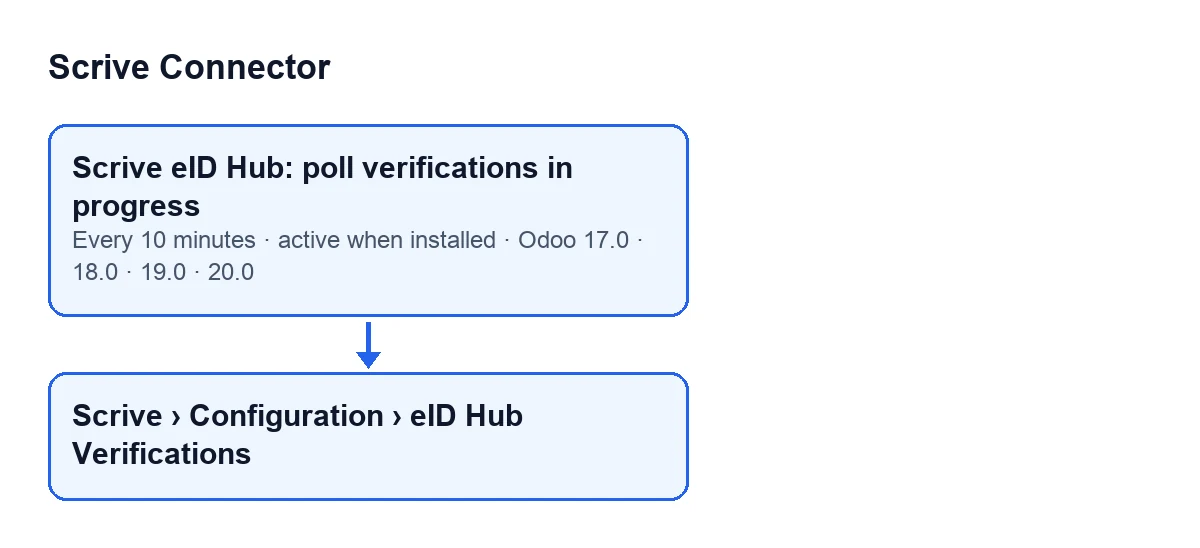
The scheduled task Scrive eID Hub: poll verifications in progress exists in every published branch of the module: Odoo 17.0, 18.0, 19.0 and 20.0. It runs every 10 minutes and is active on install. In Odoo 17.0 it repeats without end.
You see its effect in the verifications, which open from Scrive › Configuration › eID Hub Verifications. The Configuration part of the menu needs the Manager permission and the Scrive part needs User; if you lack one, you do not see that part.
The Status field of each verification appears on its form and in the Identity Verifications list, with the values New, Started, Failed and Complete. The form also shows, read-only, the Scrive Transaction ID, which the module fills in, not you; its help reads: The UUID assigned by Scrive eID Hub once the transaction is created.
Scrive eID Hub: poll verifications in progress.
Timeline of one run
These are the moments of a run, in the order the Odoo 20.0 code goes through them.
- On install The task is active and scheduled every 10 minutes; in Odoo 17.0 it repeats without end.
- Every 10 minutes, at the start First it checks that there is a FlexigoTech Cloud service. If there is none, it calls nothing at Scrive and closes nothing: the verifications wait for the service to come back, and the run is noted in the server log.
- Then, the search It takes the verifications in
NeworStarted, oldest first by creation date, up to a maximum per run. Left out are those of an eID account with its kill switch on or without its token saved in FlexigoTech Cloud. That filter is part of the search itself, so those rows do not take up room in the batch.
- Row by row, the check Each verification is handled in isolation: a failure in one does not drag down the next. If it has a
Scrive Transaction ID, the module asks Scrive for its status and stores it. If Scrive answersFailedorComplete, the verification is treated as over and the access link hosted at Scrive is cleared. If it answersComplete, the module evaluates whether the identity returned matches the contact's.
- If Scrive does not answer properly When the check ends in an API or configuration error, it is noted in the server log and the error text is kept on the verification (unless its identity data has already been purged). The code then carries on with the time check for that same row.
- Then, the time limit If after the check it is still
NeworStartedand has been open longer than allowed since its creation, it is cancelled. With a transaction ID and an account whose kill switch is not on, the module may ask Scrive to cancel it. If that cancellation fails with an API or configuration error, it is noted and the row is closed in Odoo anyway. Without a transaction ID, it is closed in Odoo without calling Scrive.
- On closing The verification goes to
Failed, its access link is cleared andThe identity verification was not completed in time; it was cancelled automatically.is stored as the reason.
- If FlexigoTech Cloud does not let the call through The run stops there, nothing is marked and the remaining rows wait for the next run. If it was cancelling, the verification is not closed either.
- Any other failure on a row It is noted in the server log and the run carries on with the others.
- At the end You see the result in the
Statuscolumn of theIdentity Verificationslist.
Why the task exists
According to the code comments, Scrive used to be queried only when the browser came back and from the completion webhook. That webhook is off by default and needs Scrive to allow the URL first. An abandoned or slow verification therefore stayed in New or Started for ever. The code gives Swedish BankID on the same device in iOS as an example, where the browser can come back before the app has finished.
So each run does two things, in this order: it re-checks every verification in progress and then cancels and closes the ones that have been open too long, so that their access link stops being usable.
What to check if it does nothing
Go through these conditions, which come straight from the code:
- FlexigoTech Cloud service. Without the service, the run calls nothing at Scrive and closes nothing. The same happens if FlexigoTech Cloud pauses during the run: it stops and the remaining rows wait.
- eID account. If its kill switch is on, or its token is not saved in FlexigoTech Cloud, its verifications do not enter the search and are neither checked nor closed.
- Status. Only verifications in
NeworStartedare looked at. One inFailedorCompleteis no longer touched. - Transaction ID. Without a
Scrive Transaction ID, the task checks nothing; for that verification, the task only closes it once the allowed time has passed. - Order and batch. Work goes from oldest to newest, with a maximum per run. If many verifications are in progress, a recent one may have to wait for a later run.
- Version. The task is in Odoo 17.0, 18.0, 19.0 and 20.0, with the same frequency.
Cost and help
The module is a one-off payment per version and needs the FlexigoTech Cloud subscription, Connector plan: €49/month or €490/year excluding VAT, up to 3 platform accounts. The connection goes through FlexigoTech Cloud, which stores the credentials encrypted. Without a subscription, or with the service suspended, what the subscription provides stops; your data stays in your Odoo. It is published on Odoo Apps for 17.0, 18.0, 19.0 and 20.0: see the listing or the module page.
FlexigoTech implements Odoo 17, 18, 19 and 20 and builds custom connectors and integrations, in case you want to review how this flow fits into your installation.
Keep reading
Checked in the connector's source code (version 17.0 and 20.0) and the linked sources
Sources
- Module source code: flexigobe_scrive_connector 20.0 (21b3b940): data/ir_cron.xml
- Module source code: flexigobe_scrive_connector 17.0 (b9f2fc7f): data/ir_cron.xml
- Module source code: flexigobe_scrive_connector 20.0 (21b3b940): models/scrive_eid_transaction.py
- apps.odoo.com/apps/modules/20.0/flexigobe_scrive_connector
- flexigotech.com/en/services.html
- flexigotech.com/precios.html
- Module source code: flexigobe_scrive_connector 20.0 (21b3b940): wizard/scrive_send_wizard.py