

 Español
 Català
 Deutsch
 Français
 Português
 Italiano
 Nederlands
 Polski
Questions that keep coming up
Who does the regulation apply to?
The AEAT sums it up in four conditions, known in Spain as the «regla de los 4 NO». It applies to businesses and professionals established in Spain who issue invoices and who, among other things, do not invoice exclusively by hand, are not in the Immediate Supply of Information system (Suministro Inmediato de Información, SII), whether required to or by choice, and do not have their tax address in the historical territories of the Basque Country or in Navarre.
What if I write my invoices by hand, from an invoice book?
Then you are not using any computerised billing system and the regulation does not apply to you. Be careful about mixing the two: the AEAT's general rule is that if any invoice comes out of a computer system, all your invoicing has to be computerised.
I use a Word or Excel template. Is that a billing system?
No, as long as you use it only to enter the invoice data, issue the invoice, print it and keep the information. The AEAT gives a clear example: an Excel file that produces lists of issued invoices with totals or other formulas is not covered.
When does it become one?
When the same spreadsheet or document processes the information and directly produces the VAT or personal income tax (IRPF) record books, the accounts or any other output you use to meet your tax obligations. The AEAT's example: if you program a macro that generates the record book of issued invoices, that spreadsheet is a computerised billing system and must meet the requirements.
Who decides whether my spreadsheet crosses the line?
The AEAT can check whether the spreadsheet or word processor you issue invoices with meets the criteria of a billing system, based on the capabilities and tools you use. A template that started out simple and kept picking up formulas and macros deserves a review.
I sell online. Does that count the same?
Yes. For the AEAT it makes no difference whether you sell in a conventional or a virtual way: online shops are covered too.
| How you use the spreadsheet | What the AEAT says |
|---|---|
| Writing, issuing, printing and keeping invoices | It is not a billing system |
| Lists of invoices with totals or formulas | Not covered |
| A macro that generates the record book of issued invoices | It is a billing system: it must comply with the regulation |
| Handwritten invoices from an invoice book | No computer system: not covered |

What the law asks of the software
Spain's General Tax Law (Ley General Tributaria) requires invoicing, accounting and management software to guarantee the integrity, preservation, accessibility, legibility, traceability and unalterability of the records, with no changes that are not logged in the system itself. Having software that does not comply, when it is required to, carries a fixed fine of €50,000 for each financial year.
On deadlines: Royal Decree-law (Real Decreto-ley) 15/2025 set 1 January 2027 for companies that file corporate income tax (Impuesto sobre Sociedades) and 1 July 2027 for everyone else. A note from the Ministry of Finance (Hacienda) dated 5 October 2026 announces plans to postpone the pending obligations until October 2028, to line them up with mandatory e-invoicing, and keeps those integrity and traceability requirements in substantially equivalent terms. Until that change is published, the 2027 dates are the ones that count.
What about the AEAT's free app?
It exists, on the AEAT's website (sede electrónica), and is meant for the self-employed (autónomos), professionals and companies that issue few invoices a year or have simple invoicing. It issues full invoices, not simplified ones (tickets), and its records cannot be exported to carry on invoicing with another system. If you plan to grow or to sell on several channels, bear in mind that your records stay behind when you leave it.
If you are going to switch, do it once
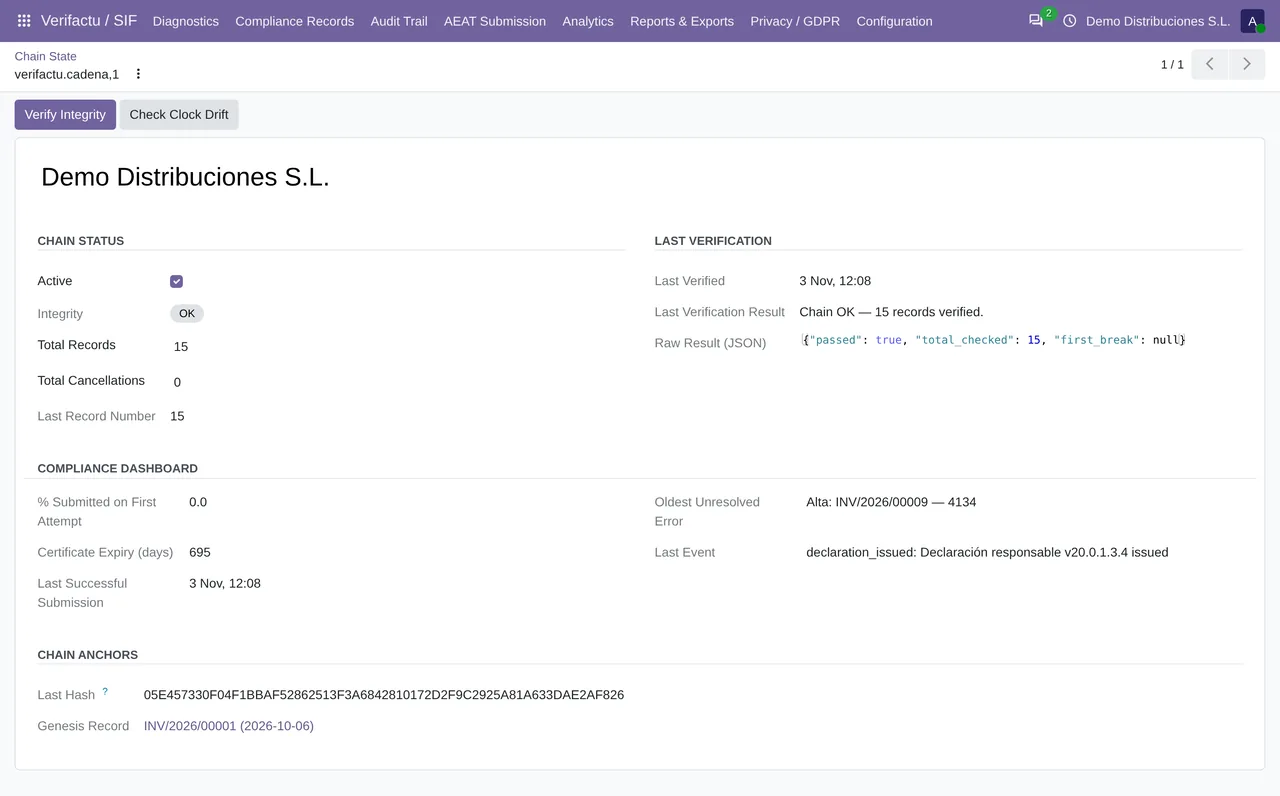
If your spreadsheet already does more than the AEAT considers harmless, or if you sell on several channels and issue a lot of invoices, the practical move is a system that does both jobs: invoicing and compliance. Odoo with the VeriFactu module keeps a billing record for every invoice and a cancellation record for every cancellation. In Odoo 18, 19 and 20, the «Verifactu: Process Submission Queue» task works through the queue of submissions to the AEAT every minute; in Odoo 17, the version of that task published today runs only once and then switches itself off, because it lacks the number of calls that Odoo 17 asks of recurring tasks.
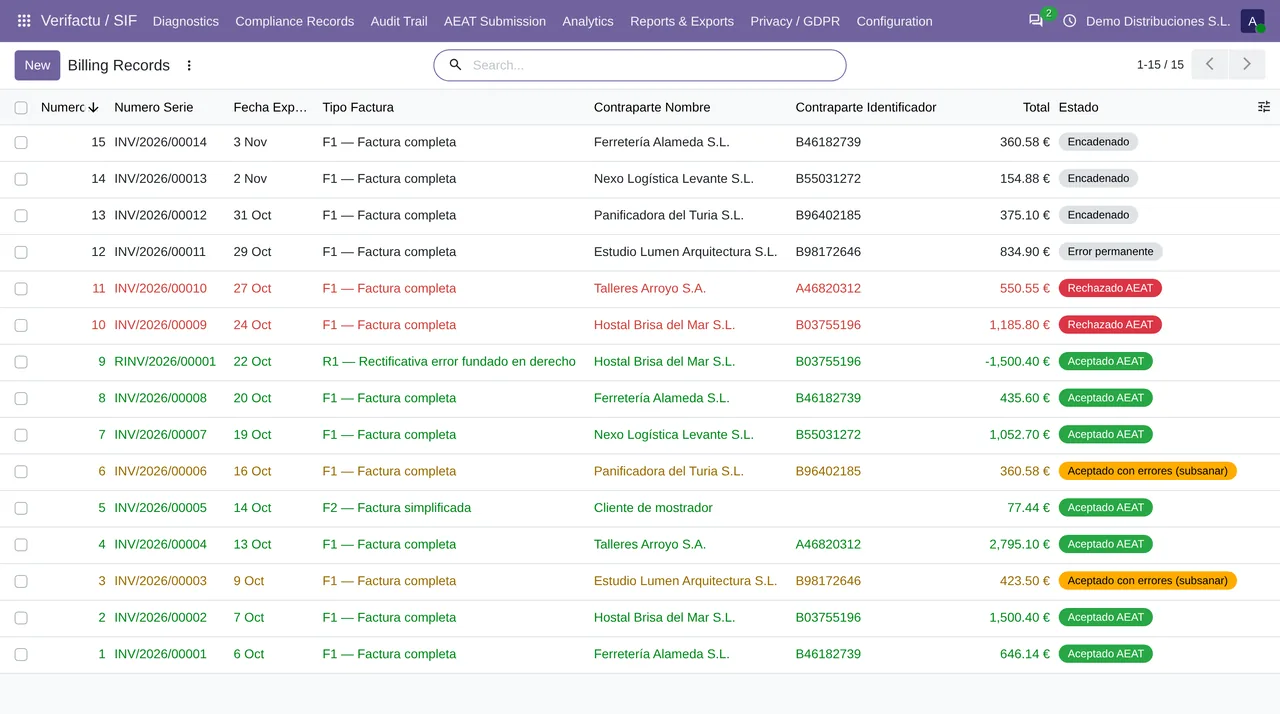
The Verifactu / SIF menu holds the records (Billing Records and Cancellation Records), the AEAT Submission section and the Audit Trail event log.
How we do it
At FlexigoTech we implement Odoo 17, 18, 19 or 20 with the VeriFactu module set up for your company. Odoo Online does not accept third-party modules, so we work on Odoo.sh or on your own server. If you need something built to measure, we analyse it for free and give you a closed price before we write any code.
Write to comercial@flexigobe.com, leave your details on our contact page or book a call.
Keep reading
Checked in the module's source code (version 17.0, 18.0, 19.0 and 20.0) and the linked sources
Sources
- Module source code: flexigo_spain_verifactu 20.0 (4dc42be4): data/verifactu_crons.xml
- sede.agenciatributaria.gob.es/Sede/iva/sistemas-informaticos-facturacion-verifactu/pregunt
- www.boe.es/buscar/act.php?id=BOE-A-2003-23186
- sede.agenciatributaria.gob.es/static_files/Sede/Biblioteca/Manual/Practicos/Manual_factura
- sede.agenciatributaria.gob.es/Sede/iva/sistemas-informaticos-facturacion-verifactu/nota-in
- www.hacienda.gob.es/sgt/gabsehacienda/nota-informativa-verifactu.pdf
- Module source code: flexigo_spain_verifactu 20.0 (4dc42be4): views/menu_views.xml
- flexigotech.com/precios.html
- flexigotech.com/services/desarrollo-a-medida.html
- flexigotech.com/en/services.html
- Module source code: flexigo_spain_verifactu · 17.0 6d25152: data/verifactu_crons.xml · Odoo 17.0: odoo/addons/base/models/ir_cron.py (numbercall) · 18.0 4695b88 · 19.0 142df15 · 20.0 aa2ea3d: data/verifactu_crons.xml