

 Español
 Català
 Deutsch
 Français
 Português
 Italiano
 Nederlands
 Polski
One number for five questions
A stock spreadsheet has one column per product. Shopify tracks five inventory states for that same product:
- Available: what you can sell.
- Committed: units set aside that can no longer be sold, such as those in an order you have not packed yet or reserved in a draft order.
- Unavailable: units in the warehouse but not for sale, because they are damaged, in quality control or kept as safety stock.
- Incoming: goods on their way that cannot be sold until they are received.
- On hand: everything at a location, the sum of committed, unavailable and available.
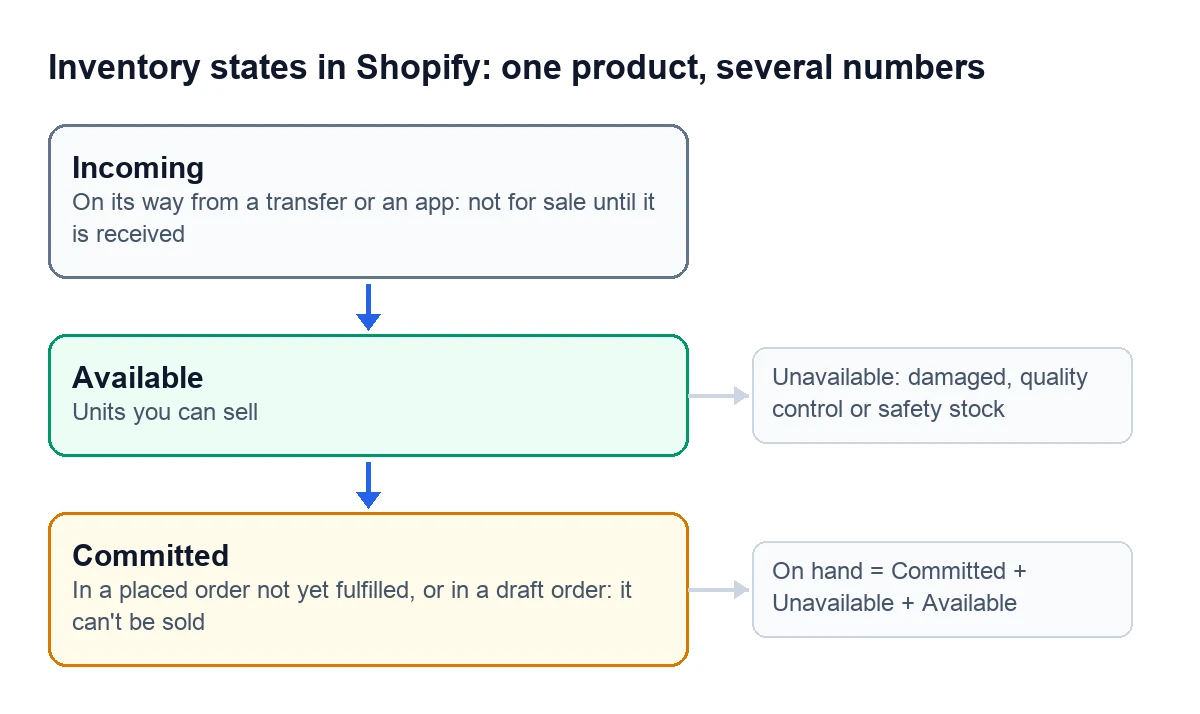
When someone types a number into the spreadsheet, which of those is it? If it is what sits on the shelf, it includes units already sold and not yet shipped. If it is what is available, someone has had to subtract every open order and every broken item, and add back every delivery.
Inside Shopify, committed units are moved by the shop itself when orders are created and fulfilled or stock is reserved on a draft order. The spreadsheet knows none of that: someone has to do the subtraction separately, and for every channel.

When it still holds up
With one channel, one warehouse and the same person recording every sale and every delivery as it happens, the spreadsheet stays close to what is really available. Each condition you lose opens a gap: another shop selling while nobody looks at the sheet, a supplier delivering when the person in charge is out, a return that comes back broken.
Signs your spreadsheet has had enough
- Before confirming an order you ask someone whether the unit is really there.
- You subtract each channel's sales by hand, at the end of the day or whenever there is time.
- Supplier deliveries get added when someone remembers, not when they arrive.
- Damaged or set-aside items sit in the same column as the ones you sell.
- You sell on more than one channel and each one keeps its own figure.
- You have had to cancel or delay an order because the unit was not there.
- There is more than one copy of the spreadsheet and nobody knows which one is right.
- Your year-end inventory comes from counting the shelves, because the spreadsheet does not add up.
If several of these sound familiar, the time you spend watching the spreadsheet already outweighs the time it saves you.
What the Spanish Commercial Code asks for at year end
In Spain, the Commercial Code requires every business owner to keep, besides the journal, a book of inventories and annual accounts (article 25). That book records the opening balance sheet, trial balances at least every quarter and, at the close, the year-end inventory together with the annual accounts (article 28).
The last box on the list matters most here: if the spreadsheet does not match the shelves, that year-end inventory comes from a manual count, and someone has to explain the difference.
What replaces it
According to Eurostat, a company's departments can share data without manual work in two ways: several applications hooked to a common database, or one modular ERP. Odoo is an ERP of that second type. With the Shopify connector, stock goes back and forth between Odoo and the store:
- Odoo publishes its stock to Shopify every 20 minutes. Every 6 hours, the «Shopify Pull Stock (Shopify → Odoo)» task goes the other way: it sets Odoo's on-hand stock to Shopify's available quantity, with no stock move, over whatever was there.
- The published figure leaves out what is reserved. Confirming an order in Odoo sets the unit aside, and Shopify stops selling it before the parcel ships.
- The connector's dashboard flags the products you need to reorder, the stock that is not selling and the syncs that failed in the last day.
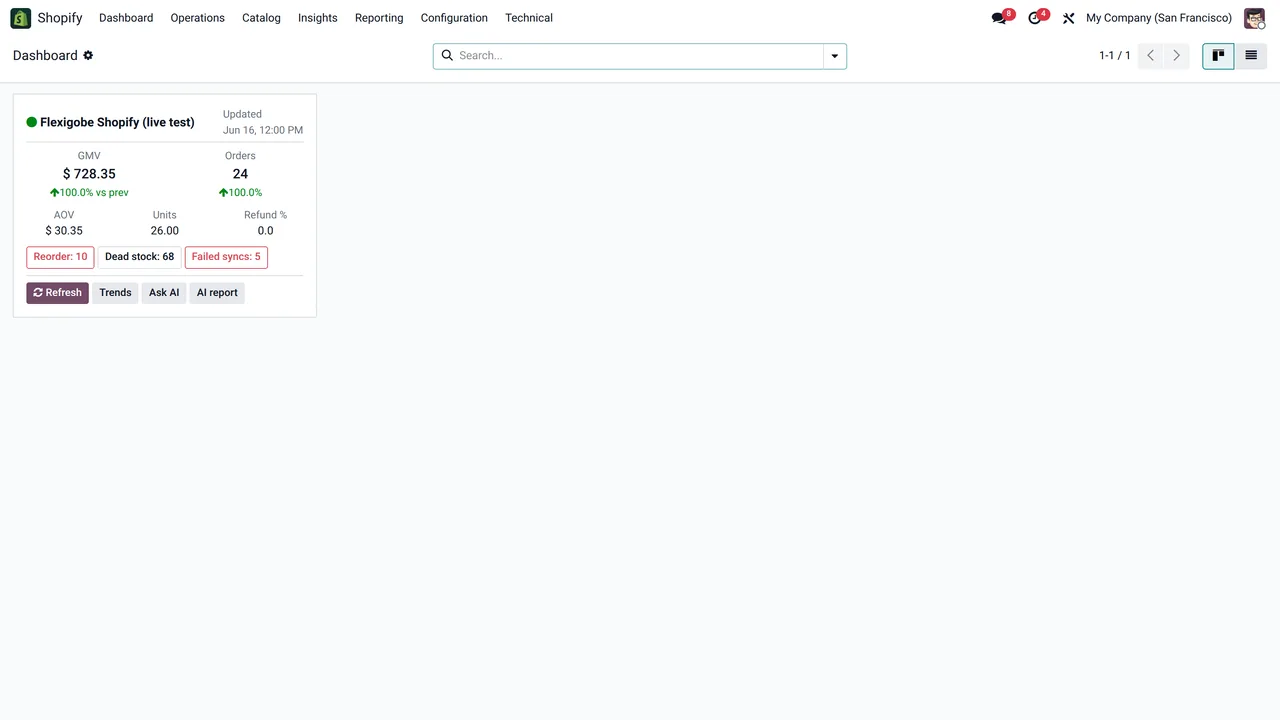
Day to day, the system does the subtraction: every confirmed sale reserves its unit and every channel gets the new quantity on the next run.
How we set it up
At FlexigoTech we implement Odoo 17, 18, 19 or 20 and connect your Shopify store and your other channels with our connectors. Odoo Online does not accept third-party modules, so we work on Odoo.sh or on your own server. Each connector can be tried for 14 days from Odoo, free and without a card, and the Connector plan starts at €49 a month, VAT excluded. If the way you work needs something that does not exist yet, we build it to measure: we analyse the case for free and give you a closed price before we write any code.
Write to comercial@flexigobe.com, leave your details on our contact page or book a call and we will go through it with your spreadsheet in front of us.
Keep reading
Checked in the connector's source code (version 17.0, 18.0, 19.0 and 20.0) and the linked sources
Sources
- shopify.dev/docs/apps/build/inventory-management-apps/manage-quantities-states.md
- www.boe.es/buscar/act.php?id=BOE-A-1885-6627
- Module source code: flexigobe_shopify_seller_connector · 17.0 2c06264 · 18.0 0272d17 · 19.0 19422d4 · 20.0 2950bdc: models/shopify_kpi_dashboard.py (reorder_now_count, dead_stock_count, open_issues_failed_sync), models/shopify_product_analytics.py (_mover_class, _restock_state)
- Module source code: flexigobe_shopify_seller_connector · 17.0 2c06264 · 18.0 0272d17 · 19.0 19422d4 · 20.0 2950bdc: data/ir_cron_data.xml, models/shopify_instance.py (action_push_stock, action_pull_stock, cron_push_stock, cron_pull_stock)
- ec.europa.eu/eurostat/statistics-explained/index.php?title=E-business_integration
- flexigotech.com/precios.html
- flexigotech.com/services/desarrollo-a-medida.html
- flexigotech.com/en/services.html