

 Español
 Català
 Deutsch
 Français
 Português
 Italiano
 Nederlands
 Polski
What you open yourself versus what runs on its own
The module works on two levels: the menus you open from Agriculture and the scheduled tasks Odoo runs by itself. The table puts them side by side.
| From the menu | Scheduled tasks | |
|---|---|---|
| Who sets it going | You, when you open a list or create a record | Odoo, according to each task's frequency |
| What it covers | The submenus of Agriculture › Farms and Agriculture › Crops | Six tasks: five start with Farm: and one with Agriculture: |
| When | Whenever you go in | Five daily (1 days) and one monthly (1 months) |
| Status | Visible in the menu | All active |
In practice: you enter and look up farms, fields, crops and plans from the menu; the six tasks run on their own at their set frequency, without you pressing anything.
The Agriculture menu, section by section
| Section | Submenus |
|---|---|
Agriculture › Farms | Farms, Fields, Zones, Field History, Temporary Access |
Agriculture › Crops | Crops, Varieties, Suitability, Crop Plans, Field Allocations, Crop Rotations, Growth Stages |
In both sections the first submenu has the same name as the section: Agriculture › Farms › Farms is an entry inside Farms, and Agriculture › Crops › Crops is an entry inside Crops. When someone on the team says «go to Farms», check whether they mean the section or the entry.
Field history lives at Agriculture › Farms › Field History and temporary access at Agriculture › Farms › Temporary Access. Crop rotations have their own entry, Agriculture › Crops › Crop Rotations, as do growth stages, at Agriculture › Crops › Growth Stages.
The six scheduled tasks, one by one
| Task | Frequency | Status |
|---|---|---|
Farm: Check Planting Windows | Daily | Active in Odoo 18, 19 and 20 |
Farm: Cache Weather at Planting | Daily | Active in Odoo 18, 19 and 20 |
Farm: Validate Crop Rotations | Daily | Active in Odoo 18, 19 and 20 |
Farm: Revoke Expired Access | Daily | Active in Odoo 18, 19 and 20 |
Farm: GDPR DSAR Retention | Monthly | Active in Odoo 18, 19 and 20 |
Agriculture: field weather from FlexigoTech Cloud | Daily | Active in Odoo 18, 19 and 20 |
The only monthly task is Farm: GDPR DSAR Retention; the rest run daily. The last one in the table has FlexigoTech Cloud in its name, the paid service the app uses, and the module listing opens with the heading Farm management with field weather in Odoo.
What sits underneath: the models
The records you see in the lists are stored in these models from the module:
agriculture.farm:Farmagriculture.crop:Cropagriculture.crop_variety:Crop Varietyfarm.crop.suitability:Farm Crop Suitabilityagriculture.equipment:Farm Equipmentagriculture.equipment_allocation:Equipment Allocationfarm.access.grant:Temporary Farm Access Grantagriculture.audit_log:Agriculture Audit Log (GDPR Accountability)
There is also a flexigo.agri.company.guard model, described as Farm data stays in its companies. It is inherited by agriculture.crop, agriculture.crop_variety, farm.access.grant and agriculture.audit_log.
What a record looks like in the lists
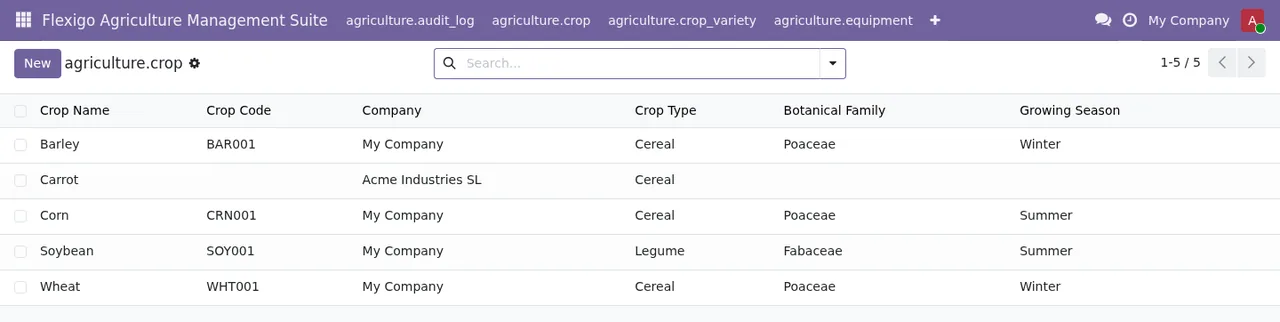
The lists under Crops show what data each record carries. You start with the crop:
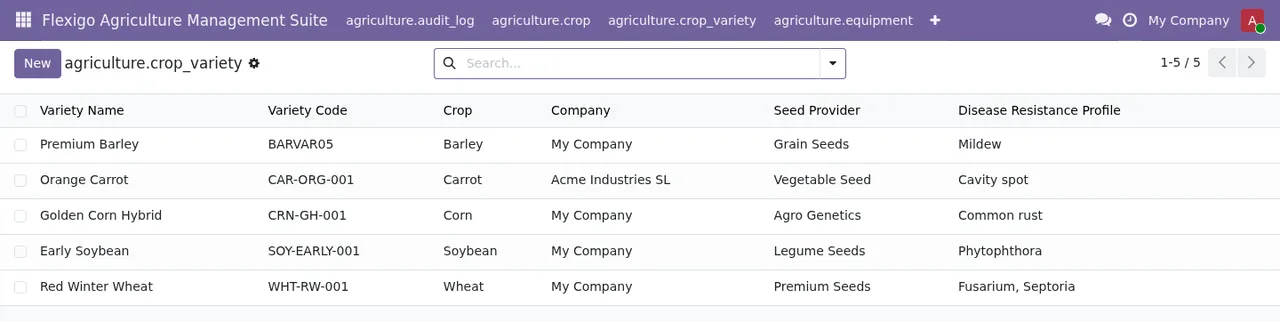
Each variety points to its crop and adds the seed supplier and the disease resistance profile:
And the crop plan brings together farm, season, plan date and planner:
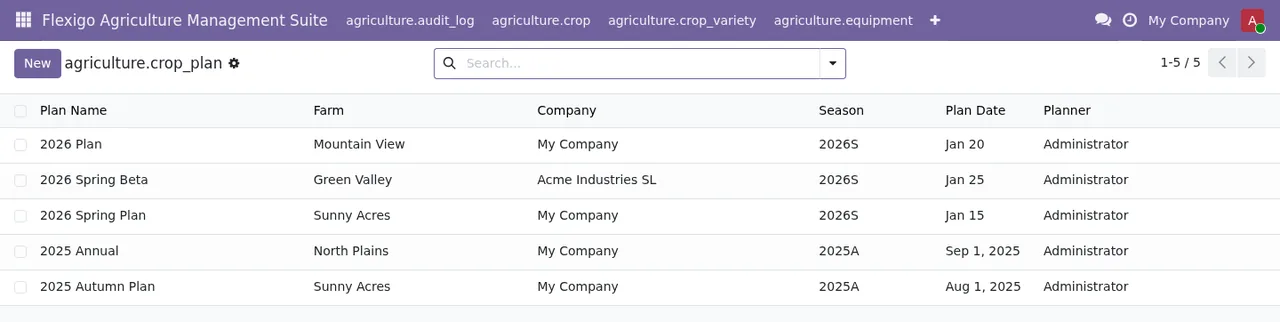
All three lists show a company column.
Where menus, models and tasks meet
Some names come up on all three levels, and it helps to know where they are:
- Temporary access: the
Agriculture › Farms › Temporary Accessmenu, thefarm.access.grantmodel (Temporary Farm Access Grant) and the daily taskFarm: Revoke Expired Access. - Rotations: the
Agriculture › Crops › Crop Rotationsmenu and the daily taskFarm: Validate Crop Rotations. - Crop suitability: the
Agriculture › Crops › Suitabilitymenu and thefarm.crop.suitabilitymodel. - Audit and GDPR: the
agriculture.audit_logmodel and the monthly taskFarm: GDPR DSAR Retention. The module listing also has aPrivacy policysection.
The settings and fields to fill in when you start are in getting Agriculture Management Suite up and running, and the module's warnings are in its error messages.
Price, versions and the FlexigoTech Cloud service
The module is published on Odoo Apps for 17.0, 18.0, 19.0 and 20.0, at €9 per Odoo version, a one-off payment excluding VAT, in all four. The listing flags it with the heading Before you buy: this app uses a paid external service, and the manifest for each version says: «This app uses a paid external service: FlexigoTech Cloud subscription (from 29 EUR/month, VAT excl.)». The local service costs €29/month or €290/year excluding VAT (Pro: €58/month or €580/year).
| Situation | Bought on the Odoo App Store | Bought on flexigotech.com |
|---|---|---|
| Module for new Odoo versions, with the subscription | Each version is bought there | Included |
| No subscription or service suspended | What the subscription provides stops; your data stays in your Odoo | What the subscription provides stops; your data stays in your Odoo |
If you plan to move from one Odoo version to another, decide where to buy before installing: it determines whether the module for the new version is included or bought separately.
How FlexigoTech can help
FlexigoTech implements Odoo 17, 18, 19 and 20 and builds bespoke connectors and integrations. The module listing is on Odoo Apps and the subscription purchase is on the module page at flexigotech.com.
Keep reading
Checked in the module's source code (version 20.0) and the linked sources
Sources
- Module source code: flexigo_agriculture_management_suite 20.0 (577ad9b5): views/menus_gen.xml
- Module source code: flexigo_agriculture_management_suite 20.0 (577ad9b5): data/farm_vertical_crons.xml
- Module source code: flexigo_agriculture_management_suite 20.0 (577ad9b5): data/meteo_cron.xml
- Module source code: flexigo_agriculture_management_suite 20.0 (577ad9b5): static/description/index.html
- Module source code: flexigo_agriculture_management_suite 20.0 (577ad9b5): models/audit_log.py
- Module source code: flexigo_agriculture_management_suite 20.0 (577ad9b5): models/company_guard.py
- Module source code: flexigo_agriculture_management_suite 20.0 (577ad9b5): models/crop.py
- Module source code: flexigo_agriculture_management_suite 20.0 (577ad9b5): models/equipment.py
- Module source code: flexigo_agriculture_management_suite 20.0 (577ad9b5): models/farm.py
- Module source code: flexigo_agriculture_management_suite 20.0 (577ad9b5): models/farm_vertical.py
- apps.odoo.com/apps/modules/20.0/flexigo_agriculture_management_suite
- apps.odoo.com/apps/modules/17.0/flexigo_agriculture_management_suite
- apps.odoo.com/apps/modules/18.0/flexigo_agriculture_management_suite
- apps.odoo.com/apps/modules/19.0/flexigo_agriculture_management_suite
- flexigotech.com/en/services.html
- flexigotech.com/precios.html