

 Español
 Català
 Deutsch
 Français
 Português
 Italiano
 Nederlands
 Polski
Configuration warnings: values and products
Some messages do not come from Correos Express at all. They are the module's own checks on the values you enter in the configuration. The text tells you which value is wrong.
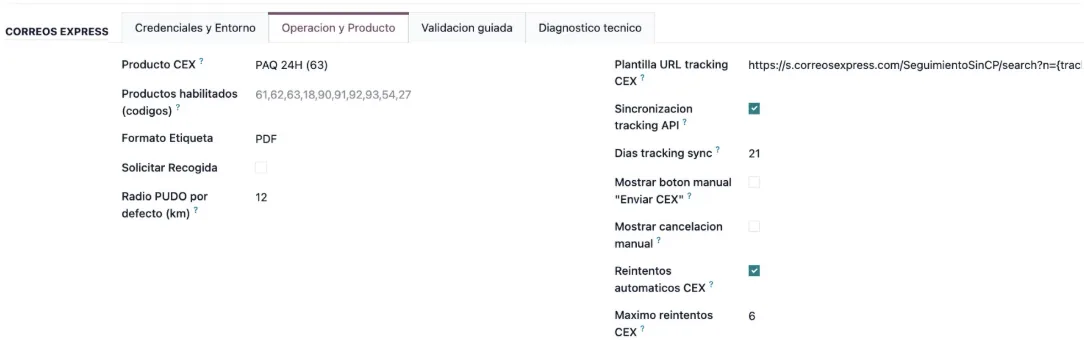
Operacion y Producto tab, with the PUDO radius, synchronisation and automatic retries switched on.Numeric values have a minimum
There are three limits, each with its own message:
El maximo de reintentos CEX no puede ser negativo.The maximum number of CEX retries cannot be a negative number.Los dias de sincronizacion tracking deben ser >= 1.Tracking synchronisation days must be at least 1.El radio PUDO por defecto debe ser >= 1 km.The default PUDO radius cannot go below 1 km.
The CEX product must be supported and also enabled
There are two separate checks here. The first belongs to the module: if the product code is not one it supports, you will see Producto CEX no soportado por el modulo: %s or its plural version, Codigos de producto CEX no soportados por el modulo: %s. Revisa tu contrato (ej: 54 activo, 44 no operativo). The message itself asks you to check your contract.
The second compares the chosen product with the enabled ones. If it is not there, you get El producto seleccionado (%s -> %s) no esta en "Productos habilitados". or El producto seleccionado (%s -> %s) no esta en los codigos habilitados del contrato (%s). The message shows the selected product, so you know which one to look at.
B-PACK needs an external point
If you use the B-PACK product, the module asks for one more piece of data: Para producto B-PACK (18) debes informar "ID Punto Externo (B-PACK)". Fill in the ID Punto Externo (B-PACK) field and save again.
Missing data on the carrier, the company or the delivery order
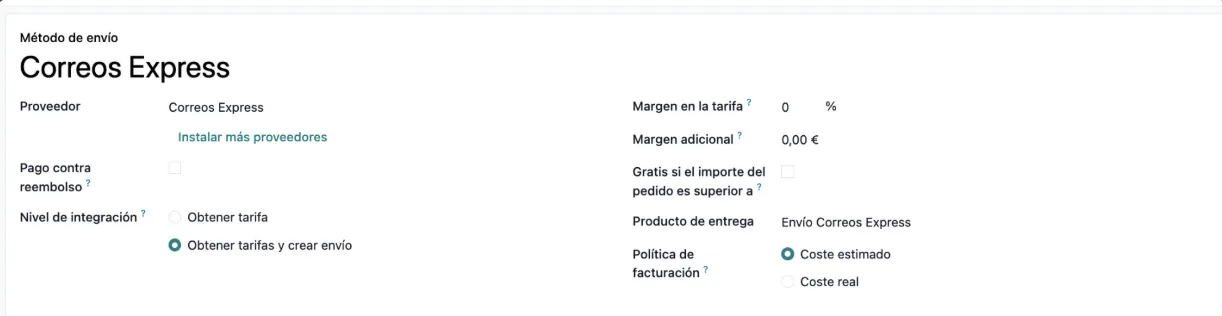
Carrier type and CEX codes
El transportista no es de tipo Correos Express. appears when the carrier you are working on is not of the Correos Express type. Open the shipping method and check the provider.
Your account codes have their own messages:
Credenciales de Correos Express no configuradas en el transportista.Falta el Codigo Cliente CEX en el transportista.Falta el Codigo Solicitante CEX en el transportista.
They all point to the carrier. The Credenciales y Entorno tab of the Correos Express configuration holds the username, the password and the requester and customer codes.
Three other messages flag data outside the carrier. No se encontro la empresa asociada al transportista. says the module could not find that company. Faltan datos de direccion del remitente en la configuracion de la empresa. refers to the sender address it takes from your company: complete it. And El albaran no tiene destinatario configurado. means the delivery order has no recipient: add one and try again.
With FlexigoTech Cloud, the password lives in the cloud
This connector runs through FlexigoTech Cloud, which stores credentials encrypted, monitors synchronisation and emails you if it fails. That is why there are two messages, in English, that depend on FlexigoTech Cloud:
Save the Correos Express password of this carrier in FlexigoTech Cloud first (Correos Express settings of the carrier). Nothing was sent.The Correos Express password for that carrier is not yet saved in FlexigoTech Cloud. Save it from the carrier's Correos Express settings, as the message says. Nothing has been sent.Through FlexigoTech Cloud this carrier only reaches the Correos Express API of its environment (%(base)s), so %(host)s was not requested and nothing was sent.The carrier only reaches the Correos Express API of its own environment, and the requested address is not that one, so it was not called and nothing went out. Check the environment and the API URLs inCredenciales y Entorno.
Without a subscription, or with the service suspended, whatever the subscription provides stops, but your data stays in your Odoo.
The configuration also has the Validacion guiada tab, with the Ejecutar prevalidacion button. The screenshot shows its results for credentials, environment, services, product, tracking and timeout.
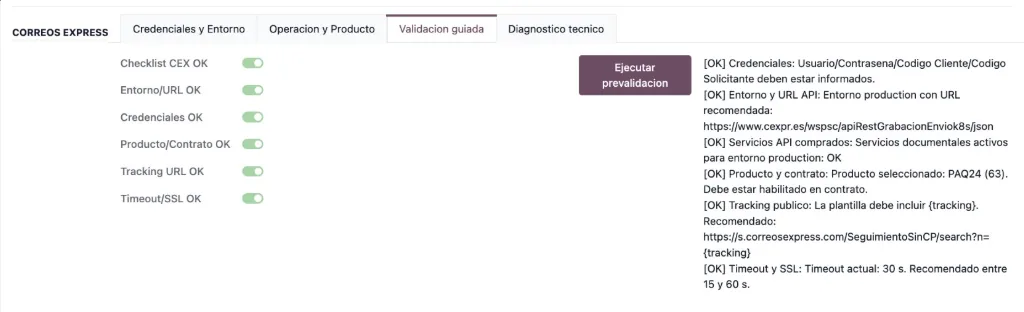
Validacion guiada tab with the Ejecutar prevalidacion button and every result showing [OK].Labels, tracking and PUDO points
Each request has its own requirements
For the label, the module needs two things. No hay numero de envio CEX para recuperar etiqueta. says there is no Correos Express shipment number. No hay keyCli CEX (cliente/solicitante) para recuperar etiqueta. points to the customer and requester codes.
If Correos Express returns no label content, you will see CEX no devolvio contenido de etiqueta para este envio. Claves respuesta: %s, which lists the keys that did come back in the response. Any other failure to retrieve it shows as No se pudo recuperar la etiqueta CEX: %s. Keep the full text, because the detail comes after the colon.
Tracking and PUDO points also need both codes: Falta Codigo Solicitante/Codigo Cliente para consultar tracking CEX. and Falta Codigo Solicitante/Codigo Cliente para consulta PUDO CEX. For tracking, No hay referencia de seguimiento para consultar en CEX. also tells you there is no tracking reference to look up. If the point lookup fails, the message is Consulta PUDO CEX fallida: %s, with the detail at the end.
Technical messages: JSON, library and debug mode
A few warnings are more technical. Respuesta no JSON en servicio CEX %s. and %s: respuesta JSON invalida. say the response could not be read as JSON, and the message includes the service. Servicio CEX no configurado para clave: %s flags a service key with no configuration. No se puede importar la libreria 'requests': %s says the module could not import the requests library: pass the full text to whoever looks after your Odoo.
Finally, Solo administradores pueden activar auditoria tecnica CEX (modo debug). is not a shipping fault: only an administrator can switch on the technical audit. Ask someone with that permission.
How FlexigoTech can help
If a message does not make sense, note down the exact text and what you were doing at the time, and tell us. FlexigoTech implements Odoo 17, 18, 19 and 20 and builds bespoke connectors and integrations, and if Correos Express changes its API, the module and the service are adapted. If you would rather understand each piece first, read how Correos Express Connector works inside Odoo.
The app costs €9 excluding VAT per Odoo version on Odoo Apps (one-off payment, for 17, 18, 19 and 20), and the connection comes with the Connector plan at €49/month or €490/year excluding VAT. You will find the details on the connector page and the Odoo Apps listing.
Keep reading
Checked in the connector's source code (version 20.0) and the linked sources
Sources
- Module source code: flexigobe_correos_express 20.0 (f7f9a2f2): models/delivery_carrier.py
- apps.odoo.com/apps/modules/20.0/flexigobe_correos_express
- apps.odoo.com/apps/modules/17.0/flexigobe_correos_express
- apps.odoo.com/apps/modules/18.0/flexigobe_correos_express
- apps.odoo.com/apps/modules/19.0/flexigobe_correos_express
- flexigotech.com/en/services.html
- flexigotech.com/precios.html