

 Español
 Català
 Deutsch
 Français
 Português
 Italiano
 Nederlands
 Polski
What moves into Odoo from your Correos Express work
If today your orders arrive in one place and you book Correos Express shipments in another, every dispatch means copying customer and parcel details by hand from one tool to the other. With Odoo and Correos Express Connector, that work starts on the sales order and carries on in the delivery order. These are the points to clear up first.
Which Correos Express operations can I run from Odoo?
According to the module's README, the connector covers shipment booking (apiRestGrabacionEnviok8s), labels per shipment and per parcel (apiRestEtiquetaTransporte), tracking through the API plus a public web tracking page, looking up and assigning PUDO points, stopping a delivery through the API, and collections: booking, changing and cancelling them, checking the cut-off time and tracking them. It also includes retries and clean-up of legacy data.
Where is a shipment launched from?
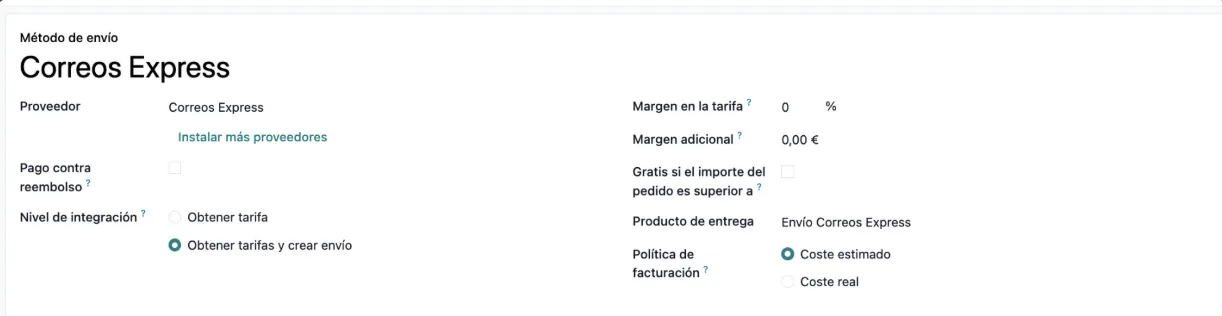
From Odoo's own sales flow. You create the sales order with the Correos Express (CEX) carrier, confirm it, and the module works on the outgoing delivery order, which is also where you use its actions. If you want the full journey of a record, I cover it in how Correos Express Connector works under the hood.
Does it handle pickup-point deliveries or shipments to businesses?
For pickup points, the module looks up and assigns PUDO points. It also checks the conditions of some Correos Express products: product 18 requires idPuntoExterno, 92 (PAQEMPRESA14) requires a business recipient and 93 requires a valid mobile number. Product 90 blocks PT and also ES, so it only works for international shipments that are not going to Portugal. The operational products listed in the README also include 91 (PAQINTEREXP) and 54 (ENTREGAPLUS).
Can I give my customers a tracking link?
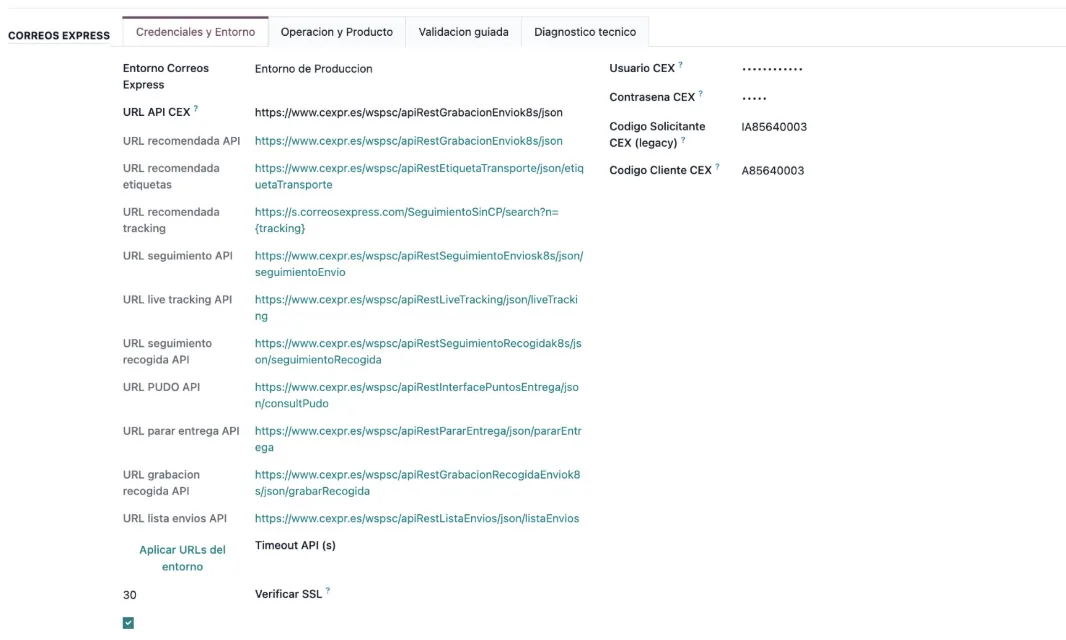
Yes. The module offers API tracking and public web tracking. In the settings you fill in Plantilla URL tracking CEX, including the {tracking} placeholder in the address.

What you need from Correos Express to connect it
Which details from my Correos Express account will I need?
The CEX credentials from your contract: the module works with per-contract credentials. You enter them in the connector settings, on the same screen where you choose the environment.
Can I choose between a test and a production environment?
Yes. In Entorno Correos Express you choose test or production and press Aplicar URLs del entorno. Then you fill in the credentials and set up the tracking template.
How do I know the setup is right before the first shipment?
You run Prevalidacion Correos Express until everything shows [OK]. If any line does not come back as [OK], the article on the connector's error messages and warnings lists the module's exact texts and what to do about each one.
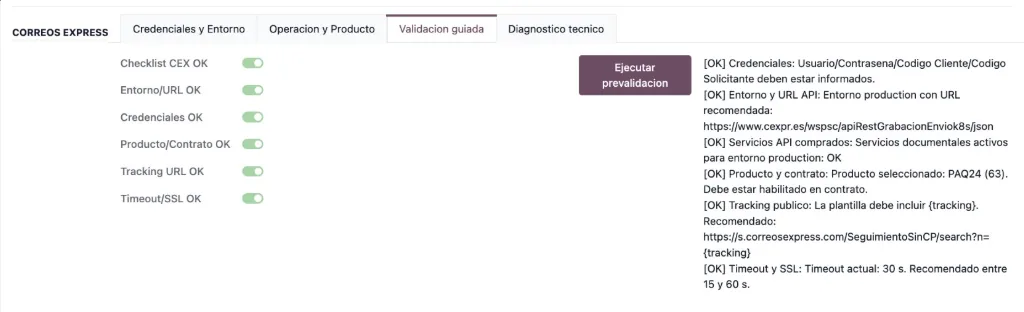
[OK] results for credentials, environment, services, product, tracking and timeout after running the pre-validation.
Where to start if you are not on Odoo yet
What does my Odoo need before I install the connector?
Correos Express Connector depends on the delivery, stock, sale and sale_stock modules, and it is published on Odoo Apps for Odoo 17, 18, 19 and 20. Installation follows the README steps: you place the addon in your custom path, update the Apps list, install or upgrade flexigobe_correos_express and, if you are on Odoo.sh, restart the services (odoosh-restart).
What is FlexigoTech Cloud and what do I pay?
The connection runs through FlexigoTech Cloud, which stores the credentials encrypted, monitors synchronisation and emails you if it fails; if Correos Express changes its API, both the module and the service are adapted. The module costs €9 excluding VAT, a one-off payment per Odoo version, for 17, 18, 19 and 20, and the Connector plan costs €49/month or €490/year excluding VAT (Pro: €98/month or €980/year), with up to 3 platform accounts (Pro: 10). Without a subscription, or with the service suspended, whatever the subscription provides stops, but your data stays in your Odoo. With the subscription, the module for new Odoo versions is included if you bought it on flexigotech.com; on the Odoo App Store, each version is bought there.
If you are starting from scratch, there are two pieces: Odoo set up with sales orders and delivery orders, and the connector configured with your CEX credentials until the pre-validation shows [OK].
How FlexigoTech helps you make the move
FlexigoTech implements Odoo 17, 18, 19 and 20 and builds bespoke connectors and integrations. If you still run Correos Express outside Odoo, we can scope the Odoo implementation and the roll-out of Correos Express Connector as a single project, and adapt whatever your operation needs beyond what the module includes. You will find the connector details and purchase options on the Correos Express Connector page.
Keep reading
Checked in the connector's source code (version 20.0) and the linked sources
Sources
- Module source code: flexigobe_correos_express 20.0 (f7f9a2f2): README.md
- apps.odoo.com/apps/modules/20.0/flexigobe_correos_express
- apps.odoo.com/apps/modules/17.0/flexigobe_correos_express
- apps.odoo.com/apps/modules/18.0/flexigobe_correos_express
- apps.odoo.com/apps/modules/19.0/flexigobe_correos_express
- flexigotech.com/en/services.html
- flexigotech.com/precios.html