

 Español
 Català
 Deutsch
 Français
 Português
 Italiano
 Nederlands
 Polski
Where Correos Express is configured in Odoo
Where does Correos Express appear inside Odoo?
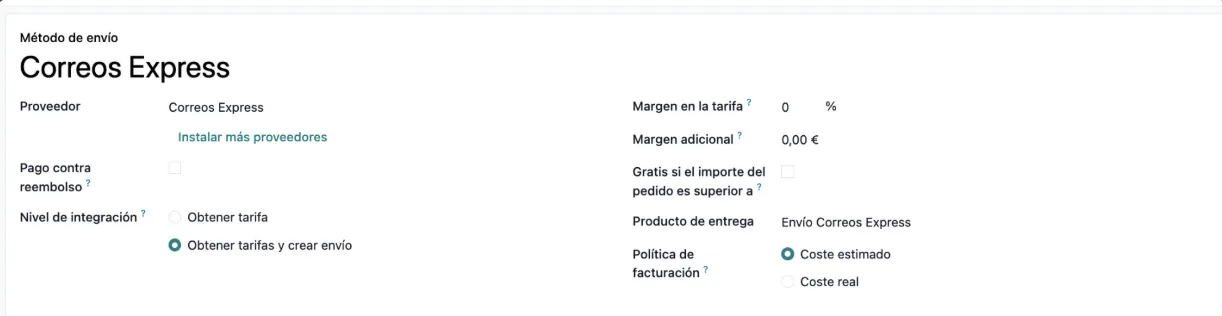
In the Correos Express shipping method form. There you see the provider, a link to install more providers, the integration level, the rate margins, the delivery product and the invoicing policy with the estimated cost. The Odoo Apps listing presents the module as Correos Express labels and tracking from Odoo (Correos Express labels and tracking from Odoo).
Where do the credentials and environment go?
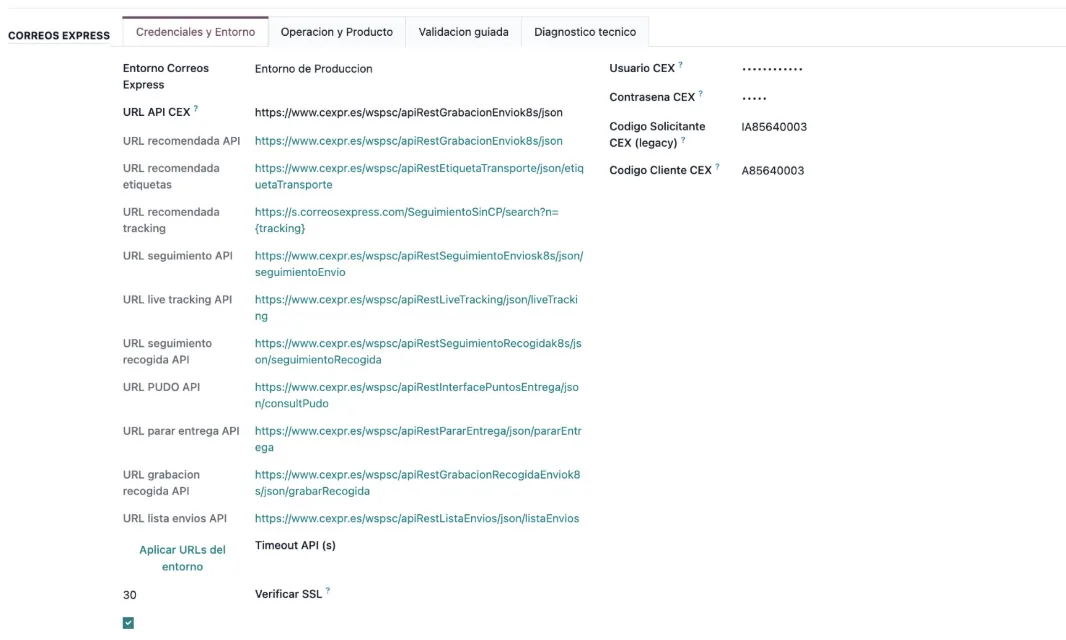
In the Correos Express settings, on the Credenciales y Entorno tab. The screenshot shows the production environment, the API URLs, the hidden username and password, the requester and customer codes, the timeout, the verify SSL box ticked and the Aplicar URLs button. Behind the scenes, the connection goes through FlexigoTech Cloud, which stores the credentials encrypted.
Can I check the configuration from within Odoo?
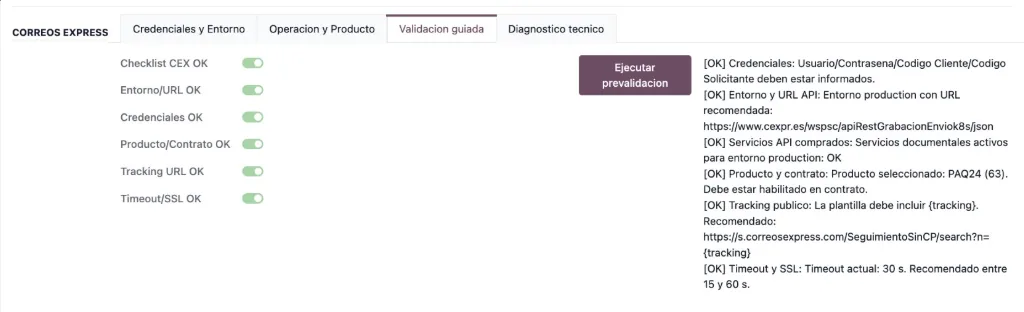
Yes. The Validacion guiada tab has a checklist of switches, the Ejecutar prevalidacion button and a results area. In the screenshot every result shows [OK]: credentials, environment, services, product, tracking and timeout. If one does not, and you get a warning you do not understand, the Correos Express Connector error messages lists the literal texts and what to do about each one.
What is on the operation tab?
The Operacion y Producto tab holds the Correos Express product, the label format (PDF in the sequence), the PUDO search radius, the tracking URL template and the synchronisation and automatic retry switches, which are switched on in the sequence.
What runs on its own: the scheduled tasks
Which scheduled tasks does the module add?
Three, and all three are active once installed:
CEX - Reintentar envios pendientes: every 5 minutes.CEX - Sincronizar tracking API: every 30 minutes.CEX - Limpiar expediciones legacy: every 1 day.
These are the names and frequencies the module creates them with. If you are looking into what is happening with a pending shipment or with tracking, these are the tasks that run without anyone starting them.
Who tells me if synchronisation fails?
FlexigoTech Cloud monitors synchronisation and sends an email if it fails. If Correos Express changes its API, both the module and the service are adapted. For the warnings you see inside Odoo, check the connector error table.
What a shipment goes through and what you need to use it
Which wizards does it include for working with shipments?
The module defines these wizards, each with its technical name and description:
cex.send.shipment.wizard:Asistente de Envio Correos Express.cex.pickup.manage.wizard:Gestion Recogida CEX.cex.pudo.lookup.wizard:Busqueda PUDO Correos Express, together withcex.pudo.lookup.line.wizard:Resultado PUDO CEX.cex.stop.delivery.wizard:Parar Entrega CEX.cex.cancel.manual.wizard:Asistente Cancelacion Manual CEX.
Going by their names, they cover sending, managing the pickup, the PUDO search and its results, stopping a delivery and manual cancellation. If someone on your team asks where each Correos Express action is done, this list is the map.
Why do I need a subscription as well as the app?
The Odoo Apps listing flags it in its Before you buy: this app uses a paid external service section: the connection goes through FlexigoTech Cloud, which stores the credentials encrypted, monitors synchronisation and emails you if it fails. The Connector plan costs €49/month or €490/year excluding VAT (Pro: €98/month or €980/year) and allows up to 3 platform accounts (Pro: 10). Without a subscription, or with the service suspended, whatever the subscription provides stops, and your data stays in your Odoo. The listing also has its Privacy policy section.
Which Odoo versions is it for and how much does the module cost?
It is published on Odoo Apps for 17.0, 18.0, 19.0 and 20.0, at €9 per Odoo version, a one-off payment excluding VAT, according to each version's listing. If you buy it from the module page on flexigotech.com, the module for new Odoo versions is included with the subscription; on Odoo Apps, each Odoo version is bought there. The listing also includes a How it works section summarising how it operates.
How FlexigoTech can help
FlexigoTech implements Odoo 17, 18, 19 and 20 and builds bespoke connectors and integrations. If you already use Odoo, we can set up the Correos Express shipping method for you and go through the pre-validation with you. If you still handle shipments outside Odoo, what Odoo brings together with Correos Express Connector shows where to start, with the implementation and the connector together.
Keep reading
Checked in the connector's source code (version 20.0) and the linked sources
Sources
- Module source code: flexigobe_correos_express 20.0 (f7f9a2f2): data/cex_cron_data.xml
- Module source code: flexigobe_correos_express 20.0 (f7f9a2f2): static/description/index.html
- Module source code: flexigobe_correos_express 20.0 (f7f9a2f2): wizard/cex_cancel_manual.py
- Module source code: flexigobe_correos_express 20.0 (f7f9a2f2): wizard/cex_pickup_manage.py
- Module source code: flexigobe_correos_express 20.0 (f7f9a2f2): wizard/cex_pudo_lookup.py
- Module source code: flexigobe_correos_express 20.0 (f7f9a2f2): wizard/cex_send_shipment.py
- Module source code: flexigobe_correos_express 20.0 (f7f9a2f2): wizard/cex_stop_delivery.py
- apps.odoo.com/apps/modules/20.0/flexigobe_correos_express
- apps.odoo.com/apps/modules/17.0/flexigobe_correos_express
- apps.odoo.com/apps/modules/18.0/flexigobe_correos_express
- apps.odoo.com/apps/modules/19.0/flexigobe_correos_express
- flexigotech.com/en/services.html
- flexigotech.com/precios.html