
 Español
 Català
 Deutsch
 Français
 Português
 Italiano
 Nederlands
 Polski



Correos Express connector for Odoo
Ship with Correos Express from Odoo: validating the delivery creates the shipment with its label, and the parcel status reaches Odoo every 30 minutes.
€49/month14 days free, no card
Yearly and Pro
- Standard€49/month · €490/year
- Pro€98/month · €980/year
Reply within 1 working day; with Pro, 4 hours. FlexigoTech Cloud pricing
After you buy
- You pay for the license (€9 + VAT) and get an email with the link to download the module.
- You install it in your Odoo, on Odoo.sh or your own server.
- In Settings → FlexigoTech Cloud you accept the data list and press «Try free for 14 days». The trial doesn't ask for a card.
- To continue, you press «Subscribe», create your account on app.flexigotech.com and pay for the plan by card.
Every purchase includes 2 months of support: we help you install it, set it up and get it working, by email and video call.
- Tested on Odoo 17, 18, 19 and 20
- Odoo Learning Partner
 A delivery shipped with Correos ExpressReal Odoo screenshot
Get started in 3 steps
- Install the moduleFrom Odoo Apps, on Odoo.sh or your own server.
- Start the trialIn Settings › FlexigoTech Cloud, an administrator accepts the data list and starts the 14-day trial, no card needed.
- Create the carrierIn Inventory › Configuration › Delivery Methods, a new one with Correos Express as provider: your user and codes; tick the FlexigoTech Cloud box and type the password.
Switch to production The carrier starts in the Correos Express test environment. When everything checks out, choose «Production Environment» and save the password again.
What you need A contract with Correos Express and the details of its API: user, password, customer code and requester code. Odoo 17, 18, 19 or 20 on Odoo.sh or your own server, not Odoo Online.
What it does
- Shipped on validationValidate the delivery and Correos Express gets the shipment.
- PDF, ZPL or EPL labelAttached to the delivery, ready to print.
- The status, in OdooIn transit, out for delivery…: updated every 30 minutes.
- PUDO points and pickupsFind a point or book the pickup from the delivery.
How it works

From Odoo
- The recipient, their address, phone and email
- The parcels, with their weight and dimensions
- The Correos Express product and, if you want, the pickup
FlexigoTech Cloud
From Correos Express
- The shipment number and each parcel's code
- The PDF, ZPL or EPL label
- The shipment status, every 30 minutes

Your Correos Express password goes once, encrypted, to FlexigoTech Cloud with your user, and is never stored in your Odoo. Every shipment, label, tracking request, pickup and PUDO point search goes through the cloud, which adds your credentials.
Where you see it in Odoo
- Inventory › Deliverieseach Correos Express delivery, with its buttons and its status
- Delivery Methodsthe Correos Express carrier, with your user and your product
 Salesthe shipping line and the «CEX History» button
Inside Odoo
Real Odoo screenshots.

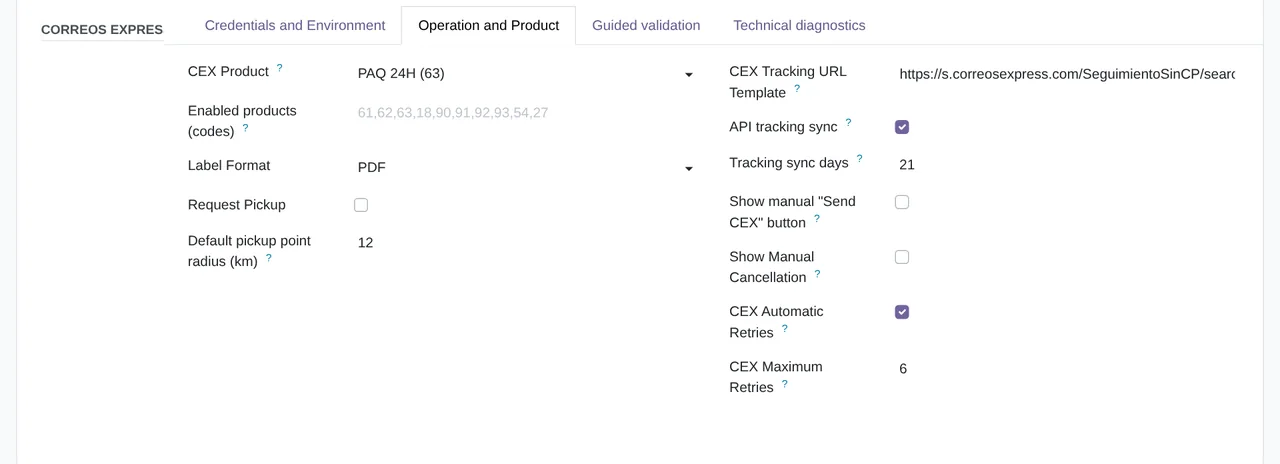
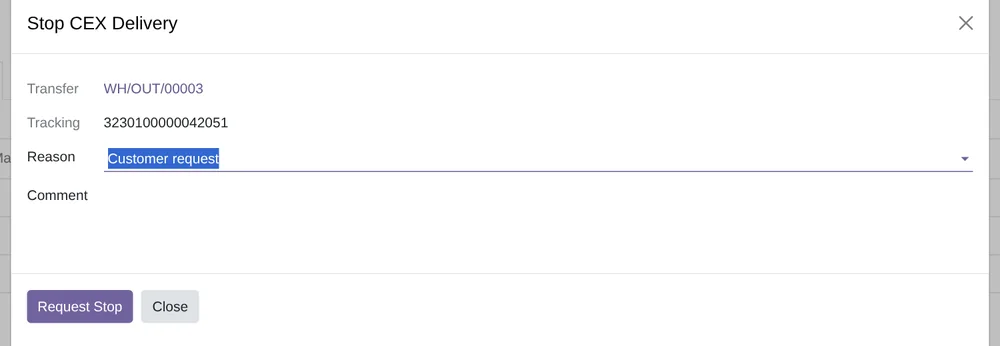
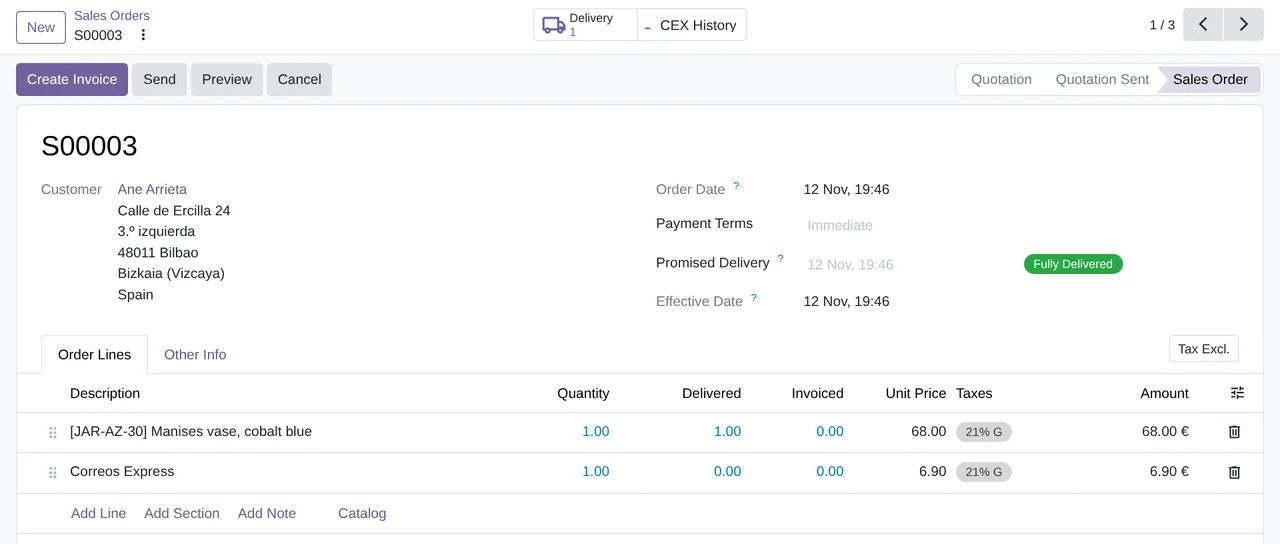
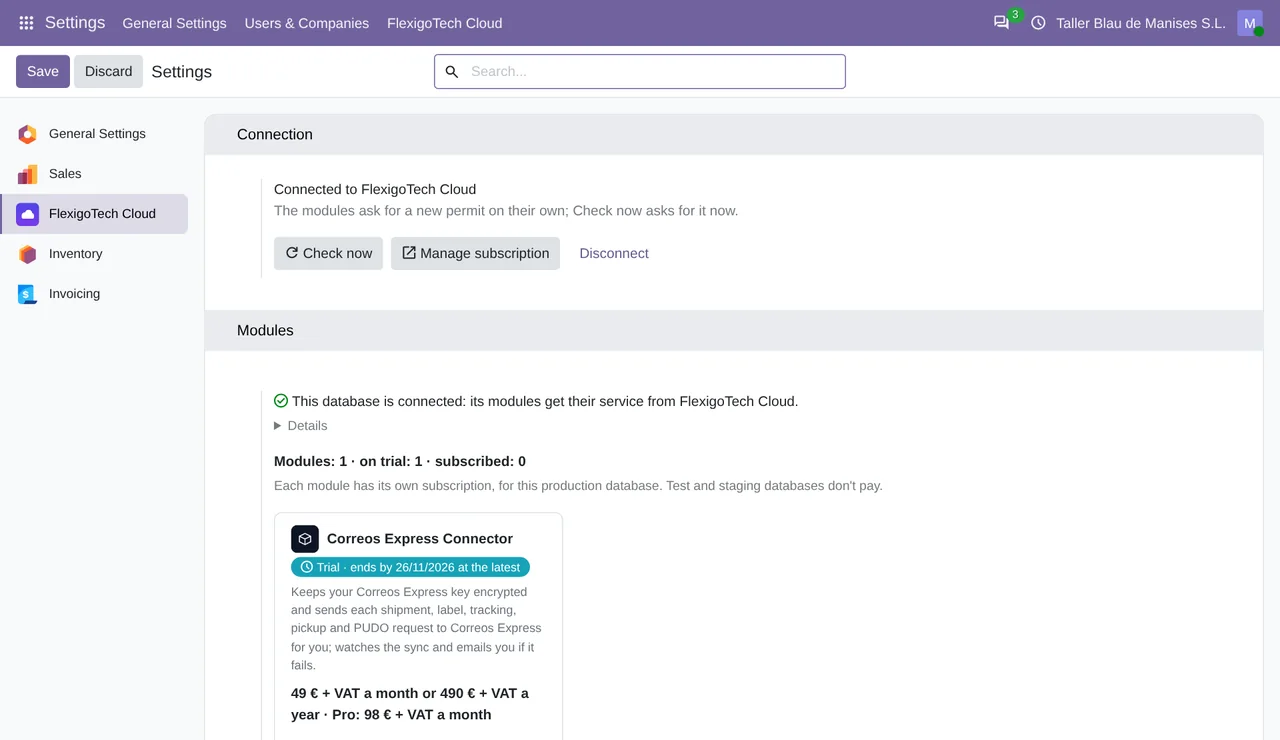
Price
Standard
€49a month + VAT
€490 a year + VAT 2 months free
- The connection runs on our servers
- We alert you if sync fails
- First response 1 working day
- Video call included for the first 2 months
- Accounts per connector Up to 3
Pro
€98a month + VAT
€980 a year + VAT 2 months free
- Everything in Standard
- First response 4 working hours
- Video call if needed
- Accounts per connector Up to 10
- + €9 for the module license, per Odoo version
- 14 days free, no card
- Cancel in two clicks
- Every purchase includes 2 months of support: we help you install it, set it up and get it working, by email and video call. While you're subscribed, support for the service stays included. Still integrating or testing? Extend your free trial.
If you cancel What the subscription gives stops. Your data stays in your Odoo.
- Support with response timesMonday to Friday, 9:00 to 18:00 (Barcelona), except public holidays.
- Maintenance and improvementsOdoo 17-20, on Odoo.sh or your own server
- We handle changes to their APIIf the platform changes its API, we adapt the module and the service.
- Servers in GermanyWe store your credentials encrypted
- Tested On Odoo 17, 18, 19 and 20. With answers shaped like the Correos Express API's, in its automated tests and in the screenshots on this page.
- 7,852 lines of code · 13-11-2026
- 109 automated tests on Odoo 20 · 13-11-2026
- No reviews yet · leave yours
Frequently asked questions
When is the shipment created at Correos Express?
When you validate the delivery, if the delivery method is set to «Get Rate and Create Shipment». If you would rather send it earlier, turn on the «Send CEX» button in the carrier's «Operation and Product» tab.
What if Correos Express returns an error?
The delivery is not validated and Odoo tells you what failed. If you send deliveries from the list with «Send to Correos Express» (it needs manual sending turned on in the carrier), a temporary failure leaves the delivery pending and the connector retries it on its own up to 6 times.
Can I see in Odoo where the parcel is?
Yes. Every 30 minutes the connector fetches the status of the shipments from the last 21 days, and «Sync CEX Tracking» fetches it at once. «CEX Tracking» opens the Correos Express tracking page.
Can I ship to a pickup point?
Yes. «Find CEX Pickup Point» searches the Correos Express points near the address and the chosen one is saved on the delivery. The Paq Punto (B-PACK) product needs it.
Does it get the shipping price from Correos Express?
No. The connector does not ask for rates: the order carries the fixed price you set on the delivery method.
What is correos_express_connector?
The same connector under its former technical name: installing it installs this module and adds nothing else.
Do I need Odoo Enterprise?
No. It uses Odoo Community's Inventory and Sales: it works on Community and Enterprise.
What happens after you press «Buy now»?
1. You pay for the license (€9 + VAT) and get an email with the link to download the module. 2. You install it in your Odoo, on Odoo.sh or your own server. 3. In Settings → FlexigoTech Cloud you accept the data list and press «Try free for 14 days». The trial doesn't ask for a card. 4. To continue, you press «Subscribe», create your account on app.flexigotech.com and pay for the plan by card.
Does it work on Odoo Online?
No: Odoo Online does not allow third-party modules. It is for Odoo 17, 18, 19 and 20, on Odoo.sh or on your own server.
Who installs it?
You do: you buy it on flexigotech.com or on Odoo Apps and install it in your Odoo. We help you install it and set it up, by email and video call, during the 2 months of included support. Custom development and data migration are quoted separately.
What support is included?
Every purchase includes 2 months of support: we help you install it, set it up and get it working, by email and video call. While you're subscribed, support for the service stays included.
What if something fails?
We monitor the connection and email you if something fails. And support has response times: first response within 1 working day; with Pro, within 4 working hours.
What about my data? And if I cancel?
The connection goes through FlexigoTech Cloud, on our servers in Germany, with your credentials encrypted. You cancel in two clicks: if you don't subscribe when the trial ends, the service stops and nothing is charged. Your data stays in your Odoo, and you can always view and export it.
Using Correos Express but not Odoo yet?
We set up Odoo, connect it to Correos Express and stay on.
From €2,450 + VAT
Start with OdooMore about the Correos Express connector
What you get out of the box
- Tracking in Odoo: each shipment's status, description and date reach the delivery every 30 minutes, or at once with a button.
- Multi-format labels: generate shipping labels in PDF, ZPL and EPL for office or thermal printers.
- Multiple parcels: several parcels per shipment, each with its code, weight and dimensions.
- Scheduled pickups: request a pickup with a date and time window right from the delivery order.
- Live tracking and stop in transit: shipment tracking and stop-delivery in transit, with its reason, straight from Odoo.
- PUDO points: deliver to Correos Express convenience points with a configurable search radius.
- Guided 6-point validation: checks credentials, environment, URL and settings before your first real shipment.
- Diagnostics and chatter: a technical diagnostics tab plus full traceability of every action in the delivery order chatter.
- Automatic retry: if the Correos Express API fails with a temporary error, the shipment is retried on its own.
- Native delivery.carrier: Correos Express shows up as one more carrier in your Odoo quotations and delivery orders.
How it works
Add your Correos Express contract credentials, then run the guided 6-point validation to confirm the environment and settings are correct before shipping.
Correos Express appears as a native delivery.carrier. Choose it on the quotation or delivery order, and add parcels or a PUDO point as needed.
Register the shipment to get the label (PDF/ZPL/EPL) and tracking number. Book the pickup and follow the parcel's status from Odoo. Temporary failures are retried automatically.
Who it's for
Built for ecommerce and companies in Spain and Portugal with an active Correos Express contract.
Available for all four versions, on Community or Enterprise, built on top of Odoo's standard carrier system.
It needs outbound internet access (to FlexigoTech Cloud), so it runs on Odoo.sh and On-Premise, not on Odoo Online (SaaS).
Related
- How the Correos Express connector works in Odoo
- MRW connector
- How FlexigoTech Cloud works
- Full module catalogue
Correos Express is a trademark of its owner. FlexigoTech publishes this connector on its own, with no endorsement or sponsorship from the trademark owner.
Correos Express guides
4 practical guides on this module: FAQs, comparisons and guides for sellers without an ERP.
- Read the Correos Express guides
- Correos Express Connector errors and warnings in Odoo: what they mean and what to do
- How Correos Express Connector works inside Odoo
- Correos Express without Odoo yet: what Odoo brings together with Correos Express Connector
- Shipping labels by hand when you sell on several stores