

 Español
 Català
 Deutsch
 Français
 Português
 Italiano
 Nederlands
 Polski
Each marketplace, its own window
When you copy orders by hand, two things matter: where you get them from and how long they stay within reach. This is what each platform publishes:
| Marketplace | How you get the orders | Window or deadline that matters |
|---|---|---|
| Amazon | Orders API (searchOrders) or order reports | The API goes back up to two years. Reports are kept for 30 days and can arrive up to 30 minutes late. The unshipped orders report covers the last 38 days. |
| Shopify | Orders API | By default, order permissions only reach orders created in the last 60 days. |
| Cdiscount (Octopia) | Polling the listings regularly: no webhooks or callbacks | Accept within 48 business hours; with no answer within 2 days, the order is cancelled automatically. |
| Mirakl | Paginated order list, or asynchronous exports for large requests | Accept or refuse each line while it is in WAITING_ACCEPTANCE. |
| ManoMano | API, with bulk acceptance of up to 50 orders per request | Invoice to the customer within 3 business days of shipping. |
| AliExpress | Seller API | The order list covers 180 days by default, and 30 for closed orders. |

Where copy and paste breaks
Accepting late
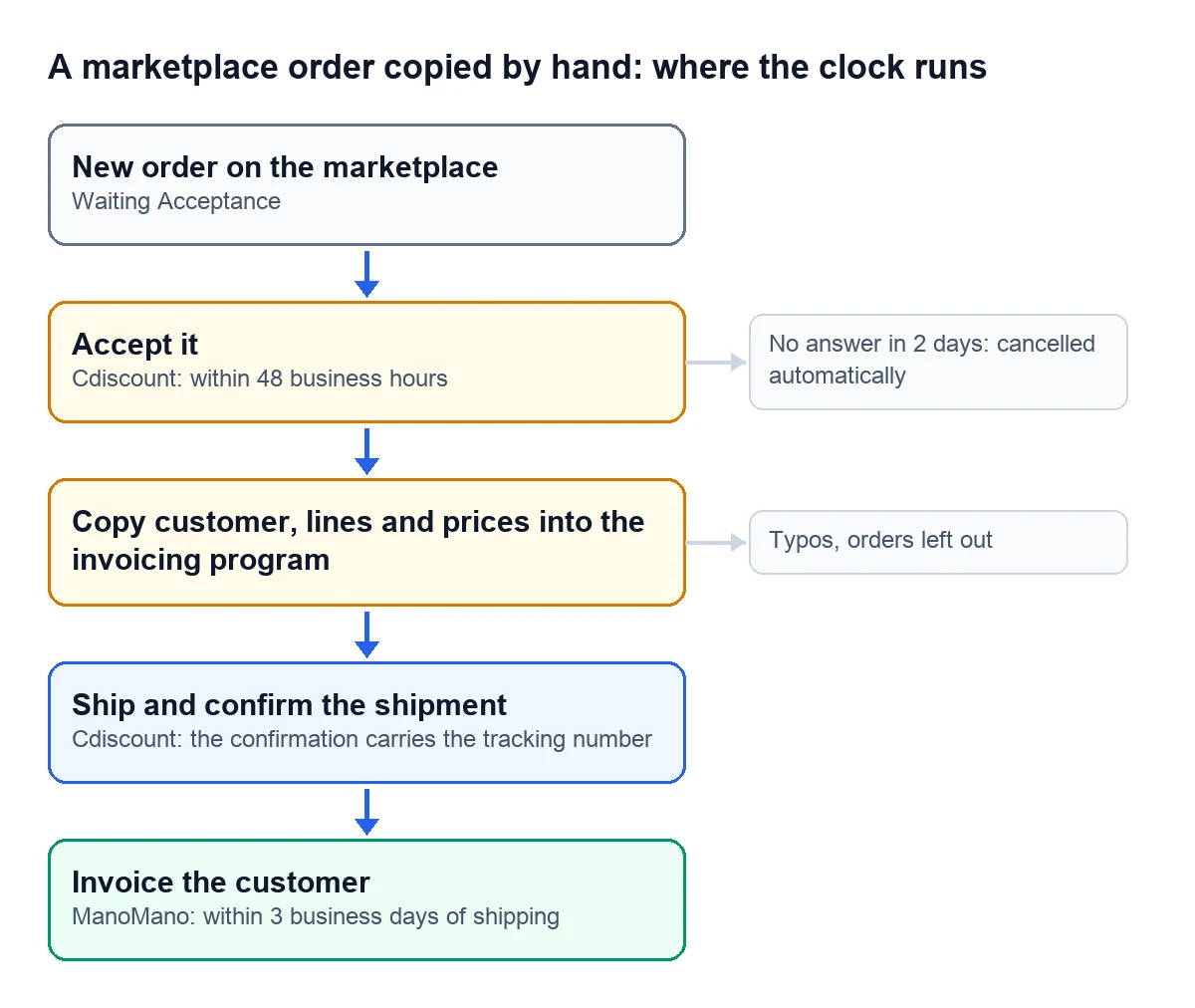
Cdiscount asks you to accept orders within 48 business hours, with an acceptance rate of 97.5% or more. An order with no answer within 2 days is cancelled automatically. On Mirakl, lines wait in WAITING_ACCEPTANCE until someone accepts or refuses them.
Invoicing late
ManoMano reminds sellers that they have 3 business days from the moment the order ships to deliver the invoice to the customer. If invoices come from copying orders once a week, that deadline is missed.
Reaching the data late
Amazon keeps order reports for 30 days; if you do not download them in time, they have to be generated again. The unshipped orders report only covers the last 38 days. AliExpress returns 180 days of orders by default, and 30 for closed ones. Whoever copies once a month is working at the edge of those windows.
Checking by hand what a machine checks every few minutes
Octopia has no webhooks: the integration has to poll the listings regularly, and for orders it gives every 5 to 10 minutes as an example. Mirakl, for its asynchronous exports, recommends polling every 5 minutes and at most once a minute. Nobody with a dashboard open can keep up that pace.
What changes with Odoo and the Cdiscount connector
With the Octopia connector, the task that brings in orders is active from the start and runs every 10 minutes for each connected account. Each incoming order creates its sales order in Odoo, so nobody types in the customer, the lines or the prices.
The rest is up to you, with three account boxes that come unticked:
- "Auto-accept Orders": accepts orders that arrive in Waiting Acceptance. Each sales channel can follow the account setting or decide for itself.
- "Auto-confirm Sales Orders": confirms the sales order.
- "Auto-create Invoices": creates and posts the customer invoice once the marketplace order has shipped.
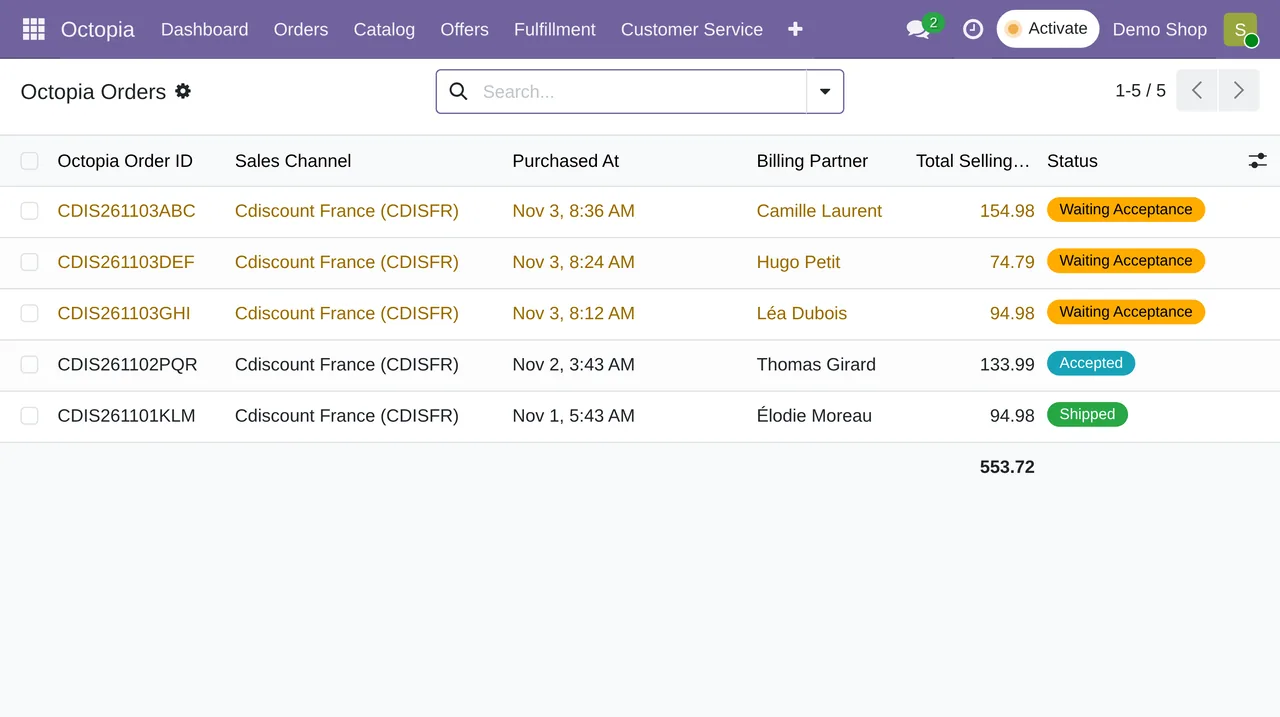
With those boxes ticked, the order comes in, gets accepted, confirmed and invoiced when it ships. You review whatever gets stuck along the way.
How we set it up
At FlexigoTech we implement Odoo 17, 18, 19 or 20 and connect your marketplaces with our connectors. Odoo Online does not accept third-party modules, so we work on Odoo.sh or on your own server. The Connector plan starts at €49 a month, VAT excluded. If one of your channels has no connector, we build a small custom integration: we analyse the case for free and give you a closed price before we write any code.
Write to comercial@flexigobe.com, leave your details on our contact page or book a call.
Keep reading
Checked in the connector's source code (version 17.0, 18.0, 19.0 and 20.0) and the linked sources
Sources
- developer-docs.amazon.com/sp-api/reference/searchorders.md
- developer-docs.amazon.com/sp-api/docs/report-type-values-order
- shopify.dev/docs/api/usage/access-scopes
- developer.mirakl.com/content/product/mmp/rest/seller/openapi3/orders/or11.md
- developer.mirakl.com/content/product/mmp/rest/seller/openapi3/orders/or21.md
- developer.octopia-io.net/user-guides/best-practices/
- www.manomano.dev/
- openservice.aliexpress.com/handler/share/apidoc/getApi.json?cid=20905&path=aliexpress.trad
- marketplace.cdiscount.com/wp-content/uploads/2025/08/2025.08.25-CGMAD-FR.pdf
- Module source code: flexigobe_octopia_connector · 17.0 501e336 · 18.0 e234fab · 19.0 d258001 · 20.0 5cbe12a: data/octopia_cron_data.xml (pull orders, 10 minutes, activa en las cuatro), models/octopia_order.py (_cron_pull_orders, _create_sale_order, _apply_automation), models/octopia_account.py (campos booleanos sin valor por defecto)
- flexigotech.com/precios.html
- flexigotech.com/services/desarrollo-a-medida.html
- flexigotech.com/en/services.html