

 Español
 Català
 Deutsch
 Français
 Português
 Italiano
 Nederlands
 Polski
There are two different requests, and a third one you do not raise yourself:
| Type in Odoo | What it is for | What it needs |
|---|---|---|
| Out-of-stock Cancellation | Cancelling because you do not have the goods | At least one order number |
| Cancellation Appeal | Asking Temu to review an order for Suspected Batch Refund or Incorrect Address | A description and, if you like, proof links |
| Remote Cancellation | The cancellation Temu already made, brought in by the sync | Nothing: it is read-only |
They all live in Temu › Orders & Fulfillment › Cancellations, and each order shows its own on the Cancellations tab.
Cancelling for lack of stock
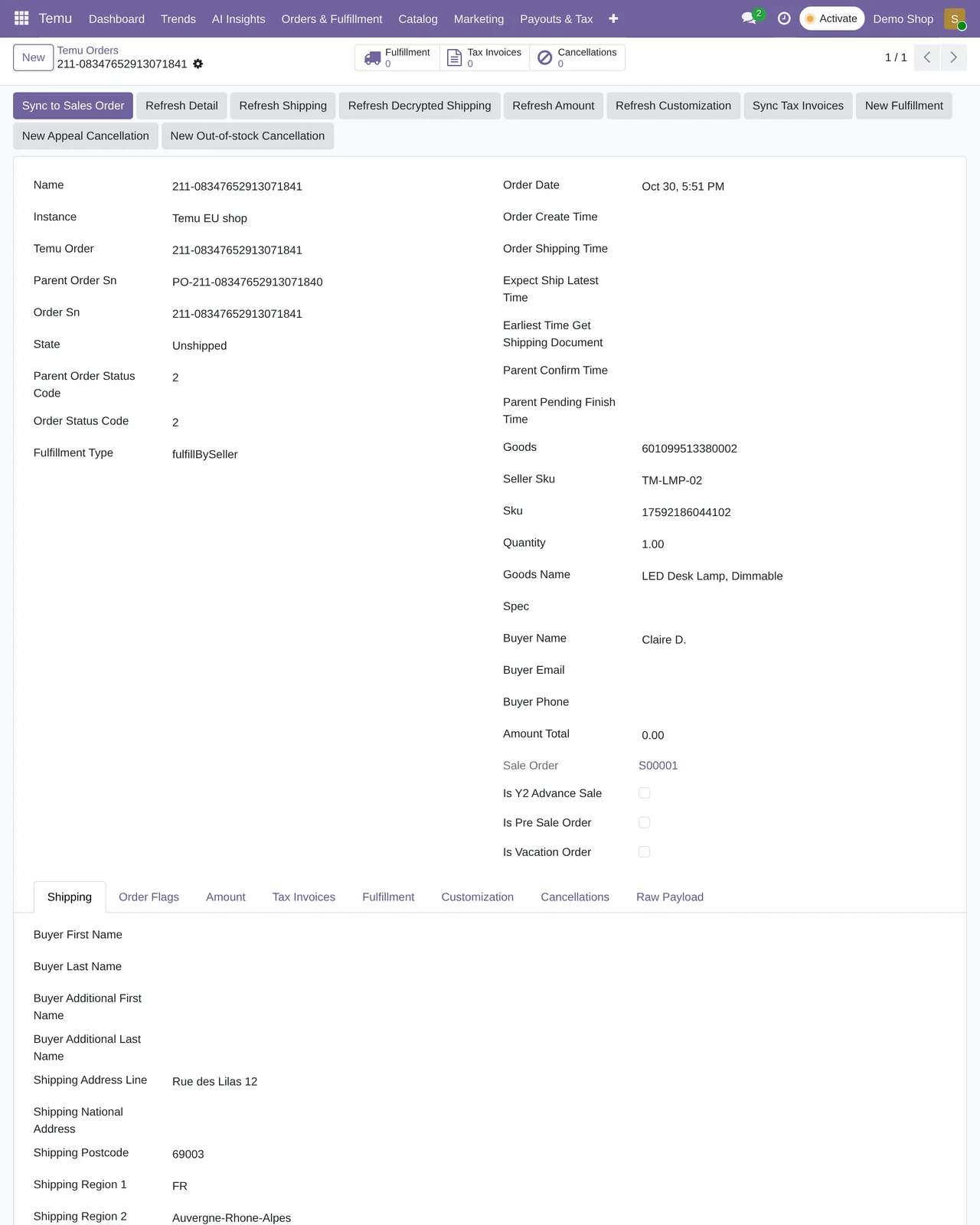
- Open the order in Temu › Orders & Fulfillment › Orders.
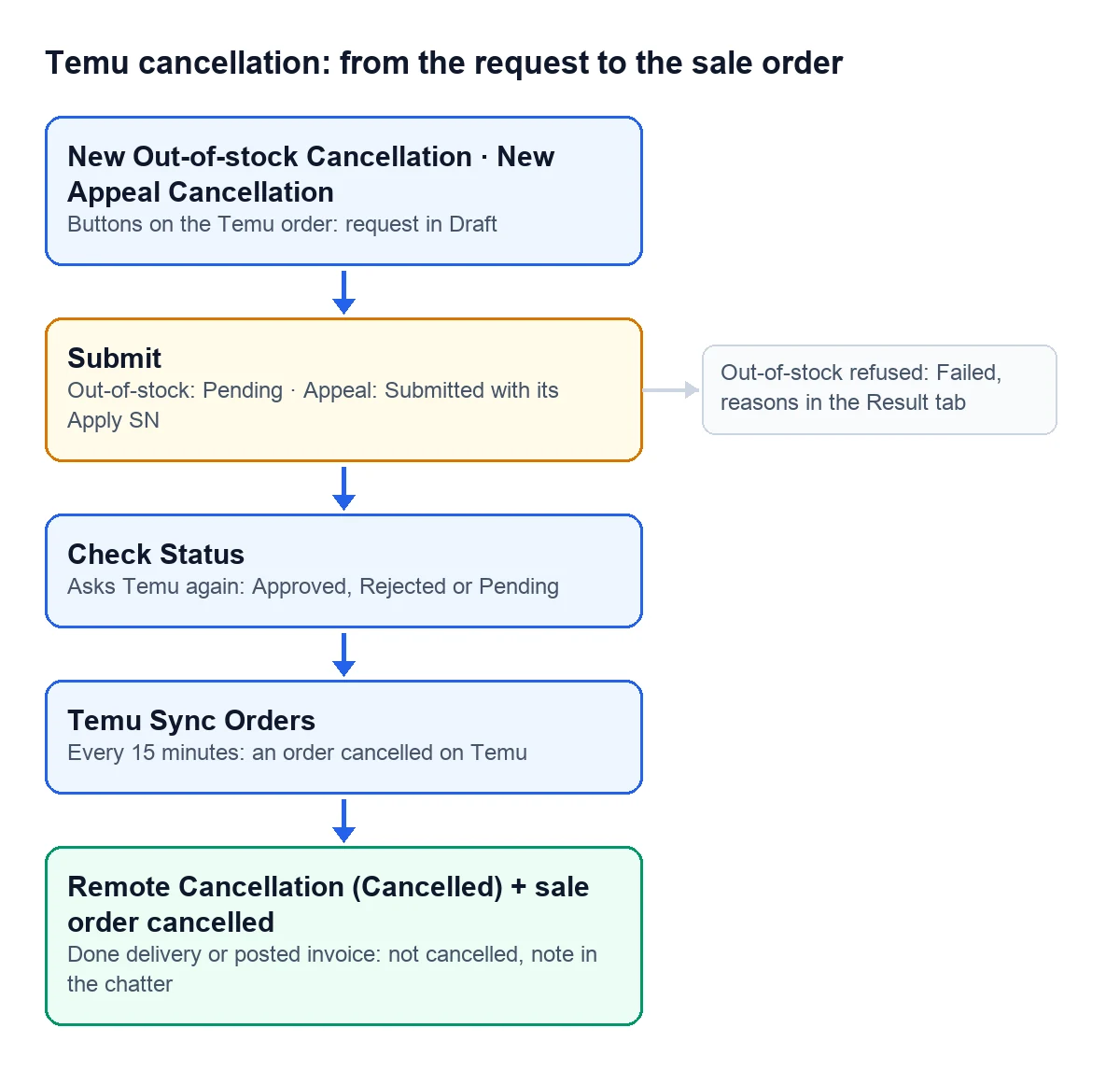
- Press «New Out-of-stock Cancellation». A request opens in Draft with the store, the order, the parent order number and the order number already filled in.
- If the parent order holds several orders and you cancel only some, leave just those numbers in the list, separated by commas.
- Press «Submit». If Temu accepts the request it moves to Pending; if not, to Failed, and Temu's reasons stay on the «Result» tab.
- Later, press «Check Status». Odoo asks Temu again and leaves it in Approved, Rejected or Pending.
Appealing an order
The appeal asks Temu to review an order. You create it with «New Appeal Cancellation» and it has its own fields:
- Temu's reason: Suspected Batch Refund or Incorrect Address, the one set by default.
- A required description. The field reminds you with the text «Reason shown to Temu risk review»: Temu's risk team reads what you write, so be specific.
- Proof links, one per line. If one is not a valid link, Odoo stops with
Invalid proof URL: %s.
When you press «Submit», the appeal moves to Submitted once Temu returns its request number (Apply SN). With that number, «Check Status» tells you how it is going. If it is missing, the message is Apply SN is required to query appeal status.
The states
- Draft The request is in Odoo and has not gone out yet.
- Submitted Temu received the appeal and gave it a number.
- Pending Temu is working on it.
- Approved Temu accepts it.
- Rejected Temu turns it down.
- Failed Temu did not accept the out-of-stock request; check the «Result» tab. If sending fails with an error, Odoo shows it on screen and the request stays in Draft.
- Cancelled It is a remote cancellation: the order is already cancelled on Temu.
To see what was sent and what Temu answered, open the request's Payload Logs tab.
When Temu is the one cancelling
The «Temu Sync Orders» task brings orders in every 15 minutes. If one arrives cancelled, the connector creates its Remote Cancellation in the Cancelled state and cancels the Odoo sale order.
There is one exception so nothing that already happened gets undone: if the sale order has a done delivery or a posted invoice, Odoo does not cancel it and notes it in its chatter with Temu marked this order as cancelled, but Odoo did not auto-cancel the sale order because there are completed deliveries or posted invoices. In that case, the return or the credit note is up to you.
Can I resend a remote cancellation?
No. They come from Temu already closed, and «Submit» refuses them with Remote cancellations are imported from Temu and cannot be submitted manually.
Which versions is it for?
For Odoo 17, 18, 19 and 20: the requests, the order buttons and the automatic cancellation of the sale are in the connector published for those versions.
Keep reading
Checked in the connector's source code (version 17.0, 18.0, 19.0 and 20.0) and the linked sources
Sources
- Module source code: flexigobe_temu_connector · 17.0 9e038a9 · 18.0 c1fe2e4 · 19.0 1f20ced · 20.0 47d68eb: views/temu_order_views.xml, views/menu_views.xml, models/temu_order.py (_action_new_cancellation)
- Module source code: flexigobe_temu_connector · 17.0 9e038a9 · 18.0 c1fe2e4 · 19.0 1f20ced · 20.0 47d68eb: models/temu_order_cancellation.py, views/temu_order_cancellation_views.xml
- Module source code: flexigobe_temu_connector · 17.0 9e038a9 · 18.0 c1fe2e4 · 19.0 1f20ced · 20.0 47d68eb: models/temu_order_cancellation.py (action_submit, action_check_status, _status_to_state), views/temu_order_cancellation_views.xml
- Module source code: flexigobe_temu_connector · 17.0 9e038a9 · 18.0 c1fe2e4 · 19.0 1f20ced · 20.0 47d68eb: models/temu_order.py (_ensure_remote_cancellation_record, _sync_cancelled_sale_order), data/ir_cron_data.xml
- apps.odoo.com/apps/modules/19.0/flexigobe_temu_connector