

 Español
 Català
 Deutsch
 Français
 Português
 Italiano
 Nederlands
 Polski
Before you connect: what you need and what it costs
Shopify Connector is published on Odoo Apps for Odoo 17, 18, 19 and 20. The module costs €9 excluding VAT per Odoo version, as a one-off payment, for 17, 18, 19 and 20, and it also needs a FlexigoTech Cloud subscription: the manifest for each version says «Needs FlexigoTech Cloud subscription (from 49 EUR/month, VAT excl.)». The Connector plan costs €49/month or €490/year excluding VAT (Pro: €98/month or €980/year) and covers up to 3 platform accounts (Pro: 10). Without a subscription, or with the service suspended, whatever the subscription provides stops; your data stays in your Odoo.
On the Odoo App Store, each Odoo version is bought separately. To connect, have three pieces of information to hand: the client ID, the client secret and the shop. If you'd like to see first which menus it adds and what each record goes through, read how the connector works under the bonnet.
How the connector's fields and statuses behave
The client secret doesn't stay in your Odoo
The Client secret (FlexigoTech Cloud) field (technical name fgt_app_secret) is sent once, encrypted, to FlexigoTech Cloud together with the client ID and the shop. It is never stored in Odoo. In Odoo you have two dates related to that step: Saved in FlexigoTech Cloud (fgt_saved_at) and Authorized through FlexigoTech Cloud (fgt_authorized_at).
The connection goes through FlexigoTech Cloud and has three states
The Shopify connection field (fgt_route) indicates that new instances connect through FlexigoTech Cloud. The service stores the credentials encrypted, monitors the sync and emails you if it fails; if Shopify changes its API, both the module and the service are adapted.
The connection state (connection_state) takes the values Connected, Error and Unconfigured. In the instances list you see it next to the domain and the latest syncs.
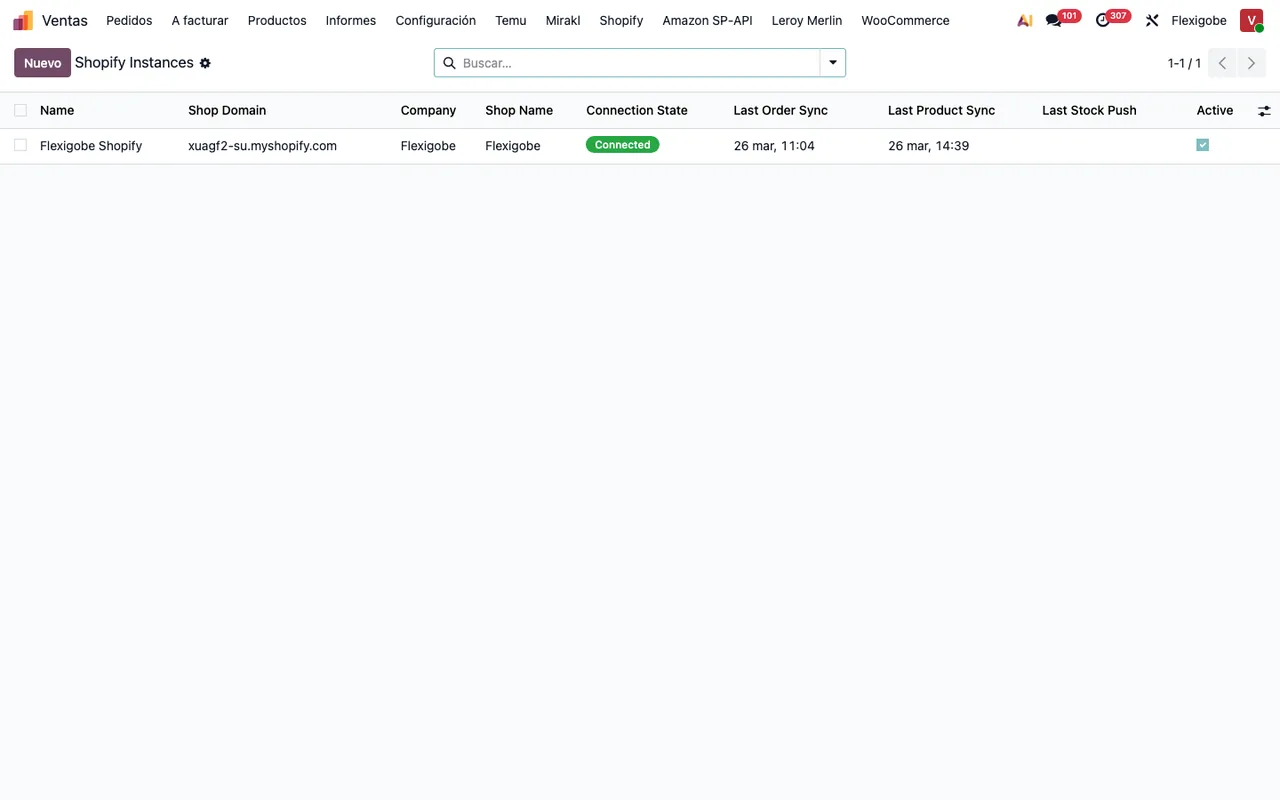
Connected status, latest order and product syncs and the Active box ticked.Other module fields you'll fill in are the company (company_id), the warehouse (warehouse_id), the sales team (Sales Team), the fallback customer (Fallback Customer) and the Enable Finance & Accounting checkbox.
Carriers are mapped by their Shopify name
Each mapping links a Shopify carrier name to an Odoo Delivery Carrier: the Odoo carrier assigned when that Shopify name is found on an order. If you tick Auto-Create Carrier and no carrier is mapped, the module automatically creates a new Odoo delivery carrier with that name.
Each mapping's Status field (mapping_state) can be Mapped, Auto-Create or Unmapped. That is the column you read to know where each carrier name stands.
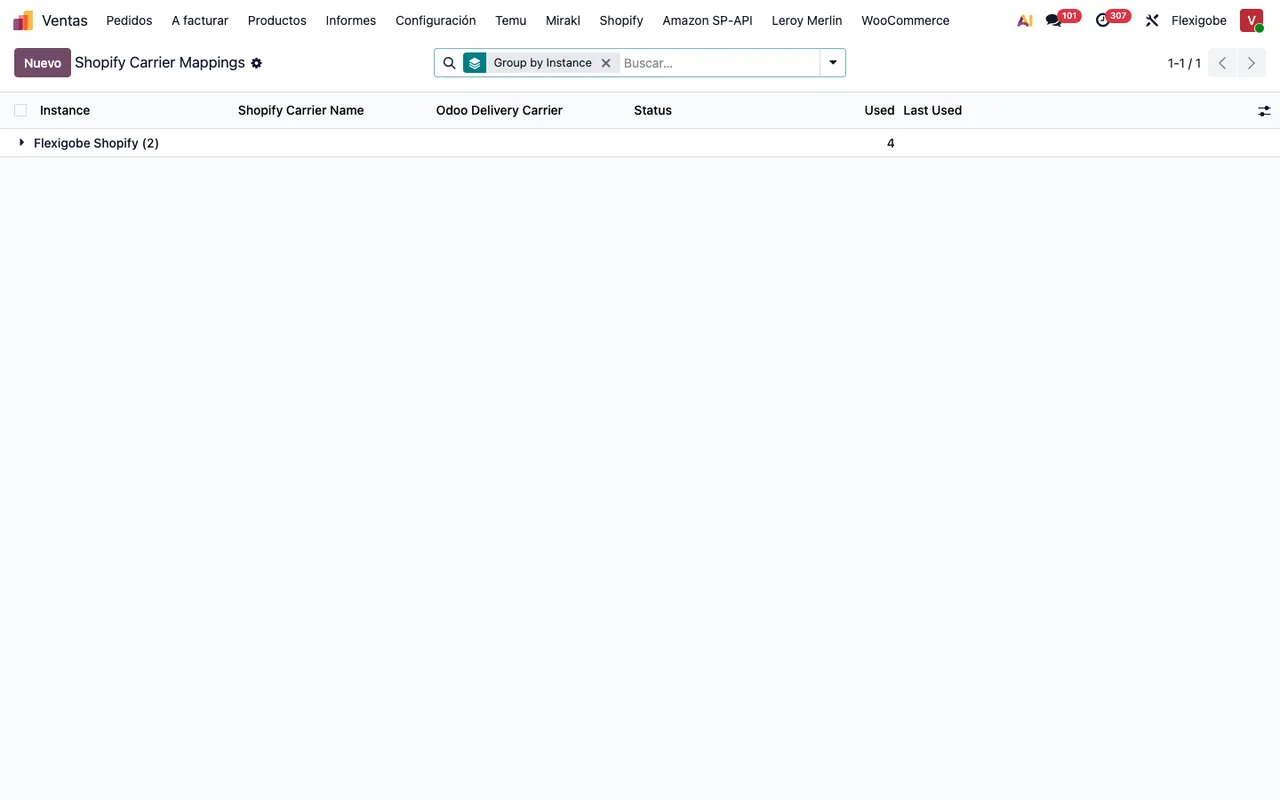
Instance, Shopify Carrier Name, Odoo Delivery Carrier, Status, Used and Last Used.Customers are matched by Shopify ID, not by email
The Shopify Customer ID field holds the Shopify customer GID, and the module uses it to match contacts exactly, without relying on email or phone. It's the field to look at when you check which contact an order has landed on.
Variants are grouped by the product GID
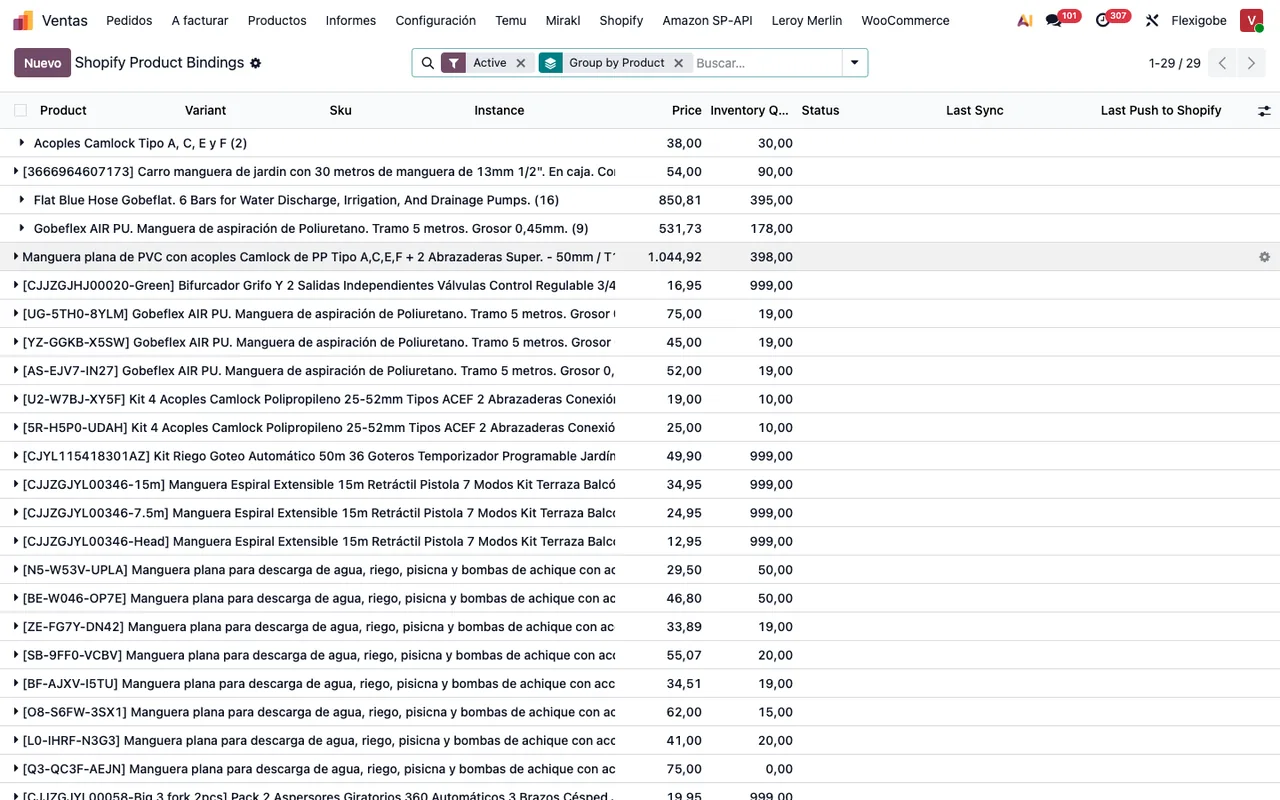
Shopify Product GID is the Shopify product GID, and the module uses it as the key for grouping variants. On the product you'll also see Shopify Vendor, Shopify Product Type, Shopify Compare-At Price, Last Push to Shopify and Shopify Tags, which holds comma-separated tags synced from Shopify and pushed to Shopify.
Shopify Status takes the values Active, Draft and Archived. In another status field in the module (status) the difference is spelt out in the label itself: Active (visible in store) versus Draft (hidden).
Delivery status has its own scale
The Estado de Envío field (shopify_delivery_status) can be No Validado, Listo para Enviar, Parcialmente Enviado, Enviado or Cancelado. The Mostrar Estado de Envío en Ventas checkbox, when enabled, shows a column with the order's delivery status in the sales list. Decide whether you want that column visible to the people working in Sales.
There are more statuses worth learning to read
The module uses other status fields:
- A
statewithOpen,Partially Fulfilled,Fulfilled,CancelledandRefunded. - A
statewithDraft,Credit Note Created,IgnoredandFailed. stock_return_state, withN/A,Pending Return,To Review,Stock ReturnedandReturn Failed.- A
statewithRunning,Success,Partial (with errors)andFailed. - A
statewithPending,Processed,FailedandFailed, no more retries.
What each alert means and what to do about it is covered in the connector's error messages and warnings.
What to check in the first week
Once the shop is connected, you can run these checks yourself:
- In Shopify Instances, that the instance shows as
Connectedand has dates for the latest order and product syncs. - Your inbox, in case FlexigoTech Cloud has emailed you about a sync failure.
- In Shopify Carrier Mappings, the
Status,UsedandLast Usedcolumns, and any mapping inUnmapped. - In Shopify Product Bindings, with the
Activefilter and grouped by product, the SKU, price, inventory and status of each variant. - On contacts that have come in from Shopify, the
Shopify Customer IDfield. - Any record in
Partial (with errors),Failed,Failed, no more retries,To RevieworReturn Failed.
Connected status and the active product bindings grouped by product.How FlexigoTech can help
FlexigoTech implements Odoo 17, 18, 19 and 20 and builds bespoke connectors and integrations. If you're implementing Odoo while connecting Shopify, we can help you get the configuration in place (company, warehouse, sales team, carriers) and adapt the connector to what your shop needs. The module is on its Odoo Apps listing.
Keep reading
Checked in the connector's source code (version 20.0) and the linked sources
Sources
- Module source code: flexigobe_shopify_connector 20.0 (04fa0489): models/fgt_cloud.py
- Module source code: flexigobe_shopify_connector 20.0 (04fa0489): models/product_product.py
- Module source code: flexigobe_shopify_connector 20.0 (04fa0489): models/product_template.py
- Module source code: flexigobe_shopify_connector 20.0 (04fa0489): models/res_partner.py
- Module source code: flexigobe_shopify_connector 20.0 (04fa0489): models/sale_order.py
- Module source code: flexigobe_shopify_connector 20.0 (04fa0489): models/shopify_carrier_mapping.py
- Module source code: flexigobe_shopify_connector 20.0 (04fa0489): models/shopify_instance.py
- Module source code: flexigobe_shopify_connector 20.0 (04fa0489): models/shopify_order.py
- Module source code: flexigobe_shopify_connector 20.0 (04fa0489): models/shopify_refund.py
- Module source code: flexigobe_shopify_connector 20.0 (04fa0489): models/shopify_sync_log.py
- Module source code: flexigobe_shopify_connector 20.0 (04fa0489): models/shopify_webhook_event.py
- Module source code: flexigobe_shopify_connector 20.0 (04fa0489): wizard/shopify_export_product_wizard.py
- apps.odoo.com/apps/modules/20.0/flexigobe_shopify_connector
- apps.odoo.com/apps/modules/17.0/flexigobe_shopify_connector
- apps.odoo.com/apps/modules/18.0/flexigobe_shopify_connector
- apps.odoo.com/apps/modules/19.0/flexigobe_shopify_connector
- flexigotech.com/en/services.html
- flexigotech.com/precios.html