

 Español
 Català
 Deutsch
 Français
 Português
 Italiano
 Nederlands
 Polski
Where sending employment contracts for signature lives
This is not in the main module: it lives in the Scrive HR Contracts submodule (flexigobe_scrive_connector_hr). In Odoo 17 and 18 it depends on flexigobe_scrive_connector and hr_contract; in Odoo 19 and 20 it depends on flexigobe_scrive_connector and hr. It installs itself when its dependencies are present.
The module is published on Odoo Apps for 17, 18, 19 and 20, and each branch has its own buttons and messages in this submodule.
Which button is in each version
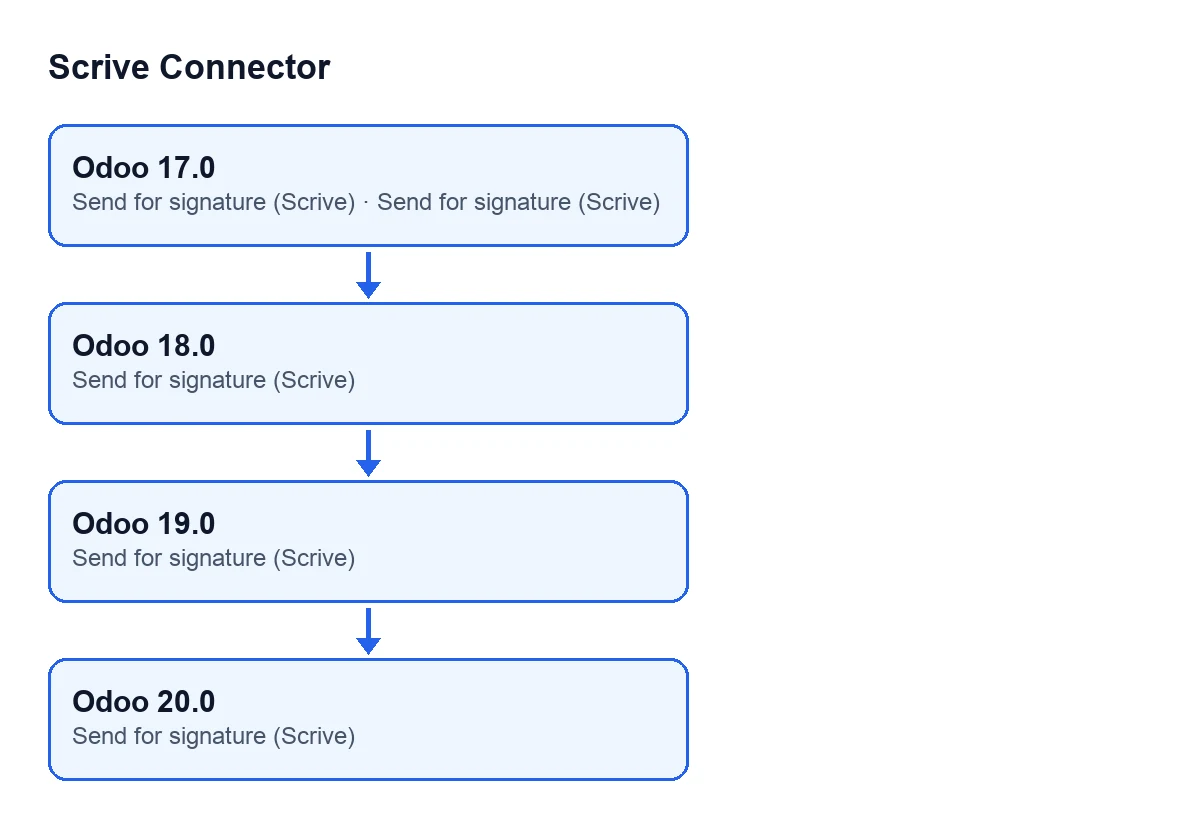
The Send for signature (Scrive) button has two places in this submodule: the contract screen and the employee screen. The table shows which versions have each one.
Send for signature (Scrive) button | Odoo 17 | Odoo 18 | Odoo 19 | Odoo 20 |
|---|---|---|---|---|
| On the contract screen | Yes | Yes | No | No |
| On the employee screen | Yes | No | Yes | Yes |
Two things hold for both buttons, in the versions where they exist: the module hides them while the record is not ready for signature, and only users with the module's Scrive user permission see them.
One point to avoid confusion: the button being absent from the contract screen in Odoo 19 and 20 does not mean the Send for signature (Scrive) label disappears from those versions. The same label is still on other screens of the module. The same goes for Odoo 18 and the employee screen: the button is not there, but the label is on other screens, the contract one among them.
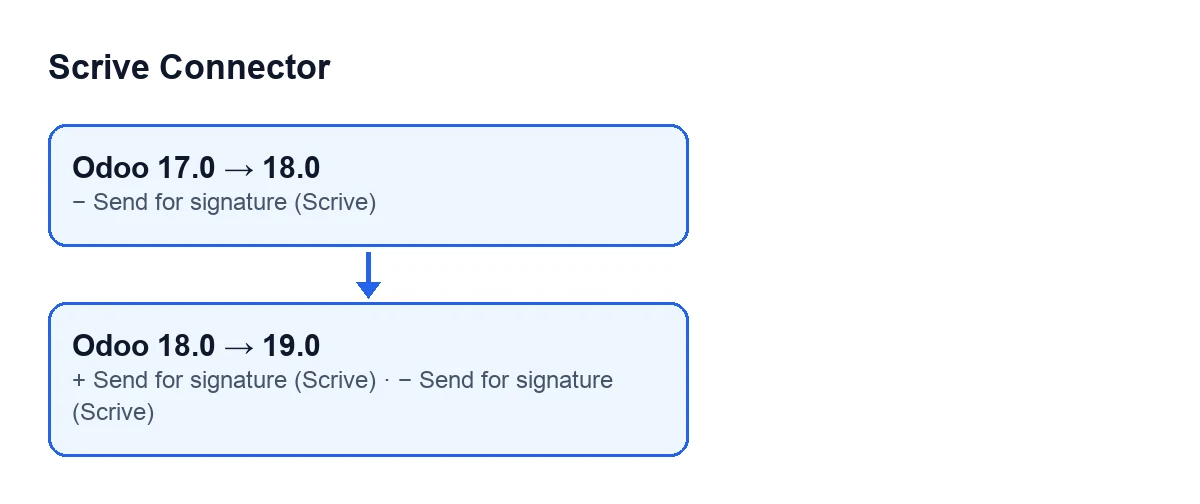
Send for signature (Scrive) among them.The submodule's messages, version by version
The messages change by branch too.
Odoo 17
A contract without an employee cannot be sent for signature: set the employee on the contract first.The employment contract of … prints …, which your access rights do not let you read, so it cannot be previewed. You can still send it for signature: the employee receives the complete contract.… has no contract record to send for signature.
Odoo 18
A contract template cannot be sent for signature: open the employee whose contract you want signed instead.Only a Contracts Administrator can send an employment contract for signature or preview it.
Odoo 19 and 20
A contract template cannot be sent for signature: open the employee whose contract you want signed instead.The employment contract of … prints …, which only an HR Manager may read, so it cannot be previewed with your access rights. You can still send it for signature: the employee receives the complete contract.… has no contract record to send for signature.… has no employment contract yet: fill in the contract start date before sending it for signature.
What changes when you upgrade
Going from Odoo 17 to 18, the button on the employee screen is no longer in 18, while the contract one stays. The messages about a contract without an employee, about access rights to the preview as worded in 17, and about a missing contract record are gone. The contract template message and the one about a Contracts Administrator appear.
Going from 18 to 19, the contract button is no longer there and the employee one returns. The Contracts Administrator message is not in 19; in 19 there are one that mentions an HR Manager and the preview, and another asking you to fill in the contract start date. The message about a missing contract record comes back.
From 19 to 20, the buttons and messages quoted above are the same in both branches. The submodule's dependency does change between 18 and 19, from hr_contract to hr.
The preview messages in 17, 19 and 20 say something useful when deciding: even if you cannot preview the contract with your access rights, you can still send it for signature, and the employee receives the complete contract.
How to check it in your Odoo
Open the contract screen (if your Odoo is 17 or 18) or the employee screen (17, 19 or 20) with a user who has the module's Scrive user permission. If you do not see the Send for signature (Scrive) button, check three things: that your version has the button on that screen according to the table, that your user has that permission, and that the record is ready for signature, because the module hides the button until it is.
What you need first and what it costs
The module is a one-off payment per Odoo version and needs a FlexigoTech Cloud subscription, Connector plan: €49 a month or €490 a year, excluding VAT (the Pro plan is €98 a month or €980 a year, excluding VAT). The module price for each version is on its Odoo Apps listing and on the module page.
The connection goes through FlexigoTech Cloud, which stores the credentials encrypted, watches the synchronisation and emails you if it fails. Without a subscription, or with the service suspended, whatever the subscription provides stops; your data stays in your Odoo. With the subscription, the module for newer Odoo versions is included if you bought it on flexigotech.com; on the Odoo App Store, each version is bought there.
How FlexigoTech can help
FlexigoTech implements Odoo 17, 18, 19 and 20 and builds custom connectors and integrations. If you are choosing a branch for signing employment contracts, or planning a move between versions, get in touch and we will go through it with you.
Keep reading
Checked in the connector's source code (version 20.0) and the linked sources
Sources
- Module source code: flexigobe_scrive_connector 20.0 (21b3b940): __manifest__.py
- Module source code: flexigobe_scrive_connector_hr 20.0 (21b3b940): __manifest__.py
- apps.odoo.com/apps/modules/20.0/flexigobe_scrive_connector
- flexigotech.com/en/services.html
- flexigotech.com/precios.html