

 Español
 Català
 Deutsch
 Français
 Português
 Italiano
 Nederlands
 Polski
A case: a commercial gesture that will not submit
Example Illustrative case: the company and its figures are made up to explain the flow.
Distribuciones Norte, a company invented for this example, sells on Cdiscount and manages its orders in Odoo with Octopia Connector. Marta, in customer service, wants to compensate a customer with a commercial gesture. She opens Octopia › Orders › Commercial Gestures. The Octopia part of that menu is visible to people with the Octopia User permission; without it, you do not see that part.
She creates the gesture record and presses Submit to Octopia. Odoo asks for confirmation with this text: A commercial gesture refunds the customer this amount. Continue?. Marta accepts and the action stops with this message: Commercial gestures apply to shipped or delivered orders only (order … is …). Where the dots are, Odoo writes the Octopia identifier of the order and the status it is in.
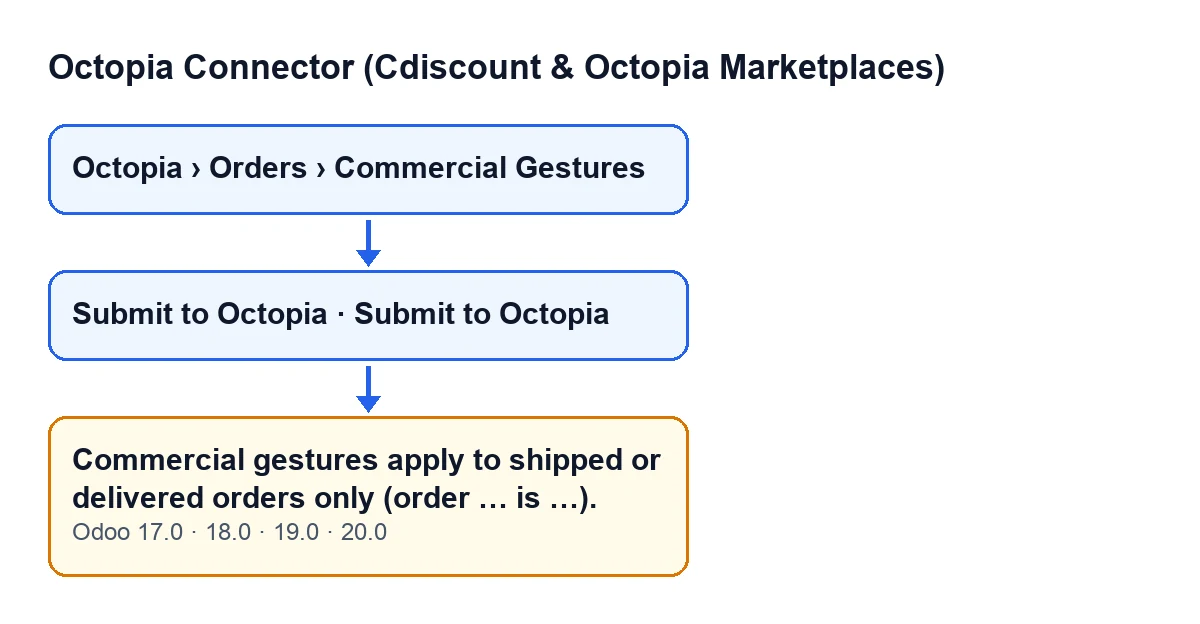
The problem is not in the gesture record but in the status of the order it refers to.

When exactly it appears
The message appears when you press Submit to Octopia on the gesture record and the order meets the condition you will see below. The button is visible while the gesture's State field has its starting value and is hidden with any other value, in Odoo 17, 18, 19 and 20.
According to the Odoo 20.0 code, the module goes through the gestures and skips any that are not in that starting state. For each of the others it runs these checks, in this order:
- It checks that the amount is greater than zero. If it is not, it stops with a different message.
- It looks at the order's sales channel: if its configuration has been synced and it has commercial gestures disabled, it also stops with a different message.
- It looks at the order's status: if it is neither shipped nor delivered, it stops with the message discussed here.
In other words, the message appears when the order status is neither shipped nor delivered, provided the amount check and the sales channel check have already passed. And the message itself tells you the order's current status.
When it stops, nothing the action was about to change is saved:
- the gesture does not move to another state;
- no request reference or submission date is recorded;
- nothing is sent to Octopia.
That is why the button stays visible on the record and you can press it again later.
The message is in the published code of branches 17.0, 18.0, 19.0 and 20.0. The order of checks you have just read is that of the Odoo 20.0 code.
Commercial gestures apply to shipped or delivered orders only (order … is …).How to resolve it
- Read the message: it carries the Octopia identifier of the order and its current status.
- If that status is neither shipped nor delivered, the gesture cannot be submitted yet. Leave the record as it is: there is nothing to correct in it because of this message.
- Once the order is shipped or delivered, open the gesture again in
Octopia › Orders › Commercial Gestures, pressSubmit to Octopiaand confirm. - Check the outcome: if the submission went through, the gesture is left in progress and the button disappears from the record, because the gesture no longer has its starting state.
If a different message appears instead, it may come from one of the earlier checks: the gesture amount or commercial gestures being disabled on the sales channel.
For the rest of what that button does, see the step-by-step guide to the Submit to Octopia button.
What happens when the order does qualify
With the order shipped or delivered, the module carries on. It asks Octopia for the remaining budget of the order. If Octopia returns a budget and the gesture amount exceeds it, the module stops with a message saying the amount exceeds the remaining budget. If it does not, or if Octopia says nothing, the module sends the gesture with its reason, its details and its amount.
If Octopia returns a request reference, the module stores it on the record. It then records the submission date, leaves the gesture in progress and creates a synchronisation log entry of the gestures type with a successful result.
What to take from the case
- The message is about the order, not the gesture: the condition that triggers it is the order's status.
- The blanks in the message are the clue: the Octopia identifier of the order and its current status.
- A message like this does not leave the submission half done: the gesture's state does not change and nothing reaches Octopia.
- The button stays in view, so the retry is simply pressing it again once the order is shipped or delivered.
Cost and how FlexigoTech can help
Octopia Connector (Cdiscount & Octopia Marketplaces) is a one-off purchase per Odoo version (17, 18, 19 and 20; the price for each version is on its Odoo Apps page) and it needs a FlexigoTech Cloud subscription, Connector plan: €49 a month or €490 a year excluding VAT, with up to 3 platform accounts.
If you are implementing Odoo and want to review how the Cdiscount order and commercial gesture flow fits your company, FlexigoTech implements Odoo 17, 18, 19 and 20 and develops custom connectors and integrations.
If another button of the module interests you, there is the article on the Import button.
Keep reading
Checked in the connector's source code (version 20.0) and the linked sources
Sources
- Module source code: flexigobe_octopia_connector 20.0 (4848da6a): models/octopia_order_actions.py
- Module source code: flexigobe_octopia_connector 20.0 (4848da6a): views/octopia_order_actions_views.xml
- apps.odoo.com/apps/modules/20.0/flexigobe_octopia_connector
- flexigotech.com/precios.html
- flexigotech.com/en/services.html