

 Español
 Català
 Deutsch
 Français
 Português
 Italiano
 Nederlands
 Polski
Where the connector lives inside Sales
The Odoo Apps listing introduces the module with the heading Sell on Shopee from Odoo. In Odoo 19 and 20, everything it adds hangs off Sales › E-Commerce Marketplaces, and the menus are grouped like this:
Sales › E-Commerce Marketplaces › Accounts.Sales › E-Commerce Marketplaces › Products, with three submenus:Product Mappings,Category MappingsandAttribute Mappings.Sales › E-Commerce Marketplaces › Orders, with four submenus:Sync Queue,Sync Logs,Sync ConflictsandHeld Orders.Sales › E-Commerce Marketplaces › Analytics, withDashboardandPerformance Report.Sales › E-Commerce Marketplaces › Settings.
The scheduled tasks and how often they run
The module ships with five scheduled tasks and all five are listed as active. Here they are with their literal names and frequency:
| Task | Frequency |
|---|---|
Marketplace: Sync Products (every 5 min) | every 5 minutes |
Marketplace: Sync Inventory (every 5 min) | every 5 minutes |
Marketplace: Sync Orders (every 30 min) | every 30 minutes |
Marketplace: Check Stale Orders (every 1 hour) | every hour |
Marketplace: Weekly Reconciliation Digest (Mon 09:00) | every week (Monday 09:00, according to its name) |
How to read the table: each task's name tells you which part of the connector it relates to (products, inventory, orders, stale orders and a weekly reconciliation digest). The product and inventory tasks run most often; the orders task runs every 30 minutes; the stale orders check, every hour. The weekly one carries its day and time in its own name.
A walk through the menus, step by step
This is a reading order for getting to know the module from the inside in Odoo 19 and 20, following the menus as they appear. It is not a sequence the module enforces: it is simply a handy way to see what each screen holds.
- Open
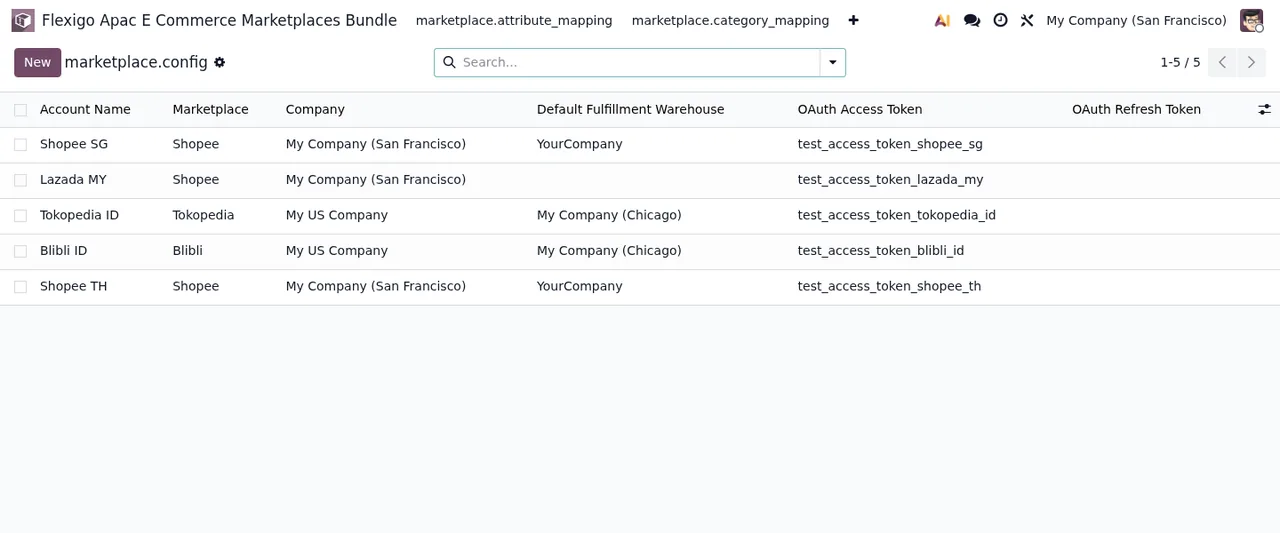
Sales › E-Commerce Marketplaces › Accounts. Marketplace accounts are stored in themarketplace.configmodel, which the code describes asMarketplace Account Configuration. The demo list shows columns for marketplace, company, warehouse and OAuth tokens. - Go to
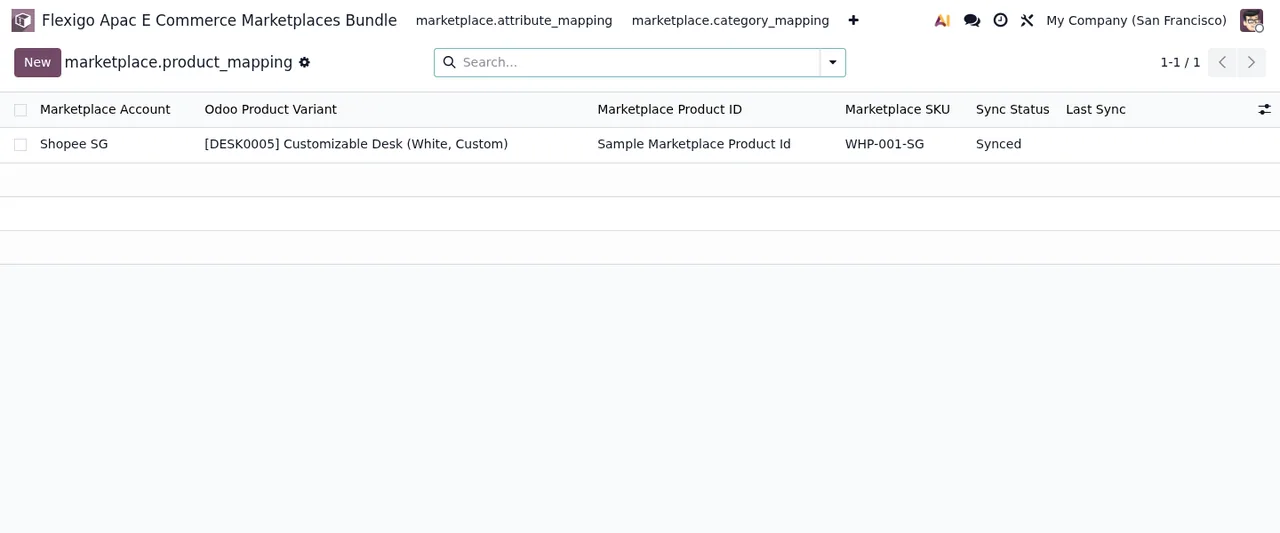
Products › Product Mappings. This is themarketplace.product_mappingmodel, described asProduct ↔ Marketplace Product ID Mapping. In the demo screenshot the row links an account, an Odoo variant, a product ID, a SKU and a status. - Move on to
Products › Category Mappings. The model ismarketplace.category_mapping, described asOdoo Category → Marketplace Category Mapping. - Carry on with
Products › Attribute Mappings. The model ismarketplace.attribute_mapping, described asOdoo Attribute → Marketplace Attribute Mapping. Its list shows the columnsMarketplace Account,Odoo Attribute,Marketplace Attribute KeyandCreated. - Open
Orders › Sync Queue. Behind it sitsmarketplace.sync_queue, described asMarketplace Sync Task Queue. - Check
Orders › Sync Logs. The model ismarketplace.sync_log, described asMarketplace Sync Audit Trail. - Look at
Orders › Sync Conflicts. The model ismarketplace.sync_conflict, described asMarketplace Sync Conflict. - Go into
Orders › Held Orders. The model ismarketplace.order.hold, described asHeld marketplace order. - Move to
Analytics:DashboardandPerformance Report. The code contains the modelsmarketplace.dashboard.overview(Marketplace Dashboard Overview),marketplace.performance.report(Marketplace Performance Report) andmarketplace.performance.report.line(Marketplace Performance Report Line). - Finally, open
Settings, the last section of the menu.
What the screen names tell you
As you go through the menus you will see the module splits into three blocks. Products brings together the mappings: product, category and attribute, each in its own model. Orders brings together the queue (Sync Queue), the audit trail (Sync Logs), conflicts (Sync Conflicts) and held orders (Held Orders). Analytics brings together the dashboard and the performance report with its lines.
In the demo screenshot of the product mapping, the row shows the status Synced. If you want to see which statuses each record goes through and which fields to fill in when you start, it is covered in the connector set-up guide. And if one of these screens shows you a warning, the error messages guide lists the literal texts and what to do about each one.
Odoo versions and price
The module is published on Odoo Apps for Odoo 17, 18, 19 and 20. All four listings show it as free. You can see it on the Odoo Apps listing or on the module page at flexigotech.com.
How FlexigoTech can help
At FlexigoTech we implement Odoo 17, 18, 19 and 20 and build bespoke connectors and integrations. If the connector fits but you need it adapted to the way you work, or you would like someone to go through the accounts, mappings and scheduled tasks with you before you start selling on Shopee, tell us about your case via the module page.
Keep reading
Checked in the module's source code (version 20.0) and the linked sources
Sources
- Module source code: flexigo_apac_e_commerce_marketplaces_bundle 20.0 (2cbf6b48): views/menus.xml
- Module source code: flexigo_apac_e_commerce_marketplaces_bundle 20.0 (2cbf6b48): data/cron_jobs.xml
- Module source code: flexigo_apac_e_commerce_marketplaces_bundle 20.0 (2cbf6b48): static/description/index.html
- Module source code: flexigo_apac_e_commerce_marketplaces_bundle 20.0 (2cbf6b48): models/marketplace_attribute_mapping.py
- Module source code: flexigo_apac_e_commerce_marketplaces_bundle 20.0 (2cbf6b48): models/marketplace_category_mapping.py
- Module source code: flexigo_apac_e_commerce_marketplaces_bundle 20.0 (2cbf6b48): models/marketplace_config.py
- Module source code: flexigo_apac_e_commerce_marketplaces_bundle 20.0 (2cbf6b48): models/marketplace_dashboard.py
- Module source code: flexigo_apac_e_commerce_marketplaces_bundle 20.0 (2cbf6b48): models/marketplace_order_hold.py
- Module source code: flexigo_apac_e_commerce_marketplaces_bundle 20.0 (2cbf6b48): models/marketplace_product_mapping.py
- Module source code: flexigo_apac_e_commerce_marketplaces_bundle 20.0 (2cbf6b48): models/marketplace_sync_conflict.py
- Module source code: flexigo_apac_e_commerce_marketplaces_bundle 20.0 (2cbf6b48): models/marketplace_sync_log.py
- Module source code: flexigo_apac_e_commerce_marketplaces_bundle 20.0 (2cbf6b48): models/marketplace_sync_queue.py
- apps.odoo.com/apps/modules/20.0/flexigo_apac_e_commerce_marketplaces_bundle
- apps.odoo.com/apps/modules/17.0/flexigo_apac_e_commerce_marketplaces_bundle
- apps.odoo.com/apps/modules/18.0/flexigo_apac_e_commerce_marketplaces_bundle
- apps.odoo.com/apps/modules/19.0/flexigo_apac_e_commerce_marketplaces_bundle
- flexigotech.com/en/services.html