

 Español
 Català
 Deutsch
 Français
 Português
 Italiano
 Nederlands
 Polski
The three blocks of the Sales › Leroy Merlin menu
The module hangs everything off a single menu inside Sales: Sales › Leroy Merlin. Inside it there are three blocks, each with its own screens:
Control Center:InstancesandLogs.
Operations:Orders,ReturnsandOffers.
Catalog:Mirakl Categories,Mirakl Attributes,Mirakl Values Lists,Category MappingandCarrier Mapping.
Note that the catalogue menus and the technical names refer to Mirakl: the instance is the leroy.mirakl.instance model, the logs live in leroy.mirakl.log and the mappings in leroy.mirakl.category.map and leroy.mirakl.carrier.map. On its Odoo Apps listing the module is presented under the heading Sell on Leroy Merlin from Odoo, which you can see on Odoo Apps.
A walk through the screens, from the instance to the logs
This is a top-to-bottom tour of the module's menus, so you know what each screen holds and what it is called. It is not the list of settings for going live: that is covered in the Leroy Merlin Connector setup guide.
- Open the instances. Under
Sales › Leroy Merlin › Control Center › Instancesyou will find the connector's instances. In the code, the model is calledleroy.mirakl.instance, described asLeroy Mirakl Instance.
- Review categories, attributes and value lists. Under
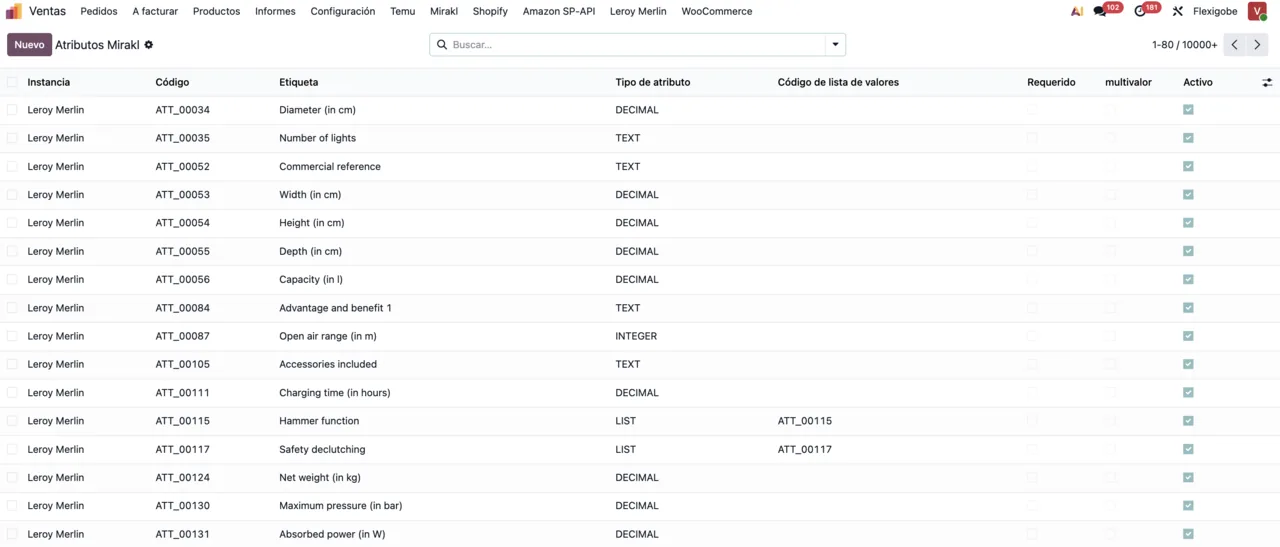
Sales › Leroy Merlin › Catalogyou haveMirakl Categories,Mirakl AttributesandMirakl Values Lists. In the code, the catalogue models are calledleroy.mirakl.catalog.category,leroy.mirakl.catalog.attributeandleroy.mirakl.catalog.value. The attributes list shows, for each row, the instance, code, label, attribute type, value list code and the required, multi-value and active flags.
- Check the category mapping. In
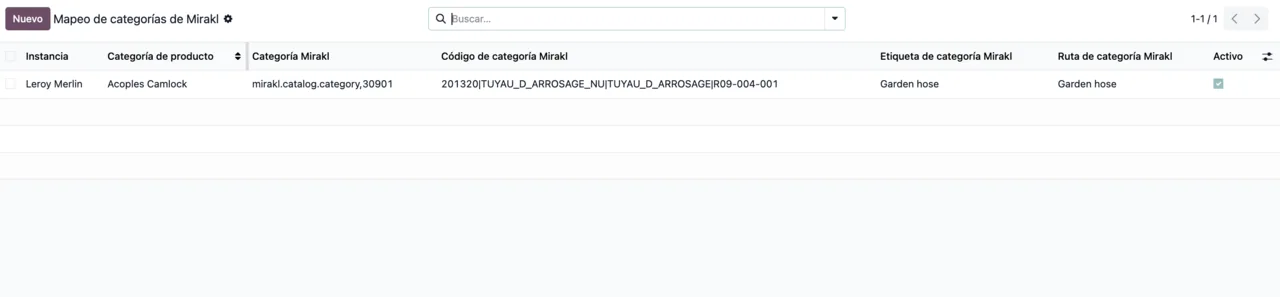
Sales › Leroy Merlin › Catalog › Category Mappingeach row carries the instance, product category, Mirakl category code, label, path and an active tick box. The model isleroy.mirakl.category.map. The module also includes the modelsleroy.mirakl.category.search.wizard(Leroy Mirakl Category Search Wizard) andleroy.mirakl.category.search.line(Leroy Mirakl Category Search Line).
- Check the carrier mapping. In
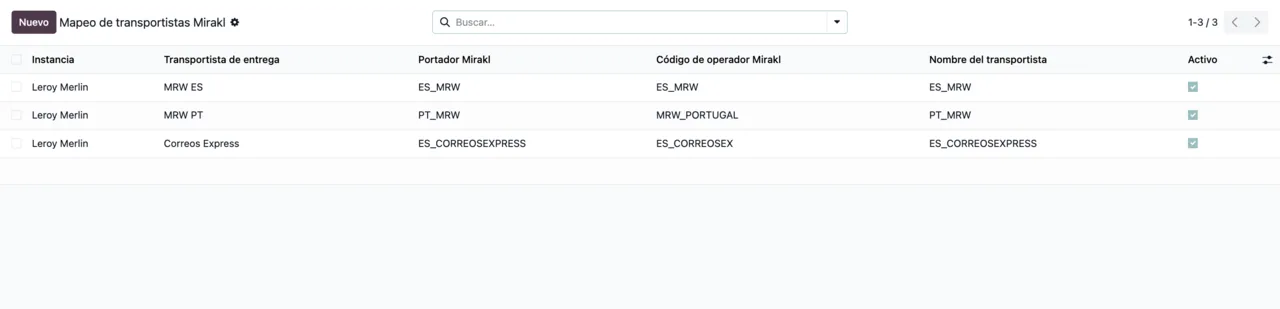
Sales › Leroy Merlin › Catalog › Carrier Mappingthe list shows the carrier, operator code, carrier name and theActivotick box. The related models areleroy.mirakl.carrier.map(Leroy Mirakl Carrier Mapping) andleroy.mirakl.available.carrier(Leroy Mirakl Available Carrier).
- Work in operations. Under
Sales › Leroy Merlin › Operationsyou haveOrders,ReturnsandOffers: Leroy Merlin orders, returns and offers inside Odoo.
- Check the logs. Under
Sales › Leroy Merlin › Control Center › Logsare the records of theleroy.mirakl.logmodel. If you see a warning and want to know what it means, the Leroy Merlin Connector error messages list each literal text with what to do.
The ten scheduled actions and how often they run
The module ships ten scheduled actions and all of them are active. Here they are with their frequency:
| Scheduled action | Frequency |
|---|---|
Leroy Mirakl - Sync Orders | every 5 minutes |
Leroy Mirakl - Export Offers | every 5 minutes |
Leroy Mirakl - Accept Orders | every 10 minutes |
Leroy Mirakl - Retry Tracking Push | every 10 minutes |
Leroy Mirakl - Export Stock (STO01) | every 10 minutes |
Leroy Mirakl - Retry Post Sale | every 15 minutes |
Leroy Mirakl - Export Prices (PRI01) | every 15 minutes |
Leroy Mirakl - Export Catalog | every 30 minutes |
Leroy Mirakl - Sync Returns | every 60 minutes |
Leroy Mirakl - Sync Catalog Dictionary | every 60 minutes |
The most frequent, every 5 minutes, are Leroy Mirakl - Sync Orders and Leroy Mirakl - Export Offers. Price and stock have separate actions: Leroy Mirakl - Export Prices (PRI01) every 15 minutes and Leroy Mirakl - Export Stock (STO01) every 10. The catalogue has two: Leroy Mirakl - Export Catalog every 30 minutes and Leroy Mirakl - Sync Catalog Dictionary every 60. Orders also have Leroy Mirakl - Accept Orders every 10 minutes, and returns have Leroy Mirakl - Sync Returns every 60. Finally, two actions carry Retry in their name: Leroy Mirakl - Retry Tracking Push every 10 minutes and Leroy Mirakl - Retry Post Sale every 15.
If something is missing in Odoo, check the frequency of its action in this table first, then the Logs.
What FlexigoTech Cloud does in the connection
The connection between your Odoo and Leroy Merlin goes through FlexigoTech Cloud. The service stores your credentials encrypted, monitors the sync and emails you if it fails. If the platform changes its API, both the module and the service are adapted.
This comes with the Connector plan subscription, which covers up to 3 platform accounts (up to 10 on the Pro plan). Without a subscription, or with the service suspended, whatever the subscription provides stops, but your data stays in your Odoo.
Odoo versions and price
The module is published on Odoo Apps for Odoo 17.0, 18.0, 19.0 and 20.0. It costs €9 per Odoo version, a one-off payment excluding VAT, for 17, 18, 19 and 20; the Connector plan is €49/month or €490/year excluding VAT (Pro: €98/month or €980/year, excluding VAT).
How FlexigoTech can help
At FlexigoTech we implement Odoo 17, 18, 19 and 20 and build bespoke connectors and integrations. If you already run Odoo and want to connect Leroy Merlin, or you need the connector to fit other processes in your business, we can help with the implementation or with custom development.
Keep reading
Checked in the connector's source code (version 20.0) and the linked sources
Sources
- Module source code: flexigobe_leroy_merlin_connector 20.0 (fb656d53): views/menu_views.xml
- Module source code: flexigobe_leroy_merlin_connector 20.0 (fb656d53): data/ir_cron_data.xml
- Module source code: flexigobe_leroy_merlin_connector 20.0 (fb656d53): static/description/index.html
- Module source code: flexigobe_leroy_merlin_connector 20.0 (fb656d53): models/leroy_mirakl_available_carrier.py
- Module source code: flexigobe_leroy_merlin_connector 20.0 (fb656d53): models/leroy_mirakl_carrier_map.py
- Module source code: flexigobe_leroy_merlin_connector 20.0 (fb656d53): models/leroy_mirakl_catalog_dictionary.py
- Module source code: flexigobe_leroy_merlin_connector 20.0 (fb656d53): models/leroy_mirakl_category_map.py
- Module source code: flexigobe_leroy_merlin_connector 20.0 (fb656d53): models/leroy_mirakl_category_search_wizard.py
- Module source code: flexigobe_leroy_merlin_connector 20.0 (fb656d53): models/leroy_mirakl_instance.py
- Module source code: flexigobe_leroy_merlin_connector 20.0 (fb656d53): models/leroy_mirakl_log.py
- apps.odoo.com/apps/modules/20.0/flexigobe_leroy_merlin_connector
- apps.odoo.com/apps/modules/17.0/flexigobe_leroy_merlin_connector
- apps.odoo.com/apps/modules/18.0/flexigobe_leroy_merlin_connector
- apps.odoo.com/apps/modules/19.0/flexigobe_leroy_merlin_connector
- flexigotech.com/en/services.html
- flexigotech.com/precios.html