

 Español
 Català
 Deutsch
 Français
 Português
 Italiano
 Nederlands
 Polski
The menus you get when you install Recovery
The Odoo Apps listing introduces the module under the heading Dunning for overdue invoices and RMA returns: chasing overdue invoices and handling RMA returns. Inside Odoo everything sits under a single app, Recovery, with these entries:
Recovery › DashboardRecovery › Dunning CasesRecovery › RMA OrdersRecovery › Configuration
The configuration menu opens into five submenus:
Recovery › Configuration › Dunning PoliciesRecovery › Configuration › RMA ReasonsRecovery › Configuration › Recovery SettingsRecovery › Configuration › Business CalendarsRecovery › Configuration › DSAR Requests
The timeline, from purchase to the annual statistics
This is the sequence as you will meet it: first what you do, then the scheduled actions that ship with the module, with their name and frequency.
- Before buying The listing has a section titled
Before you buy: some features of this app use a paid external service. Read it on the Odoo Apps listing before you decide.
- On install The Recovery app appears with
Dashboard,Dunning Cases,RMA OrdersandConfiguration.
- While configuring You go through
Recovery › Configuration:Dunning Policies,RMA Reasons,Recovery Settings,Business CalendarsandDSAR Requests.
- Every hour The scheduled action
Recovery: Open Dunning Casesruns, set as active.
- Every hour The scheduled action
Recovery: Advance Dunning Casesruns, also active.
- Every day The scheduled action
Recovery: Retention Cleanupruns, active.
- Every twelve months The scheduled action
Recovery: Annual Statisticsruns, active.
To check in your own database that all four scheduled actions exist and are active, search for them by their exact name, which always starts with Recovery:.
The pieces that make up a dunning case
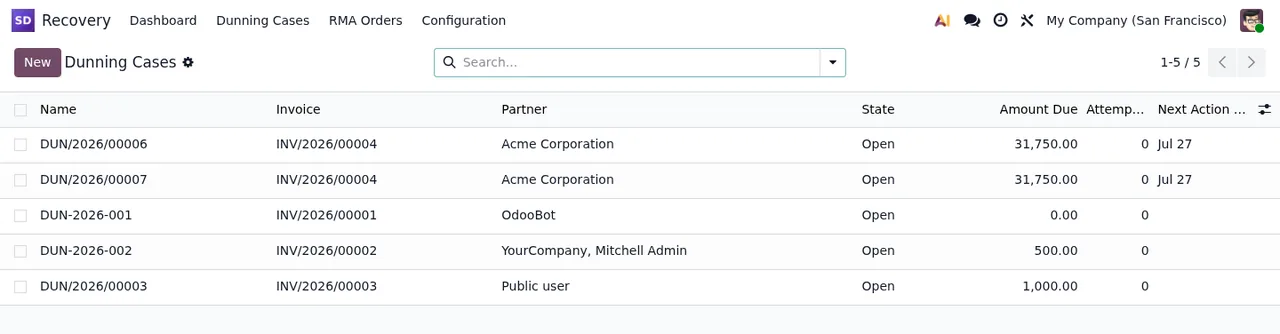
Day-to-day dunning work lives in Recovery › Dunning Cases. Each row is a case, and the list shows its name, the invoice, the company, the status, the amount owed, the attempts and the next action.
Under the bonnet, the module splits the pieces into separate models:
recovery.dunning.case(Recovery Dunning Case): the case.recovery.dunning.attempt(Recovery Dunning Attempt): the attempts.recovery.dunning.policy(Recovery Dunning Policy): the policy.recovery.dunning.policy.step(Recovery Dunning Policy Step): the steps of a policy.recovery.dunning.manual.action.wizard(Recovery Dunning Manual Action Wizard): a wizard for manual actions.
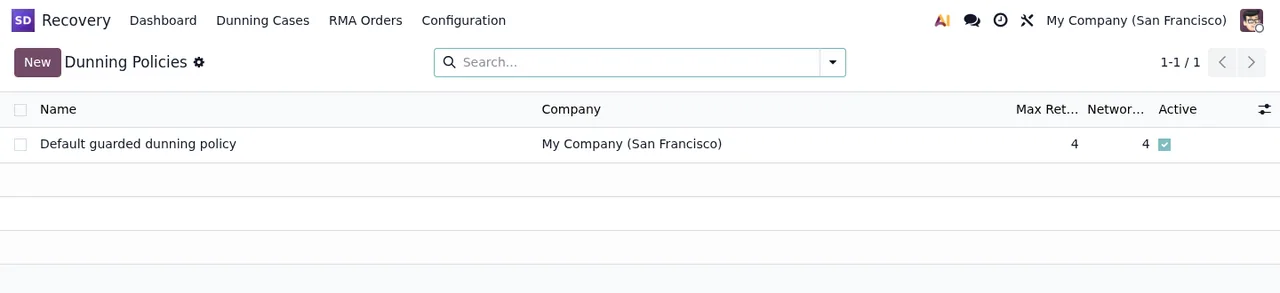
Policies are managed in Recovery › Configuration › Dunning Policies. The screenshot shows just one, Default guarded dunning policy, for the company My Company (San Francisco) and set as active.
The pieces that make up an RMA return
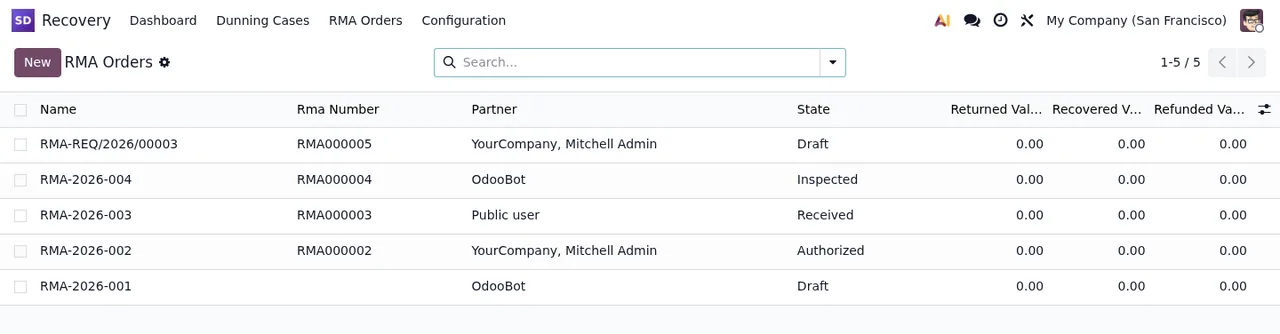
Returns live in Recovery › RMA Orders. The list shows name, RMA number, partner, status and three amounts: returned, recovered and refunded.
The models on this side are:
recovery.rma.order(Recovery RMA Order): the return order.recovery.rma.line(Recovery RMA Line): its lines.recovery.rma.disposition.line(Recovery RMA Disposition Line): disposition lines.recovery.rma.disposition.wizard(Recovery RMA Disposition Wizard): a disposition wizard.recovery.rma.reason(Recovery RMA Reason): the reasons, set up inRecovery › Configuration › RMA Reasons.
Calendars, companies, privacy and statistics
Beyond cases and RMAs, the module includes supporting pieces worth knowing about when you roll it out:
- Calendars.
Recovery › Configuration › Business Calendarsrelies on the modelsrecovery.business.calendarandrecovery.business.calendar.day. - Multiple companies. The model
recovery.company.guardis described asRecovery: company rule checked again after a change of company. - Privacy. The
Recovery › Configuration › DSAR Requestsmenu comes with the modelsrecovery.subject.requestandrecovery.dsar.wizard. The listing also has aPrivacy policysection. - Technical log. There is a model
recovery.public.abuse.event(Recovery Public Abuse Event) and arecovery.observability.mixin(Recovery Observability Mixin). - Statistics. There is
recovery.statistics.reportand the export wizardrecovery.statistics.export.wizard, alongside theRecovery: Annual Statisticsscheduled action.
If something doesn't add up once you are using it, the literal warning texts are in the Dunning and RMA Recovery error messages.
Versions, price and next step
The module is published on Odoo Apps for 17.0, 18.0 and 19.0, at €9 excluding VAT per Odoo version, as a one-off payment. If you are still unsure whether it fits, see what it covers and what you need before installing it.
At FlexigoTech we implement Odoo and build bespoke connectors and integrations, so we can help you get Recovery set up in your database or link it to the tools you already use. The details are on the module page.
Keep reading
Checked in the module's source code (version 19.0) and the linked sources
Sources
- Module source code: flexigo_subscription_dunning_and_rma_recovery_enhancer 19.0 (148cc2ff): views/recovery_menu.xml
- Module source code: flexigo_subscription_dunning_and_rma_recovery_enhancer 19.0 (148cc2ff): data/recovery_crons.xml
- Module source code: flexigo_subscription_dunning_and_rma_recovery_enhancer 19.0 (148cc2ff): static/description/index.html
- Module source code: flexigo_subscription_dunning_and_rma_recovery_enhancer 19.0 (148cc2ff): models/recovery_calendar.py
- Module source code: flexigo_subscription_dunning_and_rma_recovery_enhancer 19.0 (148cc2ff): models/recovery_company_guard.py
- Module source code: flexigo_subscription_dunning_and_rma_recovery_enhancer 19.0 (148cc2ff): models/recovery_dsar.py
- Module source code: flexigo_subscription_dunning_and_rma_recovery_enhancer 19.0 (148cc2ff): models/recovery_dunning_attempt.py
- Module source code: flexigo_subscription_dunning_and_rma_recovery_enhancer 19.0 (148cc2ff): models/recovery_dunning_case.py
- Module source code: flexigo_subscription_dunning_and_rma_recovery_enhancer 19.0 (148cc2ff): models/recovery_dunning_policy.py
- Module source code: flexigo_subscription_dunning_and_rma_recovery_enhancer 19.0 (148cc2ff): models/recovery_observability.py
- Module source code: flexigo_subscription_dunning_and_rma_recovery_enhancer 19.0 (148cc2ff): models/recovery_public_abuse.py
- Module source code: flexigo_subscription_dunning_and_rma_recovery_enhancer 19.0 (148cc2ff): models/recovery_rma_line.py
- Module source code: flexigo_subscription_dunning_and_rma_recovery_enhancer 19.0 (148cc2ff): models/recovery_rma_order.py
- Module source code: flexigo_subscription_dunning_and_rma_recovery_enhancer 19.0 (148cc2ff): models/recovery_rma_reason.py
- Module source code: flexigo_subscription_dunning_and_rma_recovery_enhancer 19.0 (148cc2ff): wizards/recovery_dsar_wizard.py
- Module source code: flexigo_subscription_dunning_and_rma_recovery_enhancer 19.0 (148cc2ff): wizards/recovery_dunning_manual_action_wizard.py
- Module source code: flexigo_subscription_dunning_and_rma_recovery_enhancer 19.0 (148cc2ff): wizards/recovery_rma_disposition_wizard.py
- Module source code: flexigo_subscription_dunning_and_rma_recovery_enhancer 19.0 (148cc2ff): wizards/recovery_statistics_export_wizard.py
- apps.odoo.com/apps/modules/19.0/flexigo_subscription_dunning_and_rma_recovery_enhancer
- apps.odoo.com/apps/modules/17.0/flexigo_subscription_dunning_and_rma_recovery_enhancer
- apps.odoo.com/apps/modules/18.0/flexigo_subscription_dunning_and_rma_recovery_enhancer
- flexigotech.com/en/services.html