

 Español
 Català
 Deutsch
 Français
 Português
 Italiano
 Nederlands
 Polski
The Reform Tax menu in a sentence
The whole module hangs off Reform Tax. Under Reform Tax › Configuration you find the tables and settings; under Reform Tax › Operations, the period summary, the per-document breakdown, diagnostics, rate warnings and the audit log. The Odoo Apps listing introduces it with the heading «Brazil IBS and CBS reform taxes, computed» and explains the workings in its How it works section.
This article is a glossary: each term is a menu or a model in the module, with its path and what you see there. If you are after what to fill in first and what to check in the first week, that is covered in getting the module up and running.
Code tables
Under Reform Tax › Configuration › Code Tables there are three lists. Each has its own model in the module, and the technical name helps you find it when working with exports or developer mode.
CST Codes- List at
Reform Tax › Configuration › Code Tables › CST Codes. The model behind it isflexigo.cst.table, namedCódigo de Situação Tributária (CST).
cClassTrib Codes- List at
Reform Tax › Configuration › Code Tables › cClassTrib Codes. The model isflexigo.cclass.trib, namedCódigo de Classificação Tributária. The list shows the code, the description, the article of the law and theValid FromandValid Untildates.
Presumed Credit Classes- List at
Reform Tax › Configuration › Code Tables › Presumed Credit Classes. Its model isflexigo.presumed.credit.class, namedPresumed Credit Class.
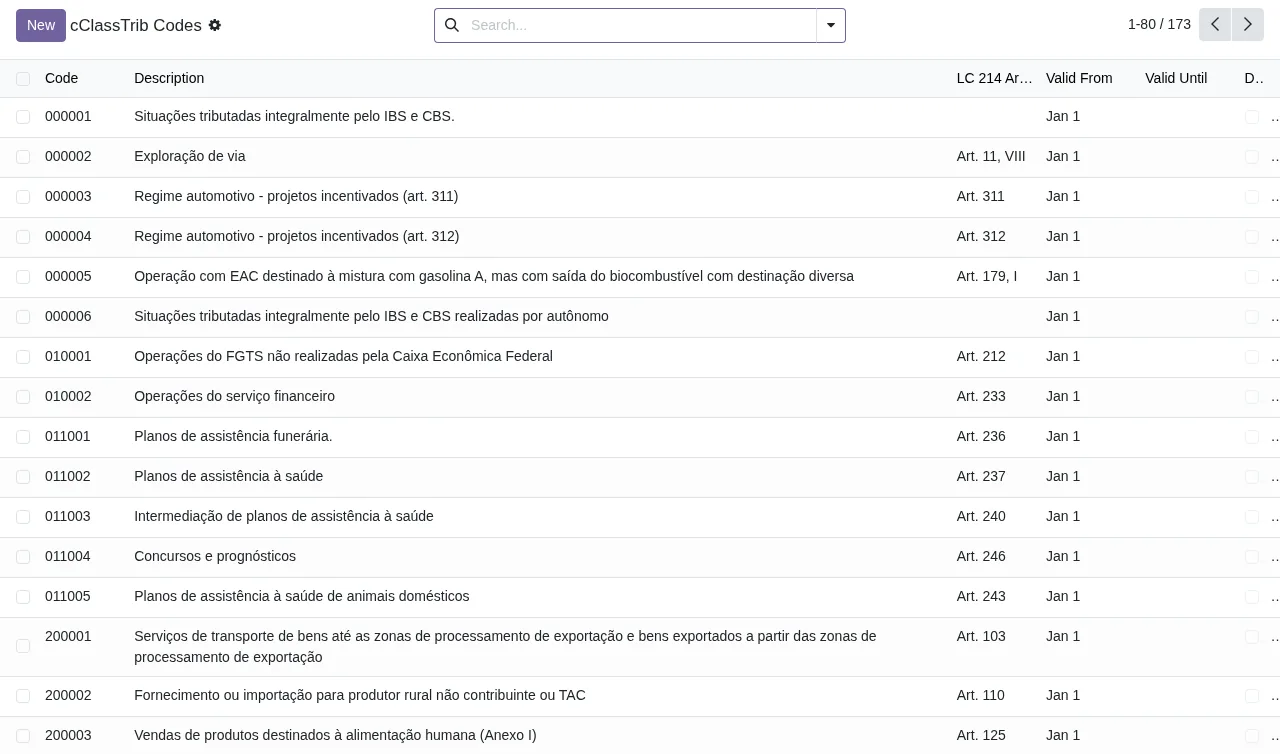
cClassTrib Codes list, with search bar and New button.Reform configuration
The rest of Reform Tax › Configuration gathers the per-company settings, the rates and the technical note (NT) versions.
Companies/Reform Config- Reform configuration entry for companies, at
Reform Tax › Configuration › Companies/Reform Config.
IS Rate Config- Menu at
Reform Tax › Configuration › IS Rate Config. The corresponding model isflexigo.is.rate.config, namedIS Rate Configuration.
Base Reductions- Menu at
Reform Tax › Configuration › Base Reductions. The module includes a modelflexigo.base.reductionnamedBase Reduction Rules.
NT Versions- Menu at
Reform Tax › Configuration › NT Versions. The module's models includeReform NT Version(flexigo.reform.nt.version) andReform NT Upgrade Log(flexigo.reform.nt.upgrade.log).
The same branch also holds these entries:
Reform Tax › Configuration › Rate TablesReform Tax › Configuration › Classification MappingReform Tax › Configuration › Validation RulesReform Tax › Configuration › Emergency NT Info
The module also defines the models Product Reform Mapping (flexigo.product.reform.map) and Reform Runtime Adapter (flexigo.reform.adapter).
Operations: where each document shows up
The Reform Tax › Operations branch is the one you will open day to day.
Document Breakdown- List at
Reform Tax › Operations › Document Breakdown. Each row is a journal entry, with its document model (CT-e or NF-e), the IBS, CBS and IS base and amount, and a totals row at the bottom.
Period Summary- Summary by period, at
Reform Tax › Operations › Period Summary.
Validation Diagnostics- Menu at
Reform Tax › Operations › Validation Diagnostics. Configuration has another entry with a similar name,Validation Rules.
Health Check- Menu at
Reform Tax › Operations › Health Check.
Rate Warnings- Menu at
Reform Tax › Operations › Rate Warnings.
Audit Log- Log at
Reform Tax › Operations › Audit Log. The model isflexigo.reform.audit.log, namedReform Audit Log.
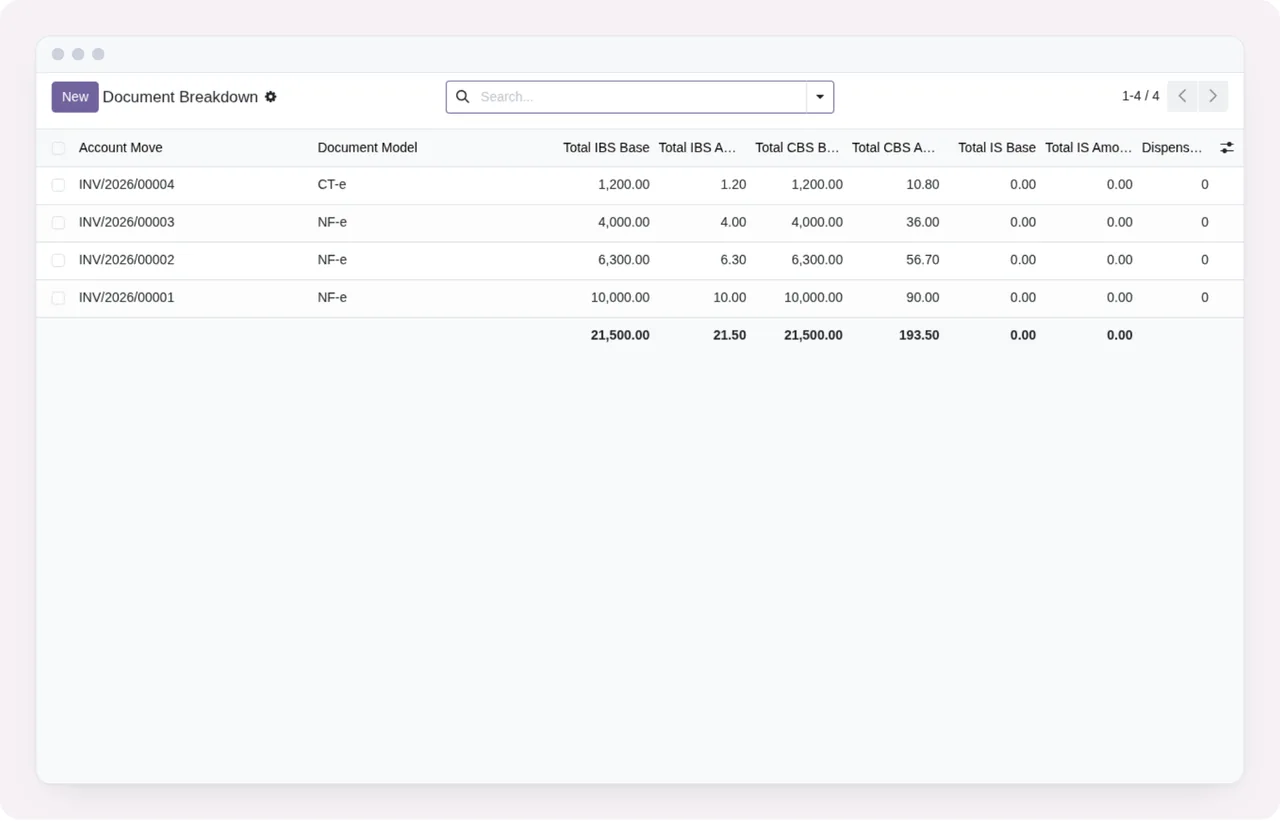
Document Breakdown list, with search bar and New button.What you see for a single document
From the list you open an entry and land on its Document Breakdown form. There the document appears with its model (CT-e in the screenshot) and separate sections for IBS, CBS, IS and CT-e, each with its bases and amounts, plus a waiver counter. This is where you check what the module has recorded for that document.
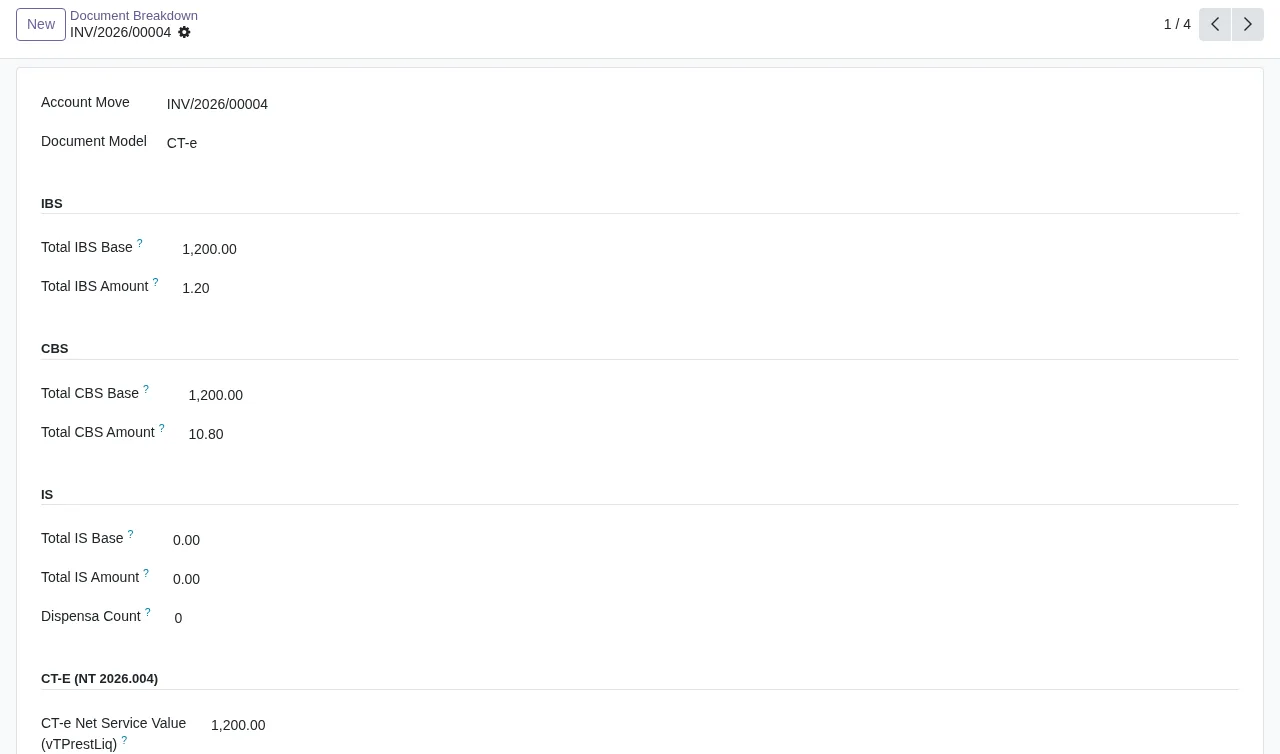
Document Breakdown; the screenshot is cut off at the bottom.If this screen or the diagnostics show a warning you do not understand, see the module's error messages and warnings, with their exact wording.
The two scheduled tasks
The module installs two scheduled tasks, both active:
Reform Tax: Rate Expiry Warning, which runs every day.Reform Tax: Rate Expiry Warning (hourly), which runs every hour.
Going by the name, both relate to rate expiry warnings. No other automatic process appears in the module's task list.
What depends on the external service
The listing warns in its Before you buy: some features of this app use a paid external service section that some features use a paid external service; here, the FlexigoTech Cloud local service. The listing also has its own Privacy policy section.
The module costs €9 per Odoo version, one-off and excluding VAT, for 17, 18, 19 and 20; the local service costs €29/month or €290/year excluding VAT (Pro: €58/month or €580/year). Without a subscription, or with the service suspended, whatever the subscription provides stops and your data stays in your Odoo. With the subscription, the module for new Odoo versions is included if you bought it on flexigotech.com; on the Odoo App Store, each version is bought there.
How FlexigoTech can help
FlexigoTech implements Odoo 17, 18, 19 and 20 and builds bespoke connectors and integrations. To see the module and the service together, visit the Brazil IBS/CBS Reform page on flexigotech.com; the listing is on Odoo Apps.
Keep reading
Checked in the module's source code (version 20.0) and the linked sources
Sources
- Module source code: flexigo_brazil_ibs_cbs_nota_fiscal_reform_layer_for_nf_ 20.0 (4876ef49): views/menu_views.xml
- Module source code: flexigo_brazil_ibs_cbs_nota_fiscal_reform_layer_for_nf_ 20.0 (4876ef49): data/cron.xml
- Module source code: flexigo_brazil_ibs_cbs_nota_fiscal_reform_layer_for_nf_ 20.0 (4876ef49): static/description/index.html
- Module source code: flexigo_brazil_ibs_cbs_nota_fiscal_reform_layer_for_nf_ 20.0 (4876ef49): models/base_reduction.py
- Module source code: flexigo_brazil_ibs_cbs_nota_fiscal_reform_layer_for_nf_ 20.0 (4876ef49): models/cclass_trib.py
- Module source code: flexigo_brazil_ibs_cbs_nota_fiscal_reform_layer_for_nf_ 20.0 (4876ef49): models/cst_table.py
- Module source code: flexigo_brazil_ibs_cbs_nota_fiscal_reform_layer_for_nf_ 20.0 (4876ef49): models/is_rate_config.py
- Module source code: flexigo_brazil_ibs_cbs_nota_fiscal_reform_layer_for_nf_ 20.0 (4876ef49): models/nt_upgrade_log.py
- Module source code: flexigo_brazil_ibs_cbs_nota_fiscal_reform_layer_for_nf_ 20.0 (4876ef49): models/nt_version.py
- Module source code: flexigo_brazil_ibs_cbs_nota_fiscal_reform_layer_for_nf_ 20.0 (4876ef49): models/presumed_credit.py
- Module source code: flexigo_brazil_ibs_cbs_nota_fiscal_reform_layer_for_nf_ 20.0 (4876ef49): models/product_reform_map.py
- Module source code: flexigo_brazil_ibs_cbs_nota_fiscal_reform_layer_for_nf_ 20.0 (4876ef49): models/reform_adapter.py
- Module source code: flexigo_brazil_ibs_cbs_nota_fiscal_reform_layer_for_nf_ 20.0 (4876ef49): models/reform_audit_log.py
- apps.odoo.com/apps/modules/20.0/flexigo_brazil_ibs_cbs_nota_fiscal_reform_layer_for_nf_
- apps.odoo.com/apps/modules/17.0/flexigo_brazil_ibs_cbs_nota_fiscal_reform_layer_for_nf_
- apps.odoo.com/apps/modules/18.0/flexigo_brazil_ibs_cbs_nota_fiscal_reform_layer_for_nf_
- apps.odoo.com/apps/modules/19.0/flexigo_brazil_ibs_cbs_nota_fiscal_reform_layer_for_nf_
- flexigotech.com/en/services.html
- flexigotech.com/precios.html