

 Español
 Català
 Deutsch
 Français
 Português
 Italiano
 Nederlands
 Polski
What Brazil IBS/CBS Reform covers according to its documentation
Before deciding, keep what the module's README describes apart from what you might assume. This is what it lists:
- Code tables: CST-IBS/CBS, with 18 codes, and cClassTrib, with 173 codes.
- Computation per line and per document from your rate rows (by date) and product mappings.
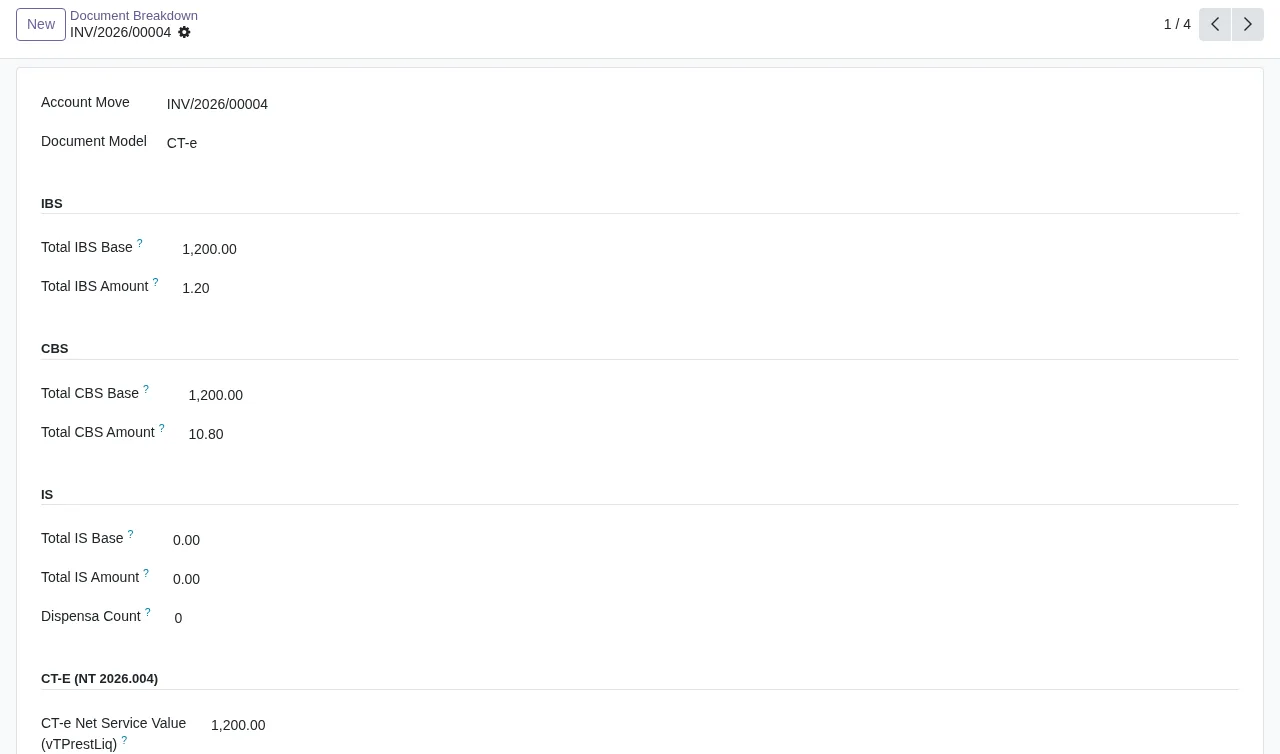
- CT-e: since version 1.2.0 of the module, the README covers NT 2026.004 RTC v1.00 and mentions the field
vTPrestLiq. - Validation rules per document: V-005/V-006, V-013, V-014/V-015, V-025 and V-060.
- NT version registry, period summary in PDF and CSV, health check and audit trail.
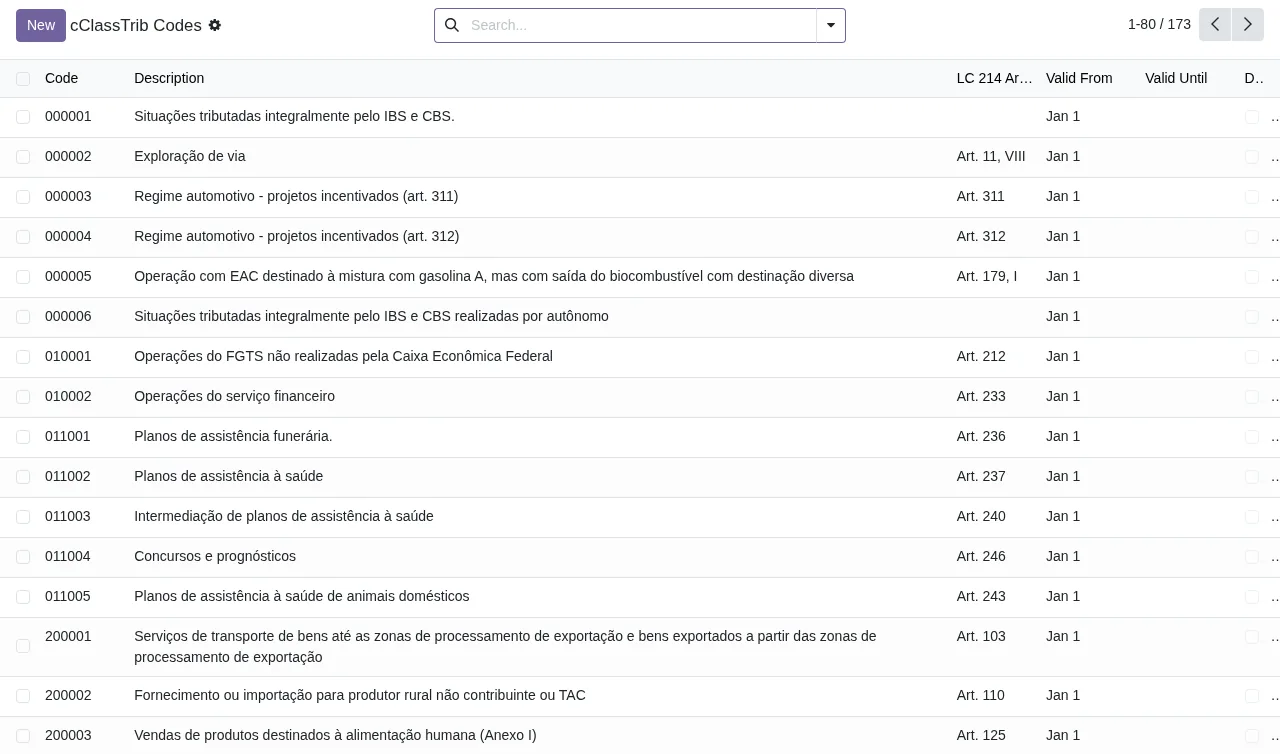
New button.According to the README, reform values are computed on document validation, and validation diagnostics appear in the Reform Tax view on invoices. Period summaries are exported from Reform Tax > Operations > Period Summary.
What the module asks of you and what is left out
The hard dependencies are base and account. Listed as soft dependencies, which the module detects at runtime, are l10n_br_fiscal, l10n_br_nfe and l10n_br_nfe_spec.
The work the module does not do for you is classification: products must be mapped to CST/cClassTrib codes. If your catalogue is long, that is the task you need to plan for.
The listing is clear on two points about the FlexigoTech service:
- We do not take care of migrating your database to a new Odoo version.
- Third-party costs are yours: you contract and pay for your account on each platform, Odoo and your hosting yourself.
An end-to-end case
Example Illustrative case: the company and its figures are made up to explain the flow.
Transportes Ipê is an invented haulier that runs its accounting in Odoo 18 and works with CT-e and NF-e model documents. It is taxed under Lucro Presumido and wants IBS and CBS computed on its invoices before each close. This is how it goes through the module:
- It checks that
accountis installed and that the module is published for its Odoo version. - It opens
Reform Tax > Configuration > Companies/Reform Configand enables the reform for its company. - It sets the tax regime from
Lucro Real,Lucro PresumidoandSimples Nacional; in its case,Lucro Presumido. - The default rate rows are created automatically.
- It configures the product classification mappings to CST/cClassTrib codes.
- It validates an invoice: the module computes the reform values and leaves the diagnostics in that invoice's
Reform Taxview. - When it wants to review the period, it exports the summary from
Reform Tax > Operations > Period Summary, as PDF or CSV.
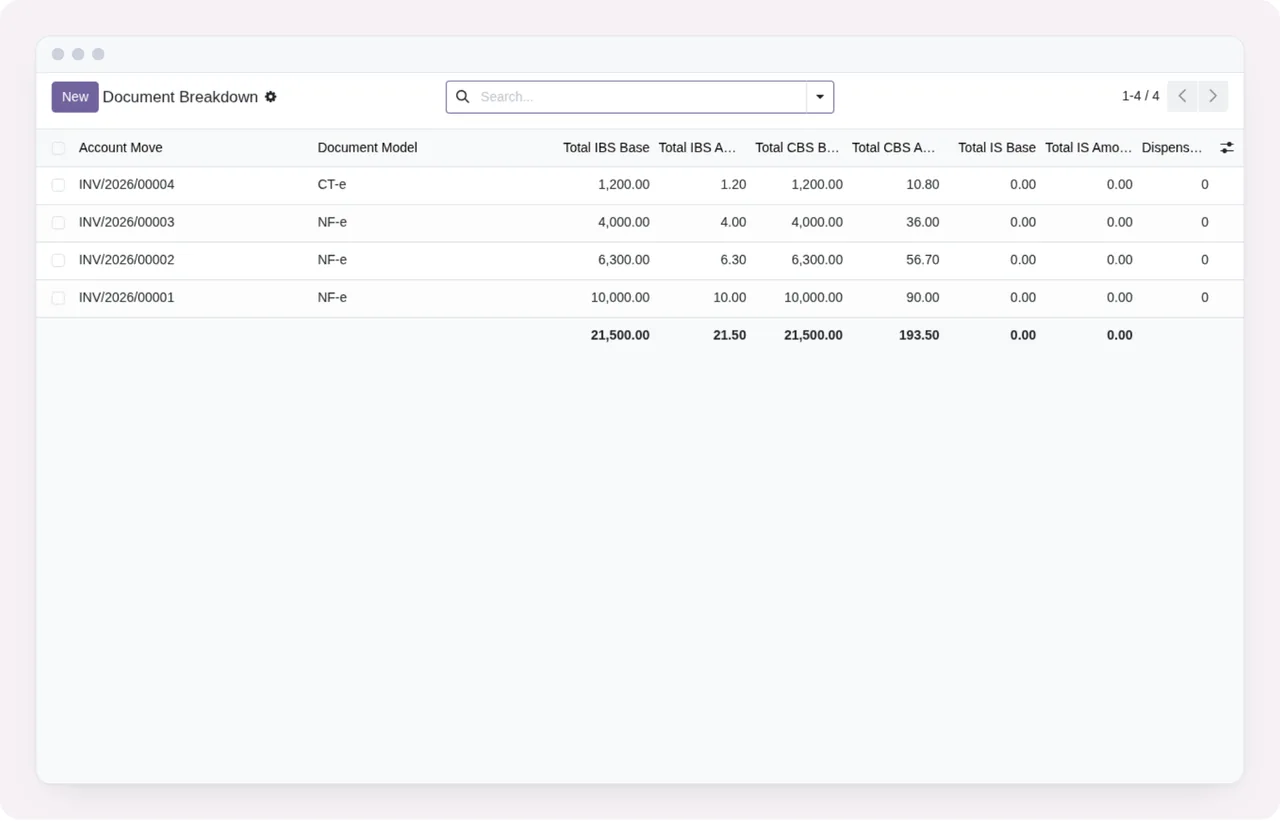
Because it works with CT-e, it also checks that it has version 1.2.0 or later of the module installed, which is the version from which the README covers NT 2026.004.
What to take from the case before deciding
The case leaves a few criteria to judge whether it suits you:
- If you do not use Odoo Accounting, it does not fit:
accountis a hard dependency. - If your regime is Lucro Real, Lucro Presumido or Simples Nacional, it is one of those the README covers in the setup.
- If your product catalogue is not classified, the first job is mapping it to CST/cClassTrib codes; without that there is nothing to compute from.
- If you work with CT-e, you need version 1.2.0 or later of the module.
- If you review taxes by period, the PDF and CSV summary and the audit trail are in the README.
- If you would rather not track changes to the technical notes yourself, the FlexigoTech Cloud subscription suits you, as it alerts you when they change.
- If you need someone to migrate your database to another Odoo version, the service does not cover it.
If you go ahead, the step-by-step setup covers the settings and fields to fill in, and the guide to messages and warnings explains what to do with each diagnostic.
Odoo versions, cost and what the service exchanges
The module is published on Odoo Apps for 17.0, 18.0, 19.0 and 20.0, and costs €9 per Odoo version, one-off payment, excluding VAT. The FlexigoTech Cloud local service costs €29/month or €290/year excluding VAT (Pro: €58/month or €580/year).
With the subscription, the module for new Odoo versions is included if you bought it on flexigotech.com; on the Odoo App Store, each Odoo version is bought there. Without a subscription, or with the service suspended, what the subscription provides stops and your data stays in your Odoo.
The listing describes the service with these items: alerts when the reform technical notes change, monitoring of the sources the module relies on with their alerts and deadline calendar, monitoring of the module's health in your database, module updates, support with a first response within 1 working day and service on staging and test copies too.
To provide it, the listing details what data is exchanged:
- The identifier (uuid) of the database, its address (URL) and the Odoo version.
- The FlexigoTech modules installed, with their version, and whether the database is a neutralised copy (staging or test).
- The company name and the email of the person who accepts, with the date and version of the text accepted.
- A public code to check that requests come from that database and a proof that it is that database, computed on your server without sending its secret.
- A request for its service permit every 6 hours and the health of the module: counters and errors (type and code), without the content of your records.
You can read the full listing on Odoo Apps.
How FlexigoTech can help
FlexigoTech implements Odoo 17, 18, 19 and 20 and builds bespoke connectors and integrations. If your situation does not quite match the example, tell us which documents you use and which Odoo version you are on, and we will look with you at whether the module works for you as it is or what is missing.
Keep reading
Checked in the module's source code (version 20.0) and the linked sources
Sources
- Module source code: flexigo_brazil_ibs_cbs_nota_fiscal_reform_layer_for_nf_ 20.0 (4876ef49): README.rst
- Module source code: flexigo_brazil_ibs_cbs_nota_fiscal_reform_layer_for_nf_ 20.0 (4876ef49): static/description/index.html
- apps.odoo.com/apps/modules/20.0/flexigo_brazil_ibs_cbs_nota_fiscal_reform_layer_for_nf_
- apps.odoo.com/apps/modules/17.0/flexigo_brazil_ibs_cbs_nota_fiscal_reform_layer_for_nf_
- apps.odoo.com/apps/modules/18.0/flexigo_brazil_ibs_cbs_nota_fiscal_reform_layer_for_nf_
- apps.odoo.com/apps/modules/19.0/flexigo_brazil_ibs_cbs_nota_fiscal_reform_layer_for_nf_
- flexigotech.com/en/services.html
- flexigotech.com/precios.html