

 Español
 Català
 Deutsch
 Français
 Português
 Italiano
 Nederlands
 Polski
Before you install: version and service
The module is published on Odoo Apps for 17.0, 18.0, 19.0 and 20.0. It costs €9 per Odoo version, a one-off payment excluding VAT, for 17, 18, 19 and 20. It is also a module with a FlexigoTech Cloud local service, which costs €29/month or €290/year excluding VAT (Pro: €58/month or €580/year).
It helps to know how the subscription works before you start: without it, or with the service suspended, whatever the subscription provides stops, but your data stays in your Odoo. And if you buy the module on flexigotech.com, the subscription includes it for new Odoo versions; if you buy it on the Odoo App Store, each Odoo version is bought there.
The steps to get it running
This is an orderly way to review what the module shows you. It does not replace your packaging compliance adviser: it helps you get the data in place so you can talk to them.
- Install the module on the right version. Check whether your database is 17.0, 18.0, 19.0 or 20.0 and buy that version. Payment is one-off per version, so if you upgrade later, re-read the section above about the subscription.
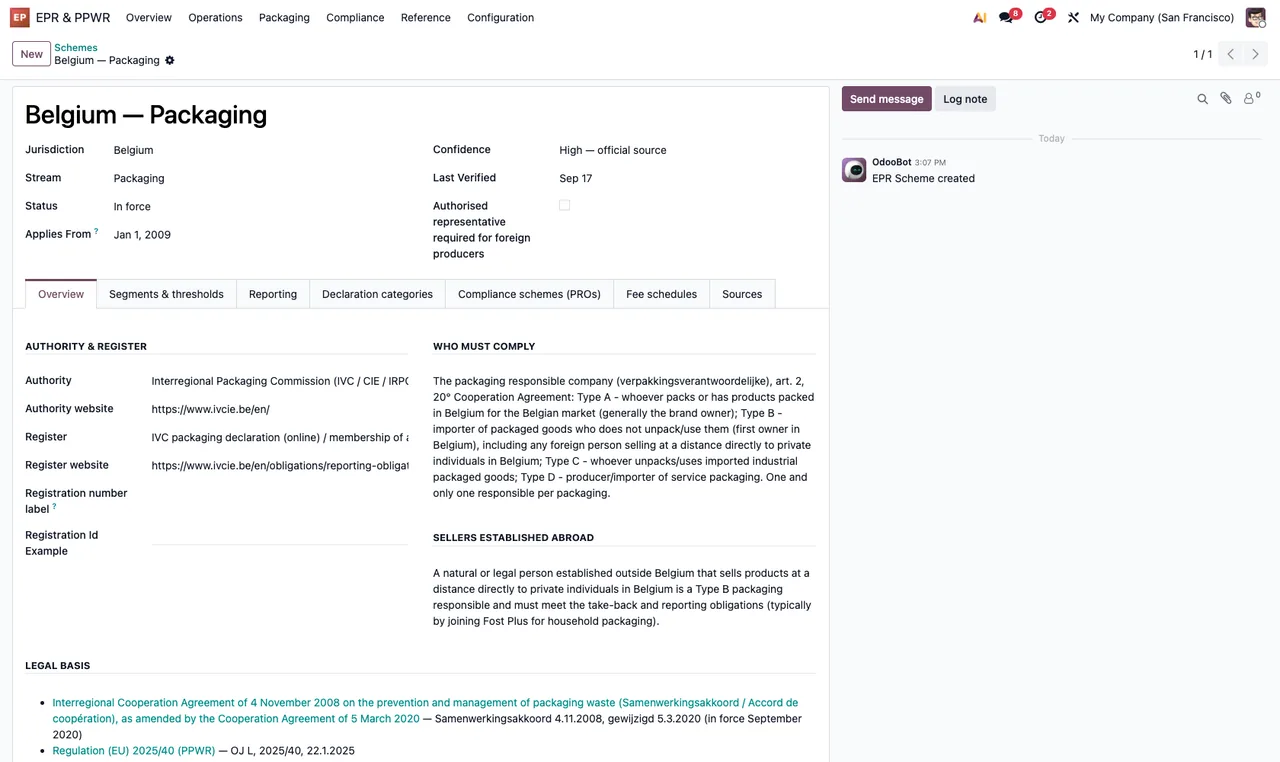
- Open the EPR scheme for the country you sell into. The scheme form shows the jurisdiction, the stream, the status, the authority and registration, who must comply, a section on foreign sellers and the legal basis. Read it all and note anything you want to double-check.
- Look at the
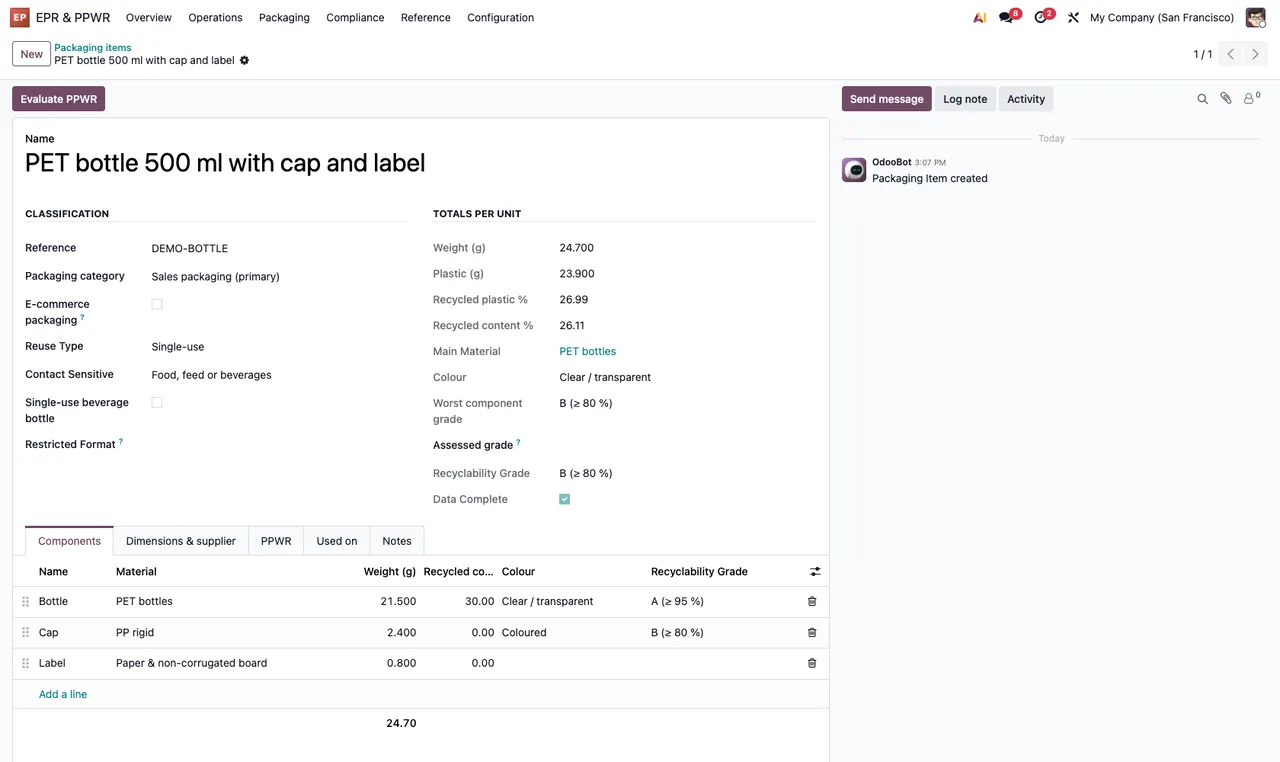
statusfields the app stores. The module has astatusfield with the valuesIn force,Adopted, not yet applicable,ProposedandNo regime, and anotherstatusfield withIn force,Postponed,ProposedandRepealed. This is what the module stores, not legal advice: if you seeProposedorPostponed, check it with your adviser. - Create your packaging items. The packaging item form holds the classification, per-unit totals, the recyclability grade and a components table. Fill it in with every part of the packaging as you sell it.
- Review the
epr_packaging_statusfield. Its values areExempt,Missing,IncompleteandComplete. Find the records atMissingandIncompleteand go through them. - Check the
pfas_statusfield. It can beNot tested,Below PPWR limits,Above PPWR limitsorNot applicable. Note the records atNot testedandAbove PPWR limitsso you can review them separately. - Read the EPR ledger. The
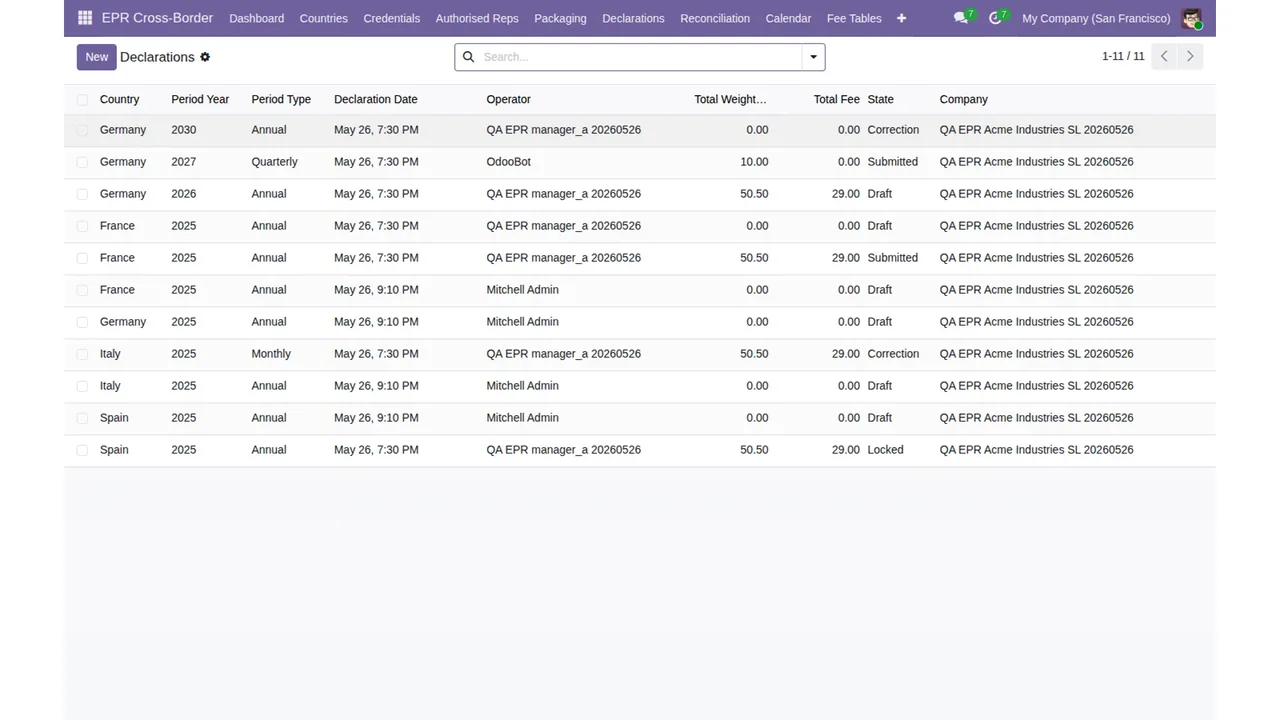
EPR ledgerpivot view lets you filter byWe declareorPlaced on marketand see weight in kg by material, quarter and country. Check the weights match what you know you have placed on the market. - Follow the declaration on its form. The declaration form shows type, registration, scheme, jurisdiction, period, material lines with weights and amounts, totals and the chatter, where the Excel export is logged. In the declarations list you will see states such as
Draft,Submitted,CorrectionandLocked.
The states you will see on each record
The module defines several status fields. These are their values:
statewithDraft,To review,Submitted,AcceptedandCancelled.statewithDraft,ActiveandArchived.statewithUpcoming,DoneandCancelled.statewithOpenandDeclared.statewithOpen,SolvedandIgnored.reconciliation_statuswithNot invoiced,MatchedandDiscrepancy.epr_packaging_statuswithExempt,Missing,IncompleteandComplete.pfas_statuswithNot tested,Below PPWR limits,Above PPWR limitsandNot applicable.
If you want to see which menus it adds and how each record moves through it under the bonnet, read the article on how the module works inside.
What to check in the first week
Once your schemes and packaging items are in, set aside a little time each day for these checks:
- Reconciliation status. Filter the
reconciliation_statusfield byDiscrepancyand byNot invoiced, and look at each record. - Open records. In the
statefield that hasOpen,SolvedandIgnored, review the ones still atOpen. - PPWR readiness. Open the
PPWR readinesslist with theIssuesfilter, grouped by requirement. Its columns arePackaging,Requirement,Article,Applies From,Status,ReasonandManual Status: read theReasoncolumn on each line. - Packaging to review. Find the records with
epr_packaging_statusatMissingandIncompleteagain until none are left unreviewed. - Pending declarations. In the declarations list, see which ones are still at
Draft. - Active service. Check the local service subscription is current, because without it whatever the subscription provides stops.
If a warning or error message turns up this week, there is an article on the module's messages and what to do about each one.
How FlexigoTech can help
At FlexigoTech we implement Odoo 17, 18, 19 and 20 and build bespoke connectors and integrations. If you need a hand loading your packaging items, reviewing the schemes for your countries or connecting the module to other systems, you can ask from the module page on flexigotech.com, where you can also buy it.
Keep reading
Checked in the module's source code (version 20.0) and the linked sources
Sources
- Module source code: flexigo_extended_producer_responsibility_cross_border_p av20epr/20.0 (8a86e540): models/epr_deadline.py
- Module source code: flexigo_extended_producer_responsibility_cross_border_p av20epr/20.0 (8a86e540): models/epr_declaration.py
- Module source code: flexigo_extended_producer_responsibility_cross_border_p av20epr/20.0 (8a86e540): models/epr_fee_schedule.py
- Module source code: flexigo_extended_producer_responsibility_cross_border_p av20epr/20.0 (8a86e540): models/epr_jurisdiction.py
- Module source code: flexigo_extended_producer_responsibility_cross_border_p av20epr/20.0 (8a86e540): models/epr_ledger.py
- Module source code: flexigo_extended_producer_responsibility_cross_border_p av20epr/20.0 (8a86e540): models/epr_packaging.py
- Module source code: flexigo_extended_producer_responsibility_cross_border_p av20epr/20.0 (8a86e540): models/epr_plastic_tax.py
- Module source code: flexigo_extended_producer_responsibility_cross_border_p av20epr/20.0 (8a86e540): models/product_template.py
- apps.odoo.com/apps/modules/20.0/flexigo_extended_producer_responsibility_cross_border_p
- apps.odoo.com/apps/modules/17.0/flexigo_extended_producer_responsibility_cross_border_p
- apps.odoo.com/apps/modules/18.0/flexigo_extended_producer_responsibility_cross_border_p
- apps.odoo.com/apps/modules/19.0/flexigo_extended_producer_responsibility_cross_border_p
- flexigotech.com/en/services.html
- flexigotech.com/precios.html