

 Español
 Català
 Deutsch
 Français
 Português
 Italiano
 Nederlands
 Polski
What the module puts into your Odoo
The Odoo Apps listing introduces the module with the heading EPR and PPWR compliance from your real shipments. Once installed, a new top-level menu appears, EPR & PPWR, with five first-level entries: Overview, Operations, Compliance, Reference and Configuration. The module also hangs menus off EPR & PPWR › Packaging, which holds the packaging entries, and EPR & PPWR › Reference, which holds Data tables (FlexigoTech Cloud). Throughout this article every name is written exactly as the module gives it, in backticks, so you can find it on screen without guessing.
A walk through the EPR & PPWR menus
This list follows the order of the module's menus; it is not a required order of work. If you want to know which settings and fields to fill in first, see the step-by-step set-up guide.
- Open
EPR & PPWR › Overview. It is the first entry in the module's main menu. - Go into
EPR & PPWR › Operations. Underneath are five entries:EPR ledger,Declarations,Data issues,Empty space ratioandRecord past transfers. - Open
EPR & PPWR › Operations › EPR ledger. This is the EPR ledger; in the screenshots further down it is shown as a pivot view, with weight in kg grouped by material. - Move on to
EPR & PPWR › Operations › Declarations. This is where the declarations sit, each with its own form. - Find the other three
Operationsentries:EPR & PPWR › Operations › Data issues,EPR & PPWR › Operations › Empty space ratioandEPR & PPWR › Operations › Record past transfers. - Go to the packaging menus under
EPR & PPWR › Packaging:Packaging items,Product packaging,Products without data,Package types,Shipping rules,PPWR readinessandImport packaging. - Open
EPR & PPWR › Packaging › PPWR readiness. Its columns arePackaging,Requirement,Article,Applies From,Status,ReasonandManual Status. - Go into
EPR & PPWR › Compliance. It containsRegistrations,Compliance calendarandObligation assessment. - Look at
EPR & PPWR › Reference, with seven entries:Jurisdictions,Schemes,Producer responsibility organisations,Fee schedules,Plastic packaging taxes,PPWR requirementsandMaterials. - Find
EPR & PPWR › Reference › Data tables (FlexigoTech Cloud), the reference entry that carries the name of the FlexigoTech Cloud service. - Finish at
EPR & PPWR › Configuration › Settings, the module's settings sub-menu.
What you will see in the EPR ledger and in a declaration
The EPR ledger can be opened as a pivot view. In the first screenshot it has the filter «We declare o Placed on market» applied and shows the weight in kg for Belgium in the third quarter of 2026, split by material (corrugated board, PET bottles and rigid PP) with a total.
The second screenshot shows the same pivot table again: same filter, the Weight Kg measure for the same quarter and country, and the three materials as rows.
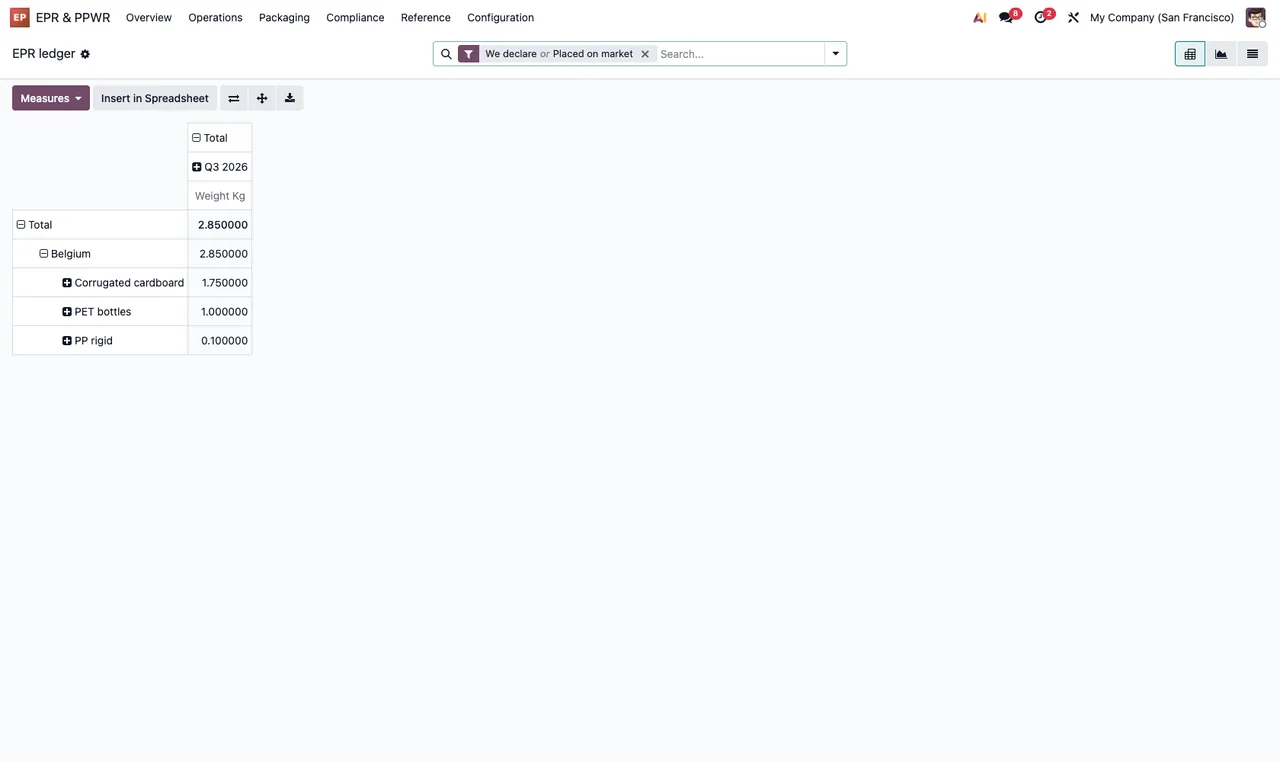
Weight Kg measure, with corrugated board, PET bottles and rigid PP for Belgium.A declaration opens from EPR & PPWR › Operations › Declarations. The form in the screenshot is in the Submitted state and shows the type, registration, scheme, jurisdiction and an annual period, plus the material lines with weights and amounts, the totals and, in the chatter, the Excel export.
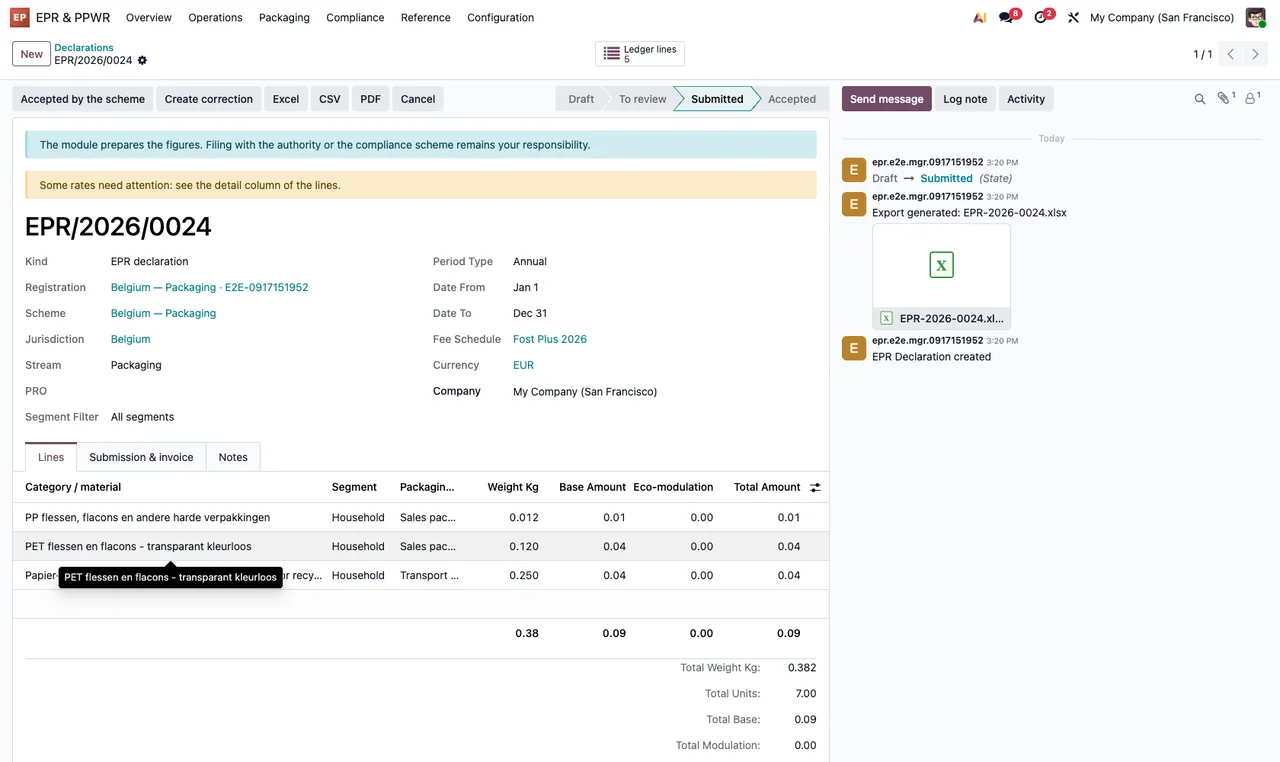
Submitted: header with type, registration, scheme, jurisdiction and annual period; below, the material lines and, in the chatter, the Excel export.The animated flow strings those screens together and adds the PPWR readiness list, grouped by requirement with the Issues filter on.
EPR ledger to a declaration in Submitted and on to the PPWR readiness list with the Issues filter.The scheduled actions running in the background
The module installs four scheduled actions, and all four come active:
EPR: generate deadlines and reminders, every day.EPR: authorised representative mandate expiry, every day.EPR: refresh PPWR packaging checks, every week.EPR: update the fee schedules from FlexigoTech Cloud, every day.
If you decide to change the frequency of any of them or switch one off, note down how it was first: the module leaves them active with the schedule in this list.
The FlexigoTech Cloud service and what it costs
This module works with a local FlexigoTech Cloud service, and the listing itself flags it in the section Before you buy: this app uses a paid external service. The module costs €9 excluding VAT, a one-off payment per version, for Odoo 17, 18, 19 and 20; the local service is €29/month or €290/year excluding VAT (Pro: €58/month or €580/year). Without a subscription, or with the service suspended, whatever the subscription provides stops, and your data stays in your Odoo. With the subscription, the module for new Odoo versions is included if you bought it on flexigotech.com; on the Odoo App Store, each version is bought there, from the Odoo Apps listing. The listing also has a Privacy policy section.
How FlexigoTech can help
At FlexigoTech we implement Odoo 17, 18, 19 and 20 and build bespoke connectors and integrations. If a warning pops up while you work through these menus, the guide to the module's error messages and warnings lists the literal texts and what to do about each one; and if you need the module adapted to the way you work, we can do that with you.
Keep reading
Checked in the module's source code (version 20.0) and the linked sources
Sources
- Module source code: flexigo_extended_producer_responsibility_cross_border_p av20epr/20.0 (8a86e540): views/epr_menus.xml
- Module source code: flexigo_extended_producer_responsibility_cross_border_p av20epr/20.0 (8a86e540): views/fgt_paquete_views.xml
- Module source code: flexigo_extended_producer_responsibility_cross_border_p av20epr/20.0 (8a86e540): data/epr_cron_data.xml
- Module source code: flexigo_extended_producer_responsibility_cross_border_p av20epr/20.0 (8a86e540): data/fgt_paquete_cron.xml
- Module source code: flexigo_extended_producer_responsibility_cross_border_p av20epr/20.0 (8a86e540): static/description/index.html
- apps.odoo.com/apps/modules/20.0/flexigo_extended_producer_responsibility_cross_border_p
- apps.odoo.com/apps/modules/17.0/flexigo_extended_producer_responsibility_cross_border_p
- apps.odoo.com/apps/modules/18.0/flexigo_extended_producer_responsibility_cross_border_p
- apps.odoo.com/apps/modules/19.0/flexigo_extended_producer_responsibility_cross_border_p
- flexigotech.com/en/services.html
- flexigotech.com/precios.html